
Xeon vs Core i7/i9 in Dell Precision: Which Processor Should You Choose?
Xeon and Core i7/i9 processors can both power Dell Precision workstations. The right choice depends on ECC memory, workload, performance needs, platform generation, and budget.

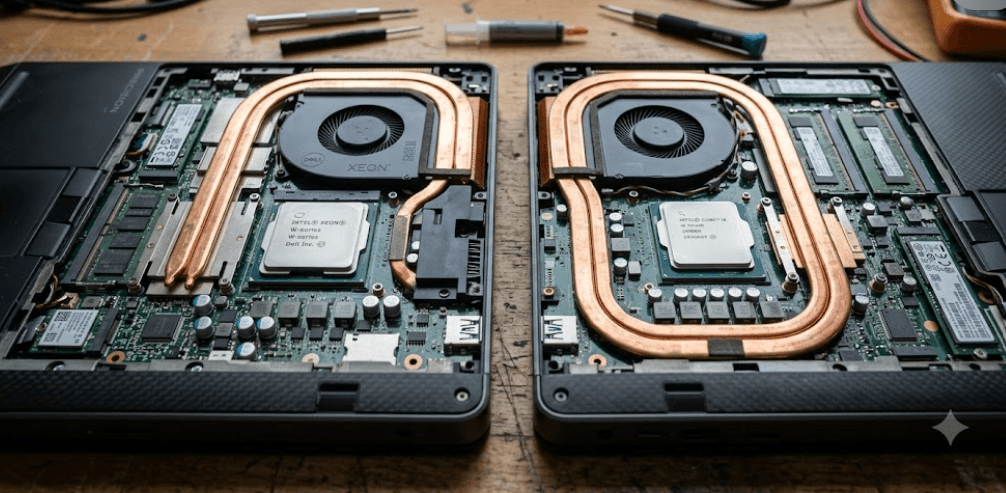
TL;DR Xeon and Core i7/i9 processors can both be excellent choices in a Dell Precision workstation, but they are designed around slightly different priorities. Xeon workstation processors are particularly relevant when ECC memory, long-running professional workloads, platform scalability, and reliability features matter, while Core i7 and i9 processors can deliver very strong performance for CAD, editing, development, multitasking, and general professional work. Dell has offered both processor families in the same Precision generations, including the Precision 7560, where the Core i9-11950H and Xeon W-11955M both had eight cores and 16 threads, showing why the processor name alone does not determine performance.
Understanding Xeon And Core i7/i9 In Dell Precision
Dell Precision workstations have historically offered a mixture of Intel Xeon and Core processors depending on the model and generation. This means you cannot assume that every Precision with a Xeon is automatically faster than every Precision with a Core i7 or i9. The Precision 7560 is a useful example because Dell offered 11th Gen Core i7, Core i9, and Xeon W processors in the same workstation family. The Core i9-11950H and Xeon W-11955M both had eight cores, 16 threads, a 45W processor rating, and boost speeds up to 5.0GHz.
The bigger distinction is the platform and features surrounding the processor. Intel positions Xeon W processors specifically for professional workstation workloads, with features such as ECC memory support and reliability, availability, and serviceability capabilities. Current Xeon W workstation platforms can also support very large memory configurations and high numbers of PCIe lanes, which is important for professional systems using multiple storage devices, GPUs, or other expansion hardware.
Core i7 and i9 processors, meanwhile, should not be dismissed as ordinary laptop CPUs when they appear in a Precision workstation. Dell's Precision 7680, for example, was offered with the 13th Gen Core i7-13850HX and Core i9-13950HX, with the i9 reaching 24 cores and 32 threads and up to 5.5GHz. These systems were also available with professional NVIDIA RTX graphics and ECC memory configurations, depending on the system configuration.
The Important Difference Is The Platform
The easiest way to understand the comparison is to stop treating Xeon, Core i7, and Core i9 as simple performance rankings. A workstation's processor, memory type, GPU, cooling system, motherboard, and software certification all contribute to the experience.
| Factor | Xeon | Core i7/i9 |
|---|---|---|
| Main positioning | Professional workstation | High-performance professional computing |
| ECC support | Available on relevant Xeon platforms | Depends on processor and Dell platform |
| High core-count workstation platforms | Yes | More limited by platform |
| High-frequency performance | Varies by model | Often very strong |
| CAD and 3D work | Strong | Strong |
| General productivity | Strong | Strong |
| Professional workstation workloads | Designed for them | Available in Precision systems |
| Best comparison method | Specific model and platform | Specific model and platform |
The table shows why processor branding should only be the starting point. A newer Core i9 Precision can outperform an older Xeon workstation in many everyday workloads, while a Xeon-based system may offer capabilities that matter more for specialized professional environments.
Xeon Vs Core i7/i9 Performance In Precision Workstations
When people compare Xeon vs Core i7/i9, clock speed is often the first specification they notice. That can be useful, but it is not enough to predict workstation performance. Core count, thread count, architecture, cache, power limits, cooling, and the specific application all influence how quickly a system completes a task. Dell's Precision 7560 illustrates this clearly because its Xeon W-11955M and Core i9-11950H were closely matched on core and thread counts and both reached 5.0GHz.
For heavily threaded workloads such as CPU rendering, simulation, compilation, and some data-processing tasks, additional cores can become more important than headline clock speed. Current Intel Xeon W workstation processors scale much further than the mobile Xeon chips found in older Precision laptops. Intel's current Xeon W-2500 and W-3500 platforms extend into much higher core counts and support large ECC RDIMM configurations, making them a different class of workstation platform from mobile Core i7/i9 systems.
For everyday professional work, however, a Core i7 or i9 Precision can be more than capable. A user working in AutoCAD, Adobe applications, Excel, browser-based tools, coding environments, or business software may not benefit enough from workstation-specific Xeon features to justify choosing Xeon solely because of its name. The exact generation matters enormously, especially when comparing a newer Core processor against an older Xeon.
Performance Depends On The Workload
| Workload | Processor Factor That Matters Most | Typical Consideration |
|---|---|---|
| Office and multitasking | Single-core and overall responsiveness | Core i7/i9 often sufficient |
| CAD | CPU plus professional GPU | Both can work well |
| 3D rendering | Multi-core performance | Higher-core Xeon can be useful |
| Video editing | CPU, GPU, memory, storage | Both families can work well |
| Simulation | CPU cores, memory, software | Xeon may suit demanding setups |
| Software development | CPU cores and memory | Both can be excellent |
| Large datasets | Memory capacity and reliability | Xeon platform may have an advantage |
| General business use | Responsiveness and efficiency | Core i7/i9 is often sufficient |
The important point is that there is no universal performance winner between these processor families. You need to compare the exact Dell Precision model and the software you intend to run.
ECC Memory And Why It Matters
ECC memory is one of the strongest reasons to consider a Xeon-based Precision workstation. ECC stands for Error-Correcting Code, and supported ECC memory can detect and correct certain types of memory errors. This matters more in workloads where a silent memory error could corrupt a calculation, interrupt a long-running process, or create unreliable results. Intel specifically identifies ECC memory and RAS features as part of the workstation-focused capabilities of its Xeon W processors.
That does not mean every Dell Precision with Xeon automatically has ECC memory installed. The system must support it, and the actual memory configuration matters. Dell's Precision 7680, for example, offered both ECC and non-ECC DDR5 SODIMM configurations, demonstrating why buyers should check the complete system specification instead of assuming that the processor name tells the whole story.
Core i7 and i9 Precision systems can also be professional workstations with substantial memory capacity and professional GPUs. Dell's Precision 7780, for example, supported ECC SODIMM configurations alongside its 13th Gen Core processors. That means the assumption that "Core means no ECC" is too broad for workstation buying decisions. What matters is whether the specific Precision platform, processor, and memory configuration support the feature you need.
ECC Is Most Relevant For Specific Workloads
| User Type | Importance Of ECC |
|---|---|
| Office user | Low |
| Student | Usually low |
| Content creator | Usually low to moderate |
| CAD professional | Moderate to high depending on workflow |
| Engineer running simulations | High |
| Scientific or technical computing | High |
| Large data processing | Potentially high |
| Long-running professional workloads | Potentially high |
For a typical buyer, ECC should not be treated as a reason by itself to spend substantially more. It becomes valuable when the workload and environment justify the additional reliability considerations.
Xeon Vs Core i7/i9 For CAD, Rendering, And Creative Work
CAD users should look beyond the processor badge because graphics certification and GPU performance can be just as important. Dell Precision systems are designed around professional graphics options, and models such as the Precision 7680 could be configured with NVIDIA RTX professional GPUs ranging from the RTX A1000 to RTX 5000-class options. For professional CAD and 3D applications, the combination of CPU, GPU, RAM, storage, drivers, and software certification can have a greater practical impact than choosing Xeon simply because it is a workstation-branded processor.
Rendering is a little different because the type of rendering determines how important the CPU is. CPU-based rendering can benefit substantially from additional cores and threads, so a higher-core Xeon workstation can make sense for workloads that consistently keep the processor busy. GPU rendering, on the other hand, shifts more of the workload toward the graphics card, making GPU selection a much more important part of the purchase decision.
For video editing and creative applications, a Core i7 or i9 Precision can be an excellent choice when paired with enough RAM, fast NVMe storage, and an appropriate professional GPU. A creator editing 4K footage, working with large Photoshop files, or using Premiere Pro does not automatically need Xeon. If the Core-based system provides the right combination of CPU, GPU, RAM, and storage for the application, it can be the more practical configuration.
Match The Processor To The Application
A good workstation configuration should be built around the application rather than the processor label. An engineer running long simulations may care about cores, memory capacity, and ECC. A designer working primarily in a GPU-accelerated application may care more about the professional GPU. A developer compiling large projects may benefit from a high-core-count processor and plenty of RAM.
This is also why refurbished Dell Precision systems need careful specification checking. Two machines with the same Precision family name can have very different processors, GPUs, memory configurations, and storage options. Dell's older Precision 7550, for example, could be configured with either Xeon W-10855M/W-10885M or Core i7/i9 processors, while the newer Precision 7680 moved to 13th Gen Core processors.
Xeon Vs Core i7/i9: Which One Should You Buy?
If you are choosing a Dell Precision for everyday professional use, a Core i7 or i9 configuration can make a great deal of sense. These processors can deliver high core counts and high boost frequencies, and Dell has used them in serious Precision mobile workstations with professional RTX graphics and large memory configurations. The 13th Gen Core i9-13950HX in the Precision 7680, for example, has 24 cores and 32 threads with a maximum turbo frequency of 5.5GHz.
Xeon becomes more compelling when your workload benefits from workstation-specific capabilities such as ECC memory and higher-end workstation platforms. This is particularly relevant for engineering, scientific computing, complex simulation, professional rendering, and other workloads where system reliability and large-scale expansion matter. Current Intel Xeon workstation platforms are built around these requirements and can support substantial memory capacity and PCIe connectivity.
There is also a generation issue to consider when buying a refurbished Precision. A newer Core i7 or i9 system may be a better practical choice than an older Xeon system if the newer platform provides better CPU architecture, faster memory, newer PCIe support, better GPU options, and longer remaining service life. The processor family should therefore be treated as one part of the buying decision rather than the final verdict.
Quick Buying Guide
| If You Are Buying For | Look More Closely At |
|---|---|
| Office and business work | Core i7 |
| Programming and development | Core i7/i9 |
| Photo and video editing | Core i7/i9 or Xeon depending on workload |
| CAD | CPU + professional GPU + RAM |
| 3D rendering | High-core-count CPU or strong GPU |
| Engineering simulation | Xeon platform, ECC, high RAM |
| Scientific workloads | Xeon and ECC-capable platform |
| Refurbished workstation | Exact generation and configuration |
| Long-term professional workloads | Platform reliability and serviceability |
| Maximum workstation expansion | Xeon workstation platform |
The key is to compare the actual configuration. A Core i9 Precision with 64GB RAM, a powerful RTX professional GPU, and fast NVMe storage can be substantially more useful for a creator than an older Xeon Precision with weaker graphics and less memory.
Common Mistakes When Choosing A Dell Precision Processor
One common mistake is assuming that Xeon automatically means faster. Intel itself notes that processor numbers are not direct measures of performance across processor families, and Dell's own Precision configurations demonstrate why model-to-model comparison matters. A Xeon W-11955M and Core i9-11950H in the Precision 7560 were extremely similar in their headline CPU specifications, while current desktop Xeon W workstation processors belong to a much more expandable platform.
Another mistake is buying the processor first and treating the GPU and memory as secondary. In a workstation, that can create an unbalanced system. A CAD professional may get more practical value from a properly configured professional GPU and sufficient RAM than from paying extra for a particular CPU badge. Similarly, a video editor may benefit from a strong GPU, fast SSD, and enough memory alongside a capable Core processor.
A third mistake is ignoring the Precision generation. A Precision 7550, 7560, 7680, 7780, 5860 Tower, and 7960 Tower are not interchangeable simply because they all carry the Precision name. The 5860 Tower, for example, supports Xeon W processors with up to 24 cores in Dell's listed configuration, while the 7960 Tower can be configured with even higher-end Xeon options.
| Mistake | Better Approach |
|---|---|
| Assuming Xeon is always faster | Compare exact CPU models |
| Choosing CPU before GPU | Match CPU and GPU to the application |
| Assuming all Xeon systems have ECC | Check the complete configuration |
| Ignoring workstation generation | Compare platform age and features |
| Looking only at GHz | Check cores, architecture, cache, and workload |
| Buying based on the Precision name | Verify the exact model number |
| Ignoring RAM capacity | Match memory to the workload |
| Assuming Core means consumer-grade | Check the actual Precision configuration |
Frequently Asked Questions
Q. Is Xeon better than Core i7 for a Dell Precision workstation?
Not automatically. Xeon is designed for workstation platforms and can provide features such as ECC memory support, while Core i7 processors can deliver excellent performance in Precision workstations. The exact processor generation and workload matter more than the family name alone.
Q. Is Core i9 good enough for a Dell Precision workstation?
Yes. Dell has used Core i9 processors in high-performance Precision mobile workstations. The Precision 7680, for example, offered the 13th Gen Core i9-13950HX with 24 cores and 32 threads and up to 5.5GHz.
Q. Does Xeon support ECC memory?
Many workstation-oriented Xeon processors support ECC memory. Intel lists ECC support as a feature of its Xeon W workstation platforms, although actual support depends on the complete system configuration.
Q. Can Core i7 or i9 Precision laptops use ECC memory?
Some can, depending on the specific Precision model and configuration. Dell's Precision 7680 and 7780 specifications list ECC memory configurations, so you should check the exact system rather than assuming Core processors cannot use ECC.
Q. Which is better for CAD, Xeon or Core i9?
Either can work well. CAD performance depends on the application, CPU, professional GPU, memory, drivers, and workload. For many CAD users, a well-balanced Core i9 Precision can be sufficient, while specialized workloads may benefit from a Xeon platform and ECC memory.
Q. Is Xeon better for 3D rendering?
Xeon can be useful for CPU-based rendering when the selected processor provides more cores and threads. However, GPU rendering can shift much of the workload to the graphics card, so the GPU should also be considered before choosing the processor.
Q. Does Xeon make a Dell Precision more reliable?
Xeon workstation platforms are designed with professional reliability and manageability features, including ECC and RAS capabilities on supported platforms. However, overall workstation reliability depends on the complete system, not just the processor.
Q. Which is better for video editing, Xeon or Core i9?
Both can be suitable. For video editing, the CPU works alongside the GPU, RAM, storage, and application-specific acceleration. A Core i9 Precision with a strong professional GPU can be a very capable editing workstation.
Q. Should I buy an older Xeon Dell Precision or a newer Core i7 model?
Compare the complete specifications before deciding. A newer Core i7 system may have a newer CPU architecture, faster memory, newer connectivity, and a newer GPU, while an older Xeon system may offer workstation-specific features that your workload requires.
Q. Does a higher GHz always mean a faster workstation?
No. Clock speed is only one part of CPU performance. Core count, architecture, cache, power limits, cooling, memory, and the software being used can all affect real-world performance. Intel also states that processor numbers should not be treated as direct performance measurements across different processor families.
Final Recommendation
For most buyers choosing a Dell Precision for business work, programming, content creation, CAD, or general professional use, a well-configured Core i7 or Core i9 system can be an excellent choice. Dell's Precision 7680 and 7780 show how powerful Core-based workstation configurations can be, with high-core-count HX processors, professional graphics options, and substantial memory configurations.
Choose a Xeon-based Precision when the specific capabilities of a workstation platform are important to your workload, particularly ECC memory, large-scale memory configurations, high expansion capacity, or demanding engineering and scientific workloads. Current Xeon W platforms are specifically designed around these professional requirements.
For refurbished Dell Precision buyers, the safest approach is to compare the exact processor model, generation, RAM, GPU, storage, memory type, and warranty rather than choosing purely by the words Xeon, Core i7, or Core i9. A newer Core i7/i9 Precision can be the more practical workstation for many users, while a properly configured Xeon system remains highly relevant for specialized professional workloads.







