Why Does 4K Video Crop on Some Cameras? Video Crop Factor Explained
Some cameras crop the image when recording 4K video. Learn why this happens, how sensor readout and frame rates affect crop, and how video crop factor changes your lens's field of view.

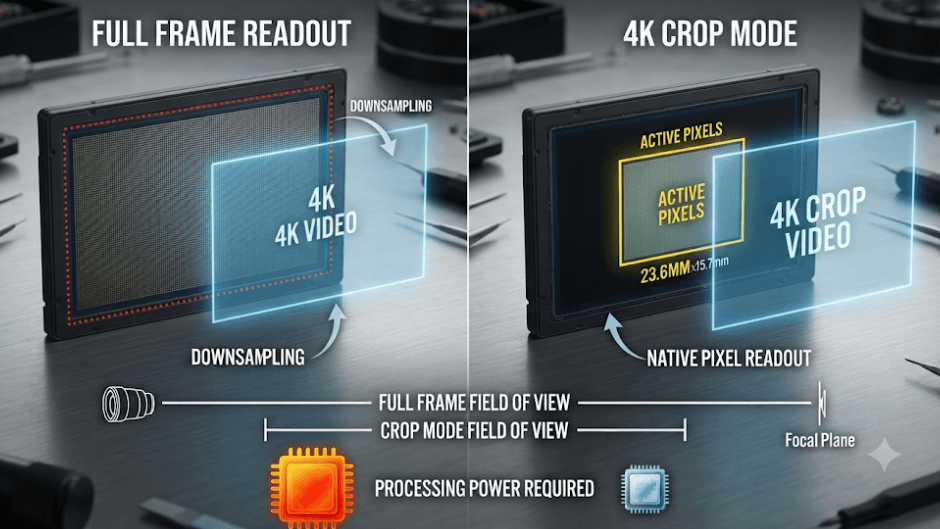
TL;DR: Some cameras show a noticeably tighter image when you switch from photo mode to 4K video. This happens because the camera may use only part of its image sensor to record 4K, rather than reading the entire sensor and downsampling it. The amount of crop depends on the camera, recording resolution, frame rate, sensor readout method, stabilisation settings and the specific video mode. A crop can make a wide-angle lens appear less wide, so understanding video crop factor is important when choosing lenses and planning shots.
What Is 4K Video Crop?
A 4K video crop occurs when a camera records video using a smaller portion of its image sensor than the area used for still photographs. Instead of capturing the entire sensor and processing all of that information into a 4K frame, the camera may read a smaller central area. The result is a narrower field of view, which makes the image appear more zoomed in even though the focal length of the lens has not physically changed.
This can be confusing because a camera may be advertised as having a full-frame sensor, but that does not automatically mean every video mode uses the entire sensor. A full-frame camera can still apply a crop in a particular 4K recording mode. Likewise, an APS-C camera already has a smaller sensor area than full frame, so an additional video crop can make the field of view even tighter.
It is also important to distinguish a video crop from the normal crop factor of a sensor. An APS-C sensor has a native crop factor of roughly 1.5x on many cameras, or around 1.6x on Canon APS-C models, compared with a 35mm full-frame reference. A separate 4K video crop can be added when the camera uses an even smaller active area of that sensor. This is why the same lens can produce different framing in stills, 4K video and other high-frame-rate modes.
Why Do Some Cameras Crop 4K Video?
One major reason is processing and sensor readout. A modern camera sensor can contain far more pixels than are required for a 4K frame. UHD 4K video is 3840 × 2160 pixels, or about 8.3 million pixels per frame. If a camera has a much higher-resolution sensor, reading the entire sensor and then converting all of that data into 4K requires substantial processing at every frame.
Some cameras solve this by reading a smaller section of the sensor that already contains enough pixels for the selected video resolution. This can reduce the amount of data the camera has to process and can make high-resolution video recording easier to manage. The trade-off is that the active imaging area becomes smaller, producing a tighter field of view.
Frame rate can also influence the crop. Recording 4K at 60 frames per second requires the camera to capture and process data twice as frequently as 4K at 30 frames per second. Depending on the camera's sensor and processing architecture, a manufacturer may use a different sensor readout area for higher frame rates. This is why a camera can offer uncropped 4K at one frame rate but introduce a crop at another.
Sensor Readout, Oversampling And Cropping Explained
To understand why manufacturers make these choices, it helps to look at how a camera turns sensor data into video. A camera can read a larger area of the sensor and then downsample that information to the required 4K resolution. When a camera reads a higher-resolution area and reduces it to 4K, this is commonly described as oversampled 4K. It can produce detailed footage and may reduce some image artifacts compared with simply taking fewer pixels from the sensor.
Another approach is to use only a portion of the sensor that closely matches the required output resolution. This is sometimes called a 1:1 or pixel-to-pixel readout, depending on the camera and implementation. It can reduce the amount of data being processed, but the smaller active area can result in a crop. Some cameras may also use pixel binning, line skipping or other readout methods, each with different effects on image quality and field of view.
There is no universal rule that says a crop is better or worse. A camera that uses a crop may be doing so to maintain a particular frame rate, reduce processing demands, control heat or achieve a specific recording mode. Meanwhile, a camera capable of reading a larger sensor area may produce a wider view and potentially better oversampled detail. The important point is that "4K" describes the output resolution, not exactly how much of the sensor the camera must use.
How Crop Factor Changes Your Lens's Field Of View
The easiest way to understand video crop is to imagine placing the same lens on two cameras and keeping the camera position unchanged. A smaller active sensor area captures a narrower portion of the image projected by the lens. Nothing has happened to the lens itself, but the recorded frame shows less of the surrounding scene.
For example, suppose a camera's 4K video mode introduces a 1.5x crop relative to full frame. A 24mm lens would give a field of view roughly comparable to a 36mm lens on a full-frame camera. The lens is still physically a 24mm lens, but the smaller area being recorded makes the framing look tighter.
The same principle becomes especially noticeable with wide-angle lenses. A 16mm lens can be extremely useful for landscapes, interiors and talking-head videos when the entire sensor area is being used. If a 1.5x video crop is applied, its full-frame field-of-view equivalent becomes approximately 24mm. That difference can determine whether you can comfortably fit yourself, your surroundings or an entire room into the frame.
| Lens | 1.0x video crop | 1.5x video crop | 1.6x video crop |
|---|---|---|---|
| 16mm | 16mm equivalent | 24mm equivalent | 25.6mm equivalent |
| 20mm | 20mm equivalent | 30mm equivalent | 32mm equivalent |
| 24mm | 24mm equivalent | 36mm equivalent | 38.4mm equivalent |
| 35mm | 35mm equivalent | 52.5mm equivalent | 56mm equivalent |
| 50mm | 50mm equivalent | 75mm equivalent | 80mm equivalent |
Is 4K Crop The Same As Sensor Crop Factor?
No. These terms are related, but they are not interchangeable. Sensor crop factor normally describes how a sensor's size compares with a 35mm full-frame reference. For example, many APS-C cameras have a crop factor around 1.5x, while Canon APS-C cameras are commonly around 1.6x. Micro Four Thirds cameras use a 2x crop factor relative to full frame.
A video crop is different because it can change depending on the recording mode. A full-frame camera can have a 1x field of view in one video mode and a tighter field of view in another. The camera may switch to a smaller active sensor area for 4K, high-frame-rate recording or another specialised mode.
This means you should not simply look at a camera's sensor size and assume you know its video framing. When comparing cameras, check the specifications for the exact resolution and frame rate you plan to use. A camera's 4K 24p, 4K 30p, 4K 60p and 4K 120p modes may not necessarily use the same sensor area.
Why Does 4K 60fps Sometimes Have More Crop?
Higher frame rates increase the amount of information that must be captured and processed every second. Recording 4K at 60fps requires the camera to produce twice as many frames per second as 4K at 30fps. Depending on the sensor and processor, the camera may not be able to read its entire sensor at the required speed while maintaining the desired image quality and processing pipeline.
A manufacturer may therefore use a smaller sensor area for a particular high-frame-rate mode. This can reduce the amount of data being read and processed for each frame. It is one reason why camera specifications should be checked mode by mode rather than assuming that every 4K option behaves identically.
However, 4K 60fps does not automatically mean there will be a crop. Some modern cameras can record 4K 60p using a wide sensor readout, while others introduce a crop. The exact behaviour is camera-specific. The safest approach is to check the manufacturer's specifications or a reliable test for the precise recording mode you intend to use.
Does Image Stabilisation Add More Crop?
Electronic or digital image stabilisation can introduce another crop because the camera needs some extra image area around the final frame to compensate for movement. If the footage is digitally shifted or corrected during recording, the camera can use the surrounding pixels to create the stabilised frame without exposing empty edges.
This means you can sometimes see a wider image when stabilisation is disabled and a tighter image when an electronic stabilisation mode is activated. The additional crop is separate from the camera's native sensor crop and can vary according to the stabilisation setting.
Not every form of stabilisation works in exactly the same way. Optical image stabilisation and sensor-shift stabilisation can operate without requiring the same type of permanent digital crop. Camera manufacturers can also combine different stabilisation systems. Therefore, when a video suddenly looks tighter after enabling stabilisation, check whether the selected stabilisation mode specifically applies an additional digital crop.
How To Check If Your Camera Crops In 4K
Start by checking the camera's official specifications for the exact video mode you want to use. Look for terms such as "crop," "APS-C mode," "Super 35," "full sensor," "full width," "sensor area" or specific crop factors. Pay particular attention to resolution and frame rate because the crop can change between recording modes.
Next, check whether the camera uses oversampling for its 4K output. A specification such as 6K or 5.9K oversampled to 4K indicates that the camera is capturing more information than the final 4K frame requires and then reducing it to the output resolution. This does not automatically guarantee a completely uncropped field of view, but it can be a useful clue about how the camera is processing its sensor data.
Finally, look at independent testing when the manufacturer's specifications do not provide enough information. Reviews can compare the field of view of the same lens across different recording modes and identify changes that are not obvious from the headline "4K" specification. This is particularly useful when you are buying a camera for vlogging, interiors, handheld work or any situation where maintaining a wide field of view matters.
How To Avoid Problems With 4K Crop
If you frequently shoot wide-angle video, check the crop before buying lenses. A lens that looks sufficiently wide in still photography may become noticeably tighter in a particular 4K mode. This is especially important for creators who shoot themselves indoors, where moving the camera farther away may not be possible.
You can also choose a wider lens to compensate. For example, if a 24mm lens becomes approximately 36mm equivalent because of a 1.5x crop, a wider lens may restore a similar field of view. The exact lens choice depends on the camera's native sensor size and the crop applied in the selected recording mode.
Another practical solution is to choose a camera that offers the required frame rate without an additional crop, if that feature is important to your workflow. This can make a difference when switching between 24p, 30p and 60p during a project. Before purchasing, compare the actual recording modes rather than judging the camera only by its sensor size or the fact that it supports 4K.
4K Crop: What Should You Look For?
A camera's ability to record 4K is only one part of its video specification. If framing is important to you, pay attention to the sensor area used, resolution, frame rate, stabilisation and readout method. These factors determine whether the final footage looks similar to what you see in another shooting mode or becomes noticeably tighter.
For general shooting, a modest crop may not be a serious disadvantage. In some situations, it can even be useful because the tighter field of view gives a little more reach. The problem usually appears when you need a wide shot and discover that your lens no longer covers as much of the scene as expected.
The best approach is therefore to treat 4K crop as a camera-specific feature rather than a universal characteristic of 4K video. Before buying a camera, check the exact crop behaviour of the resolution and frame rate you intend to use. Understanding this in advance makes it easier to choose lenses, plan compositions and avoid surprises when you start recording.
Final Recommendation And Decision Framework
A 4K crop is not automatically a sign of a bad camera. It is usually a consequence of how the camera reads and processes its sensor for a particular video mode. Some cameras use a smaller area to manage processing demands or achieve certain frame rates, while others can read a larger sensor area and downsample it to 4K.
If you mainly shoot landscapes, interiors, travel videos, vlogs or talking-head content, prioritise a camera that provides the field of view you need at your preferred frame rate. If you regularly shoot 4K 60fps, specifically check whether that mode introduces a crop. Also check whether electronic stabilisation adds another crop.
Ultimately, the right camera is the one whose complete video specifications match your shooting style. Instead of asking only whether a camera records 4K, ask how it records 4K. That small distinction can have a major effect on framing, lens selection and the way your footage looks in real-world shooting.
Frequently Asked Questions
Q. Why does my camera crop when I switch to 4K video?
Some cameras use only part of the sensor for a particular 4K mode. This creates a narrower field of view than you may see in still-photo mode.
Q. Does every camera crop 4K video?
No. Some cameras can record 4K using a large portion or the full width of their sensor, while others use a smaller area depending on the recording mode.
Q. Does 4K 60fps always have a crop?
No. Some cameras introduce a crop at 60fps, while others can record 4K 60p without an additional crop. It depends on the camera and its sensor readout capabilities.
Q. Does a 4K crop change my lens's focal length?
No. The physical focal length of the lens does not change. The camera is simply recording a smaller area of the image, which produces a narrower field of view.
Q. How do I calculate video crop factor?
A simple field-of-view comparison uses the relevant sensor dimensions or diagonal measurements. For practical shooting, you can multiply the lens focal length by the crop factor to estimate its full-frame-equivalent field of view.
Q. Is APS-C crop the same as a 4K video crop?
No. APS-C crop factor describes the sensor's size relative to full frame. A separate 4K crop can occur when a camera uses an even smaller portion of that sensor for video.
Q. Why can the same camera have different crop factors in different video modes?
Different resolutions and frame rates can require different sensor readout methods. The camera may therefore use different portions of the sensor for different modes.
Q. Does image stabilisation cause video crop?
Some electronic or digital stabilisation modes can introduce an additional crop because the camera needs surrounding image information to compensate for movement.
Q. Is cropped 4K video lower quality?
Not necessarily. Crop and image quality are separate issues. A cropped mode can still produce excellent 4K footage, although using a smaller sensor area can affect factors such as low-light performance and field of view.
Q. What should I check before buying a camera for 4K video?
Check the exact resolution and frame-rate combinations, sensor area used, crop behaviour, stabilisation modes, recording limits and whether the camera uses oversampled 4K. These details are more useful than simply seeing "4K" on the specification sheet.
Ready to upgrade your tech?
Browse our collection of quality refurbished products at unbeatable prices.