
RayNeo Air 4 Pro review: are HDR10 micro-OLED glasses finally good?
The RayNeo Air 4 Pro brings HDR10, 1080p Micro-OLED displays, 120Hz refresh, and B&O-tuned audio to affordable display glasses. Here is what works, what does not, and whether they are worth buying.

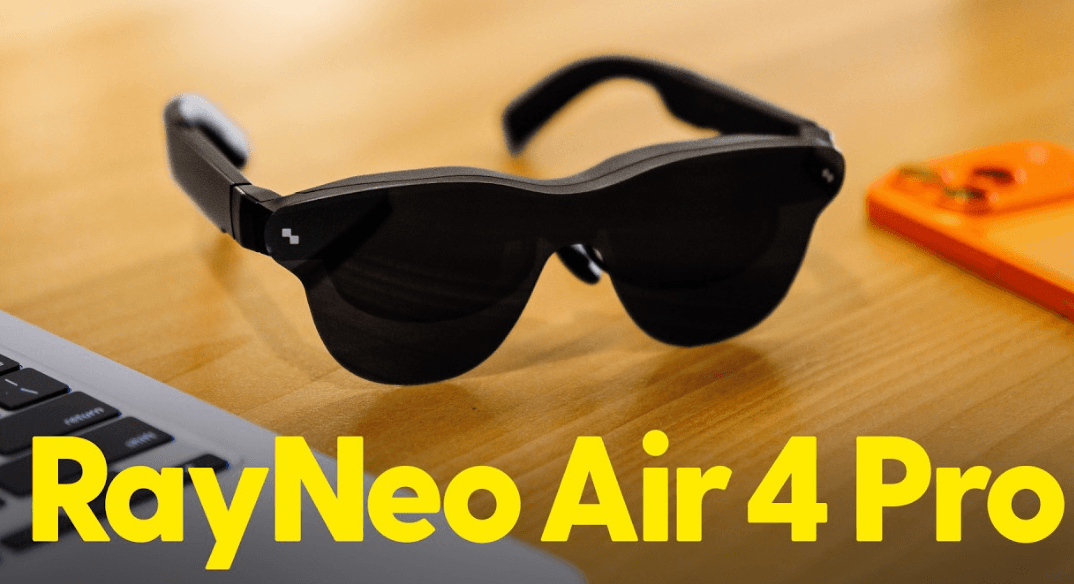
TL;DR The RayNeo Air 4 Pro is one of the more convincing affordable display glasses available in 2026, mainly because it combines dual 1080p Micro-OLED displays, up to 120Hz refresh, HDR10 support, and Bang & Olufsen-tuned audio at a $299 launch price. The glasses can create a large virtual screen for phones, laptops, tablets, and compatible gaming devices, making them particularly useful for travel, private movie watching, and gaming. However, HDR10 should not be treated as a night-and-day upgrade in every situation, and independent testing has found that HDR playback can depend on the connected device and content. The Air 4 Pro also has no built-in battery, so the connected device or an appropriate adapter is responsible for power. Its 76g frame is reasonably light for this category, but the fit can still feel front-heavy during longer sessions. Overall, the Air 4 Pro is a strong option if your priority is a private, high-quality virtual display rather than a full augmented reality experience.
What Makes The RayNeo Air 4 Pro Different?
The RayNeo Air 4 Pro is best understood as a pair of wearable displays rather than conventional smart glasses. Instead of putting cameras, an AI assistant, or a transparent augmented reality interface in front of your eyes, the glasses connect to a compatible device and place a large virtual screen in your field of view. That distinction is important because the product is designed primarily for watching movies, playing games, mirroring a phone or computer, and creating a more private workspace. RayNeo lists support for phones, tablets, laptops, and game consoles, with USB-C connectivity and HDMI support through an adapter.
The main upgrade over the previous Air generation is HDR10 support. RayNeo positions this as a major step for the category, and the Air 4 Pro combines it with dual 0.6-inch Micro-OLED displays, 1080p resolution per eye, up to a 120Hz refresh rate, and a 47-degree field of view. The company also claims a virtual screen equivalent to a 201-inch display, although that figure should be viewed as an approximation of perceived screen size rather than a physical 201-inch panel. In everyday use, the appeal is much simpler: you get a large image without carrying a large monitor or tablet.
The Air 4 Pro also adds Vision 4000 image processing and four speakers tuned by Bang & Olufsen. RayNeo says the system can perform AI-based SDR-to-HDR processing, while the glasses also support native HDR10 content. The hardware controls are built directly into the temples, including brightness and volume controls, which makes basic adjustments possible without constantly reaching for the connected device. This makes the Air 4 Pro feel more like a dedicated personal display than an experimental wearable.
RayNeo Air 4 Pro At A Glance
| Feature | RayNeo Air 4 Pro |
|---|---|
| Display | Dual Micro-OLED |
| Resolution | 1080p per eye |
| Refresh Rate | Up to 120Hz |
| HDR | HDR10 |
| Field Of View | 47 degrees |
| Brightness | Up to 1,200 nits peak |
| Virtual Screen | Up to 201 inches claimed |
| Audio | Four speakers, B&O tuned |
| Weight | 76g |
| Battery | No built-in battery |
| Connectivity | USB-C, HDMI via adapter |
| Price | $299 launch price |
How Good Is The HDR10 Micro-OLED Display?
The display is easily the strongest reason to consider the RayNeo Air 4 Pro. Micro-OLED technology gives the glasses the basic advantages you would expect from OLED, including strong contrast, deep blacks, and vivid colours. The 1080p resolution per eye is not particularly high compared with modern televisions or premium VR headsets, but the image is being projected directly into your field of view, so it can still look sharp when you are watching movies or playing games. Independent reviews generally agree that the Air 4 Pro produces a bright and punchy image, especially when used with the included light blockers.
HDR10 is where the Air 4 Pro gets more interesting, but it is also where expectations need to be realistic. HDR10 can provide a wider range between dark and bright parts of an image and supports 10-bit colour, but simply having an HDR10 label does not guarantee that every video will suddenly look dramatically better. Tom's Hardware found that HDR10 could produce slightly richer colours and a small increase in contrast compared with the previous model, while PhoneArena reported that the difference between HDR and non-HDR content was difficult to see consistently. That suggests HDR10 is a meaningful technical improvement, but not necessarily a transformation for every viewer.
There is another important limitation. The glasses support up to 120Hz, but independent testing and community technical analysis indicate that HDR10 operation may be limited to 60Hz rather than 120Hz. This matters most for gamers who want both HDR and high refresh rates at the same time. The 120Hz mode remains useful for compatible SDR gaming and other content, but buyers should not assume that HDR10 and 120Hz automatically work together in every configuration. Device compatibility can also affect HDR playback, with Android Authority reporting that HDR10 did not work correctly on its Pixel 9 Pro test setup.
Display Performance
| Display Feature | RayNeo Air 4 Pro |
| Panel Technology | Micro-OLED |
| Resolution | 1920 x 1080 per eye |
| HDR Standard | HDR10 |
| Refresh Rate | Up to 120Hz |
| Peak Brightness | 1,200 nits |
| Field Of View | 47 degrees |
| Claimed Virtual Screen | 201 inches |
Gaming And Movie Watching On The Air 4 Pro
For movies, the Air 4 Pro makes the most sense when you want a large private screen without carrying a laptop or tablet. A long flight is an obvious example. Instead of balancing a tablet on the tray table, you can connect the glasses to a compatible device and watch content on a much larger virtual display. The light-blocking accessory included with the glasses also helps improve perceived contrast by reducing the effect of surrounding light. This is one of the situations where the Air 4 Pro's design feels genuinely useful rather than simply futuristic.
Gaming is another strong use case because the 120Hz refresh rate can make supported games feel smoother than a standard 60Hz display. The glasses can connect to compatible PCs, consoles, phones, and other devices, although the exact experience depends on the device's USB-C DisplayPort support or the adapters required. For gaming, the large virtual screen can make portable play feel considerably more immersive. However, gamers should remember the HDR10 and 120Hz limitation mentioned earlier, because the best HDR experience may not be available at the maximum refresh rate.
The glasses are less convincing as a complete desktop replacement. RayNeo's Mirror Studio software can create multiple virtual monitors with Windows PCs, which can be useful for productivity, but the experience depends heavily on how well the glasses fit your face and how comfortably you can keep your eyes aligned with the display. Reviews have also noted some edge blurring, and the lack of IPD adjustment means you cannot independently move the displays to match the distance between your eyes. For short work sessions, this can be useful, but it does not automatically replace a conventional monitor.
Best Use Cases
| Use Case | Air 4 Pro Experience |
| Movies and streaming | Excellent for private viewing |
| Gaming | Very good, especially at 120Hz in supported modes |
| Travel | Strong use case |
| Casual productivity | Useful but comfort-dependent |
| Multi-monitor work | Possible with Windows and Mirror Studio |
| Outdoor use | Better with light blockers |
| Full AR applications | Not the main purpose |
Audio, Comfort, And Everyday Wearability
RayNeo has also improved the audio system. The Air 4 Pro uses four speakers tuned by Bang & Olufsen, and independent testing found the speakers to be an improvement over the previous generation. The open-ear approach means you can hear your surroundings while listening to your content, which is convenient when you are traveling or using the glasses at home. RayNeo also offers sound tubes as an accessory for directing audio more directly toward your ears, although the standard open-ear setup is designed to keep the experience relatively simple.
Comfort is more complicated. At 76g, the Air 4 Pro is relatively light for display glasses, but the weight distribution can still make the front feel noticeable during long sessions. Popular Mechanics found the frame reasonably comfortable for shorter entertainment sessions but noted that its wide, chunky design and nose-heavy balance can become an issue over time. Tom's Guide similarly praised the comfort while pointing out edge blur and the lack of IPD adjustment. These are not deal-breakers, but they are important if you expect to wear the glasses for several hours every day.
The lack of a built-in battery is both a benefit and a limitation. Because the glasses do not need to carry a battery pack, they can remain relatively light, but the connected device supplies the power. Android Authority found that using the glasses with a Pixel 9 Pro could drain the phone significantly during extended use. RayNeo sells an adapter that allows the glasses to be used while charging the connected device, which is particularly useful for long flights or gaming sessions.
Comfort And Connectivity
| Feature | What It Means |
| Weight | 76g |
| Built-In Battery | No |
| Controls | Physical brightness, volume, and menu controls |
| Connectivity | USB-C DisplayPort and HDMI with adapter |
| IPD Adjustment | No |
| Prescription Support | Lens-insert frame included |
| Light Blocking | Included light blocker |
What Are The Biggest Problems With The RayNeo Air 4 Pro?
The biggest weakness is that HDR10 sounds more revolutionary on paper than it feels in every real-world situation. If you compare HDR and SDR content carefully, you can see improvements in contrast and colour in some cases, but independent reviewers have reported that the difference can be subtle. The experience also depends on the connected device and whether the content is actually being delivered as HDR10. This means buyers should not purchase the Air 4 Pro solely because they expect every video to look dramatically better than on the previous generation.
The second problem is optical comfort. The image is impressive when your eyes are positioned correctly, but reviewers have reported some softness or blurring around the edges. The absence of IPD adjustment makes this more important because different users have different eye spacing and facial shapes. If the glasses do not sit correctly on your face, the impressive Micro-OLED hardware cannot completely compensate for the resulting viewing experience. This is one reason the Air 4 Pro is better treated as a personal entertainment device than a guaranteed all-day monitor replacement.
The third limitation is the overall build quality and ecosystem. Tom's Hardware described the materials as average and criticized the carrying case, while Tom's Guide also noted that the build quality reflects the relatively low price. The glasses are designed to deliver a strong display experience without costing several hundred dollars more, so some compromises are understandable. The important point is to know what you are paying for: the Air 4 Pro prioritizes display quality and portability over premium physical construction and advanced spatial features.
Main Pros And Cons
| Pros | Cons |
| Excellent Micro-OLED image | HDR10 improvement can be subtle |
| HDR10 support | HDR may be limited to 60Hz |
| Up to 120Hz refresh | No IPD adjustment |
| B&O-tuned audio | Edge blur can occur |
| Light 76g design | No built-in battery |
| Useful for travel and gaming | Average build materials |
| USB-C connectivity | Device compatibility varies |
RayNeo Air 4 Pro Vs Traditional Screens
The Air 4 Pro makes the most sense when you compare it with the situations where a normal screen is inconvenient rather than trying to replace every screen in your life. A 201-inch virtual display is obviously not physically comparable to a 55-inch television, but the glasses can create the perception of a much larger viewing area while taking up almost no physical space. That is useful on airplanes, trains, hotel rooms, or anywhere you do not want to carry a monitor.
For gaming, the argument is similarly practical. A conventional gaming monitor will usually provide a more predictable viewing experience, better ergonomics, and broader compatibility. The Air 4 Pro's advantage is portability. You can potentially carry a complete large-screen gaming setup in a small bag when the source device supports the required connection. The 120Hz capability also gives the glasses a meaningful advantage over basic portable displays for compatible games, although HDR10 at 60Hz remains a limitation for users who want both features simultaneously.
For productivity, the decision is more personal. A conventional monitor is still easier to use for long working hours because you can position it independently and maintain a more natural posture. The Air 4 Pro is better for temporary work, private viewing, or situations where physical desk space is limited. If your main requirement is a portable screen for travel, however, the glasses become much easier to justify because their small physical footprint is the feature a conventional monitor cannot match.
Who Should Buy The RayNeo Air 4 Pro?
The RayNeo Air 4 Pro is a good choice for travellers, gamers, movie watchers, and technology enthusiasts who want a private large-screen experience without carrying a large display. It is particularly appealing if you already own a phone, laptop, tablet, or gaming device with compatible USB-C DisplayPort output. In that situation, the glasses can act as a portable personal monitor without requiring a separate computer inside the frame.
It is also a sensible option for someone who wants to try wearable displays without moving into much more expensive hardware. At its $299 launch price, the Air 4 Pro sits in an accessible part of the AR-display market, and its HDR10 support gives it a feature that was previously unusual in this category. The combination of Micro-OLED, 120Hz refresh, improved audio, and light blockers makes it a more complete package than simply adding a higher-resolution panel.
You should skip it if you are expecting true augmented reality, all-day comfort, built-in battery operation, or a completely flawless HDR experience. The Air 4 Pro does not overlay persistent digital objects onto the physical world in the way a full AR headset might, and it cannot operate independently like a battery-powered smart device. It is fundamentally a wearable display, and understanding that distinction is the key to deciding whether it is worth buying.
Frequently Asked Questions
Q. Is the RayNeo Air 4 Pro a true AR headset?
No. The Air 4 Pro is primarily a pair of wearable display glasses. It mirrors or displays content from connected devices rather than providing the full spatial AR experience associated with headsets that track and anchor digital objects in the physical environment.
Q. Does the RayNeo Air 4 Pro support HDR10?
Yes. HDR10 is one of the main upgrades of the Air 4 Pro, although the visible improvement depends on the content and connected device. Independent testing found that the difference can sometimes be relatively subtle.
Q. Does HDR10 work at 120Hz on the RayNeo Air 4 Pro?
Current independent testing indicates that HDR10 is limited to 60Hz, while 120Hz is available for supported SDR modes. Buyers should therefore not assume that HDR10 and 120Hz can be used together in every setup.
Q. What resolution does the RayNeo Air 4 Pro have?
The Air 4 Pro uses dual Micro-OLED displays with 1080p resolution per eye. It also supports refresh rates of up to 120Hz.
Q. Does the RayNeo Air 4 Pro have a battery?
No. The glasses do not contain a built-in battery and receive power from the connected device. RayNeo also offers an adapter that can allow the source device to charge while the glasses are being used.
Q. How much does the RayNeo Air 4 Pro weigh?
The Air 4 Pro weighs about 76g. That is relatively light for this type of wearable display, although the weight distribution can still make the glasses feel front-heavy during extended use.
Q. Is the RayNeo Air 4 Pro good for gaming?
Yes, particularly for compatible devices and games that can take advantage of the 120Hz refresh rate. The glasses can connect to gaming devices including PCs and consoles through supported connections, but HDR10 may be restricted to 60Hz.
Q. Can you use the RayNeo Air 4 Pro with a laptop?
Yes. RayNeo lists laptop compatibility, and Windows users can also use Mirror Studio for virtual monitor functionality. The exact experience depends on the laptop's USB-C DisplayPort support and the software configuration.
Q. Is the RayNeo Air 4 Pro comfortable for long periods?
It can be comfortable for shorter entertainment sessions, but comfort varies by face shape and fit. Reviews have noted the 76g weight, front-heavy feel, lack of IPD adjustment, and some edge blurring as potential limitations during extended use.
Q. Should you buy the RayNeo Air 4 Pro in 2026?
Buy it if you want a portable private screen for movies, gaming, and occasional productivity, and your connected devices support it. Do not buy it expecting a complete AR headset or a perfect replacement for a conventional monitor or television.
Final Recommendation
The RayNeo Air 4 Pro is finally good enough to make wearable displays feel practical rather than purely experimental, but its biggest strength is not HDR10 alone. The combination of Micro-OLED image quality, 120Hz refresh, improved B&O-tuned audio, light blockers, and broad device compatibility creates a genuinely useful portable entertainment screen. At $299, it also avoids the pricing that makes many wearable-display products difficult to recommend.
However, the Air 4 Pro is not a perfect product. HDR10 can be subtle, HDR and 120Hz should not be assumed to work together, device compatibility can affect the experience, and the glasses still have optical and comfort limitations. The lack of a built-in battery also means your phone, laptop, or another power source remains part of the setup.
The final verdict: If your priority is a private, portable big-screen experience for movies, gaming, and travel, the RayNeo Air 4 Pro is one of the more compelling choices in 2026. If you want true augmented reality, all-day wearability, or a complete standalone device, this is not the product to buy. The Air 4 Pro is best viewed for what it actually is: an affordable wearable Micro-OLED display that gets remarkably close to making a personal cinema practical.






