PS5 or Xbox Overheating and Loud Fan: Causes and Fixes
PS5 or Xbox overheating or making a loud fan noise? Learn what causes excess heat, how to improve ventilation and clean vents, and when your console needs repair.

TL;DR: A loud fan does not automatically mean your PS5 or Xbox is overheating. Both consoles can increase fan speed during demanding games to move more heat away from their internal components. The first things to check are ventilation, dust around the vents, room temperature, and whether the console is sitting in a cramped cabinet or against another surface. For PS5, Sony specifically recommends keeping at least 10 cm of space around the console and using a low-powered vacuum to remove dust from the vents. If you see a temperature warning, experience repeated shutdowns, or hear unusual grinding or rattling, stop using the console until it cools and investigate further. Persistent overheating despite good airflow may require professional service.
Why Is My PS5 or Xbox Getting Hot?
Gaming consoles naturally produce heat because their processors and graphics hardware work harder while running demanding games. A warm console or warm air coming from its exhaust does not, by itself, mean that the hardware is overheating. In fact, the Xbox Series X was specifically designed around a large airflow path and a single axial fan, while the PS5 can increase its fan speed during some games and applications to cool the system more effectively.
The important distinction is between normal heat and an actual overheating problem. If the fan becomes louder when launching a graphically demanding game and then settles down, that can be normal operation. The situation becomes more concerning when the console repeatedly becomes excessively hot, displays a temperature warning, shuts down unexpectedly, or develops unusual mechanical fan noises. A loud fan by itself should not be treated as proof of overheating.
Airflow is one of the biggest factors you can control. When a console is placed inside a cramped cabinet, pushed against a wall, covered with something, or surrounded by dust, hot air has a harder time leaving the system. The cooling system then has to work harder to maintain temperatures. Sony specifically advises keeping PS5 vents unobstructed, avoiding narrow spaces and long-fiber carpets, and leaving at least 10 cm of free space around the console.
Common Causes Of Loud Fans And Overheating
Blocked Or Poor Ventilation
Poor ventilation is one of the first things to check when a console starts running hotter or louder than usual. A TV cabinet may look neat, but if it restricts the console's intake or exhaust airflow, heat can accumulate around the device. The same issue can occur when another electronic device is placed immediately beside or above the console.
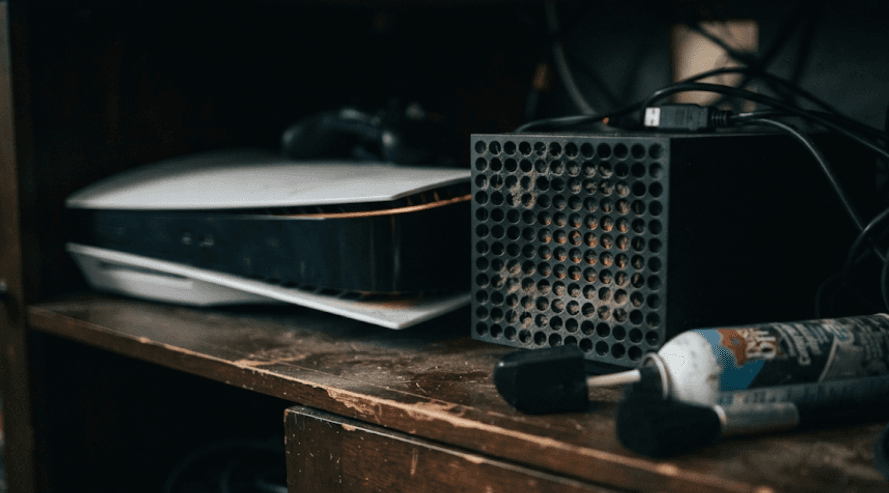
Dust can make the situation worse by accumulating around ventilation openings and restricting airflow. Sony specifically tells PS5 owners not to allow dust to build up in or around the vents. Xbox Series X|S consoles also depend on unobstructed airflow through their designed ventilation paths.
The simplest solution is usually to give the console more breathing room. Move it to an open, stable surface, keep vents clear, and avoid soft surfaces such as long-fiber carpets. Do not assume that buying an external cooling fan will solve an airflow problem. Improving the console's own ventilation should come first.
Dust And Debris
Dust is another common reason a console may need to work harder to stay cool. Over time, dust and other particles can collect around vents and, depending on the console and environment, can contribute to restricted airflow. Homes with pets, carpets or frequent dust accumulation may require more regular external cleaning.
For PS5, Sony recommends disconnecting the AC power cable before cleaning and using a low-powered vacuum cleaner to remove dust that has accumulated in and around the air vents. This is preferable to treating the console like a PC that can simply be blasted aggressively with compressed air.
If external cleaning does not improve the situation and the console continues to overheat, avoid immediately assuming that the thermal compound or internal fan is defective. Internal cooling problems require a different level of diagnosis. Opening a console without the appropriate knowledge can also create additional damage or affect warranty or repair options.
Demanding Games And High Workloads
A demanding game can naturally make the cooling system more noticeable. When the CPU and GPU are working harder, the console generates more heat and its cooling system may respond by increasing fan speed. Sony explicitly states that the PS5 fan can operate louder than usual during some games and applications because it is temporarily working faster to cool the system.
This means that hearing the fan during a graphics-intensive game is not automatically a problem. It is more useful to compare the behaviour with what the console normally does. If the fan becomes louder only during certain demanding workloads and there are no temperature warnings or shutdowns, the noise may simply reflect normal cooling behaviour.
The same principle applies to Xbox. The Series X was designed around a substantial airflow system, with the fan moving air through the console to keep its powerful hardware operating efficiently. Warm exhaust air is therefore not, on its own, evidence that the console is overheating.
PS5 Overheating And Loud Fan Fixes
Improve PS5 Ventilation
Start by checking where the PS5 is placed. Sony recommends at least 10 cm of free space around each side of the console. Avoid narrow or cramped spaces, long-fiber carpets and anything that blocks the side or rear vents. The console should also be kept away from locations where heat builds up easily.
If the PS5 is inside a closed entertainment unit, move it into an open area and test it again. Avoid placing it directly beside another device that produces significant heat. The goal is not to make the console cold; it is to ensure that the cooling system has access to reasonably cool surrounding air and can discharge warm air without obstruction.
Also avoid covering the console with cloth or other materials. Sony's guidance specifically warns against cramped placement and dust accumulation. Good ventilation is a much more important first step than purchasing additional accessories designed to blow air at the console.
Clean The PS5 Vents Safely
Before cleaning, turn the PS5 off and disconnect its AC power cable from the rear. Sony recommends using a low-powered vacuum cleaner to remove dust accumulated in and around the air vents. This gives you a straightforward maintenance step without immediately opening the console.
Pay particular attention to visible dust around the ventilation areas. Do not push objects deep into the openings or start dismantling the console simply because the fan sounds louder. External cleaning is the appropriate first-line approach for routine dust removal.
After cleaning, place the console somewhere with adequate ventilation and test it under the same workload that previously caused the fan to become loud. If the console behaves normally afterward, the problem may have been related to airflow or dust rather than a major hardware failure.
What If The PS5 Shows A Temperature Warning?
A temperature warning should be treated differently from ordinary fan noise. Sony's current PS5 safety documentation says that if the console becomes too hot, a notification appears on screen. Continued use while that message is displayed can result in the console becoming non-operational.
If you receive the warning, turn the console off and allow it to cool. Once it has cooled, move it to a well-ventilated location that is not subject to high temperatures and check that the vents are unobstructed. Sony also advises checking the heat-dissipation components if an M.2 SSD has been installed.
Do not keep playing simply because the console still appears to be working. A temperature warning is a clear sign that the normal cooling conditions are not being maintained. If the warning returns after correcting ventilation and cleaning the accessible vents, the console should be assessed rather than repeatedly tested under high load.
Xbox Overheating And Loud Fan Fixes
Check Xbox Airflow
Xbox Series X|S consoles are designed around specific airflow paths, so placement matters. Microsoft describes the Series X cooling design as using a single axial fan to pull air through the system and maintain efficient cooling. Its large ventilation openings are therefore functional parts of the thermal design, not merely cosmetic features.
Make sure the ventilation openings are not covered or pressed against surrounding surfaces. Avoid placing the console inside a cramped cabinet where warm air can accumulate. Xbox's own setup guidance also recommends leaving extra space around the console for airflow.
If the console feels warm but continues working normally, do not automatically classify that as overheating. The Series X is designed to exhaust warm air as part of its cooling process. The more meaningful warning signs are repeated shutdowns, explicit temperature-related warnings, abnormal fan behaviour or a problem that continues despite proper ventilation.
Clean The Console Carefully
If dust has accumulated around the external ventilation areas, clean the accessible surfaces carefully with the console powered down and disconnected from power. Keeping the ventilation openings clear helps the designed airflow path work as intended.
Avoid aggressive DIY cleaning methods or inserting tools through the vents. If dust appears to have accumulated deep inside the console, professional cleaning is safer than dismantling the device without the appropriate repair knowledge.
After cleaning and repositioning the Xbox, test it again during a game that previously caused excessive fan noise. If the fan is still unusually loud and the console continues to overheat or shut down, the problem may involve an internal cooling component rather than simple external dust.
Update And Restart The Console
Software should not be ignored when troubleshooting unusual console behaviour. Restarting the console can rule out a temporary software state, while keeping the system updated ensures that you are not troubleshooting an issue on outdated console software.
However, an update should not be presented as a guaranteed overheating fix. Software updates can address system behaviour and bugs, but they cannot repair a physically damaged fan or remove internal dust.
If ventilation is good, the vents are clean and the console is updated but it continues to overheat or shut down, move beyond basic troubleshooting. Repeated thermal problems are a reason to consider professional diagnosis rather than repeatedly restarting the console.
PS5 Vs Xbox: Quick Troubleshooting Guide
| Problem | PS5 | Xbox |
|---|---|---|
| Fan gets louder during demanding games | Can be normal | Can be normal |
| Warm exhaust air | Not automatically a fault | Not automatically a fault |
| Blocked vents | Can increase cooling difficulty | Can increase cooling difficulty |
| Dust around vents | Clean carefully | Clean carefully |
| Cramped cabinet | Avoid | Avoid |
| Temperature warning | Turn off and allow to cool | Follow the console's warning and support guidance |
| Repeated shutdowns | Needs investigation | Needs investigation |
| Grinding or rattling fan | Not normal fan behaviour | Not normal fan behaviour |
| External cooling fan | Not a first-line fix | Not a first-line fix |
| Persistent overheating after airflow fixes | Professional diagnosis recommended | Professional diagnosis recommended |
The key takeaway is that the troubleshooting process is broadly similar for both consoles: check airflow, remove accessible dust safely, improve placement, update the system, and then reassess the symptoms. Neither a loud fan nor warm exhaust should automatically be labelled as a hardware failure.
The biggest difference is that Sony provides a particularly clear ventilation recommendation for the PS5, including at least 10 cm of free space around the console. Sony also explicitly documents what to do if a high-temperature message appears. Xbox's Series X design, meanwhile, relies heavily on its large ventilation path and axial-fan cooling system.
When Should You Get Your Console Repaired?
A console deserves professional attention when the basic environmental fixes do not solve the problem. Repeated overheating warnings, shutdowns during ordinary gaming, unusually loud fan operation even during light workloads, or persistent abnormal noise are stronger indicators of a potential hardware issue than simply feeling warm during a demanding game.
Pay particular attention to new mechanical sounds such as grinding, rattling or clicking. A fan that changes speed smoothly during demanding gameplay can be normal, but a fan producing a new mechanical noise may need inspection. Do not try to diagnose a damaged fan solely by listening to it.
It is also important not to jump straight to replacing thermal material. PS5 models use a liquid-metal-based thermal interface material, and Sony's documentation specifically references heat-dissipation components around the M.2 SSD as well. Internal cooling work is therefore not an ideal beginner DIY repair. If the console continues overheating after proper ventilation and safe external cleaning, professional diagnosis is the better route.
How To Prevent PS5 And Xbox Overheating
Good placement is the easiest form of preventative maintenance. Keep the console in an open, stable location with its ventilation openings unobstructed. Avoid closed cabinets, soft surfaces that can interfere with airflow and areas exposed to excessive heat or direct sunlight.
Regularly inspect the ventilation openings for visible dust. You do not need to clean the console aggressively every few days. Instead, make external dust checks part of your normal setup maintenance, particularly if the console is used in a dusty environment or around carpets and pets.
Finally, pay attention to changes rather than chasing a specific fan sound. There is no universal "safe fan noise" level that applies to every PS5 or Xbox model and every game. A better approach is to learn what normal behaviour looks like for your console. If the fan suddenly becomes much louder than usual, the console begins shutting down, or a temperature warning appears, investigate the cause rather than simply accepting the noise as normal.
Final Recommendation
For both PS5 and Xbox, start with ventilation before assuming the console needs a repair. Move the console out of cramped furniture, clear the vents, remove accessible dust safely and make sure it is not sitting in a location where heat builds up. A louder fan during demanding gameplay can be completely normal, so fan noise alone should not be treated as an overheating diagnosis.
For PS5 specifically, maintain at least 10 cm of free space around the console and follow Sony's recommended low-powered vacuum method for external vent cleaning. If a high-temperature warning appears, shut the console down and let it cool before checking its placement and ventilation.
For Xbox, pay close attention to the console's ventilation path and remember that warm air coming from the exhaust is part of normal cooling. If the console repeatedly shuts down, becomes unusually loud even under light workloads, or continues overheating after ventilation and cleaning have been addressed, stop treating it as a simple airflow issue and have the cooling system professionally assessed.
Frequently Asked Questions
Q. Is it normal for a PS5 fan to get loud while gaming?
Yes. Sony says the PS5 fan can temporarily operate louder during some games and applications because it is working faster to cool the system. Loudness alone does not mean the console is overheating.
Q. How much space should I leave around my PS5?
Sony recommends leaving at least 10 cm of free space around each side of the PS5 and avoiding cramped spaces that restrict airflow.
Q. Is warm air coming out of an Xbox Series X normal?
Yes. The Xbox Series X is designed to move air through the system and exhaust warm air. Warm exhaust by itself does not prove that the console is overheating.
Q. Can dust make a PS5 or Xbox fan louder?
Dust around ventilation openings can restrict airflow and make cooling more difficult. Cleaning accessible vents and improving airflow are sensible first troubleshooting steps.
Q. Should I use an external cooling fan for my PS5 or Xbox?
It should not be your first solution. Start by correcting the console's placement and ventilation and cleaning accessible dust. An external accessory cannot compensate for blocked vents or an internal hardware problem.
Q. What should I do if my PS5 shows a high-temperature warning?
Turn the PS5 off and let it cool. Then move it to a well-ventilated location away from high temperatures and check that its vents are not blocked. Sony warns against continued use while the warning is displayed.
Q. Can a long gaming session cause a PS5 or Xbox to overheat?
Longer sessions can keep the hardware under load for longer, but session length alone does not prove overheating. Ventilation, surrounding temperature, dust and the condition of the cooling system are also important factors.
Q. Why does my Xbox fan suddenly become very loud?
The fan may increase its speed when the console is under heavier workload. If the change is accompanied by repeated overheating, shutdowns or unusual mechanical noises, however, the console should be investigated further.
Q. Should I open my PS5 or Xbox to clean the fan?
Not as a first troubleshooting step. Start with safe external cleaning and proper ventilation. If the console continues overheating, professional servicing is safer than opening the device without the appropriate repair knowledge.
Q. When should I get my PS5 or Xbox repaired?
Consider professional diagnosis if the console repeatedly overheats or shuts down, displays temperature warnings despite proper ventilation, or develops persistent abnormal fan noises after basic cleaning and placement checks.
Ready to upgrade your tech?
Browse our collection of quality refurbished products at unbeatable prices.