Phone Not Charging? 8 Fixes Before You Visit a Service Centre
Phone not charging? Before heading to a service centre, try these eight practical fixes for cables, chargers, ports, software, moisture and battery issues.

TL;DR: If your phone is not charging, do not assume that the battery or charging port has failed. Start with simple checks such as trying another wall socket, cable, and compatible adapter, then inspect the charging port for debris. Restart the phone, give a completely drained battery some time to respond, and check for moisture or temperature warnings. If your phone supports wireless charging, testing it can also help identify whether the problem is related to wired charging. If none of these steps work with known-good accessories, the issue may require professional diagnosis.
Why Is Your Phone Not Charging?
A phone can stop charging for several reasons, and the cause is not always a serious hardware failure. A damaged cable, faulty power adapter, blocked charging port, incompatible accessory, software issue, moisture detection or an extremely low battery level can all prevent normal charging.
The first step is to identify what the phone is actually doing. If there is no charging icon at all, the problem could be with the power source, cable, adapter or port. If the phone says it is charging but the battery percentage barely moves, the issue could involve charging speed, temperature, battery condition or the amount of power the phone is consuming.
The good news is that several checks can be performed at home without opening the phone. Work through the fixes below one at a time rather than changing everything at once. This makes it easier to identify whether the problem is with the accessory, the charging connection or the phone itself.
| What You Notice | Possible Cause | What To Try |
|---|---|---|
| No charging response | Cable, adapter, outlet or port | Try another cable, adapter and outlet |
| Cable feels loose | Debris or damaged port | Inspect the charging port |
| Charging is very slow | Charger, cable, heat or heavy usage | Use a compatible charger and reduce usage |
| Moisture warning | Liquid detected in port | Disconnect and allow it to dry |
| Stuck at a certain percentage | Charging limit or battery protection | Check charging settings |
| Phone is completely dead | Deeply discharged battery | Leave it connected to a working charger |
1. Try A Different Cable And Charger
A faulty charging cable is one of the easiest things to overlook. Cables can develop internal damage from repeated bending, pulling or everyday wear, even when the outer covering looks perfectly normal. If possible, test your phone with a different cable that you know works.
Do not change only the cable and assume the result proves everything. Try a different compatible power adapter as well, and connect the charger directly to a working wall outlet. Apple and Google both recommend checking the cable, adapter and power source when troubleshooting charging problems.
Also check the connectors for visible damage, bent parts or fraying. Do not continue using a cable or adapter that is visibly damaged. If another known-good combination charges the phone normally, you have likely found the problem without needing a service centre.
2. Check The Wall Outlet And Power Source
Sometimes the phone gets blamed for a problem that is actually coming from the power source. A switched-off extension board, loose connection or faulty wall socket can prevent the charger from delivering power. Plug another device into the same outlet to check whether it works.
For troubleshooting, connect the phone directly to a wall outlet instead of relying on a laptop, car USB port, hub or extension setup. Computer USB ports can provide power, but charging performance can vary depending on the port and device.
Once you have confirmed that the outlet works, reconnect the charger firmly at every point. The cable should fit securely into both the power adapter and the phone. If the phone begins charging after changing the outlet, the phone itself may not have been the problem.
3. Inspect The Charging Port For Debris
Pocket lint and dust can accumulate inside a charging port over time. When debris becomes compacted, the charging connector may not sit properly inside the port, which can lead to intermittent charging or no charging at all. A cable that suddenly feels loose is one reason to inspect the port.
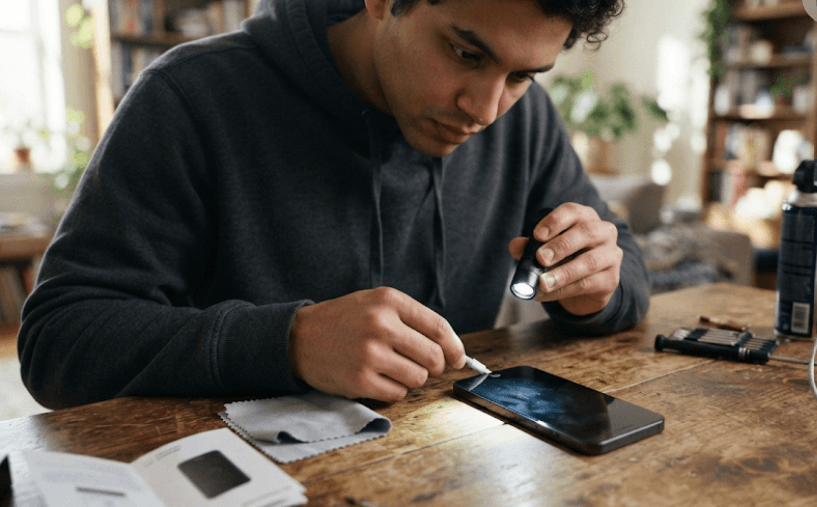
Switch the phone off before inspecting it and use a light to look inside the port. If you can see visible debris, avoid pushing sharp or metallic objects into the opening. Charging ports contain delicate contacts, and careless cleaning can cause additional damage.
If the port appears heavily blocked or damaged, professional cleaning is safer than trying to dig around inside it. Samsung specifically advises against inserting objects into the charging port. If the cable still does not connect securely after the port is visibly clean, the port itself may need inspection.
4. Restart Or Force Restart The Phone
A temporary software problem can sometimes interfere with charging behaviour. Restarting the phone is a simple troubleshooting step because it refreshes the operating system and can resolve temporary glitches without changing your personal data.
If the phone is responsive, perform a normal restart using the power menu. If the screen is frozen or the phone is not responding, you may need to use the manufacturer's force-restart procedure. The button combination differs between iPhone models and Android devices, so use the method designed for your specific phone.
If the phone is completely drained, it may not respond immediately after being connected to power. Google recommends allowing a very low-battery device time to charge before trying to restart it, while Apple also recommends leaving an iPhone connected for a period before attempting another restart.
5. Check For Moisture Or Liquid Warnings
Modern phones may stop wired charging when they detect moisture in the charging port. This is a safety measure designed to reduce the risk of corrosion or electrical damage. You may see messages such as a liquid-detection alert on an iPhone or a moisture-related warning on some Samsung Galaxy devices.
If your phone shows such a warning, disconnect the charging cable and do not keep reconnecting it to force charging. Leave the phone and cable in a dry area with airflow and allow them to dry naturally. Apple advises that drying can take considerably longer than a few minutes if moisture remains inside the connector.
Avoid common internet shortcuts such as using a hair dryer, external heat, compressed air or putting the phone in rice. Apple specifically advises against these methods for liquid-detection situations. If the warning continues after the phone and cable are completely dry, professional support may be necessary.
6. Remove The Case And Check For Charging Limits
A phone case does not normally stop charging, but an unusually tight or poorly designed case can interfere with how a connector fits. It can also interfere with positioning on some wireless charging pads. Remove the case temporarily and try charging again to rule this out.
You should also check whether your phone has a charging limit or battery-protection feature enabled. Modern smartphones can intentionally slow, pause or limit charging under certain conditions to manage battery temperature and long-term battery health. For example, iPhones and Android phones from different manufacturers offer different charging optimisation features.
A phone stopping at around 80% does not automatically mean the battery is faulty. Check the battery or charging settings for options such as a charge limit, Optimized Battery Charging, Adaptive Charging or Battery Protection. The exact name and availability depend on the phone model and software version.
7. Try Wireless Charging If Your Phone Supports It
Wireless charging can be a useful diagnostic test, not just an alternative way to power your phone. If your phone supports compatible wireless charging and it charges normally on a suitable wireless charger, the battery can accept power and the problem may be limited to the wired charging path.
Before testing wireless charging, remove accessories that may interfere with charging and place the phone correctly on the charging pad. Cases, magnetic accessories or poor alignment can affect wireless charging on some devices. Make sure the charger itself is compatible with your phone.
If wireless charging works but wired charging does not, pay particular attention to the cable, adapter and charging port. If neither wired nor wireless charging works, the issue may be deeper and could involve the battery, power-management hardware or another internal component.
8. Give A Completely Drained Battery Time To Recover
A phone with an extremely low or completely depleted battery may not immediately display the normal charging animation. This can make it look completely dead even when the charger is supplying power. Connecting it to a known-good charger and leaving it undisturbed can help determine whether it is simply deeply discharged.
Use a working cable, compatible adapter and reliable wall outlet, then leave the phone connected for a while before repeatedly pressing the power button. Google notes that a completely drained Pixel can sometimes take time before showing any response, while Apple's troubleshooting guidance also recommends allowing a device to charge before trying again.
If the phone remains completely unresponsive after sufficient charging time and you have already ruled out the cable, adapter and outlet, the problem is less likely to be a simple accessory issue. At that point, repeated charging attempts are unlikely to solve the problem, and professional diagnosis becomes more appropriate.
When Should You Visit A Service Centre?
If your phone still will not charge after testing a known-good cable, compatible adapter and working wall outlet, the issue may be inside the device. A damaged charging port, degraded battery, charging circuit problem or liquid or impact damage may require professional inspection.
Certain physical signs should also make you stop troubleshooting at home. These include a visibly damaged or burnt charging port, unusual heat while charging, liquid damage, a swollen battery, a lifting screen or a device that has recently suffered a significant drop. Do not continue charging a phone that appears physically unsafe.
Before visiting a service centre, note what you have already tested. Tell the technician whether another cable worked, whether wireless charging works, whether the phone shows a moisture warning and whether the device was recently dropped or exposed to liquid. This information can make diagnosis more straightforward.
Final Recommendation
Start with the cheapest and safest checks first: change the cable, adapter and wall outlet, inspect the charging port, restart the phone and check for moisture or charging-limit warnings. If your phone supports wireless charging, use it as an additional diagnostic test rather than immediately assuming the battery is dead.
Do not force a connector into the port, scrape inside it with metal objects or attempt to open the phone unless you have the appropriate technical expertise. Manufacturer guidance consistently places basic accessory and connection checks before professional repair.
If none of the eight fixes works with known-good charging equipment, it is time to consider a service centre. The important thing is that you have already ruled out several simple causes, which can help prevent paying for an unnecessary battery or port replacement.
Frequently Asked Questions
Q. Why is my phone not charging even though the charger is connected?
A faulty cable, adapter, wall outlet, blocked charging port, software issue, moisture detection or battery problem can prevent charging. Test another compatible cable, adapter and outlet first.
Q. How do I fix a phone that is not charging?
Start by trying another cable, power adapter and wall outlet. Then inspect the charging port, restart the phone, check for moisture or charging limits, and allow a deeply discharged battery time to respond.
Q. Can a dirty charging port stop a phone from charging?
Yes. Dust and lint can prevent the charging connector from making a proper connection. Inspect the port carefully and avoid inserting sharp or metallic objects into it.
Q. Why is my phone charging very slowly?
Slow charging can result from an underpowered or incompatible charger, damaged cable, high device temperature or heavy phone usage while charging. Try a compatible charger and avoid intensive use while charging.
Q. Why does my phone stop charging at 80%?
Some phones intentionally limit or optimise charging to manage battery health. Check the device's battery or charging settings before assuming there is a hardware problem.
Q. Can I charge my phone if the charging port is wet?
No. If your phone detects moisture, disconnect the charger and allow the phone and cable to dry naturally before reconnecting them.
Q. Should I put my phone in rice if the charging port is wet?
No. Rice is not a recommended drying method. Apple specifically advises against putting an iPhone in rice because particles can enter the connector and cause additional problems.
Q. Why does my phone charge wirelessly but not with a cable?
This can point toward a problem with the wired charging path, such as the cable, adapter or charging port. Test another compatible cable and adapter before seeking repair.
Q. How long should I leave a completely dead phone charging?
Give it some time on a known-good charger before attempting to restart it. A deeply discharged phone may not show an immediate response, particularly when its battery has reached a very low level.
Q. When should I take my phone to a service centre?
Consider professional help if the phone remains unresponsive after testing known-good charging equipment, or if you notice physical damage, unusual heat, a swollen battery, liquid damage or a damaged charging port.
Ready to upgrade your tech?
Browse our collection of quality refurbished products at unbeatable prices.