MacBook Pro M6 vs the OLED Touchscreen Model: Is the Extra Cost Worth It?
The MacBook Pro M6 costs less and delivers strong performance, while the OLED touchscreen model adds a premium display, touch input, more memory, and M5 Pro or M5 Max power. Here is which MacBook Pro makes more sense in 2026.

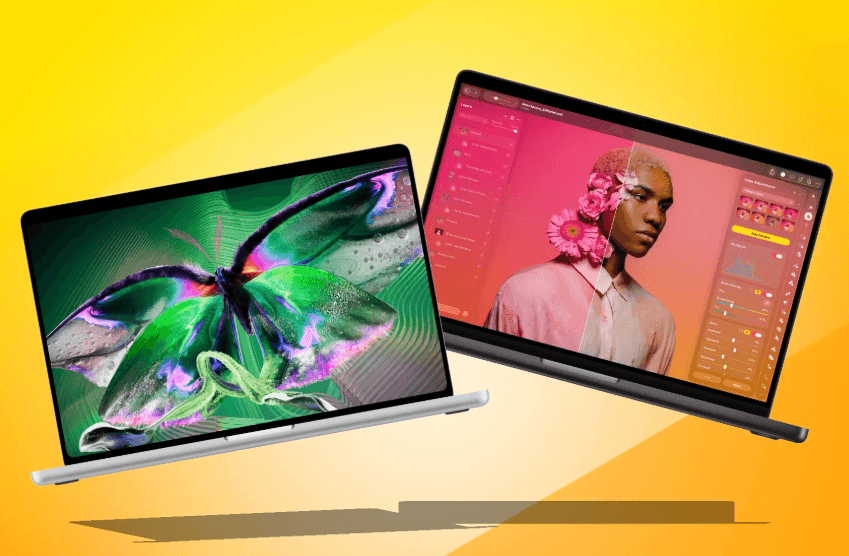
TL;DR: Apple's new MacBook Pro lineup gives buyers two very different options: the 14-inch MacBook Pro with the latest M6 chip, starting at ₹2,39,900, and the redesigned OLED touchscreen MacBook Pro, starting at ₹3,49,900. The latter costs ₹1,10,000 more at the entry level, despite using the previous-generation M5 Pro chip. However, the additional cost brings considerably more than a touchscreen. Buyers get a tandem OLED display, 2,000-nit peak brightness, Dynamic Island, touch gestures, a redesigned and lighter body, Thunderbolt 5 connectivity, and higher memory and storage configurations. The real question is whether these improvements will make a meaningful difference to everyday work. For creative professionals and users who regularly work with visual content, they could. For most students and everyday users, the M6 model remains a capable and more practical choice.
MacBook Pro M6 vs OLED Touchscreen: What's Different?
Apple's October 2026 MacBook announcements introduced an interesting choice for anyone planning to buy a high-end laptop. The standard 14-inch MacBook Pro now comes with the newer M6 processor, while the redesigned 14-inch and 16-inch OLED touchscreen models use Apple's M5 Pro and M5 Max chips. This makes the comparison slightly unusual because the more expensive laptop does not necessarily carry the newest chip generation.
The standard M6 MacBook Pro retains Apple's Liquid Retina XDR mini-LED display and the familiar laptop design. It is built for people who want strong processing performance, reliable battery life and professional connectivity without paying extra for a completely redesigned display. It also offers up to 24 hours of battery life, making it suitable for extended work sessions, productivity and demanding applications.
The OLED touchscreen model takes a different approach. Apple has redesigned the display and introduced touch interaction on a MacBook for the first time. It also brings a Dynamic Island, a thinner and lighter design, and more powerful M5 Pro and M5 Max configurations. Instead of treating this as a simple processor upgrade, it is better understood as a more premium MacBook Pro experience built around display quality, interaction and professional workloads.
| Feature | MacBook Pro M6 | OLED Touchscreen MacBook Pro |
|---|---|---|
| Starting price (India) | ₹2,39,900 | ₹3,49,900 |
| Available sizes | 14-inch | 14-inch and 16-inch |
| Processor | M6 | M5 Pro / M5 Max |
| Display | Liquid Retina XDR mini-LED | PROLED XDR tandem OLED |
| Touchscreen | No | Yes |
| Peak brightness | Up to 1,600 nits HDR | Up to 2,000 nits |
| Refresh rate | Up to 120Hz | Adaptive 10–120Hz |
| Dynamic Island | No | Yes |
| Connectivity | Thunderbolt 4 | Thunderbolt 5 |
| Battery life | Up to 24 hours | Up to 24 hours, depending on model |
Note: Prices are starting prices in India. Specifications and battery figures vary by configuration and model.
1. The OLED Display Is More Than Just a Visual Upgrade
The biggest reason to consider the more expensive MacBook Pro is its new tandem OLED display. Apple calls it PROLED XDR, and it represents a significant change from the mini-LED technology used in the standard M6 model. OLED pixels produce their own light, meaning individual pixels can switch off completely when displaying black. This creates deeper blacks, stronger contrast and more precise control over dark and bright areas of an image.
The difference becomes particularly noticeable when editing photographs, working with HDR videos, designing graphics or watching content with darker scenes. The OLED model supports a contrast ratio of 10,000,000:1 and peak brightness of up to 2,000 nits. It also supports both P3 and Adobe RGB colour gamuts, giving professionals more flexibility when working with colour-sensitive projects. The M6 model is still equipped with an impressive mini-LED display, offering up to 1,600 nits of peak HDR brightness and a 1,000,000:1 contrast ratio.
Another advantage is the touchscreen itself. Users can tap, swipe, scroll and use pinch-to-zoom gestures directly on the display. This could make certain tasks more convenient, particularly when navigating timelines, adjusting creative elements or zooming into photographs. However, the touchscreen does not replace the keyboard or trackpad. Instead, it adds another way to interact with macOS, which means users can continue working traditionally whenever they prefer.
Display Comparison
| Display feature | M6 MacBook Pro | OLED Touchscreen |
|---|---|---|
| Technology | Mini-LED | Tandem OLED |
| Contrast ratio | 1,000,000:1 | 10,000,000:1 |
| Peak HDR brightness | 1,600 nits | 2,000 nits |
| Colour gamut | P3 | P3 and Adobe RGB |
| Touch support | No | Multi-Touch |
| Refresh rate | Up to 120Hz | Adaptive 10–120Hz |
For photographers, video editors, designers and content creators, these improvements can make a noticeable difference. For someone primarily working with documents, spreadsheets and web browsing, the M6's existing display is already more than capable.
2. M6 vs M5 Pro and M5 Max: Does a Newer Chip Mean Better Performance?
This is where buyers need to look beyond the processor generation printed on the laptop. The M6 is Apple's newer base-generation chip, but the OLED touchscreen MacBook Pro uses the higher-tier M5 Pro and M5 Max processors. These chips are designed for more demanding workloads and offer greater processing resources than a standard base-tier chip.
The M5 Pro and M5 Max configurations bring more CPU and GPU cores, higher memory bandwidth and substantially different memory options. For example, the OLED M5 Pro configuration supports up to 64GB of unified memory, while the M5 Max can be configured with up to 128GB. This matters when working with large video projects, complex 3D scenes, multiple professional applications or demanding development environments. The standard M6 is designed to deliver strong everyday and professional performance, but it should not be confused with an M6 Pro or M6 Max.
There is an important distinction here: a newer chip does not automatically outperform an older chip from a higher performance tier. The M6 may be the better choice for someone prioritising the latest base-generation architecture, while an M5 Pro or M5 Max can be better suited to intensive CPU- and GPU-heavy work. Actual performance depends on the application, memory configuration, cooling and workload. Buyers should therefore compare the specific configurations rather than choosing solely based on the chip number.
Which Processor Suits Which Workload?
| Workload | More suitable option |
|---|---|
| Browsing, office work and multitasking | M6 |
| Programming and everyday development | M6 / M5 Pro |
| Professional 4K video editing | M5 Pro |
| Complex 3D rendering | M5 Pro / M5 Max |
| Large AI and machine learning workloads | M5 Max, depending on software |
| High-end visual effects and graphics | M5 Max |
3. What Else Do You Get for the Additional ₹1.10 Lakh?
The price difference becomes easier to understand when the comparison moves beyond the processor. The OLED touchscreen model introduces a redesigned chassis, a thinner and lighter build, a reinforced hinge for touch interaction and a display that is fundamentally different from the standard M6 version. These changes are particularly relevant for people who spend several hours working directly on their laptop display and want a more versatile device.
Another addition is Dynamic Island, which makes its debut on the Mac. Similar to the feature on the iPhone, it provides an interactive area for Spotlight, Live Activities and Siri AI. It is a useful interface change, particularly for users who frequently switch between applications and want contextual information without interrupting their workflow. The redesigned model also brings an enhanced six-speaker sound system with deeper bass and improved sound clarity.
Connectivity and configuration options also matter. The OLED models feature Thunderbolt 5, while the standard M6 model uses Thunderbolt 4. Thunderbolt 5 offers higher potential bandwidth for compatible peripherals, external storage and professional display setups. The M5 Pro and M5 Max OLED configurations also support larger unified memory capacities and storage options of up to 16TB. These additions are more relevant to professionals who regularly move large files or run demanding applications than to someone using a laptop for routine tasks.
What the Extra Money Brings
| Upgrade | Why it matters |
|---|---|
| Tandem OLED display | Better contrast, deeper blacks and HDR viewing |
| Touchscreen | Direct interaction with supported macOS controls |
| Dynamic Island | Contextual information and quick interactions |
| Redesigned chassis | Thinner and lighter construction |
| Thunderbolt 5 | Higher bandwidth for compatible accessories |
| Enhanced speakers | Improved audio experience |
| Up to 128GB memory | More headroom for demanding professional workflows |
| Up to 16TB storage | More room for large projects and files |
4. Is the OLED Touchscreen Actually Useful in Everyday Work?
A touchscreen on a MacBook sounds exciting, but its practical value depends on how someone uses their laptop. For graphic designers, illustrators, photographers and video editors, being able to interact directly with on-screen elements can make certain tasks feel more intuitive. Zooming into images, navigating creative interfaces and adjusting selected elements through touch can be convenient, especially when switching between different types of work.
The redesigned macOS interface also makes touch interaction more meaningful. Apple has introduced touch-friendly controls that adapt to the way users interact with the screen. For example, tapping a menu item can bring up larger controls that are easier to select with a finger. Pinch gestures and touch-based scrolling add familiar interactions for people who regularly use iPhones and iPads. The reinforced hinge is another practical addition because it is designed to keep the display stable while users interact with it.
However, touchscreen functionality is not something every MacBook owner will necessarily use throughout the day. Writers, accountants, researchers, business professionals and students may still prefer the keyboard and trackpad for most tasks. Fingerprints on the display and the ergonomics of repeatedly reaching across a laptop screen are also worth considering. The feature is a welcome addition, but it should be viewed as an extra interaction option rather than a replacement for traditional laptop controls.
5. MacBook Pro M6 vs OLED Touchscreen: Which One Should You Buy?
Choosing between these two MacBook Pro models is less about deciding which laptop is universally better and more about understanding which features will actually improve your work. The M6 model offers a newer base-generation processor, a capable mini-LED display and the performance required for most everyday professional tasks. At ₹2,39,900, it is also considerably less expensive than the OLED touchscreen version.
The OLED model makes more sense for people who can genuinely use its additional capabilities. If your work involves colour-sensitive design, professional video editing, advanced graphics, 3D applications or other demanding creative tasks, its display and higher-tier processor configurations offer meaningful advantages. The additional memory, Thunderbolt 5 connectivity and larger storage options also make it a more capable workstation for specific professional requirements.
There is also the question of long-term ownership. Someone purchasing a laptop for several years may appreciate having a better display, additional connectivity and more memory headroom. However, paying more upfront only makes sense when those features will be used regularly. A premium specification is not automatically a better investment if most of its capabilities remain unused.
Quick Buying Guide
| Buyer profile | Recommended model |
|---|---|
| College students | MacBook Pro M6 |
| Business professionals | MacBook Pro M6 |
| Writers and researchers | MacBook Pro M6 |
| Social media managers | M6 or OLED, depending on workflow |
| Photographers | OLED Touchscreen |
| Video editors | OLED with M5 Pro |
| 3D designers and animators | OLED with M5 Pro or M5 Max |
| Heavy AI and graphics workloads | OLED with M5 Max |
Final Recommendation
The OLED touchscreen MacBook Pro is a substantial redesign, not simply an expensive laptop with an additional touch feature. Its tandem OLED display, improved contrast, wider colour support, touchscreen controls, Dynamic Island, Thunderbolt 5 and higher-tier processor configurations make it a more specialised machine for professional users. The M5 Pro and M5 Max chips may belong to an older generation than M6, but their higher performance tiers make them serious options for demanding workloads.
However, the ₹1,10,000 starting-price difference is significant. If you primarily use your MacBook for studying, presentations, browsing, office applications, business work or moderate content creation, the standard M6 model is likely to be more than sufficient. You do not need to spend extra simply because the OLED model is newer in design or offers more features.
Our recommendation: Choose the M6 MacBook Pro if you want a powerful, current-generation laptop for everyday professional use. Consider the OLED touchscreen model if display quality, touch interaction, advanced creative workflows and higher memory configurations are important to your work. Ultimately, the additional money buys a more versatile and premium workstation, not an automatic performance upgrade for every user.
Frequently Asked Questions
Q. Is the MacBook Pro M6 better than the OLED touchscreen MacBook Pro?
The M6 is newer in chip generation, but the OLED model offers a higher-tier M5 Pro or M5 Max processor, a better display, and additional features. The better option depends on the workload.
Q. Why does the OLED MacBook Pro use an older M5 chip?
Apple introduced the OLED redesign with M5 Pro and M5 Max configurations rather than M6 Pro and M6 Max. These are higher-tier processors designed for demanding professional workloads.
Q. How much more expensive is the OLED touchscreen MacBook Pro in India?
The 14-inch M6 starts at ₹2,39,900, while the 14-inch OLED touchscreen model with M5 Pro starts at ₹3,49,900. The starting-price difference is ₹1,10,000.
Q. Does the MacBook Pro M6 have a touchscreen?
No. The standard 14-inch MacBook Pro with M6 uses a conventional display with keyboard and trackpad input. Touch functionality is available on the new OLED models.
Q. Is the OLED MacBook Pro better for video editing?
It can be a better choice for professional video editors because of its tandem OLED display, wider colour gamut and M5 Pro or M5 Max processing options. The right configuration depends on the complexity of the projects.
Q. What is the difference between OLED and mini-LED displays?
OLED pixels produce their own light and can switch off individually, creating deeper blacks and higher contrast. Mini-LED uses a backlight with multiple dimming zones, which can still deliver excellent brightness and HDR performance.
Q. Does the OLED MacBook Pro have better battery life than the M6 model?
Not necessarily. Apple advertises up to 24 hours of battery life for both lineups, depending on the model and usage. Actual battery performance varies with applications, brightness, and workload.
Q. Does the OLED touchscreen MacBook Pro support Apple Pencil?
Apple's listed touchscreen specifications describe Multi-Touch gesture support. Apple has not announced Apple Pencil compatibility for the MacBook Pro.
Q. Is the MacBook Pro M6 suitable for professional work?
Yes. Its processing capabilities, mini-LED display, battery life and professional connectivity make it suitable for programming, office work, moderate creative projects and multitasking.
Q. Should you wait for an M6 Pro MacBook Pro instead of buying the OLED model?
If having the newest Pro-series processor is your priority, waiting for a future model may be worth considering. However, there is no need to delay a purchase if the existing M5 Pro or M5 Max configuration already meets your performance and display requirements.
Ready to upgrade your tech?
Browse our collection of quality refurbished products at unbeatable prices.