
Lenovo ThinkPad T Series T14 Gen 3 Final Decision Guide in 2026 India
Lenovo ThinkPad T14 Gen 3 final decision guide 2026 India with performance, battery life, durability, display comfort, and value.

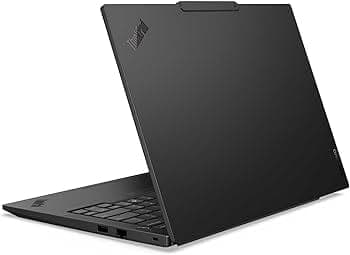
TL;DR The Lenovo ThinkPad T14 Gen 3 remains a solid choice for everyday productivity, hybrid work, and student use in India in 2026. It blends a durable business‑class build with comfortable input devices and modern performance, thanks to 12th‑Gen Intel or AMD Ryzen PRO processors paired with up to 32 GB of RAM and fast NVMe SSD storage. The 14‑inch 16:10 display options , ranging from Full HD+ to higher‑resolution panels , deliver good brightness and color, making long working hours easier on the eyes. On the battery front, real‑world use typically sees strong all‑day endurance, especially with larger battery configurations, which is valuable for professionals and students moving between classrooms and offices. With a comprehensive suite of connectivity options including Thunderbolt 4/USB‑C, HDMI, Ethernet, Wi‑Fi 6, and Bluetooth 5.2, the T14 Gen 3 is equipped for diverse Indian work environments. Its balanced blend of performance, portability, and productivity features makes it a compelling pick in its class.
Performance Assessment: CPU, RAM, and Everyday Productivity
The ThinkPad T14 Gen 3 offers configurations with both Intel 12th‑Gen Core processors and AMD Ryzen PRO processors, giving buyers flexibility depending on performance needs. Intel variants often feature Core i5 or Core i7 CPUs with hybrid Performance and Efficiency cores, while AMD options include Ryzen PRO 5 or PRO 7 series chips that excel in balanced workloads. These processors are paired with fast NVMe SSD storage and up to 32 GB of RAM, enabling smooth multitasking across office software, web apps, videoconferencing, and cloud‑based workflows. This setup ensures that everyday tasks such as writing documents, managing spreadsheets, and running collaboration tools feel responsive and effortless, even under typical multitasking loads.
In real‑world use, the T14 Gen 3’s processors handle productivity‑focused tasks with ease. For example, students can stream lectures, run multiple browser tabs for research, and work on documents without noticeable lag. Office professionals find that switching between email, presentations, and spreadsheets is smooth, and developers can comfortably run code editors and terminal sessions thanks to the efficient CPU architectures and sufficient RAM headroom. The integrated graphics , Intel Iris (for Intel SKUs) or Radeon integrated graphics (for AMD SKUs) , are also capable of supporting high‑definition media playback and light image editing, though they aren’t designed for demanding gaming or heavy 3D rendering.
One area where the T14 Gen 3 stands out in 2026 is thermal efficiency and sustained performance. The laptop’s cooling system keeps the CPU and internal components within stable operating temperatures during extended work sessions, which helps prevent throttling and allows consistent performance throughout the day. This makes it highly suited for hybrid work scenarios, where productivity and reliability are more important than peak benchmark scores. Whether you choose the Intel or AMD version, the overall performance balance makes the T14 Gen 3 a strong productivity platform for general users, professionals, and students alike.
Typical T14 Gen 3 Performance Overview
This combination of modern CPUs, sufficient RAM, and SSD storage allows the ThinkPad T14 Gen 3 to remain relevant and capable in 2026.
Battery Life & Power Management: How Long Can It Last?
Battery performance is a critical factor for laptop users who work across classrooms, offices, and cafés. The ThinkPad T14 Gen 3 ships with a variety of battery capacities depending on configuration; some models use a standard 39 Wh pack, while others come with 50 Wh or 52.5 Wh batteries that provide noticeably longer runtime. Real‑world testing shows that laptops with larger battery packs easily deliver around 6‑8 hours of consistent use on a mix of web browsing, document work, and video playback, and even more under lighter usage patterns with balanced power settings.
In the Indian context, where users often switch between indoor and outdoor environments and may not always have immediate access to power outlets, this battery endurance is especially valuable. Lower‑power display options and energy‑efficient processor designs contribute significantly to this longevity, helping ensure that a full morning or afternoon of tasks can be completed without frequent charging. Lenovo’s power management features in Windows and BIOS options also allow users to adjust profiles for better battery conservation during travel or long study sessions, making this laptop suitable for hybrid work schedules.
Charging performance is equally practical. With modern USB‑C power delivery, the T14 Gen 3 supports fast charging that can quickly recover significant battery life during short breaks. This further enhances mobility by allowing users to top up before meetings or classes. Overall, battery life and power management in the T14 Gen 3 strike a harmonious balance between all‑day productivity and portability, making it well‑suited for Indian users who value flexibility and extended use without constant dependence on a charger.
Build Quality and Keyboard Experience: Durability That Matters
The ThinkPad T14 Gen 3 continues the long‑standing ThinkPad tradition of rugged and practical build quality that professionals rely on. While newer consumer laptops often use very thin plastic shells to save weight, the T14 Gen 3 uses a mix of reinforced chassis materials and precision hinges that provide a solid feel without excess bulk. Users report that the laptop resists flex well and maintains structural integrity even after repeated opening and closing of the lid. This robust build gives Indian buyers confidence that the T14 can endure everyday use across classrooms, offices, and travel.
The keyboard experience on the T14 Gen 3 is one of its standout features. ThinkPad keyboards are widely regarded as industry benchmarks for typing comfort, and this model upholds that reputation with a spacious, responsive key layout and generous key travel, making long typing sessions more comfortable than many ultrabooks on the market. The inclusion of a backlight improves usability in low‑light conditions, and the TrackPoint pointing stick offers an alternative navigation method that long‑time ThinkPad users appreciate.
Another aspect of durability is the hinge design, which holds the display firmly in place without noticeable wobble during typing or on uneven surfaces. ThinkPads are often chosen by business users for their ability to withstand years of daily use, and the T14 Gen 3 maintains this legacy. For Indian users balancing work, study, and hybrid workflows, the combination of solid construction and comfortable input devices ensures consistent productivity without frequent hardware fatigue.
Display and Visual Comfort: Productivity Without Eye Strain
The display options on the ThinkPad T14 Gen 3 cater to a range of preferences and productivity needs. The base panel is a 14‑inch WUXGA (1920×1200) IPS screen with anti‑glare coating, and higher‑end configurations include 2.2K and even UHD panels with broader color coverage and higher brightness levels. IPS technology delivers wide viewing angles and consistent colors, which is valuable when reviewing documents, collaborating with peers in group settings, or watching video content.
Brightness levels for standard WUXGA panels can reach around 300-400 nits, which helps maintain visibility even in brighter indoor environments like classrooms or office spaces with overhead lighting. Some options also feature 100 percent sRGB coverage and Eyesafe certification, which reduce blue light exposure and help minimize eye fatigue during extended use , an increasingly important factor for professionals and students alike.
The 16:10 aspect ratio is another practical feature for productivity, as it provides more vertical screen real estate than traditional 16:9 screens. This extra space makes it easier to read long documents, view multiple windows, and work with spreadsheets efficiently. For Indian users juggling multiple tasks in a typical day, this thoughtful display design contributes to a more comfortable and productive workflow without causing unnecessary strain on the eyes.
ThinkPad T14 Gen 3 Display Options
This range of display choices helps buyers tailor the T14 Gen 3 to their visual comfort and productivity priorities.
Connectivity and Ports: Ready for the Indian Workspace
Connectivity remains one of the ThinkPad T14 Gen 3’s strengths, making it well‑suited for the varied needs of Indian users in 2026. The laptop includes a balanced set of physical and wireless connectivity options that support both modern accessories and workplace infrastructure. Standard ports include USB 3.2 Gen 1 Type‑A, two Thunderbolt 4 / USB4 ports that support data transfer, Power Delivery, and DisplayPort output, an HDMI port (up to 4K/60Hz), Ethernet (RJ‑45) for wired networks, and a headphone/mic combo jack.
These ports make it easy to connect to a broad range of devices without needing frequent adapters. Ethernet connectivity, in particular, can be important in many Indian offices and campuses where reliable wired internet is preferred for video conferencing or large file transfers. Thunderbolt 4 support ensures high‑speed external storage and docking possibilities for users who switch between home offices and corporate desks regularly.
On the wireless front, the T14 Gen 3 supports Wi‑Fi 6E and Bluetooth 5.1, offering faster network performance and better device pairing stability with peripherals like wireless headphones, keyboards, and mice. This combination of wired and wireless connectivity ensures that users can transition seamlessly between environments and devices , an essential aspect of hybrid workflows in today’s digital landscape.
Serviceability and Upgrade Potential: Long-Term Ownership
The ThinkPad T14 Gen 3 is designed with long-term ownership in mind, offering relatively easy access for RAM, storage, and battery upgrades compared to many ultrabooks. Most models allow for RAM expansion up to 32 GB, either via soldered plus an additional slot or fully via removable modules depending on SKU, which provides a useful future-proofing option as productivity applications grow more memory-intensive. Similarly, the NVMe SSD can be upgraded to higher capacities, allowing users to expand storage as needed without replacing the entire system.
Battery replacement is also straightforward. The T14 Gen 3 uses internal Li-ion packs that can be serviced or replaced by certified technicians. Lenovo provides comprehensive warranty support in India, including onsite and mail-in options for corporate and individual customers. This ensures that hardware failures can be resolved efficiently, which is especially important for Indian users who may rely on a single laptop for multiple tasks throughout the day.
In addition, Lenovo offers service manuals and support tools online, making it easier for users to perform minor maintenance tasks such as cleaning vents, reapplying thermal paste, or swapping components. This design philosophy enhances the T14 Gen 3’s longevity, reducing total cost of ownership and making it a reliable choice for students, office professionals, and hybrid workers in India.
Comparison with Competitors: Value vs Dell Latitude & HP EliteBook
When compared with other business laptops in 2026, the ThinkPad T14 Gen 3 holds a competitive edge in both build quality and usability. The Dell Latitude 5430 and HP EliteBook 840 G9 offer similar CPU and RAM options, but many users find that the ThinkPad’s keyboard and input devices remain superior, a significant advantage for professionals and students who spend long hours typing.
In terms of display, the T14 Gen 3’s 16:10 aspect ratio gives more vertical workspace than Latitude or EliteBook models, which still use 16:9 panels in many configurations. Battery life is also competitive: with 52.5 Wh or 57 Wh batteries, the T14 Gen 3 often achieves longer real-world endurance under standard workloads than its rivals, which is critical for Indian users who frequently work away from power outlets.
Price-wise, the T14 Gen 3 offers excellent value for performance and durability. While Latitude and EliteBook models may offer higher-end configurations with slightly better GPU or screen options, the ThinkPad provides the most balanced price-to-performance ratio, particularly for users who prioritize typing experience, durability, and long-term reliability.
T14 Gen 3 vs Competitors: Quick Comparison Table
This table shows that while competitors offer similar specs, the T14 Gen 3 excels in input quality, battery life, and vertical screen space, giving it a clear edge for productivity-focused users in India.
Limitations and Considerations: What It Can’t Do
While the ThinkPad T14 Gen 3 is a solid all-around business laptop, it has limitations that buyers should consider. The integrated graphics solutions, whether Intel Iris Xe or AMD Radeon integrated, are sufficient for office work, video streaming, and light image editing, but the laptop is not designed for AAA gaming, heavy 3D rendering, or GPU-intensive AI tasks. Users expecting high-performance gaming or creative workstation-grade graphics may find the T14 Gen 3 underpowered in this area.
Some high-end creative tasks, like professional video editing at 4K resolution or extensive graphic design, can be handled, but not at the speed or efficiency offered by dedicated workstation laptops with discrete GPUs. In addition, while the laptop supports memory and storage upgrades, certain SKUs have partially soldered RAM, limiting future expansion for very heavy multitasking scenarios.
Finally, the price, while competitive for the business laptop segment, may seem higher than consumer ultrabooks with similar specs but lower build quality. However, the trade-off comes in the form of durability, reliability, and a better typing and display experience, which justifies the cost for users who need a dependable daily driver rather than a casual laptop.
Final Recommendation: Who Should Buy the T14 Gen 3 in 2026
The ThinkPad T14 Gen 3 is an excellent choice for Indian professionals, students, and hybrid workers who value reliability, durability, and consistent performance over flashy features. Its 12th‑Gen Intel or AMD Ryzen PRO processors, up to 32 GB RAM, and NVMe SSDs ensure smooth daily productivity, whether you’re working on documents, attending virtual meetings, or managing multiple browser tabs. The laptop’s keyboard, 16:10 display, and build quality make it particularly well-suited for those who type extensively or require a comfortable, long-term workspace solution.
Battery life is a strong point, especially for configurations with 52.5 Wh or 57 Wh batteries, delivering 6-8 hours of real-world usage on standard workflows, which is ideal for Indian users often moving between home, office, and university. The wide range of ports, including Thunderbolt 4, HDMI, USB-A, Ethernet, and Wi‑Fi 6, ensures connectivity in diverse work and study environments. Lenovo’s warranty support and serviceability options in India further enhance long-term usability.
Overall, the T14 Gen 3 balances portability, performance, and reliability, making it a better long-term investment than consumer laptops with similar specs. Users looking for a dependable productivity machine rather than a gaming or creative powerhouse will find the ThinkPad T14 Gen 3 a strong contender in 2026.
Conversion Action: For buyers in India seeking a robust, versatile, and long-lasting laptop, the T14 Gen 3 represents a solid investment. You can explore models and pricing on Lenovo India or authorized partners to choose a configuration that suits your needs.
Frequently Asked Questions
Q. Is the Lenovo ThinkPad T14 Gen 3 still worth buying in 2026 India?
Yes, it remains an excellent choice for office work, coding, students, hybrid workflows, and long-term professional productivity.
Q. How much battery life should I expect in real-world use?
Most 52.5Wh and 57Wh variants deliver around 6 to 8 hours of mixed office, browsing, and video-call workloads.
Q. Is it good for coding and heavy multitasking?
Yes, with Intel 12th Gen or AMD Ryzen PRO CPUs, up to 32GB RAM, and NVMe SSDs, multitasking remains smooth.
Q. Is the 16:10 display better for productivity?
Yes, the taller 16:10 panel gives more vertical workspace, improving spreadsheets, coding, writing, and document readability.
Q. Can I upgrade RAM and SSD later?
SSD upgrades are easy, while RAM expansion depends on the exact SKU because some memory may be partially soldered.
Q. Is it suitable for students and office professionals?
Yes, it is ideal for students, MBA users, analysts, coders, writers, and office professionals needing reliable all-day productivity.
Q. How does it compare with Dell Latitude and HP EliteBook?
The T14 Gen 3 usually offers better keyboard comfort, stronger durability, better screen ratio, and similar battery efficiency.
Q. Does it support dual monitors and docking setups?
Yes, Thunderbolt 4, HDMI, and USB-C make it excellent for dual-monitor productivity and docking station workflows.
Q. Is it good for gaming or heavy creative work?
It works for light editing and casual gaming, but it is not meant for AAA gaming or professional 3D rendering.
Q. Who should buy the ThinkPad T14 Gen 3 in India in 2026?
It is best for professionals, students, hybrid workers, coders, and business users wanting long-term reliability and performance.






