
Is the Dell Precision's Pantone-Validated Display Worth It for Designers?
Dell Precision workstations offer wide-gamut displays designed for professional work, but Pantone validation should not be assumed for every configuration. Here is what designers should check before buying.

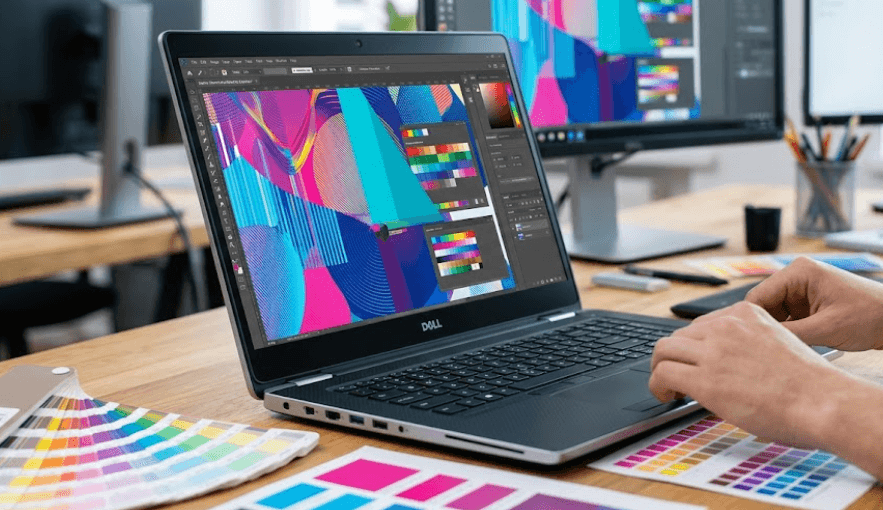
TL;DR Dell Precision workstations can be strong choices for designers because selected configurations offer high-resolution OLED displays, 100% DCI-P3 coverage, professional NVIDIA graphics, and Dell’s PremierColor features. However, there is an important distinction between a wide-gamut, color-focused display and a display that is officially Pantone Validated. Dell’s current Precision 5690 documentation lists its 16-inch UHD+ OLED panel at 3840 x 2400 resolution, 400 nits brightness, 60Hz refresh rate, and 100% DCI-P3 coverage, while Dell’s product materials identify PremierColor on the premium display option. Pantone says its Validated program evaluates displays against specific color-fidelity criteria, but the current Dell documentation reviewed for the Precision 5690 does not itself identify the panel as Pantone Validated.
What Does Pantone Validation Actually Mean?
Pantone validation is more specific than simply having a colorful or high-resolution laptop screen. Pantone describes Pantone Validated as a certification indicating that a device has met its color testing and calibration standards and can faithfully simulate the range of more than 2,000 colors in the Pantone Matching System. That makes the certification relevant to designers who regularly work with established color references rather than simply wanting a bright and attractive display.
For a designer, that distinction matters because a display can have a wide color gamut without reproducing every color accurately. A screen advertised with 100% DCI-P3 coverage tells you about the portion of the DCI-P3 color space it can cover, but it does not by itself tell you how accurately every individual color is displayed. Calibration, color profiles, uniformity, brightness, viewing conditions, and the application's color management all influence the final result.
This is why the phrase “Pantone-validated display” should be treated as a specific certification claim rather than a synonym for “good display.” Pantone itself says its program evaluates color-corrected displays for their ability to simulate Pantone colors accurately and consistently. For designers, that can provide additional confidence, but it should still be considered alongside the actual panel specifications and the type of creative work being performed.
Pantone Validation Vs Wide-Gamut Coverage
| Display specification | What it tells you |
|---|---|
| 100% DCI-P3 | The display covers the full specified DCI-P3 gamut |
| 100% Adobe RGB | Useful for workflows where Adobe RGB is the target color space |
| Delta E measurement | Indicates measured color difference, with lower generally meaning closer color reproduction |
| Factory calibration | Indicates the panel has been calibrated before reaching the user |
| Pantone Validated | Indicates the device has passed Pantone’s specific validation process |
| OLED | Describes panel technology, not color accuracy by itself |
What The Dell Precision Display Offers
The Dell Precision 5690 is a useful example because Dell currently lists two 16-inch display choices. The standard option is a 1920 x 1200 IPS panel rated at 500 nits with 100% DCI-P3 coverage. The premium option is a 3840 x 2400 OLED touchscreen rated at 400 nits, also with 100% DCI-P3 coverage. Both are 60Hz displays, so the main difference is not refresh rate but panel technology, resolution, touch capability, contrast characteristics, and finish.
The 4K OLED option is particularly attractive for visual work because its 3840 x 2400 resolution gives designers considerably more workspace and pixel density than the FHD+ panel. Dell's documentation lists the OLED panel at 283 pixels per inch, compared with 142 PPI for the FHD+ option. The OLED panel also has a stated minimum contrast ratio of 100,000:1 and a typical response time of 1ms, although those specifications should not be confused with color accuracy.
Dell’s Precision 5690 materials also identify the premium display with PremierColor and ComfortView Plus. That positioning makes sense for a mobile workstation intended for professional applications, but buyers should still check the exact configuration rather than assuming every Precision laptop has the same screen. Dell lists multiple display choices, graphics options and memory configurations, meaning the model name alone does not fully describe the machine you will receive.
Precision 5690 Display Options
| Feature | FHD+ IPS | UHD+ OLED |
|---|---|---|
| Resolution | 1920 x 1200 | 3840 x 2400 |
| Panel | IPS | OLED |
| Brightness | 500 nits | 400 nits |
| Color gamut | 100% DCI-P3 | 100% DCI-P3 |
| Refresh rate | 60Hz | 60Hz |
| Touch | No | Yes |
| PPI | 142 | 283 |
Why Designers May Prefer The OLED Configuration
The biggest practical benefit of the Precision’s OLED option is the combination of high resolution, wide color coverage and OLED contrast. OLED panels can produce very deep blacks because individual pixels can be switched off, which can make photographs, illustrations, dark interface elements and video content look more defined. For a designer working with images or video, that can make the editing experience more immersive and easier to evaluate visually.
The 4K resolution is equally important. A 3840 x 2400 display gives you substantially more pixels than a 1920 x 1200 screen, allowing detailed photographs, vector artwork, timelines and design interfaces to be viewed with greater clarity. The 16:10 aspect ratio also provides additional vertical workspace compared with traditional 16:9 displays, which can be useful when working with toolbars and long editing timelines.
However, a beautiful OLED panel is not automatically the best choice for every designer. If your workflow is mainly web design, presentations, office documents and occasional Photoshop work, the lower-resolution 500-nit IPS option may already provide enough color coverage and can offer practical advantages in bright environments because of its higher rated brightness and anti-glare finish. The OLED configuration becomes more compelling when high pixel density, contrast and visual presentation are important parts of your workflow.
Where The OLED Panel Makes The Most Difference
| Workflow | Importance Of Display Quality | Why |
|---|---|---|
| Photo editing | Very high | Color and detail are central |
| Graphic design | Very high | Accurate colors and fine details matter |
| Video editing | Very high | Resolution and wide gamut help |
| UI/UX design | High | Workspace and color consistency matter |
| Web design | High | sRGB behavior and calibration remain important |
| General office work | Moderate | A premium panel improves experience but is not essential |
Is 100% DCI-P3 Enough For Professional Design?
100% DCI-P3 is a strong specification, but it should not be treated as proof that a display is reference-grade. DCI-P3 is a wide color gamut used extensively in modern video and digital-content workflows. A display covering the entire space can show a broad range of colors, but gamut coverage alone does not tell you how accurately those colors are reproduced.
This becomes especially important when your work is moving between devices or eventually going to print. A designer preparing social media graphics may primarily care about how colors look on modern phones and monitors, while a photographer preparing images for print may have different requirements. A packaging designer working with brand colors may also need a controlled color-management workflow rather than relying solely on the laptop display.
That is where calibration becomes important. Pantone validation can provide useful additional confidence where it genuinely applies, but a professional designer should still consider a calibrated workflow, the intended color space, ICC profiles and, for particularly critical work, measurement with a colorimeter. Pantone itself describes its program as a way of giving users confidence in color fidelity, not as a replacement for understanding the complete color workflow.
What Designers Should Check Before Buying
| Specification | Why It Matters |
|---|---|
| Color gamut | Determines the range of colors the panel can reproduce |
| Calibration | Helps reduce color inaccuracies |
| Delta E | Useful for assessing measured color error |
| Brightness | Affects usability under different lighting |
| Uniformity | Helps keep brightness and color consistent across the panel |
| ICC profile | Helps applications interpret colors correctly |
| Pantone validation | Adds a specific third-party validation reference where applicable |
What About Performance For Creative Work?
Display quality is only one part of a professional workstation. The Precision 5690 can be configured with Intel Core Ultra processors and professional NVIDIA RTX Ada graphics, including options ranging up to the RTX 5000 Ada with 16GB of GDDR6 memory. That gives the system considerably more graphics capability than a typical thin-and-light laptop, particularly for demanding professional applications and GPU-accelerated creative workloads.
Memory is another important consideration. Dell lists 16GB, 32GB and 64GB LPDDR5x memory configurations at 7467 MT/s on the Precision 5690, with the memory integrated onto the system board. For designers working with large Photoshop documents, Lightroom catalogs, After Effects compositions or multiple creative applications simultaneously, choosing enough RAM at purchase is therefore more important than assuming you can upgrade it later.
Storage can also change how practical the workstation feels. Dell lists SSD options from 256GB through 4TB, depending on configuration. A designer handling RAW photographs, large video projects, 3D assets and Adobe project files can quickly outgrow a smaller drive, so 1TB is a more comfortable starting point for many professional workflows. The workstation hardware makes sense when the software actually uses it, because buying a Precision purely for its premium screen can result in paying for performance you do not need.
When The Dell Precision Display Is Worth Paying For
The premium display makes the most sense when visual accuracy and detail are part of your everyday work rather than occasional requirements. A professional photographer, graphic designer, video editor, UI designer or creative professional who spends several hours a day examining images can benefit from a high-resolution, wide-gamut display. The OLED option also makes the workstation more enjoyable for reviewing finished work, presentations and visual assets.
It becomes harder to justify when your creative work is relatively light. Someone creating Canva graphics, editing occasional social-media images or preparing PowerPoint presentations may not see enough practical improvement to justify the premium workstation configuration. In those cases, a less expensive laptop with a well-calibrated 100% sRGB or DCI-P3 display could be sufficient.
There is also a practical distinction between designing and delivering color-critical work. If the final output is printed, displayed across many different devices or used for strict brand-color matching, the laptop should be treated as one part of a broader color-managed workflow. Even a very good laptop display cannot guarantee that a printer, client monitor or smartphone will reproduce exactly what you see.
Who Benefits Most?
| User | Precision Premium Display Fit |
|---|---|
| Professional graphic designer | Strong fit |
| Photographer | Strong fit |
| Video editor | Strong fit |
| UI/UX designer | Strong fit |
| Architecture and visualization professional | Useful |
| Student designer | Depends on budget |
| Casual Canva user | Likely unnecessary |
| Office-focused user | Usually unnecessary |
Common Mistakes When Buying A Color-Accurate Laptop
The first mistake is assuming that OLED automatically means professional color accuracy. OLED describes the panel technology, while gamut, calibration and color accuracy describe different characteristics. A laptop can have a spectacular OLED screen and still require calibration for color-critical work. The same applies to a high-resolution display: 4K tells you how many pixels are present, not whether those pixels are showing accurate colors.
The second mistake is buying based on the laptop family rather than the exact configuration. Dell currently lists different display options for the Precision 5690, including a 500-nit FHD+ IPS panel and a 400-nit UHD+ OLED panel. They have different characteristics, even though both belong to the same workstation model. Checking the exact display option on the product configuration or service documentation is therefore essential.
The third mistake is treating Pantone validation as a universal Dell Precision feature. The current Dell documentation reviewed for this article confirms PremierColor and 100% DCI-P3 on the premium Precision 5690 display, but it does not identify the configuration as Pantone Validated. Pantone’s own program is specific, so buyers should verify an actual Pantone validation claim for the exact device or panel instead of assuming that every Precision display carries the certification.
Frequently Asked Questions
Q. Is the Dell Precision 5690 display good for graphic designers?
Yes. The optional 16-inch UHD+ OLED display offers 3840 x 2400 resolution and 100% DCI-P3 coverage, making it well suited to demanding visual work.
Q. Is the Dell Precision 5690 display Pantone Validated?
Dell’s current official Precision 5690 documentation reviewed here does not explicitly identify the display as Pantone Validated. It does list the premium OLED display with 100% DCI-P3 coverage and PremierColor. Buyers should verify Pantone status for the exact configuration before relying on that certification.
Q. What does Pantone Validated mean?
Pantone says Pantone Validated indicates that a device has met its color testing and calibration standards and can faithfully simulate the range of more than 2,000 Pantone Matching System colors.
Q. Is 100% DCI-P3 good for design work?
Yes, 100% DCI-P3 represents broad color coverage and is useful for many modern creative workflows. However, gamut coverage alone does not prove that every color is accurately reproduced.
Q. Is the Precision 5690 OLED better than its IPS display for designers?
The OLED option offers much higher resolution, OLED contrast and touch functionality, while the IPS option is rated at 500 nits and uses an anti-glare finish. The better choice depends on whether detail and contrast or brightness and matte viewing are more important to your workflow.
Q. Is the Dell Precision 5690 suitable for Photoshop?
Yes. Depending on configuration, it can combine high-end Intel processors, NVIDIA RTX Ada graphics, up to 64GB of onboard LPDDR5x memory and high-resolution displays, making it suitable for demanding Photoshop workflows.
Q. Is the Precision 5690 good for video editing?
The UHD+ OLED option provides 3840 x 2400 resolution and 100% DCI-P3 coverage, while available professional NVIDIA graphics can provide substantial GPU capability for supported editing applications.
Q. Can a wide-gamut display still show inaccurate colors?
Yes. Wide gamut describes the range of colors a display can reproduce, while accuracy describes how closely those displayed colors match the intended values. Calibration and color management therefore remain important.
Q. Do designers need Pantone validation?
Not every designer needs it. It becomes more relevant when your workflow depends on Pantone color references or when consistent color communication is particularly important. Other designers may get sufficient results from a properly calibrated wide-gamut display.
Q. Should you buy the Precision 5690 mainly for its display?
Only if your workflow benefits from the premium display and workstation hardware. The Precision 5690 offers a strong display configuration, but its value is easier to justify when you also need professional graphics performance, large memory configurations and workstation-oriented capabilities.
Final Recommendation
The Dell Precision’s premium display configuration is worth considering for designers, but the buying decision should be based on the actual display specifications rather than the phrase “Pantone-Validated” alone. Dell’s current Precision 5690 documentation confirms a 16-inch 3840 x 2400 OLED touchscreen with 100% DCI-P3 coverage, 400-nit brightness and 60Hz refresh rate, while the workstation can also be configured with professional NVIDIA RTX Ada graphics and up to 64GB of onboard LPDDR5x memory.
For professional photography, graphic design, video editing and other color-sensitive work, the UHD+ OLED configuration offers a strong combination of resolution, gamut and contrast. However, Pantone validation should be verified separately for the exact model and configuration because Dell’s current official documentation does not establish that every Precision 5690 OLED display carries that certification. Pantone itself treats validation as a specific color-fidelity program, so it should not be confused with DCI-P3 coverage or Dell’s PremierColor branding.
The practical approach is to check the exact panel, color gamut, calibration information, brightness and intended color space before buying. If your work genuinely depends on accurate color and you also need workstation-class performance, the premium Precision configuration can make sense. If you mainly need an attractive screen for occasional creative work, you may get better value from a less expensive laptop with a well-specified and calibrated display.






