HP EliteBook 1040 G10 Review: Is HP's Flagship Ultrabook Worth Buying Refurbished?
The HP EliteBook 1040 G10 is a lightweight premium business laptop with strong security, upgradeable RAM and modern connectivity. Here is whether buying it refurbished makes sense.

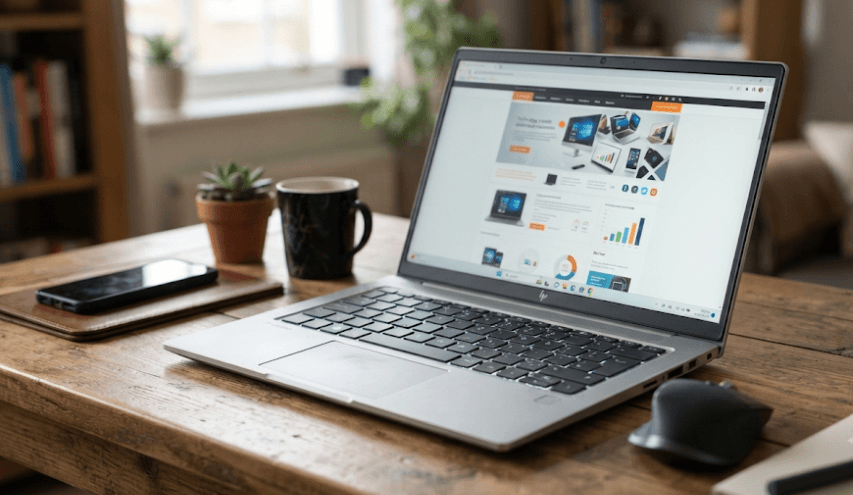
TL;DR The HP EliteBook 1040 G10 is worth considering refurbished if you want a lightweight business laptop with strong build quality, excellent connectivity, upgradeable RAM, useful security features, and enough performance for everyday professional work. Its biggest weaknesses are configuration-dependent display quality and the fan behavioUr reported in independent testing. A refurbished unit with a 13th Gen Core i7, 16GB or 32GB RAM, 512GB or larger SSD, the 400-nit 100% sRGB display, and a healthy 51Wh battery is the configuration to look for. For office work, management studies, business travel, coding, research, and multitasking, it can still be a very sensible refurbished purchase.
HP EliteBook 1040 G10 Specifications
The EliteBook 1040 G10 belongs to HP's premium business laptop range and was introduced with 13th Gen Intel Core processors. Depending on the configuration, buyers can find Core i5 or Core i7 U-series and P-series chips. HP lists processors including the Core i5-1335U, i5-1345U, i7-1355U, i7-1365U, i7-1360P, and i7-1370P. This means two laptops carrying the same EliteBook 1040 G10 name can have noticeably different performance.
The laptop has a 14-inch 16:10 display, which provides more vertical workspace than a conventional 16:9 screen. Display choices include 1920 x 1200 IPS panels, a 1000-nit Sure View privacy display, and a 2560 x 1600 panel. RAM is another strong point because the G10 uses two accessible DDR5 SODIMM slots and supports up to 64GB. Storage is based on M.2 NVMe SSDs, with official configurations reaching up to 2TB.
| Specification | HP EliteBook 1040 G10 |
|---|---|
| Display | 14-inch, 16:10 |
| Resolution options | 1920 x 1200 or 2560 x 1600 |
| Processor | 13th Gen Intel Core i5/i7 |
| Graphics | Integrated Intel graphics |
| RAM | DDR5, up to 64GB |
| Storage | PCIe NVMe SSD, up to 2TB |
| Weight | Starting around 1.18kg |
| Battery | 38Wh or 51Wh |
| USB-C | 2 x Thunderbolt 4 |
| USB-A | 2 x USB 3.2 Gen 1 |
| Wireless | Wi-Fi 6E, Bluetooth 5.3 |
| Camera | 5MP, with IR option |
| Operating System | Windows 11 Pro or other supported configurations |
Design And Build Quality
One of the strongest reasons to consider the EliteBook 1040 G10 refurbished is its physical construction. HP uses a magnesium chassis for this model, helping keep the laptop light without making it feel like a budget machine. HP lists a starting weight of approximately 1.18kg, although the final weight depends on the configuration, particularly the battery and display selected.
Independent testing also found the chassis to be rigid, with very good resistance to flexing in normal use. The understated silver finish gives it the professional appearance expected from a business laptop rather than the more aggressive styling found on gaming or performance machines. For someone who carries a laptop between a home, office, college, or meetings every day, the relatively low weight is a genuine advantage.
Durability is another part of the EliteBook proposition. HP states that the 1040 G10 undergoes 19 MIL-STD-810H tests and its business-focused design includes features intended for demanding professional environments. A refurbished laptop will obviously not be equivalent to a brand-new unit simply because the original model was designed for durability, so physical condition still matters. Check the hinges, chassis, keyboard, ports, and display carefully before buying.
Display And Multimedia Experience
The display is one area where buyers need to pay close attention to the exact refurbished configuration. HP offered several 14-inch 16:10 panels, including 1920 x 1200 options at 250 or 400 nits, a 1000-nit Sure View privacy display, and a 2560 x 1600 option. Therefore, simply seeing "14-inch WUXGA" in a listing does not tell you everything about the screen.
The 16:10 aspect ratio is well suited to productivity because documents, spreadsheets, websites, and long emails fit more comfortably vertically. However, an independent Notebookcheck review of a 400-nit low-power panel measured around 330 nits on average, below its advertised brightness. The same review found good subjective image quality but criticized the relatively slow response times and limited color coverage of that particular panel.
For a refurbished purchase, the safest approach is to prioritize a configuration with the 400-nit, 100% sRGB low-power panel if color quality matters to you. The optional Sure View display is useful for privacy in public spaces, but its viewing-angle behavior makes it less attractive for users who prioritize image quality. The laptop also has a 5MP camera with an IR option for Windows Hello, while its Bang & Olufsen-tuned audio system is designed primarily around business conferencing and everyday media consumption.
Performance And Everyday Use
The EliteBook 1040 G10 is primarily a productivity laptop, and that is where it makes the most sense. Depending on the configuration, its 13th Gen Core processors can comfortably handle web browsing, Microsoft Office, presentations, video calls, research, spreadsheets, and multiple applications running together. The Core i7 configurations offer more headroom, but buyers should not assume every i7 model performs identically because HP offered both U-series and P-series processors.
For students and professionals, 16GB RAM is a sensible starting point, while 32GB is preferable for heavier multitasking. The two accessible SODIMM slots are particularly useful for refurbished buyers because memory can be upgraded later rather than requiring a complete laptop replacement. HP officially supports up to 64GB DDR5 memory, depending on the configuration.
There is one performance-related caveat. Notebookcheck found that its Core i5-1335U test unit could briefly draw considerably more power than expected, causing the fan to become noticeable even during short bursts of activity. Sustained performance remained adequate for office work, but the fan behavior prevented the laptop from feeling as quiet as its thin-and-light design might suggest. This is not a reason to reject every 1040 G10, but it is worth knowing before buying one refurbished.
Battery Life And Portability
Battery capacity varies between configurations, with HP offering 38Wh and 51Wh batteries. HP rates the 51Wh version for up to 14 hours and the 38Wh version for up to 10 hours under its specified conditions. These are manufacturer estimates rather than guarantees, and actual battery life depends on the processor, display, brightness, applications, wireless connectivity, and battery health.
Independent testing of a 51Wh configuration produced close to 10 hours in a Wi-Fi browsing test at around 150 nits and almost 13 hours in a video test under the same brightness condition. At maximum brightness, the Wi-Fi runtime dropped to around eight hours. This suggests that the EliteBook 1040 G10 can comfortably support a substantial working day when paired with the larger battery, although newer laptops may offer better efficiency.
Battery health becomes especially important when purchasing refurbished. A used laptop can have a significantly lower remaining battery capacity than its original specification suggests. Instead of relying only on the advertised battery size, buyers should check the battery health report, compare design capacity with full-charge capacity, and confirm that the laptop is not experiencing unusually rapid battery drain. For portability, however, the lightweight chassis remains one of the 1040 G10's biggest advantages.
Ports, Connectivity And Security
Connectivity is another area where the EliteBook 1040 G10 feels more premium than many thin consumer laptops. It includes two Thunderbolt 4 USB-C ports with USB4 support, two USB-A ports, HDMI, and a headphone/microphone combo jack. Depending on the configuration, it can also include a Smart Card reader and a Nano SIM slot for optional cellular connectivity.
Wireless connectivity is equally business-focused. HP lists Intel Wi-Fi 6E and Bluetooth 5.3, while optional WWAN configurations support 4G LTE or 5G. This makes the laptop particularly useful for people who travel frequently or work away from reliable Wi-Fi networks. Wi-Fi 6E support does require compatible networking equipment to use the 6GHz band.
Security is arguably the feature that separates this machine from many mainstream refurbished laptops. HP's Wolf Security ecosystem includes technologies such as Sure Start, Sure Run, Sure Recover, Sure Click, and Sure Sense, while selected configurations can include fingerprint authentication and IR facial recognition. For business users handling sensitive files or company systems, these features can be more valuable than raw benchmark performance.
Is The HP EliteBook 1040 G10 Good For Refurbished Buyers?
The biggest advantage of buying the EliteBook 1040 G10 refurbished is value. When new, this was positioned as a premium business machine, so its build quality, security features, Thunderbolt connectivity, and professional design were never aimed at the entry-level market. A refurbished unit allows buyers to access that higher-end hardware without necessarily paying the original premium.
Refurbished availability also makes configuration more important than the model name. For example, a current refurbished listing for the EliteBook 1040 G10 is available with a 13th Gen Intel Core i7, 16GB DDR5 RAM, and a 512GB SSD. The condition grade and seller's testing process should be considered alongside the specifications because refurbished laptops can differ significantly in cosmetic condition, battery health, and remaining warranty.
The ideal refurbished configuration would be a Core i7 model with at least 16GB RAM, a 512GB NVMe SSD, the 51Wh battery, and a good 400-nit display. Buyers should also verify the exact processor because an i7-1355U and an i7-1360P are not interchangeable in performance or power characteristics. If the price difference is small, choosing the better display and larger battery can make a bigger difference to everyday use than simply choosing the highest processor tier.
Who Should Buy The HP EliteBook 1040 G10?
The EliteBook 1040 G10 is particularly well suited to professionals, students, managers, consultants, and frequent travellers who value portability and business features. Its 14-inch 16:10 screen, comfortable keyboard, low weight, strong connectivity, and security tools make it a natural fit for productivity rather than entertainment-focused use.
It also works well for users who regularly carry their laptop between locations. The magnesium construction keeps the weight low, while Thunderbolt 4 makes it easier to connect to external displays, docks, storage, and other peripherals. The upgradeable memory is another advantage for users who expect their multitasking requirements to increase over time.
It is less compelling for someone looking primarily for gaming performance, advanced 3D rendering, or a creator-focused display. The integrated Intel graphics are designed for productivity and light graphics workloads rather than modern AAA gaming. Likewise, the base display configurations are not the main selling point of this laptop. If display quality is the priority, the exact panel should be checked before purchase rather than assuming every EliteBook 1040 G10 has the same screen.
Final Recommendation And Decision Framework
The HP EliteBook 1040 G10 remains a strong refurbished business laptop when bought in the right configuration. Its lightweight magnesium chassis, excellent keyboard, upgradeable DDR5 memory, Thunderbolt 4 connectivity, strong security features, 5MP camera, and optional cellular connectivity give it advantages that are still relevant today. Independent testing confirms that the machine offers solid everyday performance and good battery life, although it also highlights weaknesses in the display and fan management of the tested configuration.
The most important lesson is not to buy the cheapest EliteBook 1040 G10 listing simply because the model number looks premium. Check the processor, RAM, SSD, display brightness and colour coverage, battery capacity and health, keyboard condition, ports, and warranty or return policy. A well-maintained Core i7 model with 16GB or 32GB RAM, a 512GB or larger SSD, and a better display can be a much more attractive purchase than a heavily worn unit with a lower-end screen.
Overall, yes, the HP EliteBook 1040 G10 is worth buying refurbished, provided the price reflects its age and the individual unit passes a proper condition check. It is not the fastest or most visually impressive ultrabook in its class, but it delivers the qualities that matter for long-term professional use: portability, durability, connectivity, upgradeability, and business-grade security. For buyers who prioritize those qualities over gaming or cutting-edge display technology, a good refurbished EliteBook 1040 G10 can still be a smart value purchase.
Frequently Asked Questions
Q. Is the HP EliteBook 1040 G10 worth buying refurbished?
Yes. A good-condition refurbished unit can offer premium build quality, strong connectivity, upgradeable RAM, and business security at a lower cost than buying new.
Q. What processor does the HP EliteBook 1040 G10 use?
It uses 13th Gen Intel Core processors, including several Core i5 and Core i7 U-series and P-series options.
Q. How much RAM does the HP EliteBook 1040 G10 support?
HP lists support for up to 64GB of DDR5 memory through two accessible SODIMM slots.
Q. Does the HP EliteBook 1040 G10 have a good display?
It depends on the configuration. HP offered several display options, so buyers should check the exact panel before purchasing.
Q. How long does the HP EliteBook 1040 G10 battery last?
HP rates the 51Wh configuration for up to 14 hours, while independent testing of one 51Wh configuration recorded close to 10 hours of Wi-Fi use.
Q. Is the HP EliteBook 1040 G10 good for students?
Yes. Its lightweight design, comfortable keyboard, strong connectivity, and productivity-focused performance make it suitable for studying, research, presentations, and multitasking.
Q. Can the RAM be upgraded on the HP EliteBook 1040 G10?
Yes. The model has two accessible DDR5 SODIMM slots and officially supports up to 64GB, depending on configuration.
Q. Does the HP EliteBook 1040 G10 have Thunderbolt?
Yes. It has two Thunderbolt 4 USB-C ports that support high-speed data, charging, and display connectivity.
Q. Is the HP EliteBook 1040 G10 good for gaming?
It can handle lighter games, but its integrated Intel graphics are not designed for demanding modern AAA gaming.
Q. What should I check before buying a refurbished HP EliteBook 1040 G10?
Check the exact processor, display, RAM, SSD, battery health, keyboard, hinges, ports, webcam, charger, Windows activation, and the seller's warranty or return policy.
Ready to upgrade your tech?
Browse our collection of quality refurbished products at unbeatable prices.