

Does the Dell Precision Support vPro and Enterprise Security Features?
Dell Precision workstations can support Intel vPro and a wide range of enterprise security features, including TPM 2.0, Secure Boot, BIOS protection, ControlVault, and remote management.

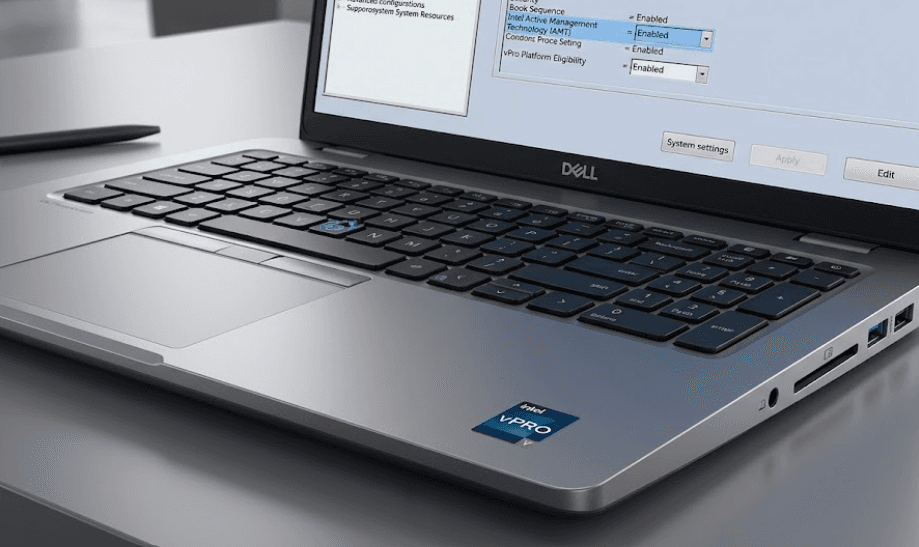
TL;DR Dell Precision workstations can support Intel vPro and a broad set of enterprise security technologies, but the exact features depend on the specific model and configuration. Selected Precision systems use Intel vPro Enterprise processors with technologies such as Intel Active Management Technology for remote management, while Dell also provides TPM 2.0, Secure Boot, BIOS protection, ControlVault authentication, chassis security, and self-encrypting drive support on selected models. The important point is that vPro should not be treated as a feature of every Dell Precision laptop. Buyers should check the processor, security hardware, operating system, and configuration of the exact Precision model before purchasing.
Dell Precision And Intel vPro Support
Dell Precision is positioned as a professional workstation family, and several Precision configurations support Intel vPro. Dell's specifications for models such as the Precision 3591 list Intel Core Ultra processors with either vPro Essentials or vPro Enterprise, while the Precision 5680 includes multiple 13th Gen Intel Core processors with vPro Enterprise or vPro Essentials support. This means the answer is yes, but it is configuration-specific rather than universal across the Precision range. A Precision workstation with a compatible Intel processor can provide enterprise-oriented manageability features that are particularly useful in business environments.
Intel vPro is more than a processor label. The platform combines hardware-based security, manageability, and stability technologies intended for business PCs. One of the most relevant technologies is Intel Active Management Technology, or Intel AMT, which can provide out-of-band management capabilities. Intel describes vPro as supporting remote management functions, including remote keyboard, video, and mouse control on supported configurations. For an IT department managing a large fleet, that can make troubleshooting and maintenance possible even when a device is not fully accessible through the operating system.
However, buyers should not assume that every Intel processor inside a Precision workstation automatically provides the complete vPro feature set. Dell's specifications distinguish between vPro Essentials, vPro Enterprise, and processors without vPro branding. The exact capabilities therefore depend on the processor and platform configuration. When buying a refurbished or new Precision workstation, checking the full processor model and Dell's original specifications is more reliable than relying only on the Precision name.
Which Precision Models Support vPro?
| Precision Model | vPro Availability | Enterprise Security Examples |
|---|---|---|
| Precision 3591 | Selected vPro Essentials and Enterprise processors | TPM 2.0, enterprise processor options |
| Precision 5680 | Selected vPro Essentials and Enterprise processors | TPM 2.0, ControlVault, Secure Boot |
| Precision 7680 | Selected Intel vPro configurations | TPM 2.0, smart card, SED, chassis security |
| Dell Pro Precision 5 Series | Selected vPro processors | Enterprise-oriented security and manageability |
| Dell Pro Precision 7 Series | Selected vPro Enterprise processors | Enterprise security and workstation management |
Enterprise Security Features On Dell Precision
The security story on Dell Precision goes well beyond Intel vPro. Depending on the model, Precision workstations can include TPM 2.0, Secure Boot, BIOS security controls, fingerprint authentication, smart-card support, ControlVault, self-encrypting drive support, and chassis security features. Dell's Precision 5680 documentation, for example, lists a discrete TPM 2.0, FIPS certification for the TPM, ControlVault 3 advanced authentication, smart-card options, and other hardware security technologies.
TPM 2.0 is particularly important because it provides a hardware or firmware-based foundation for several Windows security technologies. Dell explains that TPM can securely store cryptographic keys, certificates, and credentials and can support features such as BitLocker, Windows Hello, Secure Boot, and Measured Boot. This makes TPM relevant to everyday enterprise protection because the technology works beneath many of the security functions users interact with in Windows.
Secure Boot adds another layer by helping ensure that trusted boot software is used when the system starts. Dell's Precision documentation also exposes BIOS-level controls for Secure Boot, TPM, UEFI boot path security, firmware tamper detection, and related settings. These controls matter in business environments because security does not stop once Windows loads. Protecting the firmware and boot process can reduce the opportunity for malicious software to interfere before the operating system is fully running.
Key Security Technologies
| Security Feature | What It Does |
|---|---|
| TPM 2.0 | Stores cryptographic keys and supports Windows security features |
| Secure Boot | Helps verify trusted boot software |
| Intel vPro | Adds supported enterprise manageability and security capabilities |
| Intel AMT | Enables supported out-of-band remote management |
| ControlVault | Provides protected authentication functions on supported systems |
| Smart Card | Supports enterprise authentication workflows |
| Self-Encrypting Drive | Provides hardware-based storage encryption on supported drives |
| Chassis Security | Helps detect or deter physical tampering on supported models |
How Intel vPro Helps IT Teams
For an individual user, Intel vPro can sound like a feature that exists only on a specification sheet. Its value becomes clearer when a company has dozens, hundreds, or thousands of workstations to maintain. Intel AMT, when supported and properly configured, allows IT administrators to perform certain management operations outside the normal operating-system environment. This can be useful for diagnosing systems that are having operating-system problems or performing maintenance without requiring an employee to bring the workstation physically to an IT desk.
Intel's vPro platform also combines manageability with hardware-assisted security. Intel lists technologies including Intel Boot Guard, Intel BIOS Guard, Intel Platform Trust Technology, Intel Threat Detection Technology, and hardware support for virtualization-based security as parts of its vPro security architecture, depending on the processor generation and configuration. These features are designed to strengthen protection at different layers, from firmware and boot integrity to operating-system security.
There is also an important distinction between security capability and security configuration. Having a vPro-capable processor does not automatically mean that an organization has enabled every available management or security feature. IT teams still need compatible management tools, appropriate policies, network configuration, firmware settings, and operating-system support. In other words, vPro provides capabilities that an organization can use; it does not replace an enterprise's wider security strategy.
vPro Enterprise And vPro Essentials
Intel uses different vPro classifications, and buyers should pay attention to the exact designation. Dell's Precision 3591 specifications, for example, list both vPro Essentials and vPro Enterprise processor options. The distinction matters because the feature set and management capabilities are not identical across the platform tiers. If remote enterprise management is a major reason for buying a Precision workstation, confirming that the selected processor is specifically an appropriate vPro Enterprise configuration is important.
Dell Precision BIOS And Firmware Security
Modern Dell Precision workstations include several security controls at the firmware level. The Precision 5680, for example, provides BIOS settings for TPM 2.0, Secure Boot, UEFI boot path security, firmware device tamper detection, SMM security mitigation, BIOS recovery, and data-wipe functions. These settings give administrators control over important parts of the system before and during operating-system startup.
Dell's SafeBIOS technology also applies to compatible Precision systems. Dell states that supported Precision laptops can use SafeBIOS when they meet requirements including a supported Intel processor generation, discrete TPM, Secure Boot, verified boot, BIOS password capability, BIOS recovery, NIST 800-147 authenticated updates, and Trusted Computing Group measured boot. This is important because firmware is an increasingly important part of endpoint security, particularly in managed business fleets.
Firmware security does not mean that a Precision workstation is immune to attacks. It provides additional controls that can make certain types of tampering harder to perform or detect. Dell also continues to publish security advisories for its client platforms, which reinforces why BIOS and firmware updates remain important even on workstations equipped with enterprise security technologies. A secure configuration therefore involves both the hardware capabilities and the ongoing maintenance of the device.
BIOS Security Controls
| BIOS Security Control | Purpose |
|---|---|
| TPM 2.0 Security | Controls TPM visibility and related security functions |
| Secure Boot | Helps enforce trusted boot software |
| Firmware Tamper Detection | Helps detect firmware-related tampering |
| UEFI Boot Path Security | Adds authentication controls to selected boot paths |
| SMM Security Mitigation | Provides additional protections for system management mode |
| BIOS Recovery | Helps recover from certain BIOS failures |
| Data Wipe | Allows supported storage devices to be wiped during reboot |
Authentication And Data Protection
Enterprise security is also about controlling who can access the workstation and protecting the information stored on it. Selected Dell Precision models support fingerprint readers, smart cards, NFC, and ControlVault-based authentication. Dell's Precision 5690 and 7680 documentation, for example, lists ControlVault, fingerprint options, smart-card support, and other authentication technologies depending on configuration.
ControlVault is useful in this context because it provides a dedicated security environment for supported authentication functions rather than relying entirely on the main operating system. Some Precision configurations also support FIPS-certified authentication hardware, which can be relevant to organizations with specific regulatory or security requirements. The exact certification and hardware options still vary by model, so enterprise buyers should check the configuration rather than assuming that every Precision includes every authentication option.
Storage protection is another important consideration. Selected Precision systems support self-encrypting drives, including NVMe drives using Opal specifications. Combined with TPM-based technologies and Windows security features such as BitLocker, this can provide multiple layers of protection for business data. For organizations handling customer information, engineering files, financial documents, or intellectual property, these security features can be more important than workstation performance alone.
Is Dell Precision Suitable For Enterprise Use?
Dell Precision is designed around professional workloads, but its enterprise suitability comes from the combination of workstation hardware, manageability options, security technologies, and available business configurations. A company can configure selected Precision systems with vPro-capable Intel processors, Windows Pro editions, TPM 2.0, advanced authentication, encrypted storage, and other security features. This makes the platform relevant to organizations that need more than a conventional consumer laptop.
The actual security requirements depend on how the workstation will be used. A freelancer working with ordinary office documents may not need remote management or smart-card authentication. A design studio managing confidential client projects may place greater importance on encryption and device management. An engineering organization handling sensitive CAD files may also want workstation-class hardware combined with stronger endpoint controls. The value of enterprise security therefore depends on the environment rather than simply the presence of a feature on the specification sheet.
For IT departments, configuration consistency can be particularly important. A fleet built around compatible vPro Enterprise processors and standardized security policies can be easier to manage than a collection of systems with different hardware capabilities. However, organizations should confirm compatibility with their existing management platform before deployment. vPro is most useful when the organization's IT infrastructure is configured to take advantage of its capabilities.
Enterprise Feature Checklist
| Requirement | Dell Precision Support |
|---|---|
| Intel vPro | Available on selected configurations |
| TPM 2.0 | Available on supported Precision systems |
| Secure Boot | Supported on compatible Precision systems |
| BitLocker Support | Supported through Windows and TPM |
| Remote Management | Available through supported Intel vPro/AMT configurations |
| Fingerprint Authentication | Available on selected models |
| Smart Card | Available on selected configurations |
| Self-Encrypting Drives | Available on selected models and storage configurations |
| BIOS Security | Extensive controls on supported Precision systems |
What Should You Check Before Buying?
The first thing to check is the exact processor. Do not buy a Dell Precision simply because the product family is associated with enterprise workstations and assume that vPro is included. Look for the specific Intel processor designation and confirm whether it is vPro Enterprise, vPro Essentials, or a non-vPro processor. Dell's current Precision specifications demonstrate why this matters, with different processor options available within the same workstation family.
Next, check the security hardware and operating system. TPM 2.0, Secure Boot, fingerprint readers, ControlVault, smart-card support, and self-encrypting storage are not necessarily identical across every Precision configuration. Windows 11 Pro can also be preferable for managed business environments, but the security features you actually receive still depend on the hardware and configuration selected. Dell itself recommends Windows 11 Pro for business on several Precision workstation configurations.
Finally, consider whether your organization will actually use the enterprise features. If the workstation will be managed by an IT team, vPro and remote management can be useful additions. If you are purchasing a Precision for personal creative work, you may care more about its processor, professional GPU, display, RAM, storage, and serviceability. Enterprise security features remain valuable, but the cost of a higher configuration should be matched to your actual requirements.
Frequently Asked Questions
Q. Does every Dell Precision laptop support Intel vPro?
No. Intel vPro is configuration-dependent. Dell offers Precision systems with selected vPro Essentials and vPro Enterprise processors, but not every processor option carries vPro support.
Q. What is Intel vPro used for on a Dell Precision workstation?
Intel vPro combines enterprise security and manageability technologies. On supported systems, Intel Active Management Technology can provide out-of-band management capabilities that allow IT teams to perform certain maintenance and troubleshooting tasks remotely.
Q. Does Dell Precision have TPM 2.0?
Supported Precision systems can include TPM 2.0. Dell documentation for models such as the Precision 5680, 5690, and 7680 lists TPM 2.0 security hardware.
Q. Does Dell Precision support Secure Boot?
Yes, compatible Precision systems support Secure Boot. Dell provides BIOS controls for Secure Boot and related boot-security settings on supported models.
Q. Can Dell Precision use BitLocker?
Yes. Dell states that TPM supports security features such as BitLocker, which can use TPM-protected encryption keys to help protect data on a Windows system.
Q. Does Dell Precision support fingerprint authentication?
Selected Precision configurations support fingerprint readers. Some models pair fingerprint authentication with Dell ControlVault for additional protection.
Q. Does Dell Precision support smart cards?
Selected Precision models support contacted and contactless smart-card configurations. Availability depends on the specific model and configuration.
Q. Can Dell Precision support self-encrypting SSDs?
Selected Precision workstations support self-encrypting drives, including certain NVMe SSD configurations using Opal specifications. The exact storage options vary by model.
Q. Is vPro useful for a small business?
It can be useful when a small business has an IT administrator or managed-device environment that can take advantage of remote management and enterprise security capabilities. A user buying one workstation for personal use may not need every vPro feature.
Q. How can I check whether a specific Dell Precision has vPro?
Check the exact processor listed in Dell's specifications or service documentation. Look specifically for Intel vPro Enterprise or vPro Essentials rather than assuming that every Precision workstation includes vPro.
Final Recommendation
Dell Precision is a strong enterprise-oriented workstation platform when the configuration is chosen carefully. The key point is that Precision supports Intel vPro and enterprise security features, but support varies by model and configuration. Dell's current and previous Precision systems demonstrate support for vPro processors, TPM 2.0, Secure Boot, BIOS security controls, ControlVault authentication, smart cards, and self-encrypting storage on selected configurations.
For business buyers, the most important step is to verify the complete configuration rather than relying on the Precision branding alone. Check for the appropriate Intel vPro designation, TPM 2.0, Windows Pro, authentication hardware, storage encryption options, and compatibility with your organization's management tools. For individual users, these features can still provide useful protection, but they should be considered alongside performance, graphics, memory, storage, display quality, and upgradeability.
A properly configured Dell Precision can therefore serve as more than a professional workstation. With compatible Intel vPro hardware and Dell's broader security technologies, it can also form part of a managed enterprise endpoint strategy. The exact configuration remains the deciding factor, so checking Dell's specifications for the specific Precision model and processor is essential before purchase.
Ready to upgrade your tech?
Browse our collection of quality refurbished products at unbeatable prices.






