

Dell Precision SSD and Storage Options Explained: What Should You Choose?
Dell Precision workstations offer multiple SSD configurations, from 256GB M.2 drives to multi-drive 4TB setups. Here is how to choose the right storage for business, creative, engineering, and professional workloads.

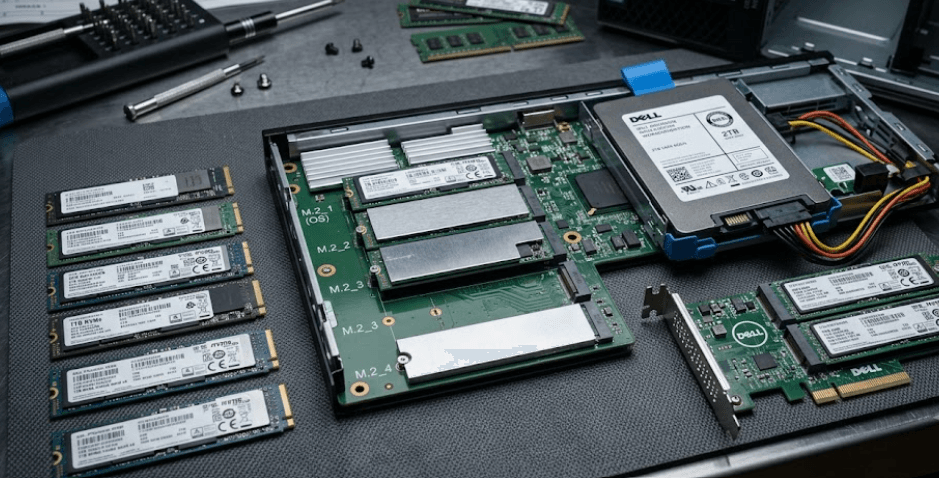
TL;DR Dell Precision workstations offer flexible SSD and storage configurations, but the right option depends on how much data you handle and whether you need one drive or multiple drives. Depending on the Precision model, Dell offers M.2 2230 and M.2 2280 PCIe NVMe SSDs, with capacities ranging from 256GB to 4TB on models such as the Precision 5690 and 5680. Some configurations also offer Opal self-encrypting drives for workloads where data security matters. For everyday business and productivity, 512GB is a practical starting point, while 1TB is better for professional applications, creative files, and larger project libraries. Users working with large datasets, video projects, engineering files, or virtual machines may benefit from 2TB, 4TB, or a multi-drive Precision configuration.
Understanding Dell Precision SSD Options
Dell Precision workstations are designed for professional workloads, so storage configuration matters more than it does on a basic office laptop. Applications such as Adobe Premiere Pro, AutoCAD, SolidWorks, engineering simulation tools, data analysis software, and large development environments can quickly consume storage. A Precision system may therefore be configured with substantially more storage than a conventional business laptop, depending on the model and configuration. Dell's documentation for the Precision 5690, for example, lists M.2 PCIe NVMe SSD options from 256GB through 4TB, while the Precision 5680 also supports storage configurations using two M.2 drives.
The physical SSD format also matters when you are comparing configurations. M.2 2230 and M.2 2280 refer to the physical size of the SSD, rather than simply indicating how much storage it contains. Dell lists both formats across certain Precision systems, with the Precision 5690 supporting two M.2 2230/2280 SSD slots. This means buyers should not assume that every M.2 SSD will fit every Precision workstation. The exact model, slot and supported drive format should always be checked before purchasing a replacement or additional SSD.
Storage capacity is another decision that should be made around the workload rather than the specification sheet alone. A 256GB drive can work for a lightweight office setup, but Windows, applications, project files and temporary data can quickly reduce the available space. A 512GB SSD is more comfortable for general professional use, while 1TB gives creative professionals, developers and engineers more room for active projects. If you regularly work with large media libraries, virtual machines or extensive engineering datasets, 2TB or 4TB can be more appropriate.
Dell Precision SSD Options At A Glance
| Storage Option | Typical Use | What To Consider |
|---|---|---|
| 256GB | Basic office work | Limited room for large applications and files |
| 512GB | Business and productivity | Practical starting point for many users |
| 1TB | Professional work | Better for applications and active projects |
| 2TB | Creative and technical workloads | Useful for large project libraries |
| 4TB | Large datasets and media | Best suited to storage-heavy workloads |
| Opal SED | Security-sensitive work | Adds hardware-based drive encryption support |
M.2 NVMe Storage In Dell Precision Workstations
PCIe NVMe is the storage technology used across the Precision configurations discussed here. Dell explains that NVMe was designed for SSDs and uses the PCIe bus, while M.2 describes the physical form factor. This distinction is important because M.2 alone does not automatically tell you the storage interface or compatibility. Dell specifically notes that M.2 devices can differ and that not every M.2 drive works in every computer.
The Precision 5690 provides a useful example of how Dell implements this approach. Its documentation lists M.2 2230 Class 35 PCIe NVMe Gen 4 storage at 256GB and M.2 2280 Class 40 PCIe NVMe Gen 4 options from 512GB to 4TB. Dell also lists 512GB and 1TB M.2 2280 Gen 4 self-encrypting Opal 2.0 SSD options. This gives buyers a choice between conventional high-capacity storage and configurations designed with additional hardware-level security features.
The number of available SSD slots can also change the way you should approach storage. The Precision 5690 and 5680 documentation lists two M.2 SSD slots, while the Precision 7680 supports three M.2 solid-state drive slots. A workstation with multiple slots can be useful when you want to separate operating-system files from project data or maintain additional internal storage without immediately replacing your existing drive. However, the exact supported configurations still depend on the model and configuration.
SSD Form Factors And Interfaces
| Term | Meaning | Why It Matters |
|---|---|---|
| M.2 2230 | Smaller M.2 physical format | Must match the supported slot and mounting system |
| M.2 2280 | Longer M.2 physical format | Common option for higher-capacity SSDs |
| PCIe NVMe | SSD storage interface/protocol | Designed for high-speed solid-state storage |
| Gen 4 | PCIe generation | Supported on several Precision SSD configurations |
| Opal SED | Self-encrypting drive | Useful where hardware-based storage security is required |
Choosing The Right SSD Capacity
For most business users, 512GB is a sensible starting point for a Dell Precision workstation. It provides enough room for Windows, Microsoft 365, browsers, productivity applications and a reasonable collection of working files without immediately forcing you to manage storage. If your Precision will primarily be used for documents, spreadsheets, presentations, browser-based work and light professional applications, moving directly to 2TB may not provide much practical benefit.
A 1TB SSD is a more comfortable choice for users whose work regularly involves larger applications and project files. Designers working with Photoshop or Lightroom, developers maintaining multiple environments, and engineers working with CAD files can all benefit from having more local space. The additional capacity also reduces the need to constantly move active projects to external drives or cloud storage. For a professional workstation expected to remain in service for several years, 1TB can therefore provide a useful middle ground.
Users with storage-heavy workloads should consider 2TB or 4TB configurations where the model supports them. Video editors can accumulate large source files and project caches, while engineers and researchers may work with datasets that occupy hundreds of gigabytes. Developers using several virtual machines can also consume storage surprisingly quickly. The important point is that higher capacity should solve a real workflow problem rather than simply make the specification look more impressive.
Which Capacity Fits Your Work?
| Workload | Recommended Starting Point |
|---|---|
| Office, email and web | 256GB to 512GB |
| Business and professional applications | 512GB to 1TB |
| Photo editing and development | 1TB |
| CAD and engineering projects | 1TB to 2TB |
| Video editing and large media libraries | 2TB to 4TB |
| Large datasets and multiple virtual machines | 2TB to 4TB |
Single SSD Or Multiple SSDs?
A single SSD keeps the storage setup straightforward. If your Precision is configured with one drive, Windows, applications and personal or professional files all reside on the same storage device. This approach works well for users who want simplicity and do not need to separate workloads. It can also make backups easier to manage because the primary working environment is concentrated on one drive.
Multiple SSDs can become more useful when the workstation handles demanding professional workloads. On Precision models with multiple M.2 slots, one drive can be used for the operating system and applications while another holds active projects or large datasets. This does not automatically make every application faster, but it can provide more storage flexibility and make it easier to organize different types of data. It can also reduce the need to replace a perfectly usable primary SSD simply because additional capacity is required.
The Precision 5690 and 5680 both document two M.2 SSD slots, while the Precision 7680 supports three M.2 solid-state drive slots. That difference shows why you should check the exact Precision model before planning an upgrade. A configuration with multiple slots can offer a useful path for expanding internal storage, but the supported drive types and factory configurations still need to be verified for the specific machine.
When Should You Choose An Opal Self-Encrypting SSD?
Security can be an important reason to choose a particular SSD configuration. Dell lists Opal 2.0 self-encrypting SSD options for systems such as the Precision 5690 and 5680. A self-encrypting drive performs encryption at the storage-device level, which can be useful for organizations that have specific requirements around protecting data stored on professional workstations.
This type of storage is particularly relevant when a Precision workstation contains confidential business information, client files, research data, intellectual property or other sensitive material. The important distinction is that an Opal SED is not simply a larger or faster SSD. Its primary purpose is security. Therefore, buyers should not pay extra for a self-encrypting configuration unless the security requirements of their organization or workflow make the feature useful.
For a personal workstation used mainly for documents, browsing, media consumption and ordinary productivity, a conventional NVMe SSD may be sufficient. For enterprise deployments, regulated environments or professional workflows involving sensitive information, however, storage security deserves more attention. The right decision depends on the organization's security policies, supported encryption infrastructure and management requirements rather than storage capacity alone.
Standard SSD Vs Opal SED
| Feature | Standard NVMe SSD | Opal Self-Encrypting SSD |
|---|---|---|
| Primary purpose | General storage | Storage with hardware-based encryption capability |
| Performance focus | Speed and capacity | Security plus storage |
| Suitable for | General professional use | Security-sensitive deployments |
| Capacity | Model-dependent | Model-dependent |
| Best reason to choose | Everyday workloads | Data protection requirements |
How To Choose Dell Precision Storage For Your Workload
The first question should be how much storage you actually use today and how quickly that amount is growing. Someone who mainly works in Microsoft Office and browser applications can usually avoid paying for several terabytes of internal storage. A designer, engineer, developer or video editor has a different requirement because active project files can consume hundreds of gigabytes over time. Looking at your existing storage usage is often more useful than guessing from the workload title alone.
The second question is whether you need expansion flexibility. If you are choosing between Precision configurations with different numbers of M.2 slots, the additional slot can be valuable even if you do not need another SSD immediately. It gives you another internal storage path later, subject to the exact model's supported configurations. The Precision 5690, for example, has two M.2 2230/2280 SSD slots, while the Precision 7680 has three M.2 SSD slots, making their storage expansion potential different.
The final consideration is longevity. Buying the smallest possible SSD can make a workstation feel restrictive as applications, project libraries and operating-system files grow. At the same time, paying for maximum capacity when you only use a fraction of it is not automatically better value. For many professional users, 1TB is a practical starting point, while 2TB becomes more attractive for large projects. A 4TB configuration is best reserved for workloads that genuinely need substantial local storage.
Common Dell Precision SSD Buying Mistakes
One common mistake is assuming that every Precision workstation supports the same SSD configuration. Dell's documentation shows clear differences between models. The Precision 5490, for example, documents an M.2 2230/2280 SSD slot, while the Precision 5690 documents two M.2 2230/2280 SSD slots. The Precision 7680 goes further with three M.2 SSD slots. This means a replacement or upgrade should always be checked against the exact model and configuration.
Another mistake is focusing only on capacity and ignoring the physical format and interface. An SSD advertised as an M.2 drive is not necessarily compatible with every M.2 slot. Dell specifically explains that M.2 devices can use different interfaces and that compatibility depends on what the computer supports. Checking the service manual before purchasing an upgrade can prevent an expensive compatibility mistake.
The third mistake is choosing storage based only on the highest number available. A 4TB SSD can sound attractive, but it is unnecessary for many office workloads. Conversely, a 256GB drive may become frustrating for a professional who works with large applications and project files. The better approach is to match storage capacity, number of drives, physical format and security features to the actual workload.
Quick Buying Guide
| If You Mainly Use Your Precision For | Storage To Consider |
|---|---|
| Office and web work | 512GB |
| Business applications | 512GB to 1TB |
| Programming and development | 1TB |
| Photo and design work | 1TB to 2TB |
| CAD and engineering | 1TB to 2TB |
| Video and large datasets | 2TB to 4TB |
| Security-sensitive enterprise work | Opal SED configuration |
Frequently Asked Questions
Q. What SSD does a Dell Precision laptop use?
Dell Precision models use M.2 PCIe NVMe SSDs, although the exact form factor, capacity, interface generation and supported configurations vary by model. Dell documentation for the Precision 5690, for example, lists M.2 2230 and M.2 2280 PCIe NVMe Gen 4 SSD options.
Q. What is the maximum SSD capacity available in Dell Precision workstations?
The maximum depends on the specific Precision model. Dell lists up to 4TB M.2 2280 SSD configurations for the Precision 5680 and 5690. Other Precision workstations can have different storage limits and slot configurations.
Q. Is the SSD upgradeable on a Dell Precision laptop?
On the Precision models discussed here, the M.2 SSD is a removable component rather than soldered storage. However, upgrade compatibility depends on the exact model, slot, physical format and supported SSD configuration.
Q. Does Dell Precision support two SSDs?
Some models do. The Precision 5690 and Precision 5680 both document two M.2 SSD slots. The Precision 7680 supports three M.2 solid-state drive slots, giving it a different internal storage configuration.
Q. Is 512GB enough for a Dell Precision workstation?
512GB can be enough for office work, business applications and moderate professional use. Users working with large CAD files, video projects, datasets or virtual machines should consider 1TB or more to provide additional working space.
Q. Should I choose a 1TB or 2TB SSD for Dell Precision?
A 1TB SSD is suitable for many professional workloads, while 2TB is more appropriate when you regularly keep large project files, media libraries, datasets or virtual machines locally. The better choice depends on your actual storage requirements.
Q. What is an Opal self-encrypting SSD?
An Opal self-encrypting SSD is a storage drive designed to provide hardware-level encryption capabilities. Dell offers Opal 2.0 self-encrypting SSD configurations on certain Precision models for workloads where storage security is an important requirement.
Q. What is the difference between M.2 2230 and M.2 2280?
The numbers describe the physical dimensions of the M.2 drive. M.2 2230 is shorter, while M.2 2280 is longer. Compatibility depends on the laptop's supported slot and mounting hardware, so the two formats should not be treated as automatically interchangeable.
Q. Can I add another SSD to my Dell Precision?
It depends on the model and its available internal slots. The Precision 5690 and 5680 have two M.2 SSD slots, while the Precision 7680 has three. You should check the exact system configuration before purchasing an additional drive.
Q. Is a 4TB SSD worth it for Dell Precision?
A 4TB SSD makes sense when your workload regularly involves very large datasets, extensive video libraries, engineering projects or multiple local virtual machines. For ordinary business work, 512GB or 1TB can provide a more practical balance.
Final Recommendation
There is no single Dell Precision SSD configuration that suits every professional user. For general business work, 512GB is a sensible starting point, while 1TB is the more comfortable choice for professionals who regularly work with demanding applications and active project files. Users handling large media libraries, engineering datasets, virtual machines or extensive research files should consider 2TB or 4TB where the specific Precision model supports those capacities.
The Precision 5690 and 5680 are particularly flexible because Dell documents two M.2 SSD slots and storage configurations reaching up to 4TB, while the Precision 7680 offers three M.2 SSD slots and a broader workstation-oriented storage design. For security-sensitive deployments, an Opal self-encrypting SSD can be considered where organizational requirements call for it.
Before buying or upgrading, check the exact Precision model, available M.2 slots, supported 2230 or 2280 format, PCIe generation, maximum capacity and whether you need a self-encrypting drive. For most buyers, choosing the storage configuration around the workload rather than simply selecting the largest SSD available will provide the most practical long-term setup.
Ready to upgrade your tech?
Browse our collection of quality refurbished products at unbeatable prices.






