
Best Dell Precision for VFX Artists and Animation Studios
Dell Precision workstations give VFX artists and animation studios a choice between portable mobile workstations and upgradeable towers. Here is how to choose the right Precision configuration for demanding creative workloads.

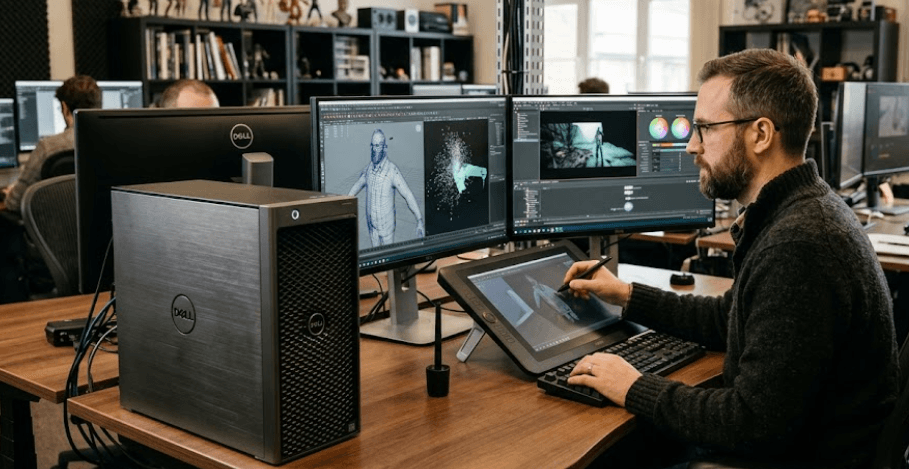
TL;DR For VFX artists and animation studios, the right Dell Precision depends on whether you need mobility or maximum workstation performance. The Precision 7780 is the more practical mobile workstation for artists who need a large display, professional NVIDIA graphics, and up to 128GB of DDR5 memory. For a studio workstation that will stay at a desk, the Precision 3680 Tower offers considerably more expansion flexibility, with support for professional NVIDIA RTX graphics up to the RTX 6000 Ada Generation, up to 128GB of DDR5 memory, and multiple storage options. For Maya, Arnold, After Effects, 3D rendering, compositing, and demanding animation workflows, GPU memory, system RAM, CPU performance, and fast storage should all be considered together rather than choosing a Precision based only on processor generation or model number.
Why Dell Precision Workstations Suit VFX Work
VFX and animation workloads are different from ordinary office workloads because the computer may need to handle several demanding tasks at once. A 3D artist might build scenes in Maya, preview animation, render frames through a GPU renderer, composite footage, and move large project files between local storage and a shared studio server. Adobe After Effects also recommends 32GB or more of RAM for 4K and higher-resolution media, while Autodesk Maya lists 16GB or more as its recommended RAM level. That makes memory capacity important once projects become more complex.
The Dell Precision range is designed around this type of professional workload rather than being positioned simply as a collection of high-end consumer laptops. Dell offers Precision mobile workstations with professional NVIDIA RTX graphics, high memory configurations, workstation-oriented support options, and displays aimed at professional users. The Precision 7780, for example, can be configured with NVIDIA RTX professional graphics and up to 128GB of DDR5 memory, giving artists substantially more headroom than a basic productivity laptop.
For an animation studio, however, mobility is not always the priority. If the workstation will remain beside a desk and connect to multiple displays, storage drives, network equipment, and other studio hardware, a tower can make more sense. The Precision 3680 Tower supports professional NVIDIA RTX graphics, up to 128GB of DDR5 memory, multiple PCIe slots, and several storage options. That expansion capability becomes particularly useful when a studio needs to increase GPU power, memory, or storage later instead of replacing the entire workstation.
What Makes A Precision Different?
The biggest distinction is the combination of professional hardware options and workstation-oriented configurations. A Precision can be configured with NVIDIA RTX professional GPUs, which are particularly relevant to applications and workflows that benefit from CUDA, OptiX, GPU rendering, or certified professional graphics hardware. Autodesk states that Arnold GPU rendering and OptiX denoising require an NVIDIA GPU on Windows and Linux, making NVIDIA graphics particularly relevant to artists using Arnold GPU workflows.
Dell Precision 7780 For Mobile VFX Artists
The Precision 7780 is the model to consider when the workstation needs to travel between home, studio, client locations, or production environments. Dell lists it with a 17.3-inch display, professional NVIDIA RTX graphics options including RTX 2000 Ada, RTX 3500 Ada, RTX 4000 Ada, and RTX 5000 Ada, depending on configuration. Its large screen can also be useful when an artist needs more workspace for timelines, node graphs, 3D viewports, and reference material without immediately connecting an external monitor.
Memory is another major advantage for professional creative work. Dell's documentation shows that the Precision 7780 supports both CAMM and SODIMM memory configurations. Depending on the configuration, it supports up to 128GB using a CAMM module or up to 64GB using SODIMMs. That gives buyers room to configure the machine around different workloads rather than being locked into a single memory capacity.
The GPU choice should be made carefully because not every Precision 7780 configuration will deliver the same rendering performance. The RTX 5000 Ada configuration has 16GB of GDDR6 memory, while the RTX 4000 Ada has 12GB and the RTX 3500 Ada has 12GB. For lighter modelling, animation, compositing, and viewport work, lower-tier professional GPUs can be sufficient, but complex scenes and GPU rendering can benefit from additional GPU memory.
Precision 7780 Key Specifications
| Feature | Dell Precision 7780 |
|---|---|
| Display | 17.3-inch FHD or UHD options |
| CPU | Up to Intel Core i9-13950HX |
| GPU Options | Up to NVIDIA RTX 5000 Ada Laptop GPU |
| GPU Memory | Up to 16GB GDDR6 |
| RAM | Up to 128GB DDR5 CAMM |
| Storage | Multiple PCIe NVMe SSD options |
| Best Suited For | Mobile VFX, 3D animation, rendering and production |
Dell Precision 3680 Tower For Animation Studios
For a studio that does not need portability, the Precision 3680 Tower is a different proposition. Its biggest advantage is expansion. Dell lists support for professional NVIDIA graphics ranging from the RTX A400 through the RTX 6000 Ada Generation, as well as AMD Radeon Pro options. The system also supports up to 128GB of DDR5 memory and provides multiple PCIe slots for expansion.
That flexibility matters because studio workloads can change. An artist working primarily in modelling and animation today may move into heavier GPU rendering later. A tower gives the studio more scope to configure the workstation around that change. The Precision 3680 can also accommodate multiple NVMe SSDs and SATA storage, which is useful when project files, cache data, applications, and finished renders need to be separated across different drives.
The graphics options are where the 3680 becomes particularly interesting for serious production environments. Dell lists the NVIDIA RTX 6000 Ada Generation with 48GB of GDDR6 memory among the supported graphics options. That is a substantially different class of GPU from the laptop RTX options available in the Precision 7780. For GPU-heavy studio workloads, that additional GPU memory can be valuable when scenes, textures, simulations, or rendering workloads become demanding.
Precision 3680 Key Specifications
| Feature | Dell Precision 3680 Tower |
|---|---|
| CPU | Up to Intel Core i9-14900K |
| GPU Options | Up to NVIDIA RTX 6000 Ada |
| GPU Memory | Up to 48GB GDDR6 |
| RAM | Up to 128GB DDR5 |
| Storage | Multiple NVMe and SATA options |
| Expansion | Multiple PCIe and storage slots |
| Best Suited For | Animation studios, rendering and fixed workstations |
Precision 5690 For Portable Creative Work
The Precision 5690 is another option for artists who want a thinner mobile workstation without moving to a much larger 17.3-inch machine. Dell's specifications list Intel Core Ultra processors, NVIDIA RTX professional graphics up to the RTX 5000 Ada Laptop GPU, and up to 64GB of LPDDR5X onboard memory. Its 16-inch form factor is also smaller and lighter than the 7780, with Dell listing a minimum weight of about 2.01kg.
The 5690 also offers display configurations aimed at creative work. Dell lists a 16-inch FHD+ panel with 500 nits and 100% DCI-P3 coverage, as well as a UHD+ OLED touch option with 100% DCI-P3 coverage. For artists who spend significant time looking at footage, colour-sensitive assets, or detailed compositions, the display configuration deserves as much attention as the processor.
There is one important buying consideration in 2026: Dell currently lists the Precision 5690 as unavailable on its India product page. That does not make the model technically irrelevant, particularly when considering existing inventory or refurbished units, but buyers should distinguish between an older Precision configuration and a currently available workstation. For a new studio purchase, current availability, warranty, service coverage, and exact configuration should be checked before committing.
Mobile Precision Comparison
| Model | GPU Ceiling | RAM Ceiling | Form Factor | Main Advantage |
|---|---|---|---|---|
| Precision 5690 | RTX 5000 Ada Laptop | 64GB | 16-inch | Portability |
| Precision 7780 | RTX 5000 Ada Laptop | 128GB | 17.3-inch | Mobile workstation performance |
| Precision 3680 Tower | RTX 6000 Ada | 128GB | Desktop tower | Expansion and GPU power |
How Much RAM And GPU Power Do VFX Artists Need?
RAM requirements depend heavily on the type of work being performed. Autodesk recommends 16GB or more for Maya, while Adobe recommends 32GB or more for 4K and higher-resolution work in After Effects. These are application requirements, not guarantees of performance for every professional project. A complex animation scene, large texture library, simulation, or multitasking workflow can require substantially more memory.
For a professional VFX workflow, 32GB should therefore be viewed as a practical starting point rather than an automatic target for every artist. A 64GB configuration gives more breathing room for demanding Maya scenes, After Effects compositions, Photoshop assets, browsers, and other applications running together. Studios handling large scenes, simulations, compositing projects, or heavy multitasking may benefit from 128GB where the workstation supports it.
GPU memory is equally important for GPU rendering and complex visual workloads. Arnold for Maya supports GPU rendering through NVIDIA GPUs on Windows and Linux, and OptiX denoising also requires NVIDIA graphics. The Precision 7780 can reach a 16GB RTX 5000 Ada Laptop GPU, while the Precision 3680 can be configured with the 48GB RTX 6000 Ada Generation. That does not mean every VFX artist needs the largest GPU, but it shows why a studio should select the graphics configuration based on its actual renderer and scene complexity.
Recommended Configurations By Workload
| Workload | RAM Target | GPU Direction | Suitable Precision |
|---|---|---|---|
| 2D animation and editing | 32GB | Professional mid-range GPU | Precision 5690/7780 |
| Maya modelling and animation | 32–64GB | NVIDIA RTX professional GPU | Precision 7780 |
| 4K compositing | 64GB | Higher-memory NVIDIA GPU | Precision 7780 |
| GPU rendering | 64–128GB | High-VRAM NVIDIA GPU | Precision 7780/3680 |
| Studio-scale rendering | 64–128GB | RTX 5000/6000 Ada class | Precision 3680 Tower |
What Should Animation Studios Prioritize?
An animation studio should start with the software pipeline rather than the laptop brand. Maya, Arnold, After Effects, compositing software, simulation tools, and render engines can place very different demands on the system. Autodesk specifically directs Maya users toward its certified hardware information for supported graphics hardware, while Arnold's GPU workflow has specific NVIDIA requirements. Checking the exact application and renderer combination before purchasing can prevent a studio from paying for hardware that does not meaningfully improve its workflow.
Storage is another area that is easy to underestimate. A VFX workstation may hold project files, source footage, cache data, textures, preview renders, and final output. A fast NVMe SSD is useful for active project and cache workloads, but a studio may still need separate high-capacity storage for completed projects and archives. The Precision 3680 is particularly flexible here because Dell lists several NVMe and SATA storage options.
Cooling and sustained performance should also be considered rather than relying only on peak processor clock speeds. Rendering can keep the CPU and GPU under heavy load for extended periods, unlike short office tasks. This is one reason a desktop tower can be attractive for a studio that does not need mobility. A tower has more physical room for workstation-class components and can be configured with much higher-end graphics than the mobile Precision models discussed here.
Common Buying Mistakes With Precision Workstations
One common mistake is choosing the highest processor tier while underestimating the GPU. In VFX, the balance between CPU, GPU, GPU memory, system RAM, and storage matters more than the processor name alone. Another mistake is buying a mobile workstation simply because it looks more convenient when the machine will spend its entire life on a studio desk. In that situation, the expansion capabilities of a tower can be more useful than portability.
Another mistake is treating every NVIDIA RTX configuration as equivalent. The Precision 7780 can be configured with several professional RTX GPUs, and the available GPU memory varies considerably. The Precision 3680 goes much further, supporting the RTX 6000 Ada Generation with 48GB of GDDR6. That difference matters when choosing a workstation for GPU rendering or other memory-intensive workloads.
The final mistake is ignoring the exact configuration. Dell Precision models are sold in many configurations, so two systems carrying the same model number can have very different processors, graphics cards, memory, displays, and storage. This is particularly important when buying refurbished workstations. Check the exact GPU, VRAM, RAM configuration, SSD capacity, display, warranty status, and service coverage rather than relying only on the Precision model number.
Frequently Asked Questions
Q. Which Dell Precision is best for VFX artists?
The Precision 7780 is a strong mobile option because it combines a large 17.3-inch display with professional NVIDIA RTX graphics and support for up to 128GB of DDR5 memory. For a fixed studio workstation, the Precision 3680 Tower offers higher-end GPU options and greater expansion flexibility.
Q. Is Dell Precision good for 3D animation?
Yes. Precision workstations can be configured with professional NVIDIA RTX graphics, high-capacity memory, and powerful processors, making them suitable for demanding 3D applications. The exact configuration matters more than the Precision branding alone.
Q. How much RAM is recommended for VFX?
32GB is a practical starting point for many professional creative workloads, while 64GB or more provides greater headroom for complex scenes, compositing, simulations, and multitasking. Adobe recommends 32GB or more for 4K and higher-resolution After Effects work.
Q. Is 64GB RAM enough for Maya?
For many Maya workflows, 64GB can provide substantial headroom. Autodesk lists 16GB or more as its recommended RAM level for Maya, but professional project requirements can be considerably higher depending on scene complexity and other applications running simultaneously.
Q. Which Precision is better for a VFX studio, laptop or desktop?
A desktop such as the Precision 3680 makes more sense when mobility is not required and the studio needs greater GPU, memory, storage, and expansion flexibility. A Precision 7780 is more appropriate when artists need to carry their workstation between locations.
Q. Does Arnold benefit from an NVIDIA GPU?
Arnold GPU rendering and OptiX denoising support NVIDIA GPUs on Windows and Linux. Autodesk specifies an NVIDIA GPU with Maxwell architecture or newer for these workflows.
Q. Is the Precision 7780 good for After Effects?
It can be a strong workstation for After Effects when configured with sufficient RAM, a suitable GPU, and fast SSD storage. Adobe recommends 32GB or more for 4K and higher-resolution media, so a professional configuration should not be built around minimal memory.
Q. Can the Precision 3680 handle professional GPU rendering?
Yes. Dell lists professional NVIDIA GPUs up to the RTX 6000 Ada Generation with 48GB of GDDR6 memory for the Precision 3680. That gives the tower substantially more GPU memory potential than the mobile configurations discussed here.
Q. Is the Precision 5690 still worth considering?
It can make sense when available at an appropriate price, particularly for users who want a more portable workstation. However, Dell currently lists the Precision 5690 as unavailable on its India product page, so buyers should check current stock, warranty, and configuration before purchasing.
Q. Should a VFX artist buy a refurbished Dell Precision?
A refurbished Precision can be worth considering when the exact configuration provides enough RAM, GPU VRAM, storage, and processor performance for the workload. The buyer should verify the machine's condition, battery health if applicable, warranty, service coverage, and exact GPU before purchasing.
Final Recommendation
For a VFX artist who needs mobility, the Dell Precision 7780 is the more appropriate Precision to focus on. Its 17.3-inch display, professional NVIDIA RTX graphics options, and support for up to 128GB of DDR5 memory give it the hardware flexibility expected from a mobile workstation. The key is to choose the GPU configuration carefully rather than treating every 7780 as equivalent.
For an animation studio that does not need portability, the Precision 3680 Tower is the more expandable choice. Its support for professional GPUs up to the RTX 6000 Ada Generation, 128GB of DDR5 memory, multiple PCIe slots, and multiple storage options makes it better suited to a fixed production environment where rendering, expansion, and long-term workstation upgrades matter.
The most sensible buying approach is therefore to match the Precision to the workflow first. For modelling, animation, compositing, and mobile production, configure the Precision 7780 with at least 32GB and preferably 64GB of RAM, fast NVMe storage, and an NVIDIA RTX professional GPU appropriate to the renderer. For studio rendering and heavier production workloads, look toward the Precision 3680 Tower with higher-VRAM professional graphics and greater memory capacity. The model number is only the starting point; the actual CPU, GPU, VRAM, RAM, storage, display, and support configuration determine whether the workstation is genuinely suitable for professional VFX work.







