8GB vs 16GB RAM on a MacBook: Is 8GB Still Enough in 2026?
Is 8GB RAM still enough for a MacBook in 2026? Compare 8GB vs 16GB memory for everyday use, multitasking, creative work, coding and long-term value.

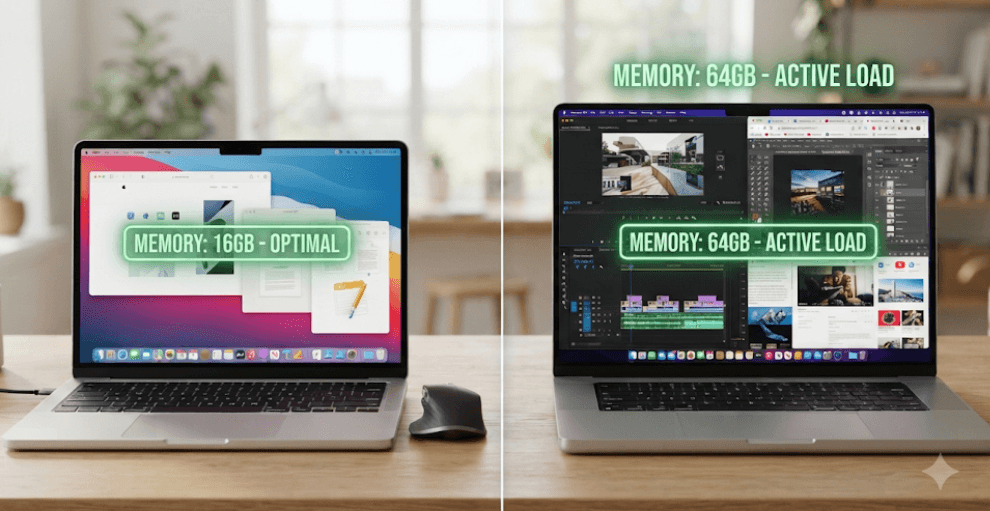
TL;DR: 8GB RAM can still handle basic MacBook tasks such as web browsing, documents, email, video calls and streaming, but 16GB is the better choice for most buyers in 2026. Apple’s current M5 MacBook Air starts with 16GB unified memory, while the MacBook Neo is the notable current 8GB option. If you plan to multitask, edit photos or videos, code, use large spreadsheets, or keep your MacBook for several years, 16GB gives you more breathing room and better long-term flexibility.
8GB vs 16GB RAM: What Has Changed In 2026?
The 8GB versus 16GB MacBook debate looks a little different in 2026 than it did a few years ago. Apple has gradually moved away from 8GB as the standard configuration. The current 13-inch and 15-inch MacBook Air models with the M5 chip start with 16GB of unified memory, with options for 24GB and 32GB. This means that if you are buying a current MacBook Air directly from Apple, 16GB is effectively the starting point rather than an expensive upgrade.
The main exception is the MacBook Neo, which Apple introduced as a more affordable Mac notebook with 8GB of memory. It is designed around everyday computing rather than sustained professional workloads. Older MacBook models with 8GB can also still be found in the used and refurbished market. So, in 2026, asking whether 8GB is enough is often less about choosing between two configurations of the same new MacBook and more about deciding whether an 8GB Mac is a sensible purchase for your needs.
There is also an important distinction between RAM capacity and overall performance. Having twice as much RAM does not automatically make a MacBook twice as fast. The processor, GPU, storage, cooling and software all influence performance. RAM mainly determines how much information and how many applications the system can keep readily available before it has to compress memory or move some data to the SSD. That extra capacity becomes increasingly valuable when your workload gets heavier.
How Apple’s Unified Memory Changes The Equation
MacBooks powered by Apple silicon use unified memory rather than the traditional setup where the CPU and GPU have separate memory pools. The CPU, GPU and other parts of the chip can access the same pool of memory. This architecture can make efficient use of available memory, but it does not mean that 8GB and 16GB provide the same amount of usable capacity. Eight gigabytes is still half the physical memory of 16GB.
macOS also uses memory compression and caching to manage available RAM efficiently. When memory becomes tight, macOS can compress inactive data to free up space for active tasks. It can also use the Mac's startup disk for swap. Apple explains that memory pressure considers factors including free memory, compressed memory, wired memory, cached files and swap activity. This is why simply looking at how much RAM is "used" does not tell you whether your Mac is struggling.
The important takeaway is that unified memory makes Apple silicon very efficient, but it does not eliminate the benefits of having more memory. If your workload regularly pushes the system toward its memory limit, 16GB gives macOS more room before it needs to rely more heavily on compression and swapping. For a buyer planning to keep a MacBook for several years, that additional headroom can be more valuable than it initially appears.
When Is 8GB RAM Still Enough?
For basic everyday computing, 8GB can still be perfectly usable. If your MacBook is mainly used for Safari browsing, email, Google Docs or Microsoft Office, online classes, video calls, music streaming and watching videos, you may not notice a dramatic difference between 8GB and 16GB during light workloads. An 8GB Mac can still be responsive when you are doing one or a few relatively lightweight tasks at a time.
Students with straightforward workloads can also manage with 8GB, particularly if their work involves reading PDFs, preparing presentations, attending online lectures, taking notes and working with standard documents. The MacBook Neo is specifically positioned as an affordable Mac for everyday users, and current reviews similarly identify 8GB as workable for general productivity.
The catch is multitasking. Eight gigabytes becomes less comfortable when you combine many browser tabs with several applications, video conferencing, large spreadsheets or creative software. You may still be able to do all of these things, but you have less memory headroom. If you are buying an 8GB Mac at a substantial discount, therefore, it can make sense for a light workload. If the price difference between 8GB and 16GB is small, however, 16GB is generally the more sensible choice.
When Should You Choose 16GB RAM?
16GB is the safer option if you regularly work with several applications simultaneously. Think of a typical workday with a browser full of tabs, Slack or Teams, email, Excel, PowerPoint, Spotify and other background applications all running together. None of these tasks necessarily requires huge amounts of memory individually, but their combined footprint can make 8GB feel restrictive.
Creative users have an even stronger reason to choose 16GB. Photo editing, graphic design and video editing can require significantly more memory depending on file size, application and workflow. Similarly, developers working with code editors, browsers, local development environments, databases or containers can benefit from having additional memory available. The exact requirement varies by workload, but 16GB provides a much more comfortable baseline than 8GB for these users.
There is also a longevity argument. Current MacBook memory is not something you can simply replace later. Apple’s current M5 MacBook Air specifications list 16GB as the base configuration, with 24GB and 32GB options. If you expect to keep your MacBook for four or five years, buying more memory at the start can be preferable to saving money today and discovering later that your workload has outgrown the machine.
8GB vs 16GB MacBook RAM: Which Is Better For Your Work?
| Use Case | 8GB RAM | 16GB RAM | Better Choice |
|---|---|---|---|
| Web browsing and email | Yes | Yes | 8GB |
| Documents and presentations | Yes | Yes | 8GB |
| Streaming and video calls | Yes | Yes | 8GB |
| College and basic student work | Yes | Yes | 8GB/16GB |
| Heavy browser multitasking | Limited | Yes | 16GB |
| Large Excel spreadsheets | Usable | Better | 16GB |
| Photo editing | Basic | Better | 16GB |
| Video editing | Light | Better | 16GB |
| Coding and development | Basic | Better | 16GB |
| Running multiple demanding apps | Limited | Yes | 16GB |
| Long-term ownership | Less ideal | Better | 16GB |
The table shows why there is no universal answer to the 8GB versus 16GB question. Someone who spends most of the day writing documents and watching YouTube has very different requirements from someone running Xcode, Docker, Photoshop and dozens of browser tabs simultaneously.
For most buyers in 2026, however, 16GB is the more sensible baseline. It is also worth remembering that Apple's current M5 MacBook Air already starts at 16GB, so choosing 16GB does not necessarily mean paying a premium for a high-end configuration.
Does 16GB Make A MacBook Faster?
Not necessarily. This is one of the most common misunderstandings about RAM. If an application comfortably fits within the available memory, adding more RAM does not automatically increase the application's processing speed. The CPU and GPU remain responsible for much of the actual computation.
The advantage of 16GB appears when the workload becomes memory-intensive. More memory allows the system to keep more applications and data readily available. That can reduce the need for aggressive memory compression and swapping, particularly when several demanding applications are open at the same time.
Apple recommends looking at Memory Pressure in Activity Monitor rather than simply judging performance based on how much RAM is shown as being used. Green memory pressure indicates that the Mac is using memory efficiently, while yellow or red pressure can indicate that the system may benefit from more memory or that a particular application is consuming an unusually large amount.
What About MacBook RAM And AI In 2026?
AI is another reason memory requirements are becoming more relevant. Modern Macs use memory for normal applications as well as operating-system features and AI-related workloads. Apple silicon includes a Neural Engine and other hardware designed to accelerate machine-learning tasks, but having an AI-capable chip does not mean every AI workload requires the same amount of RAM.
For normal users, this does not mean you suddenly need 32GB or 64GB just because a MacBook supports AI features. The amount of memory you need still depends on what you actually do. Using built-in AI features alongside normal productivity applications is very different from running large AI models locally.
If you are experimenting with local AI models, virtual machines, large development environments or other memory-heavy workloads, 16GB may not be enough. In those cases, 24GB, 32GB or more can make sense. For everyday AI-assisted writing, research, productivity and image tools, 16GB remains a much more reasonable starting point.
Should You Buy An 8GB MacBook In 2026?
An 8GB MacBook can still make sense, but the price has to justify the compromise. If you find an older Apple silicon MacBook at a significant discount and your workload is light, 8GB does not automatically make it a bad laptop. It can continue to handle browsing, documents, streaming, video calls and other everyday tasks.
The calculation changes if you are buying new. Apple's current M5 MacBook Air starts with 16GB, while the MacBook Neo is the current 8GB option. That means an 8GB configuration should be evaluated as a budget-oriented choice rather than the normal MacBook standard.
Before buying an 8GB model, think beyond what you are doing today. If you are a student who expects to use the laptop for several years, a professional who regularly multitasks, or someone who may move into photo, video, coding or other demanding work, 16GB is the safer investment. If your needs are genuinely basic and the 8GB model saves a meaningful amount of money, it can still be reasonable.
How To Check If Your Mac Needs More RAM
If you already own a MacBook, you do not need to guess whether you need more memory. macOS provides a useful way to monitor memory behaviour through Activity Monitor. Open Activity Monitor, select the Memory tab and look at the Memory Pressure graph while using the Mac normally.
Green memory pressure generally means your Mac is managing its memory efficiently. Yellow indicates that memory resources may be getting tighter, while red indicates that the system needs more memory. Apple also provides information about compressed memory and swap usage, which can help you identify whether your workload is putting sustained pressure on available RAM.
Do not panic simply because you see a high percentage of RAM being used. macOS intentionally uses available memory for caching and other purposes, so "used memory" alone is not a problem. Look at the overall memory-pressure behaviour and your real-world experience. If applications frequently slow down when multitasking or memory pressure repeatedly becomes high, moving to a higher-memory Mac can be worthwhile.
8GB vs 16GB RAM: Final Recommendation
For 2026, 16GB is the better default choice for most MacBook buyers. It is not because 8GB suddenly stopped working. Eight gigabytes can still handle basic browsing, documents, streaming, email and other everyday tasks. The problem is that it leaves less room for multitasking and future workloads.
If you already own an 8GB MacBook and it performs well for your needs, there is no urgent reason to replace it simply because 16GB exists. Use Activity Monitor and your actual experience as the guide. However, if you are buying a MacBook today and expect to keep it for several years, 16GB offers a more comfortable balance of performance, flexibility and longevity.
For buyers doing heavier creative work, professional development, virtual machines, large datasets or local AI workloads, 24GB or 32GB may be worth considering. But for the majority of students, professionals and everyday users, 16GB is the sweet spot in 2026. The current M5 MacBook Air starting at 16GB reinforces that position, while the 8GB MacBook Neo remains the budget-focused alternative for lighter workloads.
Frequently Asked Questions
Q. Is 8GB RAM enough for a MacBook in 2026?
Yes, 8GB can still be enough for browsing, documents, email, streaming, video calls and other light tasks. However, 16GB is the better choice for most new MacBook buyers who want more multitasking and long-term headroom.
Q. Is 16GB RAM better than 8GB on a MacBook?
Yes, 16GB provides more memory headroom for multitasking, creative applications, development tools and demanding workloads. It is the better general-purpose choice in 2026.
Q. Does 16GB RAM make a MacBook twice as fast as 8GB?
No. RAM capacity does not directly double processing speed. The main benefit of 16GB is that the Mac can handle more data and applications before relying more heavily on memory compression or SSD swapping.
Q. Can I upgrade the RAM on a MacBook later?
Apple silicon MacBooks use integrated unified memory, so you should choose the memory capacity you want when buying the computer. You cannot treat it like a conventional laptop with an accessible RAM slot.
Q. Is 8GB enough for college students?
It can be enough for students mainly using documents, presentations, browsing, video calls and online learning. If your course involves coding, creative software, large datasets or heavy multitasking, 16GB is a better choice.
Q. Is 16GB enough for video editing on a MacBook?
For many light to moderate video-editing workflows, 16GB can be a good starting point. Professional or highly demanding projects may benefit from 24GB, 32GB or more depending on the software and workload.
Q. Is 16GB enough for coding on a MacBook?
For many programming and development workflows, yes. Web development, scripting and general software development can work well with 16GB, while Docker-heavy workflows, virtual machines and multiple development environments may require more.
Q. Does Apple’s unified memory make 8GB equivalent to 16GB?
No. Unified memory helps Apple silicon use memory efficiently, but 8GB still provides half the physical memory capacity of 16GB. More memory can provide additional headroom when workloads become demanding.
Q. Should I buy an 8GB MacBook if it is cheaper?
It can make sense if you have a light workload and the price difference is substantial. For a new MacBook that you plan to keep for several years, however, 16GB is generally the safer investment.
Q. How do I know if my MacBook needs more RAM?
Open Activity Monitor and check the Memory tab. Pay particular attention to Memory Pressure. Green generally indicates efficient memory use, while repeated yellow or red pressure can indicate that your workload is pushing the system's memory capacity.
Ready to upgrade your tech?
Browse our collection of quality refurbished products at unbeatable prices.