
Lenovo ThinkPad T Series T470 Reliability Guide in 2026 India
Explore ThinkPad T470 reliability in India with insights on durability performance battery lifespan upgrades maintenance and long term productivity value in 2026

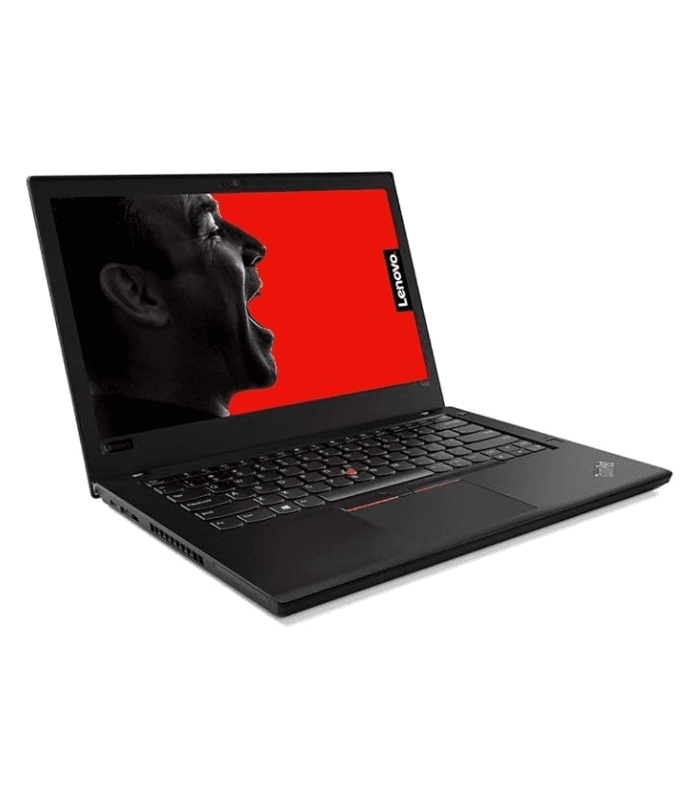
TL;DR The Lenovo ThinkPad T470 remains a dependable business laptop in 2026 for Indian users who prioritize durability, long-term battery life, and consistent performance. Its magnesium-reinforced chassis, robust hinge design, and spill-resistant keyboard provide a reliable typing and working experience even after several years of use. Equipped with 6th-generation Intel Core i5 or i7 processors, up to 32GB RAM, and SSD storage, the T470 handles multitasking, web-based productivity, and coding tasks effectively. The PowerBridge battery system, combining an internal and swappable external battery, ensures sustained usage with minimal downtime. For professionals, students, and coders seeking a laptop that can remain functional for 5-7 years, the T470 continues to be a smart investment in India.
Lenovo ThinkPad T470 Refurbished Review
The ThinkPad T470 builds upon the proven design language of the T Series, emphasizing business-grade durability and maintainability. The chassis combines magnesium-reinforced plastic with a robust hinge system, which minimizes screen wobble and resists wear from years of daily transport. Users in India, where laptops often endure long commutes and variable power conditions, benefit from this long-lasting construction. The laptop retains the iconic ThinkPad keyboard, known for its tactile feedback, full travel, and spill resistance, making typing comfortable during extended sessions.
One of the highlights of the T470 is its modular design, allowing easy access to RAM, storage, and batteries. This feature not only extends the life of the device but also ensures that local service centers in India can easily perform upgrades or repairs. Unlike ultrathin laptops, which often solder components and complicate service, the T470 prioritizes practical longevity, reinforcing its reputation as a reliable workhorse. The hinge design, combined with the sturdy chassis, ensures that the laptop opens and closes smoothly over thousands of cycles, a testament to Lenovo’s engineering for business users.
In terms of daily usability, the T470 continues to impress. Its keyboard backlight and robust typing experience remain intact on well-maintained units, while the TrackPoint and precision touchpad offer reliable navigation without drifting or unresponsiveness. Even refurbished models, if sourced from trusted sellers, retain key ThinkPad characteristics that professionals rely on, making the T470 a laptop that combines durability with long-term practicality for Indian office, educational, and coding workloads.
T470 Build & Keyboard Specifications
Performance Consistency: Can the T470 Handle Modern Workloads?
The ThinkPad T470 comes with 6th-generation Intel Core i5 or i7 processors, primarily dual-core U-series chips such as i5-6300U and i7-6600U, designed for energy efficiency while delivering steady productivity. These CPUs remain sufficient for typical office applications, coding environments, web-based tools, and cloud productivity. The processor is soldered onto the motherboard, so performance improvements are achieved primarily through RAM and SSD upgrades, rather than CPU swaps.
RAM is critical for multitasking, and the T470 supports up to 32GB DDR4 RAM across two slots. This allows users to run multiple applications simultaneously without performance drops, making it suitable for Indian professionals juggling spreadsheets, coding IDEs, browsers with many tabs, and remote collaboration tools. SSD storage also plays a key role in maintaining system responsiveness, reducing boot times, and ensuring smooth day-to-day operations compared with older hard drives.
While the T470 is not built for gaming or high-end 3D rendering, its Intel HD Graphics 520 integrated GPU handles multimedia, video streaming, light photo editing, and software testing reliably. For most Indian users, this combination of CPU, RAM, and SSD ensures consistent performance over years, with minimal thermal throttling thanks to efficient cooling. Properly maintained refurbished units continue to deliver predictable performance, making the T470 a stable and practical investment for productivity-focused buyers.
T470 Performance Overview
How Long Can You Really Work Without Charging?
The ThinkPad T470 is well known for its PowerBridge dual‑battery system, which combines an internal battery with a removable external one. This architecture was designed to deliver some of the longest battery life in its class when introduced, with Lenovo and independent tests showing runtimes that significantly exceeded many competitors. In LaptopMag’s real‑world battery test, a T470 with the larger external battery ran for over 17 hours while surfing over Wi‑Fi, while the basic 3‑cell internal setup lasted around 8 hours and 39 minutes. These results illustrate how users could easily power through a full workday even with heavier workloads.
In practical Indian usage scenarios in 2026, battery reliability still varies based on battery condition, configuration, and workload. Many T470 units in the second‑hand market are sold with older batteries that have reduced capacity due to aging and charge cycles. Even so, well‑maintained units equipped with a healthy internal battery and a quality external battery typically deliver 4-6 hours of mixed productivity usage, including office apps, browsing, and video conferencing. Users who rely on heavy cloud apps or premium brightness settings may see shorter runtimes, while those with larger capacity external batteries or replacements can often reach extended runtimes approaching original levels.
Another long‑term reliability advantage of the PowerBridge system is the ability to swap external batteries on the fly without shutting down the laptop. This makes it easy to extend runtime during full‑day presentations, travel, or extended programming sessions. Replacement batteries remain available through third‑party and OEM channels in India, allowing owners to refresh worn packs rather than replacing the entire device. As a result, the T470 continues to offer long‑term battery reliability when properly maintained, making it a strong choice for productivity‑centric users.
T470 Battery Runtime Estimates (2026 India)
Storage Durability
Storage reliability remains one of the most critical aspects of long‑term laptop use, particularly for devices like the ThinkPad T470 that are expected to remain productive for many years. Early T470 configurations often shipped with traditional hard disk drives (HDDs), but these mechanical drives are prone to wear and slower performance as they age. In contrast, solid‑state drives (SSDs) have no moving parts, significantly lower failure rates, and much faster read/write speeds. The performance and longevity benefits of SSDs are even more pronounced in 2026, with newer drives offering improved efficiency and reliability over their predecessors.
In refurbished or second‑hand units, most reliable sellers now equip T470 laptops with 256 GB or 512 GB SATA SSDs, which dramatically improve responsiveness. Boot times drop to around 15-25 seconds, and applications load near‑instantaneously compared to the long waits common with aging mechanical drives. Because SSDs are less susceptible to physical shock and heat, they also tolerate everyday use better in mobile environments, a key advantage for Indian users who move between offices, homes, and campuses. Many SSD manufacturers also offer longer warranties and builtin health monitoring that helps predict drive health, reducing the risk of unexpected data loss.
Another factor that contributes to storage durability is thermal stability. SSDs in the T470 operate within safe temperature ranges thanks to the device’s efficient cooling system, which keeps internal temperatures moderate even under sustained productivity workloads. This stability not only enhances daily performance but also reduces long‑term wear on the storage subsystem. Whether for office documents, coding projects, or large data sets, SSD storage continues to be a dependable choice for longevity and performance in the T470 platform.
Storage Performance & Reliability Comparison
Staying Cool Under Continuous Load
Thermal management is a key factor in system reliability over time, as excessive heat can degrade processors, memory modules, and storage devices. Reviews of the ThinkPad T470 note that its cooling system was designed to balance quiet operation and effective heat dissipation for a business laptop in its class. The single‑fan cooling solution typically keeps surface temperatures moderate during web browsing, document editing, and video playback, while ramping up only under heavier sustained workloads.
Thanks to the low‑voltage Intel Core i5 and i7 processors, the T470 does not generate excessive heat compared with higher‑TDP mobile CPUs. Even during moderate CPU and memory loads, the system maintains stable operating temperatures without continuous high‑speed fan noise, which contributes to a quieter and more comfortable user experience. This moderate heat profile not only makes daily tasks more pleasant but also helps to prolong the lifespan of internal components, as high heat over long periods is a common cause of hardware degradation.
Long‑term T470 reliability is further bolstered by the fact that thermal throttling rarely occurs during standard office use or web‑focused multitasking. Users in India running typical productivity apps, video meetings, or light programming environments can expect consistent performance without the system excessively cutting clock speeds to manage temperature. This effective thermal design reinforces the T470’s reputation as a laptop that can keep cool and remain dependable over years of use.
Thermal Performance Overview
Ports and Connectivity Longevity
The ThinkPad T470 was designed as a business-class laptop with a versatile set of ports that remain practical even in 2026. Users get USB 3.0 ports, HDMI, Mini DisplayPort, Ethernet, SD card reader, and a headphone jack, along with Wi-Fi 5 (802.11ac) and Bluetooth 4.1. These connectivity options ensure that Indian professionals, students, and coders can continue using wired networks, external monitors, and legacy peripherals without compromise. Even as newer standards like USB-C and Wi-Fi 6 become mainstream, the T470’s mix of modern and legacy ports provides real-world versatility.
Over years of use, physical port reliability can be a concern. However, ThinkPad laptops are known for business-grade durability, and T470 units generally maintain stable connectivity with minimal degradation if ports are properly handled. Ethernet connections remain functional for offices and educational institutions where wired networking is common, while HDMI and Mini DisplayPort support modern external displays. USB 3.0 ports maintain high-speed data transfer even after extensive use, making external drives, keyboards, and mice reliable for long-term productivity.
Wireless performance remains strong. While the T470 does not support Wi-Fi 6, Wi-Fi 5 (802.11ac) is still sufficient for streaming, cloud-based work, and video calls, especially in India where Wi-Fi 6 adoption is still limited in many areas. Bluetooth 4.1 provides consistent connectivity for peripherals such as wireless mice, headphones, and presentation devices. Overall, the T470’s ports and connectivity options remain practical and reliable for business, coding, and student workflows in 2026.
T470 Ports & Connectivity Overview
Maintaining Productivity With Age
The ThinkPad T470 comes with a 14-inch IPS display available in HD (1366×768) or Full HD (1920×1080), often with anti-glare coating. IPS technology ensures good viewing angles and consistent colors, which remain stable even after several years. For Indian users working under varied lighting conditions, the anti-glare finish reduces eye strain during extended productivity sessions. Brightness may not match modern ultra-premium laptops, but it is sufficient for office work, coding, and online learning environments.
The keyboard is a defining feature of the ThinkPad series. The T470 retains the spill-resistant, backlit, and tactile keyboard that professionals rely on for long typing sessions. Even refurbished units from trusted sources provide a near-new typing experience, making coding, documentation, and report writing comfortable over hours of work. The TrackPoint and precision touchpad complement the keyboard by providing reliable navigation without drift or misclicks.
Backlight reliability and keyboard durability are key for long-term usability. Users report that well-maintained units retain both function and comfort after years of use. Whether typing in low-light environments or on bright daylight screens, the T470 ensures consistent productivity, a critical factor for office professionals, students, and coders who rely on the laptop daily.
T470 Display & Keyboard Specifications
Maintenance, Upgrades, and Serviceability in India
One of the T470’s greatest advantages is serviceability. Lenovo designed the laptop to allow easy access to RAM, SSD, and batteries, which extends its operational life significantly. RAM can be upgraded to 32GB DDR4, and SSDs can be swapped for higher-capacity or faster drives, improving responsiveness for coding, office work, and multitasking. Batteries, including internal and external PowerBridge cells, are also replaceable without specialized tools. This modular design makes the T470 easier to maintain than ultra-thin laptops that solder components and complicate repairs.
Local availability of replacement parts in India is strong. RAM modules, SSDs, and batteries for the T470 are sold by both Lenovo-authorized service centers and third-party vendors, often at reasonable prices. Fan cleaning and thermal repasting are also straightforward, helping maintain consistent cooling and long-term reliability. Serviceability not only lowers maintenance costs but also allows users to restore performance years after initial purchase, making it a long-term productivity tool.
Additionally, the T470’s build and modular design mean that even refurbished units retain most of their original lifespan, provided they are purchased from trusted sellers who test components and replace worn batteries or SSDs. For Indian users, this combination of upgradeability, local service access, and durable design ensures the T470 remains a workhorse for 5-7 years or more, supporting daily office tasks, student workloads, and coding projects reliably.
T470 Serviceability & Upgrades
Final Verdict: Is the T470 Worth Buying for Indian Workloads?
The Lenovo ThinkPad T470 remains a reliable, long-lasting laptop for Indian professionals, students, and coders in 2026. Its durable magnesium-reinforced chassis, spill-resistant backlit keyboard, and robust hinge design ensure consistent performance even after years of daily use. The laptop’s modular design allows easy upgrades to RAM and SSD, and replacement of batteries, ensuring it stays productive far longer than many modern ultra-thin laptops that are difficult or expensive to service.
Performance is consistent thanks to 6th-generation Intel Core i5/i7 processors, up to 32GB RAM, and SSD storage, which handle office applications, cloud productivity tools, web-based coding, and multitasking efficiently. While integrated Intel HD Graphics 520 limits gaming or heavy 3D workloads, it is more than adequate for productivity-focused use, video conferencing, and casual multimedia tasks. Thermal design is reliable, preventing throttling under sustained workloads, and the PowerBridge battery system provides flexible and long-lasting runtime, even in refurbished units with replaced or maintained batteries.
Connectivity and ports remain practical, with USB 3.0, HDMI, Mini DisplayPort, Ethernet, Wi-Fi 5, and Bluetooth 4.1, allowing seamless integration with wired networks, external monitors, and peripherals commonly used in Indian offices and educational environments. With easy access to replacement parts locally, the T470 can remain a fully functional and productive device for 5-7 years or more. Overall, the T470 is a smart investment for anyone prioritizing durability, reliability, and upgradeability over cutting-edge graphics or gaming performance.
T470 Reliability Summary
Frequently Asked Questions
Q. How reliable is the ThinkPad T470 for long term use in 2026
A. The laptop remains highly reliable due to its durable chassis stable performance and upgradeable components that support several years of productivity
Q. Can the RAM be upgraded on the ThinkPad T470
A. Yes it supports up to 32GB DDR4 RAM across two slots which helps improve multitasking and long term usability
Q. Is it possible to upgrade the processor on this laptop
A. No the Intel Core i5 or i7 processor is soldered onto the motherboard so upgrades are limited to RAM storage and battery
Q. Should I choose an SSD instead of an HDD for better reliability
A. Yes SSD storage improves speed reduces failure risk and enhances overall system responsiveness for daily work
Q. How durable are the keyboard and hinge design over time
A. The spill resistant keyboard and strong hinge mechanism are built for heavy daily use and usually remain functional for many years
Q. Does the ThinkPad T470 support modern wireless connectivity
A. Yes it supports WiFi 5 and Bluetooth which are adequate for online meetings cloud apps and everyday connectivity needs
Q. Are replacement parts easily available in India for maintenance
A. Yes RAM SSD batteries and cooling components are widely available through local repair shops and online stores
Q. Is the ThinkPad T470 suitable for gaming or heavy graphics work
A. No its integrated graphics are designed for office tasks streaming and light editing rather than intensive gaming workloads
Q. Do ports remain reliable after years of usage
A. Yes with careful handling USB HDMI Mini DisplayPort and Ethernet ports generally remain stable for long term productivity
Q. Who should consider buying the ThinkPad T470 in India today
A. Students office professionals coders and remote workers who need a durable upgradeable and cost effective productivity laptop will benefit most
Ready to upgrade your tech?
Browse our collection of quality refurbished products at unbeatable prices.






