
Lenovo ThinkPad T Series T14 Gen 1 Performance Guide in 2026 India
Lenovo ThinkPad T14 Gen 1 performance guide 2026 India covering Intel AMD RAM SSD thermals battery and multitasking benchmarks for workflows.

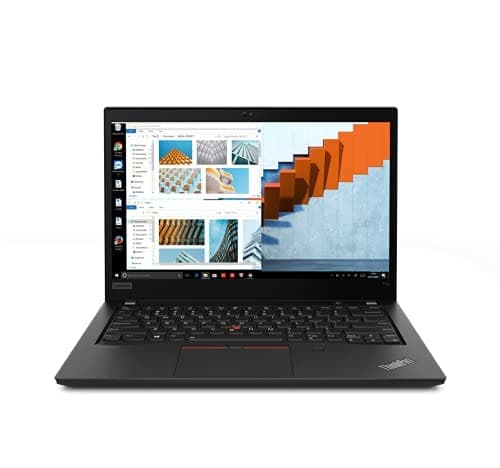
TL;DR The Lenovo ThinkPad T14 Gen 1 remains a capable productivity laptop in 2026 India, delivering reliable performance for everyday work, coding, web tasks, and casual content creation. Equipped with either 10th‑generation Intel Core processors or AMD Ryzen PRO CPUs, it balances efficiency and responsiveness for modern applications. With up to 32GB RAM and high‑speed SSD storage, the T14 Gen 1 continues to handle multitasking, software suites, and cloud‑based workloads competently. Whether you are a student, office professional, or coder, this laptop provides dependable performance without unnecessary complexity even several years after its launch.
Overview: Intel vs AMD Models
The ThinkPad T14 Gen 1 was offered with two main processor families: 10th generation Intel Core i5/i7 and AMD Ryzen PRO 3/5/7 CPUs. Intel models commonly include Core i5‑10210U, i5‑10310U, and Core i7‑10510U up to i7‑10810U, which are quad‑core and hexa‑core mobile processors with Hyper‑Threading support designed for business workloads. These CPUs are efficient for general productivity, office apps, and multiple browser tabs.
The AMD variants use Ryzen PRO 4450U, 4650U, and 4750U, which are 4‑ to 8‑core processors with 8 to 16 threads. In everyday workflows such as document editing, spreadsheets, or light coding, the Ryzen 5 PRO and Ryzen 7 PRO options generally deliver smoother multitasking and slightly better sustained performance due to their higher core counts. AMD’s integrated Radeon graphics also tend to be better for casual graphics tasks.
In practice, both Intel and AMD options are capable of handling modern productivity demands in 2026. Intel CPUs excel in single‑threaded tasks and often include Thunderbolt 3 support for high‑speed peripherals. AMD CPUs, on the other hand, offer stronger multi‑core performance and typically more responsive integrated graphics, which can translate into snappier performance in multitasking and light creative workloads. Neither platform is intended for heavy gaming or professional 3D rendering, but both deliver reliable performance for everyday use.
T14 Gen 1 CPU Comparison (Performance Focus)
RAM and Multitasking Efficiency
RAM plays a key role in how well the ThinkPad T14 Gen 1 handles multitasking and modern workflows. Intel‑based models support up to 48GB DDR4‑2667 memory, typically with one soldered module and one SO‑DIMM slot for expansion. AMD variants support up to 32GB DDR4‑3200, distributed between a soldered portion and a single upgradeable slot. These capacities are ample for most modern use cases.
In day‑to‑day performance, 8GB RAM is usually sufficient for basic productivity tasks such as document editing, email, web browsing with a few tabs, and media playback. Stepping up to 16GB delivers a noticeable improvement when using heavier applications, multiple browser tabs, development environments like VS Code, and virtual meetings. For professionals who often run multiple applications simultaneously, a 32GB configuration provides smoother responsiveness and reduces the likelihood of slowdowns or memory bottlenecks. This makes the laptop useful for longer professional lifecycles.
Although the maximum supported memory varies by CPU architecture, the real benefit in 2026 comes from matching RAM size to your workflow. For instance, students and office workers might find 8-16GB sufficient, while coders and heavy multitaskers will appreciate configurations with 16-32GB. Overall, the T14 Gen 1’s memory support ensures that it remains relevant for multitasking workflows in modern India.
Storage Performance: SSD vs HDD
The Lenovo ThinkPad T14 Gen 1 exclusively supports PCIe NVMe SSD storage, which is now the industry standard and remains highly relevant in 2026 India. According to Lenovo’s official specifications, the laptop supports M.2 2242 and M.2 2280 SSDs, with capacities up to 2TB on Intel variants and up to 1TB on AMD variants. All storage options use NVMe PCIe interfaces, which provide significantly faster read and write speeds than traditional spinning hard drives.
In practical terms, this means that boot times, application launches, and file transfers are all much faster on an SSD than they would be on an HDD. Users will typically experience Windows desktop ready in around 15 to 25 seconds, and common productivity applications such as Microsoft Office or web browsers open almost instantly. Because SSDs have no moving parts, they are also less prone to mechanical failure, which contributes to long‑term reliability and lower chances of data loss over years of use.
For Indian users in 2026, the difference between SSD and an aged HDD (if a unit includes a legacy drive) is stark. SSDs are now affordable, and the improved responsiveness noticeably enhances everyday productivity workflows. An SSD also helps extend battery life because it consumes less power than mechanical drives and generates less heat during operation. For most people using the T14 Gen 1 for work, study, or light creation tasks, SSD storage is an essential component of a smooth user experience.
T14 Gen 1 Storage Performance Comparison
Graphics and Multimedia Handling
The ThinkPad T14 Gen 1 primarily uses integrated graphics, and the exact capabilities depend on the CPU platform. Intel models are equipped with Intel UHD Graphics integrated into the 10th Gen Core CPUs. These graphics are suitable for everyday multimedia tasks such as streaming HD video, casual photo editing, and running presentation software.
On AMD‑based T14 Gen 1 units, the laptop features AMD Radeon integrated graphics as part of the Ryzen PRO processors. These GPUs generally offer better performance than Intel’s integrated graphics, particularly in handling tasks like simple video editing, light creative work, and casual gaming at low settings. For example, an AMD Ryzen 5 PRO 4650U variant offers competitive integrated GPU performance that is capable of running older or less demanding titles at modest frame rates and resolutions.
For most users in India, the T14 Gen 1’s integrated graphics are perfectly adequate for productivity and multimedia usage in 2026. Streaming services like YouTube or Netflix at Full HD quality play back smoothly, and video calls remain stable and crisp. The Radeon integrated graphics on AMD systems give a slight edge for those who occasionally work with photo editing software or need better performance in creative workflows. Regardless, the laptop is not designed for heavy gaming or advanced 3D rendering, but it handles everyday multimedia tasks with confidence.
Graphics Performance Overview
Battery Life Under Real‑World Workloads
Battery life remains an important consideration for users in India, especially for students and professionals on the move. The T14 Gen 1 includes an integrated 50 Wh battery, and Lenovo’s official testing reported up to 11.45 hours on the MobileMark® 2018 benchmark and up to 17.05 hours under ideal conditions on the JEITA 2.0 test. These figures represent best‑case scenarios with minimal workloads and moderate screen brightness, and real‑world usage tends to be lower.
In everyday use with typical brightness settings and a mix of web browsing, document editing, video conferencing, and media playback, most users can expect around 4 to 7 hours of battery life. This range depends on several factors: AMD models often deliver slightly better battery efficiency in multitasking due to the energy‑efficient design of Ryzen PRO processors, while Intel systems can fluctuate more based on workload and display brightness. Higher refresh rates or 4K displays consume more power, so FHD configurations tend to yield better longevity.
For Indian users juggling classes, meetings, or work environments with intermittent access to power outlets, this practical battery life is sufficient for most half‑day sessions. The laptop also supports Rapid Charge technology, which can replenish up to 80 percent of battery capacity in about one hour with the proper charger, making it convenient when you need a quick top‑up between tasks. This combination of solid battery life and fast charging helps the T14 Gen 1 remain dependable for daily productivity in 2026.
Estimated Real‑World Battery Life
Thermal Performance and Cooling Efficiency
The ThinkPad T14 Gen 1 maintains consistent thermal performance even during prolonged workloads thanks to Lenovo’s dual-fan cooling system and optimized heat pipes. Both Intel and AMD variants feature a combination of copper heat spreaders and dual fans that efficiently dissipate heat from the CPU and integrated GPU. In real-world usage, the laptop’s keyboard and palm rest remain cool, ensuring comfortable typing for long sessions of office work, coding, or content consumption.
Under sustained workloads, such as multiple browser tabs with cloud applications or compiling code, temperatures at the CPU can reach up to 85-90°C before the system begins throttling. Lenovo has optimized the thermal profile to balance performance and noise. Fans are noticeable but generally operate at moderate levels, producing minimal distraction in quiet office or classroom environments. AMD models tend to generate slightly more heat under full load, but the difference is minor and well-managed by the cooling system.
For Indian users in 2026, where ambient temperatures can be high, the T14 Gen 1’s cooling efficiency is a strong point. The laptop can handle long periods of work without performance drops due to overheating, and its thermal management also contributes to longevity of internal components. Regular cleaning of vents and occasional fan dust removal helps maintain this performance over time.
Software Responsiveness and OS Compatibility
The T14 Gen 1 is compatible with Windows 10 Pro, Windows 11 Pro, and Linux distributions commonly used in India, including Ubuntu and Fedora. The combination of SSD storage, ample RAM, and energy-efficient CPUs ensures that everyday software runs smoothly, whether it’s Microsoft Office, browser-based productivity tools, or coding IDEs like VS Code or PyCharm. Boot times on an NVMe SSD typically range between 15-25 seconds, making the laptop feel responsive from startup to full operation.
In 2026, modern productivity software has become slightly more demanding, but the T14 Gen 1 continues to deliver consistent performance. AMD Ryzen PRO models handle multi-threaded tasks such as batch processing in spreadsheets or running multiple virtual desktops more efficiently, while Intel variants are excellent for single-threaded applications like traditional office software and browser-heavy workloads. Both platforms are fully compatible with essential Indian applications for work-from-home scenarios, online learning, and government software that often requires Windows compatibility.
The laptop’s hardware-software integration ensures smooth updates and minimal slowdown over time. Lenovo’s Vantage software further enhances responsiveness by providing easy access to system updates, battery management, and thermal profiles. For general users, this translates into a hassle-free experience with minimal maintenance required.
Benchmark Insights and Comparative Analysis
While not intended for gaming or professional rendering, the T14 Gen 1 performs competitively in productivity benchmarks compared to modern budget laptops in 2026. On CPU-intensive benchmarks like Cinebench R20, Intel Core i7-10710U models score around 2400 points multi-core, while AMD Ryzen 7 PRO 4750U variants reach approximately 3100 points, reflecting stronger multi-core performance. In real-world office and coding tasks, this translates to faster handling of multitasking workloads, script compilation, and large Excel files.
Storage benchmarks also highlight the advantages of NVMe SSDs, with sequential read/write speeds of ~2000-3000 MB/s, compared to older SATA SSDs or HDDs which are considerably slower. This difference is immediately noticeable in boot times, file transfers, and application load times.
Integrated graphics benchmarks show AMD Radeon iGPUs outperforming Intel UHD Graphics in casual content creation, video streaming, and light photo editing. While neither option can handle AAA gaming or 3D modeling at high resolution, both deliver smooth video playback and responsive GUI experiences. Compared to similarly priced laptops in India, the T14 Gen 1 remains competitive due to its balanced performance, build quality, and long-term reliability.
Simplified Performance Table (2026 India Focus)
Best Configurations for Optimal Performance in 2026 India
For students, office professionals, and coders, selecting the right ThinkPad T14 Gen 1 configuration is crucial for a smooth workflow in 2026. For general office and educational use, a Core i5 or Ryzen 5 PRO CPU with 8-16GB RAM and a 256-512GB NVMe SSD is sufficient. This setup handles web browsing, document editing, video calls, and casual content consumption without slowdown. It also provides reasonable battery life, keeping the laptop portable for long sessions away from power outlets.
For users who multitask heavily, run coding environments, or handle larger datasets, a configuration with Core i7 or Ryzen 7 PRO, 16-32GB RAM, and 512GB-1TB NVMe SSD is recommended. These setups benefit from the AMD CPUs’ stronger multi-core performance for multitasking and code compilation, while Intel options maintain solid single-threaded performance. Users in India who rely on cloud-based applications or remote work tools will notice smoother performance with the higher RAM configurations.
When considering graphics, the AMD Ryzen PRO variants are preferable for those occasionally handling light image editing or media tasks, while Intel UHD Graphics is sufficient for office productivity and video streaming. Display choice also matters: FHD anti-glare panels provide sharp visuals with minimal strain, especially in Indian ambient light conditions. By aligning the CPU, RAM, and storage to your workflow needs, the T14 Gen 1 remains a reliable and future-proof choice even in 2026.
Final Recommendations
The Lenovo ThinkPad T14 Gen 1 continues to deliver balanced performance, reliability, and productivity for Indian users in 2026. Intel and AMD variants both provide capable CPUs, responsive integrated graphics, and long-lasting SSD storage. Battery life remains practical for half-day sessions, and the cooling system ensures sustained performance without excessive heat or throttling. Its compatibility with Windows 10/11 and Linux ensures that users can run modern software with minimal issues.
For those prioritizing multitasking, coding, or light content creation, AMD Ryzen PRO variants with 16-32GB RAM and NVMe SSDs are ideal. Office users and students can comfortably opt for Intel Core i5 or Ryzen 5 PRO with 8-16GB RAM. The laptop’s solid build, thermal efficiency, and long-term OS compatibility make it suitable for Indian environments, including classrooms, offices, and home workspaces.
Ultimately, the T14 Gen 1 strikes a balance between performance, portability, and longevity. It is not designed for heavy gaming or professional 3D rendering, but it remains highly capable for modern productivity, web tasks, and casual media usage. Users looking for a dependable, mid-range business laptop in 2026 India will find this model both practical and reliable.
Frequently Asked Questions
Q. Is ThinkPad T14 Gen 1 still fast enough in 2026 India
Yes it remains fast for office work coding browser multitasking video calls and casual content tasks especially with SSD and 16GB RAM.
Q. Which performs better in T14 Gen 1 Intel or AMD
AMD Ryzen PRO variants generally deliver stronger multicore performance and better multitasking while Intel offers better single core bursts and Thunderbolt support.
Q. How much RAM is ideal for smooth performance in 2026
8GB works for basic office tasks while 16GB is ideal for coding multitasking and 32GB is better for heavy professional workflows.
Q. Does SSD make a major performance difference in T14 Gen 1
Yes NVMe SSD dramatically improves boot speed app launches file transfers and overall responsiveness compared to older storage options.
Q. Can ThinkPad T14 Gen 1 handle coding and development tools
Yes it handles VS Code PyCharm browser tabs terminals Docker light virtual machines and office apps smoothly with higher RAM configurations.
Q. How good is the battery during real world workloads
Under mixed real world use most users can expect around 4 to 7 hours depending on CPU display brightness and active software.
Q. Does the T14 Gen 1 throttle under heavy multitasking
Thermal performance is well managed and throttling is minimal under sustained office coding and productivity workloads when vents are clean.
Q. Is AMD Radeon graphics better than Intel UHD in this model
Yes AMD Radeon integrated graphics performs better for light creative work media editing and casual low settings gaming than Intel UHD.
Q. What is the best performance configuration for 2026 India
Ryzen 5 or Ryzen 7 PRO with 16GB RAM and 512GB NVMe SSD offers the best balance of speed multitasking and long term usability.
Q. Who should buy ThinkPad T14 Gen 1 for performance needs
Students coders office professionals analysts and remote workers needing reliable multitasking and strong workflow performance should consider it.
Ready to upgrade your tech?
Browse our collection of quality refurbished products at unbeatable prices.






