
Lenovo ThinkPad T Series T14 Gen 1 Final Decision Guide in 2026 India
Lenovo ThinkPad T14 Gen 1 final decision guide 2026 India covering value reliability upgrades battery and final buyer verdict.

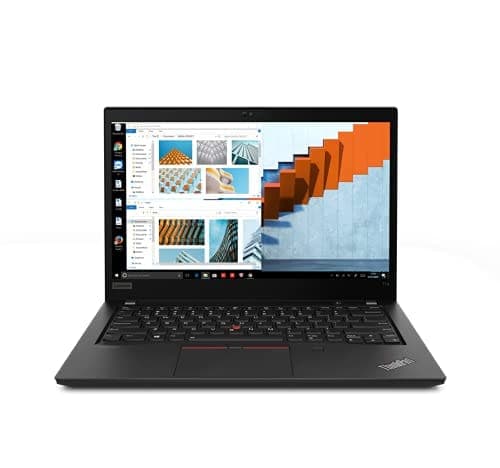
TL;DR The Lenovo ThinkPad T14 Gen 1 continues to offer strong value in India in 2026 for general productivity, education, and hybrid work use. With a solid build, reliable keyboard, and long battery life, it remains a capable everyday machine even years after its launch. Typical configurations include Intel 10th generation processors or AMD Ryzen Pro 4000 series options, both of which handle word processing, web browsing, video calls, and office tasks comfortably. The laptop’s 50 Wh integrated battery is rated for long durations in benchmark tests, though real‑world use typically lands around four to six hours depending on settings and tasks. While it does not match the latest flagship models in raw performance, the T14 Gen 1 still serves most modern users well in daily tasks, making it a practical choice for Indian students, professionals, and remote workers who want a dependable 14‑inch laptop without paying premium prices.
Is the T14 Gen 1 Still Relevant in 2026?
ThinkPad T14 Gen 1 was initially released in 2020 and offered a balance of performance, portability, and business‑oriented features. In 2026, its relevance is best judged by the types of tasks users perform today. For everyday productivity, the T14 Gen 1 still checks most boxes. Core tasks such as document editing, spreadsheet work, email, and cloud‑based collaboration run smoothly on this laptop, particularly when equipped with 8 GB or more RAM and SSD storage. Such common workloads remain the bread and butter of everyday computing for students and professionals in India, and the T14 Gen 1 handles them reliably without significant lag.
Hybrid work and education scenarios often include video conferencing and multitasking with several browser tabs open. The T14’s integrated graphics and processor options,whether Intel or AMD,provide enough headroom to keep these activities fluid. Intel variants use 10th generation Core CPUs, while AMD versions with Ryzen Pro 4000 series chips offer strong multicore performance and efficiency. Both platforms are dated compared with the latest silicon, but they remain fit for the majority of productivity‑oriented tasks in 2026, especially for users who are not pushing heavy graphics workloads or high‑end content creation.
Another aspect of relevance is the ThinkPad ecosystem itself. Security features like TPM 2.0 for Windows security, robust port selection including USB‑C and Ethernet, and support for Wi‑Fi 6 ensure the T14 Gen 1 can connect and secure workflows for years to come. These capabilities make it a more versatile and future‑ready choice than many consumer‑oriented laptops at similar price points, especially for Indian buyers who value reliability and real‑world usability over cutting‑edge specs.
Performance Reality Check: Everyday Use and Expectations
When it comes to everyday performance, the ThinkPad T14 Gen 1 is best understood as a productivity‑focused machine rather than a high‑end performance powerhouse. Intel versions of the T14 Gen 1 come with 10th generation Core i5 and Core i7 processors with up to six cores on higher‑end models, which deliver solid performance for daily tasks such as writing, email, and web apps. These CPUs are energy‑efficient and provide enough responsiveness for most educational and office workflows. AMD variants based on the Ryzen Pro 4000 series incorporate up to eight cores and offer even more consistent performance, especially in multicore workloads like compiling code or managing multiple applications simultaneously.
In real usage, these processors paired with integrated graphics handle everyday tasks smoothly. Expect reliable performance in tools like Microsoft Office, online collaboration platforms, and basic multimedia consumption. For many Indian users, including students and professionals working with web‑based tools or remote desktop software, the T14 Gen 1 provides a comfortable experience without frequent slowdown. RAM plays a significant role here; configurations with 16 GB and above are generally more responsive when many browser tabs or applications are open at once, reducing stutters and keeping things fluid.
Gaming and heavy content creation are not the T14’s strengths. While some AMD Ryzen variants can handle lighter titles at modest settings, this laptop is not designed for intensive graphic or rendering workloads. Users who primarily need a machine for everyday application workflows will find it satisfactory, but those wanting strong performance in video editing, 3D rendering, or gaming should consider newer models. That said, for the intended use in productivity and hybrid work, the T14 Gen 1 remains relevant and capable even in 2026.
Battery Reliability for Indian Workloads
The ThinkPad T14 Gen 1 is equipped with a 50 Wh integrated lithium‑polymer battery that supports Rapid Charge, allowing the laptop to reach up to 80 percent charge in about one hour with a compatible charger. Official battery‑life estimates from Lenovo include results such as up to 11.45 hours in the MobileMark 2018 benchmark and up to 17 hours in JEITA 2.0 tests, though these are ideal figures that assume light workloads and specific testing conditions. In real‑world use in India, where workflows are a mix of online meetings, browsing, document editing, and occasional media playback, most users report around five to seven hours of continuous use on a full charge at moderate brightness levels.
Actual battery performance depends heavily on the workload and display configuration. Models with Full HD displays are generally more efficient than HD panels, and AMD‑equipped variants,such as those with Ryzen 5 PRO 4650U or Ryzen 7 PRO 4750U,may deliver slightly better energy efficiency because of the strong balance between performance and low power draw. When you factor in typical Indian conditions such as higher ambient temperatures and frequent video conferencing, a fully charged T14 Gen 1 tends to provide comfortable half‑day usage without charging for most productivity tasks. However, heavier use like extended video calls or running multiple demanding apps simultaneously will reduce this figure toward the lower end of that range.
Long‑term battery reliability is another important consideration, especially if the laptop has been in use for more than a few years. Batteries age over time, and capacity naturally diminishes with charging cycles. Because ThinkPad batteries are built to industry standards and support Rapid Charge, they remain serviceable if you need to replace the battery after extended use. While Lenovo does not publish end‑of‑support dates for this model, third‑party repair guides and community discussions suggest battery replacement is possible with compatible packs if the original cell no longer holds sufficient charge, ensuring the laptop remains functional throughout its usable life.
Build Quality and Long‑Term Reliability: Worth the Investment?
The ThinkPad T14 Gen 1 carries forward the legacy of Lenovo’s ThinkPad series, known for its business‑class durability and robust build. The chassis uses a blend of PPS with glass fiber, magnesium alloy reinforcement, and high‑quality plastics that resist flexing and everyday impacts. This construction provides a solid feel and practical durability that endurance tests and user reports confirm holds up well even after years of use. The laptop’s design also incorporates anti‑glare displays and a spill‑resistant keyboard, features that help it withstand occasional mishaps in classroom or office environments without immediate service needs.
One hallmark of ThinkPad reliability is the keyboard and input experience. The full‑size spill‑resistant keyboard on the T14 Gen 1 delivers comfortable key travel and a responsive feel that many users appreciate for long typing sessions. Even units that are several years old often retain keyboard reliability and comfort, making the T14 Gen 1 an appealing choice for students, writers, and professionals alike. The presence of a TrackPoint integrated into the keyboard layout continues to be a productivity favorite among ThinkPad enthusiasts, offering precise navigation that many find superior to generic touchpads.
Serviceability and parts accessibility also contribute to long‑term reliability. Although the RAM is partly soldered,requiring careful selection at purchase,the laptop does offer one SO‑DIMM slot for additional memory and a fully upgradeable M.2 NVMe SSD up to 2 TB, allowing the machine to adapt to future storage needs. Routine tasks like cleaning vents, updating drivers, or replacing aging components remain feasible with basic tools, which helps keep maintenance costs lower over time. All of these factors make the T14 Gen 1 a worthwhile investment for users who favor durability and longevity over the latest cutting‑edge specs.
Build & Reliability Summary
Practical Connectivity and Hybrid Work Compatibility
Connectivity remains a strong point for the ThinkPad T14 Gen 1, with a mix of modern and legacy ports that are still relevant today. Intel‑based models provide a combination of USB‑A and USB‑C ports, one of which supports Thunderbolt‑3, HDMI 1.4b, Ethernet (RJ‑45), and a microSD card reader, ensuring broad compatibility with peripherals, external monitors, and wired networks. AMD‑based variants have a similar complement with USB‑C 3.2 Gen 2 and HDMI 2.0 outputs, also offering Gigabit Ethernet for reliable office and home networking. This blend makes the T14 Gen 1 versatile for Indian users who may switch between conference rooms, homes, and classrooms throughout the week.
Wireless connectivity is equally relevant, with support for Wi‑Fi 6 (802.11ax) on many configurations and Bluetooth 5.1, which remain sufficient for current router standards and modern wireless peripherals. For hybrid work setups that depend on stable video calls, cloud collaboration, and large file transfers, these wireless standards provide both speed and reliability. Optional WWAN support on certain SKUs also allows mobile data connectivity where Wi‑Fi may not be available, a useful feature for Indian professionals who travel frequently or work from varied locations.
In terms of display compatibility, the combination of HDMI and USB‑C/Thunderbolt outputs means you can easily connect to external monitors, projectors, or docking stations without requiring proprietary adapters. This practical port selection ensures that the laptop integrates smoothly into hybrid and office environments, whether you are connecting to a single external monitor for extended productivity or multiple displays for multitasking workflows. Overall, the T14 Gen 1’s connectivity suite supports common hybrid work needs in 2026 without forcing excessive adapter use.
Connectivity at a Glance
Upgrade Path and Future‑Proofing
The ThinkPad T14 Gen 1 offers moderate upgrade potential, which is key to extending its usable life in 2026. The laptop comes with one SO‑DIMM slot in addition to soldered RAM, allowing configurations to expand up to 32 GB DDR4. This is sufficient for multitasking, video calls, and office workloads, though the soldered portion limits maximum flexibility. For storage, the M.2 NVMe SSD slot supports upgrades up to 2 TB, making it easy to enhance speed and capacity without replacing the entire machine. These upgrades are straightforward and can significantly prolong the laptop’s relevance for daily productivity tasks.
Future‑proofing also depends on choosing the right configuration at purchase. Intel i5 and i7 CPUs or AMD Ryzen 5 Pro and Ryzen 7 Pro options remain capable for office, hybrid work, and student applications, but they may struggle with high-end multimedia editing or AI workloads that newer laptops handle effortlessly. Selecting 16 GB RAM or higher and an SSD over the base HDD ensures the laptop remains responsive for several more years. Wireless connectivity with Wi‑Fi 6 and Bluetooth 5.1 further guarantees compatibility with modern routers and peripherals.
While the T14 Gen 1 is not cutting‑edge, the combination of solid build, upgradeable RAM/SSD, and modern connectivity standards ensures it will remain a practical tool for typical Indian users until newer productivity necessitates a full replacement. For those who plan to rely on the laptop for five or more years, these upgrade paths make the T14 Gen 1 a cost-effective investment.
Total Cost of Ownership (TCO): 5‑Year Value Assessment
Evaluating the TCO of the ThinkPad T14 Gen 1 in India involves looking beyond the upfront price to factors such as longevity, maintenance, and upgrades. New units in 2026 are priced around ₹60,000-₹80,000 depending on configuration (Intel vs AMD, RAM, SSD). Given its durability and the availability of upgrade options, the laptop provides a strong return on investment over a five-year horizon. Users can extend its relevance by increasing RAM, upgrading the SSD, or replacing the battery if capacity drops, all at relatively low cost. (lenovo.com)
Maintenance costs are low thanks to the laptop’s modular design, allowing easy replacement of worn components. Compared with newer budget laptops that may require full replacement after three to four years due to non-upgradable components or insufficient performance, the T14 Gen 1 reduces recurring expenses, especially for Indian buyers who prioritize longevity over ultra-high specs. Its durability, supported by the ThinkPad’s legacy design and spill-resistant keyboard, also minimizes repair requirements in daily use, further enhancing cost efficiency.
A table summarizing TCO considerations shows how initial investment spreads over practical years of usage:
This demonstrates that, for general productivity, the T14 Gen 1 remains economically viable compared to replacing lower-end laptops more frequently.
Resale and Second‑Life Value in India
The ThinkPad T14 Gen 1 retains value well in the Indian market due to its reputation for durability and business-class reliability. A well-maintained T14 Gen 1 with SSD and sufficient RAM can command ₹35,000-₹50,000 in resale even in 2026, depending on configuration and condition. Users benefit from Lenovo’s consistent brand perception and ThinkPad loyalty, which helps in maintaining second-life value compared to consumer laptops of similar age.
Factors affecting resale include battery health, cosmetic condition, and storage upgrades. A T14 Gen 1 with a healthy battery and upgraded SSD tends to attract professional buyers seeking a dependable laptop at lower cost, whereas units with worn batteries or minor screen imperfections sell at a discount. The inclusion of business features such as TPM security and modern wireless standards also increases attractiveness in corporate resale markets.
From a second-life perspective, the T14 Gen 1 can serve multiple roles: as a backup machine, secondary laptop, or study/workstation device, extending its utility well beyond typical three-year laptop cycles. For Indian users looking to balance performance, durability, and cost, this retention of value makes it a sensible long-term choice, particularly when factoring in hybrid work, online education, and day-to-day productivity.
Who Should (and Should Not) Buy the T14 Gen 1 in 2026 India
The ThinkPad T14 Gen 1 is ideally suited for Indian users who prioritize reliability, battery life, and productivity over cutting-edge performance. Students, professionals, and hybrid workers benefit from its durable chassis, spill-resistant keyboard, and sufficient processing power for daily tasks like browsing, document creation, video conferencing, and light multitasking. Its moderate size and weight make it easy to carry between classrooms, offices, and co-working spaces, while the robust port selection ensures compatibility with external displays, wired networks, and peripherals. RAM and SSD upgrades further extend its usability, making it a practical long-term investment for Indian buyers who want a balance between affordability and performance.
Conversely, the T14 Gen 1 is not recommended for users who need high-end graphics, gaming, or intensive content creation. Integrated Intel or AMD graphics can handle casual media and light photo editing, but modern 3D rendering, 4K video editing, or AI workloads will be sluggish. Users looking for the absolute fastest processors, the newest Wi-Fi standards beyond Wi-Fi 6, or cutting-edge display technology may find the T14 Gen 1 limiting. Similarly, those seeking ultra-lightweight ultraportables with minimal thickness may prefer newer models designed for extreme mobility.
In short, the T14 Gen 1 is best for users who value durability, practicality, and long-term reliability over bleeding-edge specs. For Indian buyers balancing budget and performance, it remains a solid choice in 2026, offering strong productivity capabilities and consistent hybrid work performance without frequent replacement needs.
Frequently Asked Questions
Q. Is the Lenovo ThinkPad T14 Gen 1 still worth buying in 2026 India
Yes, for students, office professionals, and hybrid workers it remains highly practical because of strong durability, upgrades, and reliable productivity.
Q. How much battery life does it give in real use
Most users can expect around 5 to 7 hours with web browsing, office work, meetings, and moderate brightness.
Q. Is it good for long term use
Yes, with SSD upgrades, RAM expansion, and battery replacement it can remain productive for another 3 to 5 years.
Q. Should I choose Intel or AMD variants
AMD Ryzen Pro variants are better for multitasking and efficiency, while Intel models are excellent for stable office and business workflows.
Q. Can it still handle hybrid work in 2026
Yes, Wi-Fi 6, Ethernet, HDMI, USB-C, and strong keyboard ergonomics make it excellent for remote and office setups.
Q. Is it good for students in India
Yes, it is ideal for research, assignments, online classes, coding, browsing, and general productivity without performance anxiety.
Q. Is it suitable for gaming or video editing
No, integrated graphics are not meant for AAA gaming, 3D rendering, or heavy 4K editing workloads.
Q. What is the best configuration to buy today
The sweet spot is Ryzen 5 Pro or Core i5 with 16GB RAM and 512GB NVMe SSD.
Q. Does it still retain resale value in India
Yes, ThinkPad T-series laptops generally retain stronger resale value than consumer laptops because of durability and business trust.
Q. Who should avoid buying the T14 Gen 1
Users needing gaming, AI workflows, heavy rendering, or ultra-thin portability should choose newer generation laptops.
Ready to upgrade your tech?
Browse our collection of quality refurbished products at unbeatable prices.






