
HP ZBook Firefly Z11 vs Dell Precision In 2026: Best Mobile Workstation?
A detailed comparison of HP ZBook Firefly Z11 and Dell Precision thin workstations covering portability, durability, display accuracy, thermals, and refurbished value in India for 2026 professionals.

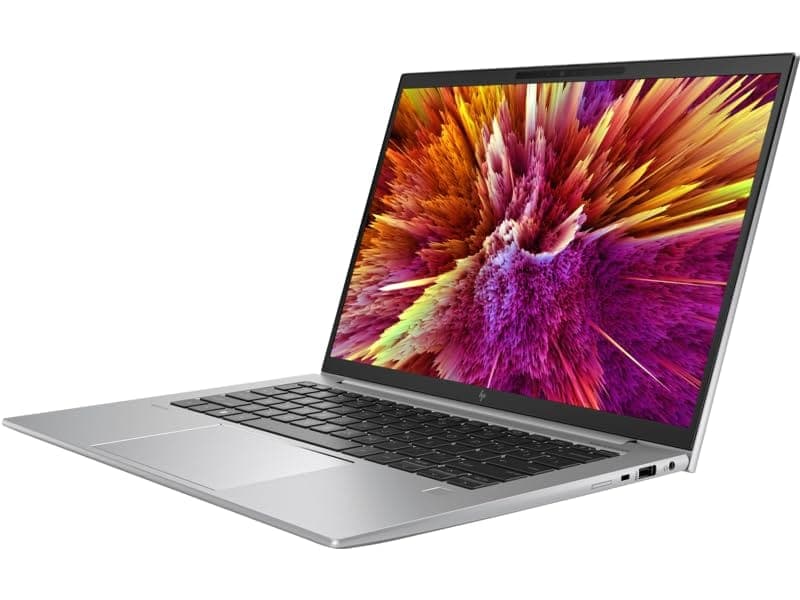
TL;DR The HP ZBook Firefly Z11 Workstation Laptop and Dell Precision thin-and-light mobile workstation models compete directly in the 14-inch professional category in 2026. Both platforms prioritize enterprise reliability, ISV certification, and mobility, but their strengths differ. HP focuses on display accuracy, lighter chassis engineering, and refined thermal balance, while Dell emphasizes chassis rigidity, docking ecosystem integration, and conservative thermal tuning. For Indian professionals evaluating HP ZBook Firefly Z11 Price in India or considering Refurbished HP ZBook Firefly Z11 versus Dell Precision alternatives, the right choice depends on workflow intensity, display sensitivity, and long-term service expectations rather than raw benchmark numbers.
HP ZBook vs Dell Precision: Quick Decision Guide (2026)
Choosing between HP ZBook Firefly Z11 Specs and Dell Precision configurations in 2026 requires understanding how both brands approach thin mobile workstation design. HP positions the Firefly line as a balance between enterprise portability and professional graphics stability. Dell’s Precision thin series, particularly the 3000 and 5000 families, aim for conservative engineering with strong IT deployment support and standardized enterprise components.
Performance-wise, both systems typically feature Intel Core i7 U or P-series processors and optional NVIDIA RTX A500 or T500 class GPUs. In sustained productivity tasks such as CAD viewing, data modeling, and multi-tab business workloads, performance remains closely matched. However, thermal behavior differs slightly, with HP often allowing short boost bursts before stabilizing clocks, whereas Dell applies more conservative long-term tuning.
The buying decision in India frequently comes down to three factors: display quality, long-term service access, and refurbished value proposition. HP frequently offers brighter WUXGA 16:10 panels with better vertical workspace. Dell often offers slightly heavier but more rigid chassis builds. Refurbished ecosystem availability may also favor HP due to wider channel distribution.
Quick Comparison Table (2026)
For users prioritizing lighter mobility and visual precision, HP gains advantage. For conservative corporate deployments, Dell remains equally viable.
Design Philosophy: Enterprise Engineering vs Corporate Mobility Approach
The HP ZBook Firefly Z11 Review narrative consistently emphasizes mobility-first workstation design. HP engineers the Firefly series to function as a professional laptop that travels easily between home, client site, and office docking station. Magnesium-aluminum hybrid construction allows weight reduction without compromising MIL-STD durability certifications. The aesthetic leans toward minimal corporate styling rather than aggressive workstation bulk.
Dell Precision thin workstations adopt a slightly different philosophy. While still portable, Dell tends to design chassis structures with heavier aluminum reinforcement. This results in slightly increased weight but enhanced torsional rigidity. IT departments often favor this approach because of standardized part alignment across Latitude and Precision fleets.
Thermal ventilation also reflects philosophical differences. HP prioritizes quieter acoustic tuning suitable for meetings and collaborative environments. Dell often prioritizes steady airflow stability even if fan noise rises slightly under load. These distinctions matter more in real-world deployment than raw CPU benchmarks.
In 2026, mobile professionals increasingly value portability without sacrificing ISV stability, and both brands approach this differently. HP leans toward a refined mobile creative device; Dell leans toward a compact enterprise workstation tool. The decision should align with whether the user travels frequently or remains docked in structured office environments.
Build Quality and Chassis Durability Comparison
When comparing the HP ZBook Firefly Z11 Workstation Laptop with Dell Precision thin mobile workstation models, chassis construction quality becomes a key decision factor. HP builds the Firefly series using a magnesium-aluminum hybrid structure designed to meet MIL-STD-810H durability standards. This certification indicates resistance to vibration, minor drops, temperature variation, and travel stress. The Firefly design emphasizes weight reduction without compromising structural integrity, making it particularly attractive for consultants and professionals who frequently travel between client locations.
Dell Precision thin models such as the Precision 3480 and 5480 rely heavily on CNC-milled aluminum construction. Dell’s approach prioritizes torsional rigidity and premium metallic finish. The chassis tends to feel slightly denser and heavier compared to HP’s lighter magnesium blend. Corporate IT departments often appreciate Dell’s structural consistency because parts alignment and port placement remain standardized across enterprise fleets.
Keyboard deck rigidity, hinge durability, and screen flex control are well engineered on both platforms. HP’s hinge mechanism allows smooth one-hand opening while maintaining screen stability during typing. Dell’s hinges typically offer firmer resistance, which some users interpret as additional durability confidence. Both systems meet enterprise drop-test criteria and are engineered for long corporate deployment cycles rather than consumer lifespan expectations.
In real-world Indian business environments where devices are transported daily in backpacks, durability matters more than aesthetic appeal. Both workstations perform strongly in this regard, though HP edges ahead for lighter portability while Dell may feel marginally more solid under torsional pressure.
Thermal Performance and Sustained Load Stability
Thermal management defines whether a mobile workstation truly qualifies as professional hardware. The HP ZBook Firefly Z11 Specs typically include Intel Core i7 P-series or U-series processors paired with optional NVIDIA RTX A500 class GPUs. HP tunes its cooling system to allow short performance boosts under burst workloads such as exporting files, compiling code, or rendering previews. After this boost window, clock speeds stabilize to maintain balanced temperature and noise levels.
Dell Precision thin systems adopt slightly more conservative thermal curves. Instead of permitting aggressive short bursts, Dell prioritizes stable sustained clock speeds over extended workloads. Under continuous CAD sessions or simulation previews, Dell systems may demonstrate marginally steadier thermal output at the cost of slightly lower initial peak frequency. This approach reduces fan ramp-up fluctuations during heavy use.
Both machines feature dual-fan configurations and heat pipe systems appropriate for thin workstation form factors. However, neither model is designed for sustained heavy 3D rendering comparable to thicker workstation classes such as HP ZBook Fury or Dell Precision 7000 series. For typical workloads including analytics, moderate CAD review, programming, and office productivity, thermal stability remains reliable on both devices.
In 2026, professionals increasingly demand quiet workstations for hybrid meetings. HP’s acoustic tuning generally results in lower perceived fan noise during everyday productivity, while Dell may produce slightly more audible airflow during prolonged CPU stress. The difference is not dramatic but becomes noticeable in silent meeting environments.
Display Quality and Color Accuracy for Professional Users
Display performance remains one of the strongest differentiators between HP and Dell thin workstations. The HP ZBook Firefly Z11 Review narrative consistently highlights its 16:10 WUXGA IPS panels and optional DreamColor configurations. These panels are factory calibrated and tuned for accurate sRGB reproduction, making them suitable for dashboard visualization, UI layout review, marketing presentations, and light creative editing. The taller aspect ratio increases vertical workspace, which significantly improves spreadsheet usability and documentation review efficiency.
Dell Precision thin models also offer 16:10 IPS panels with solid brightness levels and anti-glare coatings. However, Dell generally focuses on business-standard calibration rather than high-end color refinement. While entirely adequate for corporate workflows, Dell panels may not match the tighter calibration tolerance seen in DreamColor-equipped HP configurations.
Brightness output on both systems typically ranges between 300 and 400 nits depending on configuration. HP’s panel uniformity is often praised for reduced color shift across viewing angles. Dell panels remain highly usable but sometimes prioritize power efficiency over maximum vibrancy. For professionals engaged in client-facing design presentations or color-sensitive review tasks, HP often offers a marginal edge.
Ultimately, both workstations provide professional-grade displays far superior to consumer laptops. The deciding factor becomes whether the user requires enhanced calibration precision or simply dependable office clarity. For color-sensitive professionals, HP’s display ecosystem may justify selection, whereas general enterprise users will find Dell equally competent.
Battery Life and Real-World Mobility Performance
Battery efficiency has become increasingly important in thin mobile workstation design, especially for professionals working in hybrid environments. The HP ZBook Firefly Z11 Workstation Laptop class typically integrates high-efficiency Intel U-series or P-series processors combined with low-power IPS panels. In realistic professional workflows such as Excel modeling, browser-based ERP usage, documentation drafting, and video conferencing, users can expect approximately 6 to 9 hours of balanced productivity depending on configuration and brightness levels. HP often includes battery optimization features within BIOS and Windows power profiles to preserve long-term battery health in enterprise deployments.
Dell Precision thin workstation models such as the 3480 series generally deliver comparable runtime, though real-world battery duration may differ slightly depending on panel resolution and GPU selection. Dell sometimes configures higher default brightness levels, which can reduce unplugged endurance unless manually adjusted. Under GPU-accelerated tasks, both platforms see similar battery decline patterns because RTX A-series graphics increase power draw significantly.
Charging flexibility also matters in India, where mobility often includes travel between client offices or locations with inconsistent power backup. Both HP and Dell support USB-C charging via Thunderbolt 4, enabling compatibility with universal docks and power banks that support Power Delivery. In practical usage, Firefly systems may charge slightly faster due to optimized fast-charge firmware profiles.
Overall, battery life does not dramatically separate the two brands. Both prioritize efficiency over extreme performance output. However, HP’s lighter chassis and display efficiency tuning give it a small edge for users prioritizing extended unplugged office sessions.
Upgradeability, Serviceability, and Long-Term Maintenance
Long-term ownership economics are central to workstation purchases, especially for Indian professionals comparing Refurbished HP ZBook Firefly Z11 with pre-owned Dell Precision alternatives. The Firefly series is designed with partial serviceability in mind. Depending on configuration, RAM may be partially soldered with one additional upgrade slot, while SSD storage typically remains fully replaceable through accessible internal compartments. HP documentation provides structured service manuals, allowing enterprise IT teams to maintain devices efficiently.
Dell Precision thin models follow a similar philosophy. Storage upgrades are straightforward, and in many configurations, RAM remains upgradeable depending on motherboard design. Dell’s enterprise presence ensures spare part availability across corporate supply chains. This becomes important for businesses planning multi-year deployment cycles.
Battery replacement accessibility differs slightly. HP often designs Firefly models with internal battery packs secured by screws, requiring careful disassembly but remaining serviceable. Dell adopts comparable internal battery construction. Neither model offers user-swappable external batteries, reflecting modern thin workstation trends.
For refurbished buyers evaluating HP ZBook Firefly Z11 Price in India, part availability through enterprise resellers and secondary markets strongly supports long-term usability. Dell similarly maintains a strong aftermarket ecosystem. From a serviceability perspective, both systems remain superior to sealed consumer ultrabooks that restrict upgrades entirely. In terms of maintenance longevity, the difference between brands is minimal and largely dependent on regional spare part networks.
Driver Stability, ISV Certifications, and Software Compatibility
Workstation classification is defined less by hardware and more by software validation. Both HP ZBook and Dell Precision platforms maintain ISV (Independent Software Vendor) certifications for professional applications such as AutoCAD, SolidWorks, Adobe Creative Cloud, and other engineering tools. These certifications ensure that drivers are optimized and tested for reliability in production environments rather than gaming performance metrics.
HP provides dedicated workstation driver packages optimized for NVIDIA RTX A-series GPUs. These drivers prioritize stability and consistent rendering output. The HP ZBook Firefly Z11 Review context frequently highlights stable performance in professional software compared to gaming laptops using GeForce drivers. BIOS firmware updates are also distributed regularly to maintain compatibility with evolving Windows versions.
Dell Precision systems similarly deploy enterprise-validated driver stacks. Dell’s ProSupport ecosystem further strengthens its enterprise appeal, offering structured remote diagnostics and driver lifecycle management. In IT-managed organizations, Dell’s centralized management tools can simplify large fleet maintenance.
In real-world professional use, both systems provide excellent compatibility with modern business and engineering software. The difference lies more in enterprise service ecosystem preference rather than software reliability itself. Users operating specialized CAD or simulation environments should confirm ISV certification lists before purchase, but broadly speaking, both workstations deliver the software stability expected from certified mobile workstation platforms in 2026.
Port Selection, Connectivity, and Docking Ecosystem
Modern mobile workstations must function as both portable systems and desk-based productivity hubs. The HP ZBook Firefly Z11 Workstation Laptop typically includes dual Thunderbolt 4 ports, USB-A ports, HDMI 2.0 or 2.1 (depending on configuration), a headphone/mic combo jack, and optional smart card reader support for enterprise security environments. Thunderbolt 4 enables high-bandwidth docking, external GPU compatibility (where supported), and multi-display output through a single cable solution.
Dell Precision thin models such as the 3480 or 5480 series offer a very similar I/O configuration. Dual Thunderbolt 4 ports are standard on most enterprise configurations, accompanied by USB-A, HDMI, and optional microSD or smart card modules. Dell’s ecosystem integrates tightly with WD-series Thunderbolt docks, which are widely deployed in corporate offices. HP, meanwhile, supports Thunderbolt docking through its own enterprise dock lineup, offering power delivery, Ethernet, and multi-monitor support through one connection.
In practical usage, both systems handle dual 4K displays without issue when docked. Networking stability via wired Ethernet through docks remains strong across both brands. The decision between HP and Dell in this category often depends less on raw port count and more on existing office infrastructure compatibility. Organizations already invested in Dell docks may lean toward Precision for convenience, while HP environments will benefit from seamless ZBook docking integration.
Connectivity reliability in 2026 also includes Wi-Fi 6E support and Bluetooth 5.x, both present across current workstation platforms. For hybrid professionals moving between office and client sites, both laptops offer enterprise-grade connectivity standards expected in this class.
Price Comparison in India: New vs Refurbished Workstation Value
Pricing remains one of the most influential factors for Indian buyers comparing HP ZBook Firefly Z11 Price in India against Dell Precision alternatives. New thin mobile workstations in 2026 typically fall within the premium enterprise segment, especially when configured with RTX A-series GPUs and higher memory options. The upfront cost difference between HP and Dell new units is generally minimal, varying by reseller discounts and configuration choices.
The refurbished market, however, introduces significant differentiation. HP ZBook models often appear more widely in refurbished enterprise channels due to larger global corporate deployment volumes. This increases availability and competitive pricing. Buyers evaluating Refurbished HP ZBook Firefly Z11 frequently find better value-to-spec ratios compared to similarly specced refurbished Dell Precision units.
Warranty structure also influences value. Refurbished enterprise systems sourced through certified channels may include limited warranty coverage, offering peace of mind absent in grey-market listings. Long-term ROI should consider upgradeability and resale stability, where both brands perform strongly due to workstation classification.
India Pricing Comparison (Approximate 2026 Market Range)
For cost-conscious professionals, refurbished workstation value strongly improves the affordability equation compared to purchasing new ultrabooks with weaker GPU capability.
Which Workstation Should You Buy in 2026?
Choosing between the HP ZBook Firefly Z11 and Dell Precision thin workstation models ultimately depends on professional priorities rather than brand loyalty. If your workflow emphasizes lighter portability, calibrated display precision, and quieter acoustic tuning, HP presents a slightly more refined mobile experience. Its 16:10 display ratio and potential DreamColor option provide advantages for presentation-oriented professionals and visually sensitive workflows.
Dell Precision systems, on the other hand, appeal strongly to structured enterprise deployments. Their chassis rigidity, IT ecosystem alignment, and conservative thermal management make them ideal for standardized corporate rollouts. Organizations already invested in Dell docks, service contracts, and management platforms may find smoother integration through Precision systems.
For independent professionals and small business owners in India comparing HP ZBook Firefly Z11 Specs with Dell alternatives, refurbished workstation options provide the most rational balance of performance and investment efficiency. Neither device dramatically outperforms the other in raw productivity tasks; instead, the difference lies in nuanced design philosophy and deployment environment. Both represent reliable mobile workstation choices in 2026, but your decision should prioritize mobility needs, display sensitivity, budget strategy, and long-term service accessibility.
Frequently Asked Questions
Q. Is HP ZBook Firefly Z11 better than Dell Precision for portability?
A. Yes. HP typically offers a slightly lighter chassis within the thin workstation category, making it better suited for travel-heavy professionals.
Q. Which has better display quality?
A. HP may offer DreamColor configurations with tighter factory calibration, while Dell provides solid IPS business panels suitable for professional use.
Q. Are both laptops ISV certified?
A. Yes. Both platforms maintain professional software certifications for major CAD, design, and enterprise applications.
Q. Which is better for long office usage?
A. Both are designed for extended productivity, though HP may operate slightly quieter under moderate workloads.
Q. Is refurbished HP ZBook Firefly Z11 reliable?
A. Yes. When purchased through certified enterprise refurbishment channels, these systems remain durable and dependable.
Q. Do both support Thunderbolt docking?
A. Yes. Both models support Thunderbolt 4 docking for multi-display and high-speed peripheral connectivity.
Q. Which is better for thermal stability?
A. Dell often prioritizes steady sustained performance, while HP may allow stronger short boost bursts before stabilizing.
Q. Are they suitable for heavy rendering?
A. Thin workstation models are best for moderate GPU workloads, while heavier workstation classes handle sustained rendering more effectively.
Q. Which offers better value in India?
A. Refurbished workstation units from either brand generally provide better long-term value than new consumer laptops.
Q. Is battery life similar between the two?
A. Yes. Real-world productivity battery performance is broadly comparable across both platforms.
Ready to upgrade your tech?
Browse our collection of quality refurbished products at unbeatable prices.






