
HP ZBook Firefly Z11 Display And Speakers In 2026: Pro Visuals And Media Quality
HP ZBook Firefly Z11 offers professional IPS visuals, DreamColor accuracy, anti-glare comfort, and clear conferencing audio for productivity workflows in 2026.

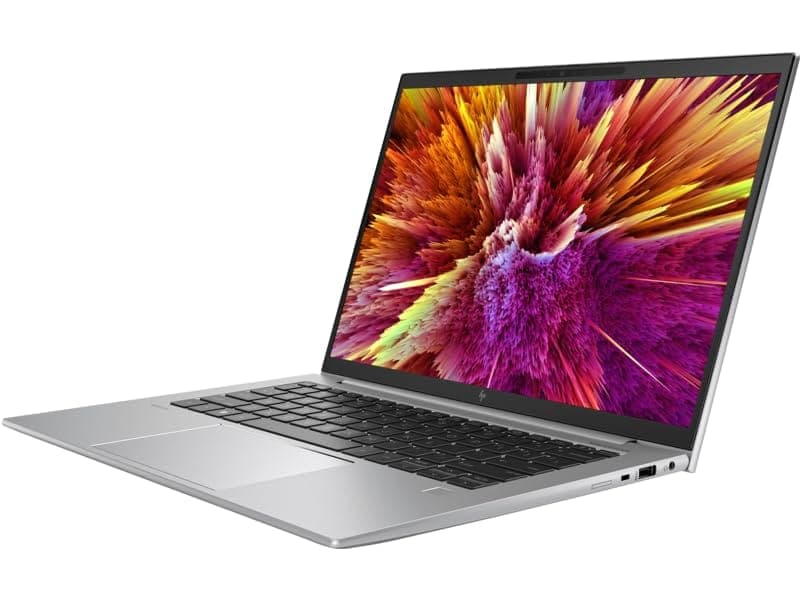
TL;DR The HP ZBook Firefly Z11 represents HP’s modern thin-and-light workstation philosophy where display quality and media clarity matter as much as processing performance. In 2026, professionals increasingly rely on laptop screens for extended productivity, remote collaboration, analytics visualization, and content review rather than connecting external monitors constantly. The Firefly Z11 delivers strong IPS-based display options, high brightness panels, accurate color reproduction, and enterprise-grade anti-glare optimization suited for long professional usage. Combined with tuned stereo speakers designed for conferencing clarity, the system balances visual precision with practical business media performance. For Indian professionals evaluating Refurbished HP ZBook Firefly Z11 systems, the display experience remains one of the strongest reasons this workstation continues to hold value across consulting, finance, engineering, and hybrid remote workflows.
HP ZBook Firefly Z11 Display Overview in 2026
In 2026, workstation displays are judged less by raw resolution numbers and more by consistency, color stability, and long-duration usability. The HP ZBook Firefly Z11 Workstation Laptop follows this professional-first design approach. Unlike consumer ultrabooks that prioritize glossy visuals for entertainment appeal, the Firefly Z11 display is engineered for productivity clarity under varied lighting conditions commonly found in offices, classrooms, and remote setups across India.
Typical configurations include high-quality 14-inch IPS panels with Full HD or WUXGA resolutions, delivering improved vertical workspace compared to older 16:9 displays. The taller aspect ratio significantly enhances spreadsheet visibility, coding environments, and document-heavy workflows. Professionals working with dashboards or financial models benefit from reduced scrolling and better information density on screen.
Modern refurbished enterprise units available through platforms such as the HP ZBook workstation collection at Refurbo continue to retain strong panel longevity because enterprise-grade displays degrade far slower than consumer panels. Even after several years of deployment, brightness uniformity and viewing-angle stability remain reliable.
Another important factor is brightness calibration. Many Firefly Z11 configurations exceed 400 nits, allowing comfortable viewing in brightly lit Indian offices or near windows where reflections typically affect standard laptops. Combined with matte anti-glare coatings, the display remains usable throughout extended work sessions without excessive eye fatigue.
Overall, in 2026 the Firefly Z11 display positions itself not as a media-centric screen but as a professional visualization tool optimized for sustained clarity and productivity accuracy.
Panel Technology Explained: IPS, DreamColor, and Standard Displays
The display strength of the HP ZBook Firefly Z11 Specs lies primarily in HP’s adoption of professional IPS panel technology across most configurations. IPS panels offer superior viewing angles compared to traditional TN displays, ensuring that colors and brightness remain consistent even when viewed from side angles during collaborative discussions or presentations. This becomes particularly useful in consulting environments where multiple stakeholders review data simultaneously on a single screen.
Higher-end configurations may include HP’s DreamColor-certified panels, historically developed for creative professionals requiring strict color fidelity. DreamColor displays undergo factory calibration processes that improve color accuracy and tonal consistency. While not every Firefly Z11 configuration includes DreamColor branding, even standard IPS variants benefit from workstation-level calibration tuned closer to professional standards than consumer laptops.
Standard enterprise IPS panels used in the Firefly Z11 prioritize balanced color reproduction instead of oversaturated visuals commonly seen in entertainment-focused displays. This results in realistic chart visualization, accurate UI rendering, and dependable image representation during design validation or presentation work. For professionals handling CAD previews, marketing assets, or analytical dashboards, visual neutrality often matters more than vividness.
Another advantage of IPS implementation is long-term durability. Unlike OLED panels that may experience burn-in risks under static enterprise workloads, IPS technology remains stable for spreadsheet-heavy or IDE-based usage common in corporate workflows. As a result, refurbished HP ZBook Firefly Z11 units continue delivering consistent visual performance years after initial deployment.
The combination of IPS stability, optional DreamColor precision, and enterprise calibration philosophy makes the Firefly Z11 display particularly suitable for professionals requiring reliable visual output rather than entertainment-oriented color exaggeration.
Resolution Options and Real Workspace Usability (FHD vs UHD vs WUXGA)
The display usability of the HP ZBook Firefly Z11 depends significantly on resolution configuration rather than screen size alone. In professional environments, resolution directly impacts workflow efficiency, multitasking comfort, and long-session productivity. The Firefly Z11 typically ships with Full HD (1920×1080), WUXGA (1920×1200), and select high-resolution panels depending on enterprise configuration availability.
Full HD panels remain the most common option in refurbished enterprise deployments because they offer the best balance between clarity and battery efficiency. Text rendering remains sharp for spreadsheets, ERP dashboards, documentation, and coding environments while maintaining lower GPU and battery load. For finance professionals or consultants working primarily in Excel and browser tools, FHD continues to deliver practical usability without unnecessary scaling complications.
WUXGA panels introduce a 16:10 aspect ratio, which has become increasingly important by 2026 standards. The additional vertical pixels provide noticeably more workspace for timelines, documents, IDE windows, and analytics dashboards. Professionals handling large datasets benefit from reduced scrolling and improved visual continuity during long sessions. This makes WUXGA one of the most productivity-friendly configurations available in the Firefly lineup.
Ultra-high resolution panels, where available, improve sharpness for visual professionals but introduce higher power consumption and scaling adjustments within legacy enterprise software. For most workstation users, higher resolution does not always translate into higher efficiency unless color-sensitive or design-focused work is involved.
In real-world enterprise usage, WUXGA configurations increasingly represent the optimal productivity choice in 2026.
Color Accuracy, sRGB Coverage, and Professional Calibration Performance
Professional laptops are evaluated not only by brightness but also by color reliability, and the HP ZBook Firefly Z11 Review consistently highlights stable color reproduction as a major strength. Workstation displays are factory tuned to maintain predictable color output rather than visually exaggerated saturation levels seen in consumer laptops.
Most Firefly Z11 IPS configurations deliver approximately full or near-full sRGB coverage, which remains the industry baseline for professional digital workflows. This ensures accurate rendering of presentations, marketing creatives, dashboards, and UI elements. For professionals reviewing brand materials or visual reports, consistent color reproduction prevents discrepancies when content is later viewed on external monitors or client systems.
DreamColor-equipped variants further enhance calibration precision through hardware-level profiling. These panels undergo factory calibration processes that minimize color deviation and maintain uniform tonal gradients across the display surface. Even non-DreamColor panels benefit from enterprise calibration standards intended for engineering and corporate visualization tasks.
Another important advantage is color stability over time. Enterprise workstation panels are designed for prolonged operational cycles, meaning refurbished HP ZBook Firefly Z11 units typically retain usable color accuracy even after years of deployment. Unlike consumer displays that may shift toward warmer tones with age, workstation-grade panels maintain predictable output essential for professional reliability.
For analysts, architects reviewing plans, consultants preparing presentations, or creators performing light visual editing, the Firefly Z11 delivers dependable visual neutrality. In 2026 workflows where digital collaboration dominates, color consistency matters more than cinematic vibrancy, and this workstation aligns strongly with that professional requirement.
Eye Comfort, Anti-Glare Coating, and Long Working Hours Usage
Long-duration usability has become one of the most critical evaluation factors for workstation displays in 2026. The HP ZBook Firefly Z11 Workstation Laptop is engineered specifically for extended professional usage rather than short entertainment sessions. This philosophy becomes evident through its matte anti-glare coating and brightness management design.
Unlike glossy consumer panels that reflect overhead lighting, the Firefly Z11 minimizes reflections commonly encountered in Indian office environments with fluorescent lighting or window-side seating. The anti-glare layer diffuses reflections without significantly reducing sharpness, allowing professionals to maintain focus during prolonged spreadsheet analysis, coding sessions, or documentation work.
Eye strain reduction also benefits from stable brightness distribution across the panel. Enterprise displays emphasize uniform luminance rather than peak brightness bursts, preventing rapid contrast fluctuations that fatigue eyes over time. Combined with modern operating-system level blue light reduction tools, the display remains comfortable for multi-hour usage cycles common among accountants, developers, and analysts.
Another contributing factor is flicker management. Many workstation panels operate with reduced PWM flicker at typical brightness levels, lowering fatigue during evening work sessions. This becomes especially valuable for professionals working late hours or attending extended virtual meetings.
In practical daily usage, users transitioning from consumer laptops often notice reduced eye fatigue despite similar resolution levels. The Firefly Z11 achieves this through balanced brightness, matte finish optimization, and professional calibration rather than aggressive visual enhancement. For Indian professionals working 8 to10 hour digital schedules, these ergonomic display characteristics significantly improve long-term comfort and productivity sustainability.
Speaker Quality and Audio Output for Meetings and Media
Audio quality has become increasingly important in modern workstation laptops as hybrid work environments dominate professional communication. The HP ZBook Firefly Z11 integrates enterprise-focused stereo speakers tuned primarily for voice clarity rather than entertainment-heavy bass output. This distinction reflects the intended professional usage of the system.
The Firefly Z11 typically features upward or keyboard-deck aligned stereo speakers optimized through HP’s collaboration with Bang & Olufsen audio tuning principles used across premium ZBook devices. The tuning prioritizes mid-frequency clarity, which directly improves speech intelligibility during meetings, webinars, training sessions, and remote presentations. Voices sound clear even at moderate volume levels, reducing dependence on headphones during daily office work.
Unlike gaming laptops that emphasize loudness and bass response, workstation speakers aim for distortion-free output at sustained listening levels. During conference calls conducted through platforms such as Microsoft Teams or Zoom, dialogue remains balanced without harsh treble spikes. This becomes particularly beneficial during long virtual meetings where inconsistent audio causes listening fatigue.
Media playback performance remains respectable for casual usage including training videos, OTT streaming, or presentations containing embedded audio. While low-frequency depth remains limited due to thin chassis constraints, stereo separation is adequate for personal viewing sessions. For professionals who consume instructional content or recorded lectures, the audio system delivers clean reproduction without requiring external speakers.
Overall, speaker implementation in the Firefly Z11 aligns with enterprise expectations in 2026: clarity first, consistency second, entertainment third. For business professionals, educators, consultants, and analysts, this approach proves far more practical than louder but less controlled consumer laptop audio systems.
Real-World Audio Performance for Video Calls and Professional Usage
In real professional environments, laptop audio performance is judged less by music playback and more by communication reliability. The HP ZBook Firefly Z11 Review consistently highlights stable microphone and speaker coordination during conferencing workloads, which remains essential in hybrid workplaces across India.
During extended video conferencing sessions, the Firefly Z11 maintains balanced output levels that prevent voice compression or echo artifacts. Integrated dual-array microphones work alongside AI-assisted noise reduction algorithms to filter background disturbances such as ceiling fans, keyboard typing, or ambient office sounds. This significantly improves communication clarity in home-office setups where acoustic isolation may be limited.
Speaker tuning also supports consistent volume projection without distortion when multiple participants speak simultaneously. Professionals conducting online training, consulting calls, or remote audits benefit from clearer conversational separation compared to standard ultrabook speakers. Even at mid-volume levels, speech remains intelligible across moderately noisy environments.
Another practical advantage appears during presentation scenarios. When sharing screens or demonstrating workflows, system audio remains synchronized and audible without sudden fluctuations. This ensures smoother delivery during webinars or classroom-style sessions where consistent audio playback directly impacts engagement.
For users working across co-working spaces or travel environments, dependable onboard audio reduces reliance on accessories. While dedicated headsets still provide superior immersion, the Firefly Z11’s native audio system proves sufficiently capable for daily professional communication.
In 2026 workflows dominated by remote collaboration, reliable conferencing audio has become as critical as CPU performance. The Firefly Z11 succeeds by delivering predictable, meeting-ready sound quality rather than entertainment-focused acoustics.
Display and Audio Comparison With Similar Workstations in 2026
Within the thin mobile workstation category, the HP ZBook Firefly Z11 Price in India places it against enterprise competitors such as the Dell Precision 5490 and Lenovo ThinkPad P14s Gen 5. These systems target professionals needing portability combined with certified workstation reliability.
The Firefly Z11 distinguishes itself through balanced brightness levels, consistent IPS panel quality, and professional matte optimization. While competing devices may offer similar resolutions, HP’s calibration approach tends to emphasize long-duration readability rather than visual punch. This results in reduced eye fatigue during analytics-heavy or documentation workflows.
Audio performance also remains competitive. Precision systems often prioritize performance hardware, whereas ThinkPad devices traditionally focus on keyboard ergonomics. The Firefly Z11 achieves a middle ground by offering strong conferencing clarity combined with acceptable media playback performance.
In practical enterprise environments, differences between these systems are incremental rather than dramatic. However, the Firefly Z11’s display comfort and conferencing-ready audio make it particularly attractive for professionals prioritizing productivity clarity and communication reliability over entertainment-focused multimedia performance.
External Monitor Support and Multi-Display Productivity
Modern professional workflows rarely operate on a single screen, and the HP ZBook Firefly Z11 is designed with strong external display scalability in mind. In 2026, analysts, consultants, developers, and designers increasingly rely on dual- or triple-monitor environments for productivity expansion, and the Firefly Z11 integrates enterprise-grade connectivity to support these workflows efficiently.
The workstation typically includes Thunderbolt 4 / USB-C ports capable of DisplayPort output alongside HDMI connectivity depending on configuration. These interfaces allow seamless connection to high-resolution external monitors without requiring dedicated docking hardware, although enterprise docks further simplify cable management. Users can comfortably drive dual 4K displays or a combination of high-resolution productivity monitors alongside the internal panel.
For financial analysts or MBA professionals handling dashboards, ERP systems, or multi-sheet Excel environments, external display support dramatically improves workflow efficiency. One screen may host live analytics while another manages documentation or communication tools. The integrated GPU architecture efficiently distributes display workloads without noticeable system slowdown during standard productivity tasks.
Another advantage lies in color continuity. When paired with calibrated external monitors, the Firefly Z11 maintains consistent scaling and color rendering, ensuring smoother transitions between laptop and desktop workstations. This becomes important for professionals presenting visual reports or reviewing designs across multiple displays.
In real enterprise usage, the Firefly Z11 effectively transforms from an ultra-portable workstation into a desktop-replacement productivity hub when docked. This flexibility allows professionals to maintain mobility during travel while preserving high-efficiency multi-monitor setups at offices or home workstations.
Who Should Buy Based on Display and Audio Needs?
The HP ZBook Firefly Z11 Workstation Laptop is best suited for professionals whose daily productivity depends heavily on visual clarity and communication reliability rather than cinematic media consumption. Users working long hours with spreadsheets, analytics dashboards, documents, or browser-based enterprise platforms benefit most from the workstation’s matte IPS display and stable brightness characteristics.
Chartered accountants, consultants, financial analysts, MBA students, and corporate professionals represent ideal buyers because their workflows demand sustained readability rather than exaggerated color output. The display minimizes reflections and reduces eye fatigue during extended usage sessions commonly exceeding eight hours per day. Professionals who frequently participate in virtual meetings also gain practical advantages from the tuned speaker and microphone system designed specifically for conferencing clarity.
Creative professionals performing light visual editing, UI validation, or presentation design also benefit from consistent color accuracy available in higher-spec configurations. While the system is not positioned as a dedicated content-creation workstation, its calibrated panels remain reliable for moderate professional visual work.
Remote professionals and travelling consultants form another strong user group. The combination of portable size, clear speakers, and bright anti-glare display enables comfortable productivity across airports, client offices, co-working environments, or home setups without constant dependency on external peripherals.
However, users seeking immersive entertainment audio or HDR-focused media experiences may prefer consumer multimedia laptops. The Firefly Z11 instead prioritizes professional communication and visual stability. For buyers evaluating Refurbished HP ZBook Firefly Z11 systems in India, the device aligns exceptionally well with productivity-centric workflows where display comfort and meeting performance directly influence daily efficiency.
Final Recommendation And Decision Framework
The HP ZBook Firefly Z11 Review demonstrates that modern workstation value in 2026 extends beyond processing performance into visual ergonomics and communication reliability. The Firefly Z11 succeeds by delivering a display engineered for sustained professional usage rather than short-term visual impact. Its IPS panel quality, anti-glare optimization, and consistent brightness behavior make it particularly suitable for long analytical or documentation workloads common in enterprise environments.
From an audio perspective, the workstation focuses on clarity and predictability. In an era where hybrid meetings dominate professional interaction, dependable speakers and microphones contribute significantly to workflow efficiency. Users conducting presentations, consulting sessions, or collaborative discussions benefit more from speech accuracy than entertainment-grade loudness, and the Firefly Z11 reflects this enterprise design philosophy.
For Indian buyers evaluating refurbished workstation investments, display durability becomes a critical advantage. Enterprise panels age more gracefully compared to consumer laptops, allowing Refurbished HP ZBook Firefly Z11 units to retain usability and visual consistency even after years of deployment. When combined with strong external monitor support, the system adapts equally well to mobile and desk-based productivity environments.
The decision framework is therefore straightforward. Professionals prioritizing eye comfort, conferencing reliability, and long-hour productivity will find the Firefly Z11 an intelligent workstation choice. Those requiring cinema-grade multimedia or studio-level audio may look elsewhere. For most business, consulting, analytics, and hybrid professionals, however, the Firefly Z11 delivers one of the most balanced professional visual experiences available in the thin workstation category.
Frequently Asked Questions (FAQs)
Q. Is the HP ZBook Firefly Z11 display suitable for long office work in 2026?
A. Yes, the anti-glare IPS display is optimized for extended productivity sessions and minimizes eye strain during long working hours.
Q. Does the HP ZBook Firefly Z11 support external 4K monitors?
A. Yes, Thunderbolt 4 and USB-C ports allow connection to multiple high-resolution external monitors, including dual 4K displays.
Q. Is DreamColor display available on HP ZBook Firefly Z11?
A. Yes, select configurations include DreamColor panels that provide improved color accuracy and wider color gamut for professional visual workflows.
Q. Are the speakers good enough for video calls and meetings?
A. Yes, the speakers are tuned for voice clarity and provide clear audio output suitable for conferencing, training sessions, and presentations.
Q. Can HP ZBook Firefly Z11 replace a desktop workstation setup?
A. Yes, when connected to external monitors and docking solutions, it functions effectively as a full productivity workstation.
Q. Is the Firefly Z11 display suitable for designers and creative professionals?
A. Yes, it supports light to moderate design and visual work, especially with DreamColor-equipped configurations.
Q. Does display quality degrade significantly in refurbished Firefly Z11 units?
A. No, enterprise-grade IPS panels are designed for long-term durability and typically retain brightness and color stability well.
Q. Is brightness sufficient for Indian office lighting conditions?
A. Yes, most configurations reach around 400 nits, which is suitable for bright indoor environments and window-side usage.
Q. Are external speakers required for professional usage?
A. No, built-in stereo speakers provide sufficient clarity for meetings, online learning, and everyday media playback.
Q. Who benefits most from HP ZBook Firefly Z11 display and audio quality?
A. Consultants, analysts, MBA students, engineers, and remote professionals benefit the most from its comfort-focused display and communication-ready audio system.
Ready to upgrade your tech?
Browse our collection of quality refurbished products at unbeatable prices.






