
What Is a Tiny PC? OptiPlex, EliteDesk and ThinkCentre Tiny Models Explained
Discover what a tiny PC is, how Dell OptiPlex Micro, HP EliteDesk Mini, and Lenovo ThinkCentre Tiny models compare, and what to check before buying a compact desktop.

TL;DR:
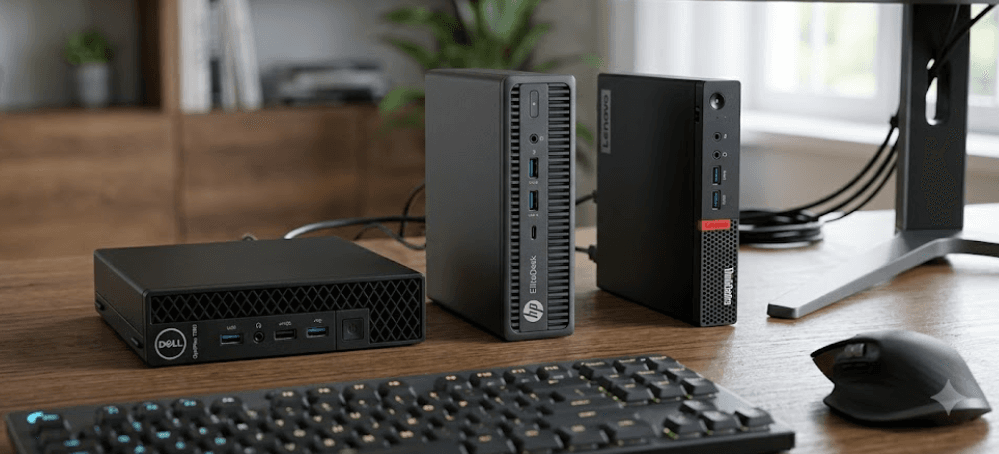
A tiny PC is a compact desktop computer designed to deliver everyday computing performance without taking up the space of a traditional desktop tower. Business-focused models such as Dell OptiPlex Micro, HP EliteDesk Mini, and Lenovo ThinkCentre Tiny are popular for office work, reception desks, classrooms, home offices, and digital signage. They can support productivity applications, multiple displays, and business management features, depending on the configuration. However, processor performance, memory capacity, storage, ports, and upgrade options vary by generation. If you are considering a tiny PC in 2026, compare the exact model and specifications rather than assuming every compact desktop offers the same capabilities.
What Is A Tiny PC?
A tiny PC is a small desktop computer that combines a processor, memory, storage, and essential connectivity in a compact enclosure. Unlike a conventional desktop tower, which needs space under or beside a desk, a tiny PC can sit next to a monitor or be mounted behind a compatible display using an appropriate mounting bracket. This makes it useful in offices where desk space is limited or where several computers must be installed in one location. Despite its size, a tiny PC can run a full desktop operating system and standard business applications, provided its hardware and software meet the requirements.
The term tiny PC is commonly used for compact business desktops, including systems marketed as Micro, Mini, or Tiny models. These names describe a product family or physical form factor, not a universal performance category. A newer compact desktop with a modern processor and sufficient memory may handle spreadsheets, video calls, browser-based applications, and multiple monitors comfortably. An older refurbished unit may still be useful for basic office work, but its performance, connectivity, and software support can be more limited. The generation and configuration matter more than the label.
Tiny PCs are particularly useful when a laptop's portability is unnecessary and a full-size desktop would be excessive. For example, a small business can use one to run billing software, manage inventory, or power a reception workstation. A home user can connect one to a monitor, keyboard, and mouse for everyday computing. However, a tiny PC is not automatically suitable for demanding gaming, complex 3D rendering, or intensive video production. Those workloads depend on the processor, graphics hardware, cooling capacity, and available memory.
How Does A Tiny PC Differ From A Traditional Desktop?
The main difference is physical design. A traditional tower generally offers more internal room for expansion, additional drives, larger cooling systems, and dedicated graphics cards. A tiny PC prioritizes a smaller footprint, which can simplify desk organization and deployment across multiple workstations. Some models provide upgradeable RAM and storage, but expansion options are typically more restricted than on a larger desktop.
| Feature | Tiny PC | Traditional Desktop Tower |
|---|---|---|
| Physical size | Compact enclosure | Larger chassis |
| Desk space | Minimal | Requires more room |
| Everyday office work | Suitable with appropriate specifications | Suitable with appropriate specifications |
| Internal expansion | Model-dependent and often limited | Usually more flexible |
| Dedicated graphics | Limited or unavailable on many models | More options |
| Typical use | Offices, home offices, kiosks | Office work, creative workloads, gaming, and expansion |
Dell OptiPlex Micro Explained
Dell OptiPlex Micro is part of Dell's business desktop range, designed for organizations that need compact computers for everyday workplace tasks. Depending on the generation, configurations may include Intel processors, integrated graphics, solid-state storage, business security features, and support for multiple displays. The small enclosure makes these systems practical for office desks, shared workstations, and environments where computers must be deployed consistently across many employees. For buyers considering refurbished business computers, an OptiPlex Micro can be an alternative to purchasing a new full-size desktop, provided its age and specifications match the intended workload.
One advantage of the OptiPlex Micro family is that some models offer replaceable memory modules rather than permanently soldered RAM. For example, Dell's official documentation for the OptiPlex Micro 7010 lists two SO-DIMM memory slots and configurations of up to 64GB of DDR4 memory. This is a specification for that particular model, not a guarantee that every OptiPlex Micro supports the same memory type or capacity. Buyers should check the service manual for the exact model before ordering RAM, especially when considering a used system with an unknown configuration.
For typical office workloads, an OptiPlex Micro with a suitable processor, 16GB of RAM, and an SSD can provide a responsive experience with documents, spreadsheets, email, web applications, and video meetings. More demanding tasks require closer evaluation of the processor generation, integrated graphics, cooling, and memory capacity. Refurbished units also deserve a careful inspection of their power adapter, ports, storage health, and operating-system eligibility. A low purchase price is useful only if the machine remains reliable and compatible with the applications you need.
What Should You Check Before Buying An OptiPlex Micro?
Start with the complete model number and processor generation. A name such as OptiPlex Micro does not tell you whether the computer uses an older processor or a more recent platform. Check the installed RAM, supported memory type, SSD capacity, display outputs, wireless connectivity, and available USB ports. If the PC will drive two or more monitors, confirm that its actual port combination supports your intended displays and resolutions.
Also consider serviceability and future use. A system with accessible SO-DIMM slots and a replaceable M.2 SSD may be easier to maintain than one with more restricted components, but compatibility varies by generation. Review the manufacturer's service documentation before planning upgrades, and verify the seller's warranty and return policy when purchasing refurbished hardware.
HP EliteDesk Mini Explained
HP EliteDesk Mini is another business-oriented compact desktop family intended for professional environments. Depending on the model, these computers can offer business-class processors, integrated graphics, configurable memory, SSD storage, and connectivity for monitors and workplace accessories. Their small size makes them suitable for administrative desks, customer service stations, meeting rooms, and other settings where a conventional desktop would take up unnecessary space. As with other business mini PCs, the actual experience depends on the configuration rather than the product family name alone.
Memory upgradeability is available on many EliteDesk and related HP Mini desktop models, but the exact specifications differ across generations. For example, HP's official specifications for the EliteDesk 805 G8 Desktop Mini list two customer-accessible SO-DIMM slots and support for up to 64GB of memory in the documented configurations. That information applies to the EliteDesk 805 G8, not every computer sold under the EliteDesk name. Before purchasing, check the exact model's support page to establish the maximum supported memory, compatible modules, processor options, and storage arrangements.
An EliteDesk Mini can be a practical choice for organizations that need compact workstations for office applications, web-based business software, and routine multitasking. Buyers evaluating refurbished models should consider the processor's age, the installed operating system, available security updates, and the condition of the cooling system. It is also worth checking whether the unit includes Wi-Fi and Bluetooth, since wireless features and included accessories can vary by configuration. For a deployment involving several computers, consistent model specifications can make maintenance and replacement easier.
Is An EliteDesk Mini Suitable For Business Use?
For general office work, it can be, provided the processor and memory meet the workload requirements. A configuration with an SSD and sufficient RAM can handle common productivity tasks without requiring a large desktop chassis. Businesses should also check whether the specific model provides the necessary management and security features, since these capabilities vary by hardware configuration and software edition.
For more demanding work, such as advanced design software, heavy media editing, or large data processing tasks, evaluate application requirements before choosing a mini PC. Compact systems can have tighter thermal and expansion limits than larger workstations. A business label alone does not mean a machine is certified or optimized for every professional application.
Lenovo ThinkCentre Tiny Explained
Lenovo ThinkCentre Tiny is a family of compact business desktops designed for space-conscious workplace deployments. Depending on the generation and configuration, these systems can be used for office productivity, educational computer labs, reception desks, shared workstations, and digital signage. The Tiny form factor makes it possible to place the computer on a desk or use compatible mounting accessories to position it out of the way. This can help organizations maintain a clean workspace without switching to a laptop for stationary computing.
Upgrade options vary across ThinkCentre Tiny models, so it is important to consult the relevant Lenovo product specifications reference, commonly known as PSREF. For example, Lenovo's documentation for the ThinkCentre M75q Tiny lists two DDR4 SO-DIMM slots and support for up to 32GB of memory in the documented configuration. Other ThinkCentre generations may support different memory standards or capacities. A buyer should never assume that a newer-looking chassis or the word Tiny guarantees compatibility with a particular RAM module or SSD.
ThinkCentre Tiny computers can be attractive for organizations that value compact installation, standard desktop connectivity, and a consistent fleet of business machines. When comparing refurbished units, check the processor, RAM configuration, SSD health, display outputs, power supply, and included accessories. A compact desktop that meets today's requirements can remain useful for everyday tasks, but an older model may have limitations involving performance, connectivity, or operating-system support. Those factors should be weighed alongside the initial purchase price.
What Makes ThinkCentre Tiny Worth Considering?
The strongest reason to consider a ThinkCentre Tiny is its combination of compact design and conventional desktop functionality. It can support a workstation setup with a full-size monitor, keyboard, and mouse while occupying relatively little space. Some models also provide accessible memory and storage components, making maintenance easier than on devices with more restricted internal designs.
However, buyers should compare specific models rather than choosing solely by brand. A ThinkCentre Tiny with an older processor may be less suitable for modern multitasking than a newer OptiPlex Micro or EliteDesk Mini, even if all three have similar dimensions. The best option is the system that offers the right balance of performance, serviceability, connectivity, warranty, and price.
OptiPlex Micro Vs EliteDesk Mini Vs ThinkCentre Tiny
These three product families target similar business needs, so there is no universal winner based on the brand name alone. Dell OptiPlex Micro, HP EliteDesk Mini, and Lenovo ThinkCentre Tiny all include compact desktop models, but available processors, memory capacities, storage options, and ports vary by generation. A fair comparison must use complete model numbers and comparable configurations rather than comparing a new system from one manufacturer with an older refurbished system from another.
For everyday productivity, prioritize a modern-enough processor, an SSD, and sufficient memory for the number of applications you use at once. For business deployments, warranty coverage, security support, manageability, and access to replacement parts can matter as much as benchmark performance. If you are purchasing refurbished units, also compare the condition, included power adapter, licensing status, and seller's return policy. A slightly more expensive computer may be better value if it comes with a stronger warranty or a more useful configuration.
| Product Family | Example Documented Model | Memory Information | Best Comparison Criteria |
|---|---|---|---|
| Dell OptiPlex Micro | OptiPlex Micro 7010 | Two SO-DIMM slots; up to 64GB DDR4 in the documented configuration | Processor generation, ports, upgrade options, support |
| HP EliteDesk Mini | EliteDesk 805 G8 Desktop Mini | Two SO-DIMM slots; up to 64GB in the documented configurations | Processor, memory, storage, warranty |
| Lenovo ThinkCentre Tiny | ThinkCentre M75q Tiny | Two DDR4 SO-DIMM slots; up to 32GB in the documented configuration | Processor, memory compatibility, ports, serviceability |
These examples illustrate why exact model identification matters. They are not a direct performance ranking, and the listed memory limits should not be applied to other generations. Check the manufacturer's documentation for the system you intend to buy before making a decision.
What To Check Before Buying A Tiny PC
The first step is to match the computer to the workload. For basic browsing, email, word processing, and office software, a modest modern processor, 16GB of RAM, and an SSD are a sensible starting point for a comfortable everyday experience. More demanding multitasking, software development, and specialist applications may justify 32GB of RAM or a faster processor. These are practical guidelines rather than fixed requirements, so check the specifications of the applications you plan to run.
Next, review the components and connectivity. Confirm whether the memory is upgradeable, how many storage devices the model supports, and whether the ports match your monitor and peripheral setup. Some tiny PCs use DisplayPort, HDMI, USB-C, or optional port modules, but the available combination depends on the model. Also check whether Wi-Fi, Bluetooth, and a compatible power adapter are included. If you intend to mount the system behind a monitor, confirm compatibility with the required mounting bracket and display.
Finally, consider the full cost of ownership. A refurbished tiny PC may offer good value, but an older processor, limited warranty, worn SSD, or unsupported operating system can reduce its usefulness. Check the manufacturer's support information for operating-system compatibility and security updates, and avoid assuming that every computer can run every current operating system simply because it meets the basic hardware requirements. Compare the purchase price with the cost of any RAM, storage, adapters, mounting accessories, or repairs you may need.
Common Uses For Tiny PCs
Tiny PCs are well suited to environments where a computer needs to remain in one place without dominating the workspace. In offices, they can power email, spreadsheets, customer records, and browser-based business applications. In schools and training rooms, they can provide compact workstations for lessons and computer-based assessments. In retail or hospitality settings, suitable configurations can run point-of-sale software, display menus, or support back-office tasks, subject to the software and peripheral requirements.
They can also work well for home offices and general household computing. A tiny PC connected to a monitor can handle web browsing, online banking, video calls, document editing, and media playback when its hardware supports those tasks. Users who want a small computer for a television or media center should check video outputs, supported resolutions, audio connections, wireless capability, and the software they intend to use. The small enclosure is convenient, but it does not guarantee silent operation or the same multimedia capabilities across all models.
Tiny PCs are less suitable when a workload depends on high-end dedicated graphics, extensive internal expansion, or sustained processing power beyond the system's thermal limits. Some specialized mini workstations offer stronger graphics and processors, but these should be assessed individually. If your main goal is gaming, advanced 3D work, or intensive video production, compare a tiny PC with a full-size desktop or workstation before buying. The right system is determined by the workload, not by how small the enclosure looks.
Frequently Asked Questions
Q. What is a tiny PC?
A tiny PC is a compact desktop computer designed to deliver standard computing functionality in a small enclosure. It connects to a monitor, keyboard, and mouse and can run supported desktop applications.
Q. Are Dell OptiPlex Micro computers upgradeable?
Some models are. For example, the OptiPlex Micro 7010 has two SO-DIMM memory slots, but upgrade options depend on the exact model and its specifications.
Q. Is HP EliteDesk Mini good for office work?
Yes, a suitably configured EliteDesk Mini can handle common office tasks such as documents, spreadsheets, email, and web applications. Processor generation, RAM, and storage determine its performance.
Q. Can Lenovo ThinkCentre Tiny run Windows?
Many ThinkCentre Tiny configurations support Windows, but compatibility depends on the exact model, hardware, and operating-system requirements. Check Lenovo's documentation before installing or purchasing a system.
Q. How much RAM does a tiny PC need?
For everyday multitasking, 16GB is a sensible starting point. More demanding workloads may benefit from 32GB or more, provided the specific system supports that capacity.
Q. Can a tiny PC support two monitors?
Many models can support multiple displays, but the number of screens, supported resolutions, and refresh rates depend on the available video outputs and graphics hardware.
Q. Is a tiny PC better than a laptop?
A tiny PC is useful for a stationary setup where portability is unnecessary. A laptop is better when you need a built-in display, keyboard, battery, and the ability to work away from a desk.
Q. Can you upgrade the SSD in a tiny PC?
Some tiny PCs support SSD replacement or expansion, but drive type, capacity, and the number of available slots vary. Check the manufacturer's service manual before buying an SSD.
Q. Are refurbished tiny PCs worth buying?
They can be good value if the processor, memory, storage, operating-system support, and condition suit your needs. Check the warranty, return policy, and included accessories before purchasing.
Q. Which tiny PC should I choose: Dell, HP, or Lenovo?
Compare the exact models rather than choosing by brand alone. Prioritize performance, upgradeability, ports, security support, warranty, and total cost for your intended workload.
Final Recommendation
A tiny PC is worth considering if you need a capable desktop for a small workspace and do not require the expansion options of a traditional tower. Dell OptiPlex Micro, HP EliteDesk Mini, and Lenovo ThinkCentre Tiny are all established business desktop families, but their specifications differ significantly across generations. For a typical office or home workstation, look for a suitable processor, 16GB of RAM, an SSD, the right display outputs, and a warranty that matches your expectations.
If you plan to keep the computer for several years, confirm memory and storage upgrade options before buying. For refurbished systems, prioritize supported hardware and operating-system compatibility over the lowest advertised price. The best tiny PC is not necessarily the smallest or cheapest model. It is the one that handles your daily workload reliably, connects to your equipment, and offers the right balance of performance, serviceability, and long-term value.
Ready to upgrade your tech?
Browse our collection of quality refurbished products at unbeatable prices.






