
What Does "Quantum Dot" Actually Mean on a Budget 4K QLED TV?
Discover what quantum dots actually do in a budget 4K QLED TV, how they affect color and brightness, and which specifications matter more when choosing your next television.

TL;DR: Quantum dots are tiny semiconductor particles that help a QLED television produce a wider, more precise range of colors by converting light from its backlight into specific colors. On a budget 4K QLED TV, this can make animated films, nature documentaries, sports, and HDR content look more vivid than they might on a comparable conventional LED TV. However, quantum dots do not automatically guarantee excellent picture quality, deep blacks, high brightness, or premium HDR performance. Those qualities also depend on the backlight, contrast performance, panel type, brightness, image processing, and local dimming capabilities. Before buying, look beyond the QLED label and compare the actual specifications that affect your viewing experience.
What Quantum Dot Actually Means on a QLED TV
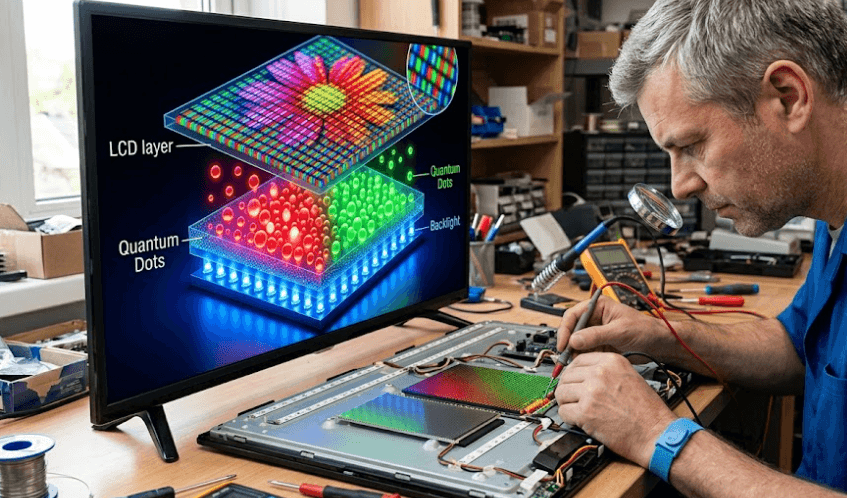
Quantum dots are nanoscale semiconductor materials that interact with light in a controlled way. Their optical properties depend partly on their size, allowing them to emit particular wavelengths of light when excited by an appropriate light source. In many QLED televisions, a quantum dot layer converts light from the backlight into more precisely defined colors. The display then combines red, green, and blue light to reproduce the colors in a picture. Samsung and TCL describe quantum dot technology as a way to improve color reproduction and expand the range of colors a television can display.
For a budget television, the practical benefit is that colors can appear richer and more distinct, particularly in bright scenes. Think of a nature documentary showing a green forest, a blue ocean, or a sunset with several shades of orange and red. A capable quantum dot display can reproduce a broader range of these colors than a comparable conventional LED television with a more limited color gamut. The difference depends on the specific models being compared, however, so the QLED label alone cannot tell you how noticeable the improvement will be.
It is also important to understand that QLED does not mean the television has the same self-emitting pixels as an OLED TV. Most conventional QLED televisions are LCD televisions that use an LED backlight and a quantum dot layer to improve colour performance. The backlight illuminates the display, while the LCD panel controls how much light passes through each pixel. This distinction matters because quantum dots primarily improve colour, whereas black levels, contrast, and motion performance depend on other parts of the display system.
How Quantum Dots Work in Everyday Viewing?
The simplest way to understand quantum dots is to think of them as a colour-conversion layer. They help a television produce more precisely defined colours from the light supplied by its backlight. This can be especially useful when watching colourful films, animated content, sports, and compatible HDR programmes, where the range of colours in the source material may exceed what a basic display can reproduce.
| Display feature | What it means for you |
|---|---|
| Quantum dot layer | Helps produce a wider range of colors |
| LED backlight | Supplies the light used to form the picture |
| LCD panel | Controls how light passes through the pixels |
| 4K resolution | Provides approximately 8.3 million pixels |
| HDR support | Allows compatible content to use a wider brightness and color range, depending on the TV |
Why Quantum Dot Matters on a Budget 4K TV
Quantum dot technology was once strongly associated with more expensive televisions, but it is now available in more affordable models. This gives buyers an opportunity to get improved colour performance without necessarily paying flagship prices. For households upgrading from an older Full HD television or a basic LED model, a budget 4K QLED TV may offer a noticeable improvement in colour reproduction, resolution, and access to modern smart TV features. The actual improvement will depend on the quality of the particular television rather than its technology label alone.
The difference is often easiest to notice when the content contains bright, saturated colours. Sports broadcasts, animated films, travel videos, and colourful streaming shows can benefit from a wider colour gamut. A quantum dot layer can also help a television maintain more convincing colours at higher brightness levels, provided the rest of the display is capable of delivering that brightness. This is one reason quantum dot technology is useful for HDR viewing, although the technology alone does not guarantee a strong HDR experience.
However, budget televisions still involve compromises. A manufacturer may prioritise a larger screen, a competitive price, or smart features while using a relatively simple backlight and a standard 60Hz panel. Such a television may offer pleasing colours but struggle with dark movie scenes, reflections in a sunny room, or fast-moving sports. When comparing televisions, consider quantum dots as one useful part of the picture-quality package, not as proof that the entire television is premium.
What You Gain and What You Do Not
The main advantage of quantum dots is improved colour reproduction. They do not independently determine resolution, refresh rate, black levels, viewing angles, or sound quality. Those features must be evaluated separately, particularly when comparing televisions at similar prices.
| Feature | What quantum dots contribute | What to check separately |
|---|---|---|
| Color | Can expand color gamut and improve color precision | Independent reviews and color performance |
| Brightness | Can support efficient color production at higher brightness | Measured peak and sustained brightness |
| Contrast | No automatic guarantee of better contrast | Native contrast and local dimming |
| HDR | Can improve color reproduction in HDR content | HDR format support and actual brightness |
| Gaming | No direct guarantee of smoother gameplay | Refresh rate, input lag, VRR and HDMI features |
Does a Budget QLED TV Deliver Better Picture Quality?
A budget QLED television can deliver better colour performance than a comparable standard LED television, but it is not automatically better in every situation. The quantum dot layer can help the display reproduce vivid colours, while the backlight and LCD panel determine how well it handles brightness and contrast. A model with good colour performance but weak black levels may still look less convincing during a dark film than a competing television with better contrast. Picture quality comes from how these components work together.
Brightness is particularly important if your television will sit in a living room with large windows or strong daytime lighting. A bright display can make highlights easier to see, but advertised brightness figures need context. Peak brightness may be measured only in specific conditions or for small portions of the image. Sustained brightness, screen reflections, and the picture mode also influence what you see at home. Quantum dots can help maintain vivid colours at higher brightness, but they cannot compensate for an underpowered backlight.
Resolution is another separate consideration. A 4K television has a resolution of 3840 × 2160 pixels, but resolution alone does not guarantee a sharper-looking picture in every situation. The quality of the source video, scaling, sharpening, viewing distance, and overall image processing all matter. If you mostly stream compressed videos or watch standard-definition television channels, a good upscaling system may make a greater practical difference than the QLED label.
Features Worth Checking Before You Buy
Check the complete specification sheet rather than relying on marketing terms. Look for measured brightness information in credible reviews, local dimming details, supported HDR formats, refresh rate, and the number of HDMI ports. If you watch films in a dark room, contrast and black-level performance deserve particular attention. If you watch television during the day, brightness and reflections become more important.
Also distinguish native 4K content from upscaled content. Upscaling can improve the appearance of lower-resolution video, but it does not turn the source into genuine native 4K detail. Similarly, HDR compatibility means the television can accept a supported HDR signal; it does not prove that the screen has enough brightness or contrast to reproduce the full intended effect.
Quantum Dot vs Standard LED vs OLED
Comparing display technologies helps explain where a budget QLED television fits. A standard LED TV generally uses an LCD panel illuminated by an LED backlight. A QLED TV typically adds quantum dot technology to improve color reproduction while still relying on an LCD panel and backlight. OLED works differently: its pixels emit their own light and can switch off individually, allowing it to produce very deep blacks without a conventional backlight.
For many budget-conscious households, QLED offers a useful middle ground. It can provide more vibrant colors than some basic LED models without requiring the cost of a premium OLED television. However, an entry-level QLED model with limited brightness and no effective local dimming may not deliver the contrast or HDR impact of a more advanced display. The name identifies a technology, not a guaranteed quality level.
OLED is often attractive for movie enthusiasts who watch in dim rooms and value deep blacks, while QLED can be appealing to viewers who prefer vivid colors and a bright picture. Neither label should replace model-specific comparisons. A well-designed television using one technology can outperform a poorly implemented alternative in important areas.
| Feature | Standard LED TV | Budget QLED TV | OLED TV |
|---|---|---|---|
| Display structure | LCD with LED backlight | LCD with LED backlight and quantum dot layer | Self-emissive pixels |
| Color reproduction | Depends on panel and backlight | Can offer a wider color gamut | Depends on panel generation and processing |
| Black levels | Depend on contrast and dimming | Depend on contrast and dimming | Excellent pixel-level black control |
| Bright-room use | Depends on brightness and reflections | Can be a strong option if sufficiently bright | Depends on model brightness and reflections |
| Typical value proposition | Affordable everyday viewing | Enhanced color at a range of prices | Strong contrast and premium picture quality |
How to Choose the Right Budget 4K QLED TV
Start with how you actually watch television. If your household mainly watches streaming shows, cricket, YouTube, and general entertainment, a budget QLED TV with good color performance, reliable smart software, and adequate brightness may be a sensible purchase. You may not need advanced local dimming or a high refresh rate if you rarely watch demanding HDR films or play fast-paced games. Choosing features that match your routine is a better way to control costs than paying extra for specifications you will seldom use.
If you watch films at night, pay closer attention to contrast, black uniformity, and local dimming. Local dimming allows parts of a backlight to dim independently, which can improve contrast on supported LCD televisions. Not every QLED television includes it, and the quality of implementation varies. A model without local dimming can still have vivid colors but may show grey-looking blacks in a dark room. Independent reviews can reveal these limitations more clearly than a product page.
Gamers should also look beyond quantum dots. Check whether the TV has a native 60Hz or 120Hz panel, whether it supports variable refresh rate (VRR), and which gaming features are available over its HDMI ports. These features vary by model and price. For everyday console gaming, a good 4K 60Hz TV may be sufficient; competitive players may benefit from a higher refresh rate and lower input lag. Do not assume a QLED badge means the television includes premium gaming hardware.
A Practical Buying Checklist
| Your priority | What to look for |
|---|---|
| Streaming and everyday viewing | Reliable smart platform, 4K resolution and good upscaling |
| Bright living room | Strong measured brightness and effective reflection handling |
| Movies at night | Good contrast, black levels and local dimming where available |
| Sports | Motion handling and a suitable native refresh rate |
| Gaming | Low input lag, supported VRR and appropriate HDMI features |
| HDR films | Supported HDR formats, real brightness capability and contrast |
Common Misconceptions About Quantum Dot TVs
One common misconception is that every QLED TV produces the same level of picture quality. In reality, quantum dot implementation, backlight design, panel quality, and image processing vary across models. The QLED label indicates the use of quantum dot technology, but it does not tell you how wide the color gamut is, how accurately the TV reproduces colors, or how well it handles dark scenes. When possible, consult independent reviews that measure picture quality instead of relying solely on brand descriptions.
Another misconception is that quantum dots automatically make a television brighter than every standard LED model. Quantum dots can improve the efficiency of color production and help a display maintain saturated colors at higher brightness, but the television's light source and design still determine its output. A budget QLED model can be less bright than a well-designed LED television. Similarly, HDR support does not guarantee impressive HDR performance, because the result depends on brightness, contrast, tone mapping, and the content being played.
Finally, 4K and QLED describe different things. 4K refers to resolution, while QLED refers to display technology. A television can have 4K resolution without quantum dots, and quantum dot televisions are available at different resolutions and price points. Understanding this distinction makes it easier to compare specifications accurately and avoid paying extra for a label that does not address your main viewing needs.
Final Recommendation
A budget 4K QLED TV can be a worthwhile upgrade if you want richer colors and a more vibrant viewing experience without moving into a premium price bracket. Quantum dots help the television reproduce a wider range of colors, making them especially useful for colorful films, sports, animation, and compatible HDR content. The benefit is real, but its visibility depends on the quality of the full display system and the content you watch.
Before buying, compare brightness, contrast, local dimming, HDR format support, refresh rate, smart TV software, and warranty coverage. Read independent reviews for the exact model, especially if you watch films in a dark room or use the television for gaming. Do not assume that every QLED TV is better than every standard LED TV, or that the quantum dot layer guarantees premium HDR performance.
The final recommendation is to treat quantum dots as a meaningful color feature, not a complete quality rating. If two televisions are similarly priced, choose the one that combines convincing color reproduction with strong contrast, sufficient brightness, dependable software, and the features your household will actually use. That approach will help you buy a better television rather than simply a better-sounding specification.
Frequently Asked Questions
Q. What does quantum dot mean on a budget 4K QLED TV?
Quantum dot refers to a layer of nanoscale semiconductor materials that helps a television produce more precise colors. In a typical QLED TV, these particles convert light from the backlight into specific colors, helping expand the display's color range. The final picture quality still depends on the panel, brightness, contrast, and image processing.
Q. Is a budget QLED TV better than a regular LED TV?
A budget QLED TV can deliver richer colors than a comparable standard LED TV, but it is not automatically better in every respect. Contrast, brightness, motion handling, and image processing vary between models. Compare independent reviews and complete specifications before deciding which television offers better value.
Q. Does quantum dot technology improve 4K resolution?
No. Quantum dot technology primarily improves color reproduction, while 4K refers to resolution. A 4K television has a resolution of 3840 × 2160 pixels. Quantum dots do not add pixels or convert lower-resolution content into native 4K, although separate upscaling technology can improve how lower-resolution video looks.
Q. Do all QLED TVs support HDR?
No. HDR support depends on the television's specifications. Even when a TV supports HDR formats, the actual experience depends on brightness, contrast, color reproduction, and tone mapping. Check the supported formats and independent picture-quality tests rather than assuming that QLED automatically means excellent HDR performance.
Q. Are quantum dot TVs good for watching cricket and other sports?
They can be. Quantum dots help produce vivid colors, which can make green fields, team uniforms, and colorful broadcasts look more appealing. However, smooth motion also matters. Check the TV's native refresh rate and motion handling, especially if you watch fast-paced sports regularly.
Q. Is QLED better than OLED for watching movies?
Neither technology is universally better. QLED can offer vivid colors and strong brightness, depending on the model. OLED can produce exceptionally deep blacks because its pixels emit light individually. If you watch movies in a dark room, OLED's contrast may be especially appealing, while a sufficiently bright QLED can work well in a brighter living room.
Q. Does quantum dot technology make a TV brighter?
Quantum dots can help a display produce saturated colors efficiently, including at higher brightness levels. However, they do not determine the television's maximum brightness on their own. The backlight, panel design, and power management also matter.
Ready to upgrade your tech?
Browse our collection of quality refurbished products at unbeatable prices.






