Video Frame Rates and the 180-Degree Shutter Rule: 24 vs 30 vs 60fps
Understand 24fps, 30fps and 60fps, how frame rate affects motion, and how the 180-degree shutter rule helps you choose the right shutter speed.

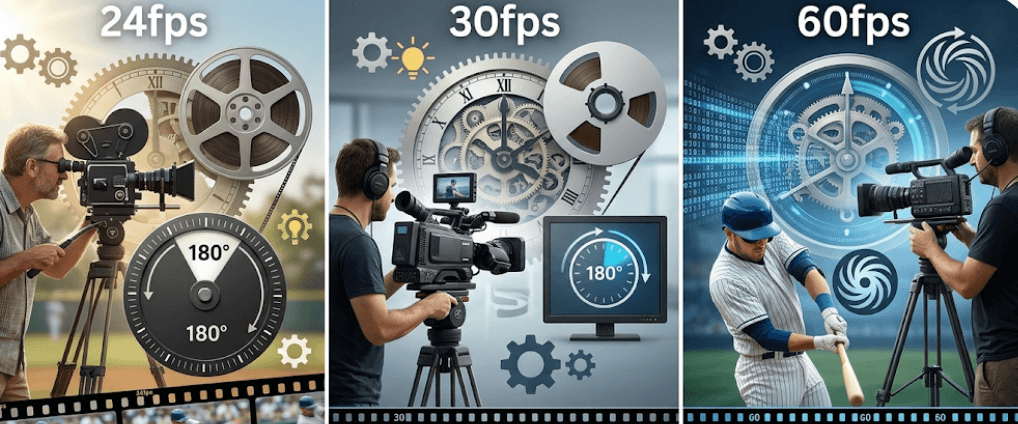
TL;DR: Choosing between 24fps, 30fps, and 60fps changes how motion looks and how much flexibility you have in editing. 24fps is widely associated with a cinematic look, 30fps gives smoother real-time motion and works well for general online content, while 60fps is useful for fast action and slow-motion playback. For natural-looking motion blur, the 180-degree shutter guideline recommends an exposure time of about 1/48 second at 24fps, 1/60 at 30fps, and 1/120 at 60fps. These are starting points rather than strict rules, and your final choice should depend on the subject, lighting, delivery format, and creative intent.
What Is Frame Rate In Video?
Frame rate refers to the number of individual frames a camera records or a video displays every second. It is expressed as frames per second, or fps. A video recorded at 24fps contains 24 individual frames for every second of footage, while 60fps contains 60. The more frames captured each second, the more frequently motion is sampled.
Frame rate is not the same thing as shutter speed. Frame rate determines how often frames are captured, while shutter speed determines how long each individual frame is exposed to light. Because shutter speed affects motion blur, the two settings work closely together. Changing only the frame rate without considering shutter settings can produce footage that looks very different from what you expected.
For example, 24fps can give footage a familiar film-style cadence, while 60fps captures considerably more motion samples and can appear smoother. However, higher frame rates are not automatically better. They can require more light and may create larger amounts of data, depending on the camera's recording format and bitrate.
24fps Vs 30fps Vs 60fps
The three frame rates are useful for different shooting situations. 24fps is commonly associated with cinema and narrative filmmaking, 30fps is widely used for general video and broadcast-style content, and 60fps is particularly useful when you want smoother motion or plan to create slow-motion footage. Sony notes that 24p is closer to the frame rate traditionally associated with theatrical film, while 30p and 60p are also common recording formats.
The difference becomes more noticeable when the camera or subject moves. At 24fps, quick pans can appear less smooth, particularly if the camera movement is too fast. At 30fps, there are more frames available to represent movement, making motion appear somewhat smoother. At 60fps, movement is sampled much more frequently, which makes it especially useful for sports, gaming, dance, action, and other fast-moving subjects.
There is also an important editing advantage to 60fps. If 60fps footage is placed on a 30fps timeline and played back at half speed, it can produce smooth 30fps slow motion because every recorded frame can be used. Similarly, 60fps footage can be slowed to 24fps for a slow-motion effect, although the exact playback speed and frame-handling method depend on the editing workflow.
| Frame Rate | Typical Look | Common Uses | 180° Shutter |
|---|---|---|---|
| 24fps | Cinematic, natural motion blur | Films, storytelling, controlled B-roll | 1/48 sec |
| 30fps | Smooth real-time motion | Interviews, tutorials, online video | 1/60 sec |
| 60fps | Very smooth motion | Sports, gaming, action, slow motion | 1/120 sec |
How The 180-Degree Shutter Rule Works
The 180-degree shutter rule is a guideline for achieving natural-looking motion blur. Its name comes from the rotating mechanical shutters used in traditional film cameras. A 180-degree shutter means the shutter is open for half of each frame's interval. In digital cameras, the same concept can be represented using either shutter angle or shutter speed.
The mathematical relationship is straightforward: exposure time ≈ 1 ÷ (2 × frame rate). At exactly 24fps, a 180-degree shutter corresponds to 1/48 second. At 30fps, it becomes 1/60 second, while 60fps corresponds to 1/120 second. Since many cameras do not offer 1/48, 1/50 is a common practical setting for 24fps. Sony also lists 1/50 as the practical shutter speed for 24p on many cameras.
Following this guideline gives moving subjects a moderate amount of blur between frames. If the shutter is much faster, each frame becomes sharper and motion can take on a noticeably staccato or jittery appearance. If the shutter is much slower, moving objects can produce excessive blur. The 180-degree rule therefore provides a useful starting point, but it is not a rule that must never be broken.
24fps And The 180-Degree Shutter
Shooting at 24fps is a popular choice when you want a film-style visual cadence. At a true 180-degree shutter, the mathematical exposure time is 1/48 second. Since many cameras provide 1/50 rather than 1/48, 1/50 is generally used as the closest practical setting. This combination produces the amount of motion blur many viewers associate with conventional cinematic footage.
24fps can work particularly well for narrative scenes, interviews, lifestyle videos, cinematic B-roll, short films, and controlled camera movements. It is not automatically "more cinematic," however. Lens choice, lighting, composition, camera movement, color, production design, and shutter settings all contribute to the overall appearance of footage.
One limitation is fast camera movement. A rapid pan at 24fps can appear noticeably choppy, especially when combined with certain shutter settings. Sony recommends slower, smoother panning when recording at lower frame rates and notes that higher frame rates can provide better coverage of fast movement with reduced motion blur.
30fps And The 180-Degree Shutter
At 30fps, the 180-degree shutter guideline gives an exposure time of 1/60 second. This is one of the simplest combinations for creators to remember because 30fps and 1/60 are widely supported by cameras, smartphones, and other video devices. It provides a little more temporal sampling than 24fps while retaining a natural amount of motion blur.
30fps is a practical choice for interviews, tutorials, educational videos, corporate content, product demonstrations, social media videos, and general-purpose online content. It can also be useful when your footage contains moderate camera movement and you want a slightly smoother appearance without moving all the way to 60fps.
The choice between 24fps and 30fps is therefore less about one being objectively superior and more about the intended viewing experience. If your project is designed around a conventional cinematic cadence, 24fps may make more sense. If the priority is general-purpose video with slightly smoother motion, 30fps is often a practical option.
60fps And The 180-Degree Shutter
At 60fps, the 180-degree shutter guideline corresponds to 1/120 second. Because each frame is exposed for less time than at 24fps or 30fps, maintaining the same overall exposure requires more light or another exposure adjustment. Blackmagic Design specifically notes that higher frame rates reduce the amount of time available for each frame to collect light.
The major advantage of 60fps is its ability to capture fast movement with more temporal information. Sports, gaming, dance, action scenes, wildlife, automotive footage, and other fast-moving subjects can benefit from the additional frames. It is also useful when you know that some footage will be slowed down during editing.
However, shooting everything at 60fps is not automatically the best approach. You may need more light, and the resulting footage can consume more storage depending on the recording settings. If your final video will be delivered at 24fps or 30fps and you do not need slow motion, recording at 60fps may offer little practical benefit.
How Frame Rate Changes Motion Blur And Exposure
Frame rate and shutter angle are connected. When you maintain a 180-degree shutter, increasing the frame rate decreases the exposure time for each frame. Moving from 30fps at 1/60 to 60fps at 1/120 cuts the exposure time in half, which means the sensor receives roughly one stop less light from shutter exposure alone. Blackmagic Design explains the same relationship when discussing high-frame-rate recording.
If you need to maintain exposure at a higher frame rate, you can compensate using additional light, a wider aperture, higher ISO or gain, or a wider shutter angle where appropriate. Each option has trade-offs. Opening the aperture changes depth of field, increasing ISO can introduce more noise, and adding light may not always be practical. In bright outdoor scenes, an ND filter can be useful when you want to maintain a particular shutter speed and aperture.
Lighting frequency should also be considered, particularly when shooting indoors. Artificial lights can flicker depending on their design, driver electronics, dimming system, and local power frequency. This is one reason creators should test their camera settings under the actual lighting they plan to use rather than assuming that one frame rate will work perfectly everywhere.
Which Frame Rate Should You Choose?
The easiest way to choose a frame rate is to start with the final purpose of the video, rather than automatically selecting the highest number available. For cinematic storytelling, 24fps is a strong starting point. For interviews, tutorials, presentations, and general online video, 30fps can be a practical choice. For fast action or footage intended for slow motion, 60fps is often more useful.
You should also consider your final timeline and delivery frame rate before recording. If you know your project will be edited and delivered at 24fps, shooting the majority of your footage at 24fps keeps the workflow straightforward. If the project is designed around 30fps, recording your main footage at 30fps avoids unnecessary frame-rate conversions.
For mixed projects, you can deliberately combine frame rates. For example, a creator might shoot an interview at 30fps and capture supporting action footage at 60fps for slow-motion inserts. The important point is to understand how the footage will be interpreted in the edit. A higher frame rate should be chosen for a specific reason, not simply because the camera offers it.
| Shooting Goal | Recommended Starting Point | Shutter Guideline |
|---|---|---|
| Cinematic storytelling | 24fps | 1/48 or 1/50 |
| Interviews and tutorials | 30fps | 1/60 |
| General online content | 30fps | 1/60 |
| Sports and fast action | 60fps | 1/120 |
| Slow-motion footage | 60fps or higher | Based on capture fps |
| Intentional crisp/staccato motion | Varies | Faster than 180° |
Common 180-Degree Shutter Mistakes
One common mistake is thinking that the 180-degree shutter rule means setting the shutter speed to twice the numerical fps value. Technically, that wording is misleading. At 30fps, for example, the shutter speed is not 1/60 because "60 is twice 30" in a direct speed comparison. The actual relationship is that the exposure time is approximately 1 divided by twice the frame rate. That distinction becomes important when explaining the rule accurately.
Another mistake is treating 180 degrees as an unbreakable filmmaking law. It is a guideline for a particular motion-blur appearance. A faster shutter can intentionally produce sharper, more staccato movement, which may be useful for action or certain visual styles. A wider shutter angle can produce more motion blur. Adobe and Blackmagic both describe shutter settings as tools that can be adjusted for creative and exposure purposes.
Finally, do not assume that 60fps automatically makes every video look better. Higher frame rates can require more light and storage, and the smoother appearance may not suit every project. A well-exposed 24fps or 30fps video with appropriate motion blur can look considerably better than poorly exposed 60fps footage. The right setting is the one that supports the intended movement, mood, lighting, and delivery format.
Frequently Asked Questions
Q. What is the best frame rate for cinematic video?
24fps is a common starting point for cinematic and narrative video because it has a long-established association with film-style motion.
Q. What shutter speed should I use for 24fps?
For a 180-degree shutter, the exact exposure time is 1/48 second. Since many cameras offer 1/50 instead, 1/50 is commonly used.
Q. What shutter speed should I use for 30fps?
Use approximately 1/60 second when following the 180-degree shutter guideline.
Q. What shutter speed should I use for 60fps?
Use approximately 1/120 second for a 180-degree shutter.
Q. Is 60fps better than 24fps?
Not necessarily. 60fps captures more frames and is useful for fast movement and slow motion, while 24fps can be better suited to cinematic storytelling.
Q. Can I shoot 60fps and export at 30fps?
Yes. 60fps footage can be used on a 30fps timeline and can also be slowed to half speed for smooth slow motion.
Q. Why does high frame rate video need more light?
At the same 180-degree shutter angle, higher frame rates use shorter exposure times for each frame. This reduces the amount of light collected per frame.
Q. Does the 180-degree shutter rule always have to be followed?
No. It is a useful starting guideline for natural-looking motion blur. You can intentionally use different shutter settings for creative effects or specific shooting conditions.
Q. Why does my 24fps video look choppy?
Fast camera movements, particularly rapid pans, can look choppy at 24fps. Slower and smoother camera movement can help.
Q. Should I always record at the highest fps my camera supports?
No. Choose the frame rate based on the final video, desired motion, lighting, storage requirements, and whether you need slow motion.
Final Recommendation
For most creators, there is no single frame rate that should be used for every video. Start with 24fps for cinematic storytelling, 30fps for general-purpose content, and 60fps when you need smoother action or slow motion. Then use the 180-degree shutter guideline as your starting point: approximately 1/48 or 1/50 at 24fps, 1/60 at 30fps, and 1/120 at 60fps.
The most important takeaway is that frame rate and shutter speed should be considered together. A "cinematic" look does not come from choosing 24fps alone, and a "professional" video does not require 60fps. Choose the frame rate intentionally, maintain appropriate motion blur, account for lighting, and make your settings fit the way the final video will actually be viewed.
Ready to upgrade your tech?
Browse our collection of quality refurbished products at unbeatable prices.