
Using Canon EF Lenses on Sony Mirrorless Cameras: Adapter Guide
Keep your Canon EF lenses when switching to Sony mirrorless. Learn how electronic adapters work, compare compatibility and autofocus limitations, and choose the right adapter for your camera and shooting style.

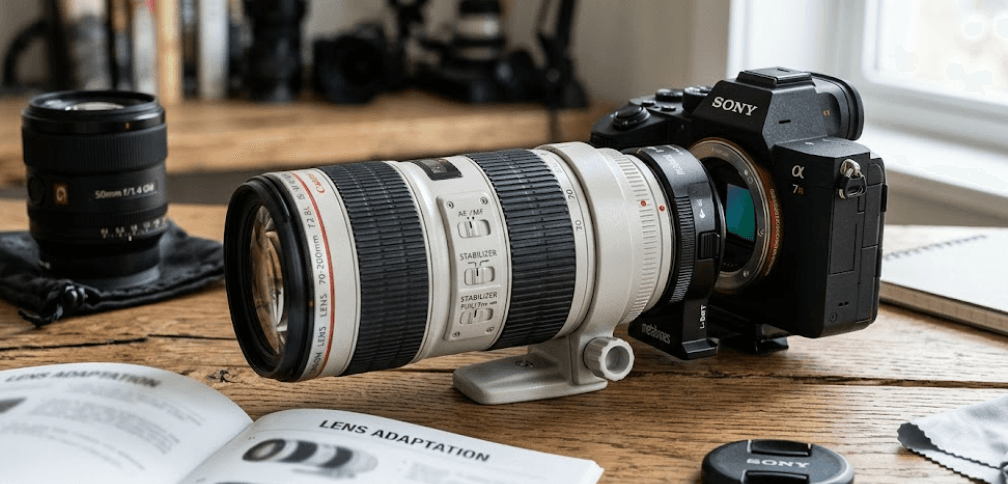
TL;DR: You can use Canon EF lenses on Sony mirrorless cameras with a compatible Canon EF-to-Sony E-mount adapter. An electronic adapter, such as the Metabones EF-to-E Smart Adapter, can preserve functions such as aperture control, lens communication, and autofocus, depending on the lens, adapter, and camera body. However, autofocus tracking, stabilization, and video performance may not match those of native Sony E-mount lenses. Before buying an adapter, check the exact lens and camera compatibility list, especially if you shoot moving subjects or record video. For photographers who already own quality Canon EF lenses, adapting them can be a practical way to move to Sony without replacing their entire lens collection at once.
Understanding Canon EF Lens Compatibility With Sony Cameras
Canon EF lenses were designed for Canon's EF-mount camera system, while Sony mirrorless cameras use the E-mount. Because the two systems have different mount designs and flange distances, a Canon EF lens cannot attach directly to a Sony E-mount camera. A compatible adapter bridges the physical distance and provides the connection needed to mount the lens safely. This makes it possible to reuse existing Canon glass on Sony Alpha cameras and compatible Sony mirrorless video cameras without purchasing a new lens for every focal length.
Using an adapter does not automatically make a Canon lens behave exactly like a native Sony lens. Electronic communication depends on the adapter's design, firmware, lens model, and camera body. Some combinations support autofocus and electronic aperture control, while others may have slower focusing, limited tracking, or functions that do not work at all. Sony also warns that third-party lenses and adapters may not support every camera function, so compatibility should be checked before purchase rather than assumed from the mount name alone.
Canon EF vs. EF-S Lenses
Canon EF lenses are designed for full-frame coverage, although they can also be used on compatible crop-sensor cameras. Canon EF-S lenses are designed for Canon APS-C DSLRs and cover a smaller image circle. Some EF-to-E adapters support both types, but compatibility varies by product. On a Sony full-frame camera, an EF-S lens may require APS-C crop mode or produce dark corners if the image circle does not cover the sensor. On a Sony APS-C camera, coverage may be more straightforward, but the exact adapter and lens still need to be checked.
Choosing the Right Canon EF-to-Sony E Adapter
The most important distinction is between a simple mechanical adapter and an electronic adapter. A mechanical adapter provides the physical connection but does not translate electronic signals between the lens and camera. Because Canon EF lenses rely on electronic communication for aperture control, focus, and other functions, a basic mechanical adapter is generally not sufficient for normal operation with an EF lens. An electronic adapter is the more practical option when you want to retain as many automatic features as possible.
Metabones offers Canon EF-to-Sony E Smart Adapters designed to provide electronic communication, autofocus support on specified combinations, aperture control, and lens information. These features can make adapting Canon lenses useful for still photography and selected video workflows. However, advertised features should not be interpreted as universal guarantees. Metabones documents specific limitations, and Sony states that it cannot guarantee the full functionality of third-party adapters. Always check the manufacturer's compatibility information for your exact camera and lens before spending money.
Adapter Options Compared
| Adapter Type | Main Purpose | What to Check |
|---|---|---|
| Electronic EF-to-E Smart Adapter | Retains supported electronic lens functions | Autofocus, aperture control, firmware, and camera compatibility |
| Mechanical adapter | Provides a physical mount connection | EF electronic functions generally will not operate normally |
| EF-to-E Speed Booster | Uses optics to alter the effective field of view and light transmission | Lens coverage, optical quality, crop factor, and autofocus support |
| Sigma MC-11 | Adapts compatible Sigma lenses in Canon EF mount to Sony E | Sigma lens compatibility and documented AF limitations |
The Sigma MC-11 deserves particular attention because it is often mentioned in discussions about adapting EF-mount lenses. Sigma describes it primarily as a mount converter for compatible Sigma lenses in Canon EF mount or Sigma SA mount, rather than a universal adapter guaranteed to work with every Canon EF lens. Its compatibility documentation specifies supported lenses and operating limitations. If you own Canon-branded EF lenses, verify the manufacturer's compatibility information carefully and consider an adapter specifically designed for Canon EF-to-Sony E use.
Autofocus, Aperture, and Image Stabilization
Autofocus is often the deciding factor when photographers consider adapting Canon EF lenses. With a compatible electronic adapter, autofocus may work for still photography, and some combinations also support continuous autofocus. However, performance depends on the lens motor, adapter firmware, camera generation, and focusing mode. A lens that focuses reliably on a Canon DSLR may behave differently on a Sony body, particularly when tracking a moving subject. For portraits, landscapes, and relatively still subjects, the limitations may be manageable. For sports, wildlife, or fast-moving events, testing the exact combination is much more important.
Electronic aperture control is another essential feature. Many Canon EF lenses use electronic communication to adjust the aperture, so a suitable electronic adapter is needed to change the f-number from the camera body. Depending on the adapter, the camera may also record lens information in image metadata. These functions are useful for photographers who want to retain a familiar workflow, but support varies. Before a paid shoot, confirm that the aperture changes correctly across the lens's range and that the camera displays the expected settings.
Does Image Stabilization Work?
Canon lenses with optical image stabilization, commonly labeled IS, may retain stabilization when used with a compatible electronic adapter. Whether that stabilization works alongside Sony's in-body image stabilization depends on the adapter, lens, and camera. Some adapters offer controls for choosing between lens-based and in-body stabilization, but this is not universal. Test stabilization at the focal lengths and shutter speeds you actually use, and check the adapter manual for any restrictions. For video, listen for focusing or aperture noise as well, since mechanical sounds from an adapted lens can be picked up by an onboard microphone.
Using Adapted Canon Lenses for Photography and Video
For still photography, adapting Canon EF lenses can be a sensible way to keep using lenses you already own. A sharp portrait lens, a macro lens, or a standard zoom may continue to deliver useful image quality on a Sony body when the adapter and lens combination is compatible. The optical design of the lens does not automatically change simply because it is adapted. However, autofocus behavior, metadata, and camera corrections may differ, so image quality and functionality should be evaluated separately rather than treating the adapter as a guarantee of identical performance.
Video work requires more careful testing. Continuous autofocus can be less predictable with some adapted lenses, and focus transitions may not look as smooth as they do with a native Sony lens. Aperture changes can also be audible on certain combinations, which matters when recording dialogue with a camera-mounted microphone. Manual focus can be a reliable alternative for interviews, product videos, and controlled scenes, provided the lens's focus ring behaves well with the adapter. For run-and-gun recording, where subjects and distances change quickly, a native E-mount lens is often the safer choice.
Practical Compatibility Checklist
Before using an adapted lens for an important assignment, test autofocus in both single-shot and continuous modes, where supported. Check aperture control, image stabilization, EXIF information, and any camera features you rely on. Update the adapter firmware only according to the manufacturer's instructions, and confirm whether the update supports your camera and lens. If you are recording video, test autofocus transitions, focus noise, and stabilization in the actual recording format. A short test at home can reveal problems that would otherwise appear during a paid shoot.
Common Mistakes When Adapting Canon EF Lenses
One common mistake is choosing an adapter based only on its price or the claim that it supports autofocus. Compatibility is rarely identical across every Canon EF lens and Sony camera. Older lenses, third-party EF-mount lenses, and certain t can behave differently from the manufacturer's best-tested examples. A listing that says “autofocus supported” does not necessarily mean that every autofocus mode works at the same speed or reliability as it would with a native lens. Check the exact compatibility list and read the limitations before y.
Another mistake is expecting a Speed Booster to work like a standard Smart Adapter. A conventional Smart Adapter primarily bridges the mount and electronic communication, while a Speed Booster includes optical elements that change the effective focal length and light transmission. These products serve different purposes, and their coverage and compatibility rules can differ. EF-S lenses also need special attention on full-frame Sony bodies because the smaller image circle can cause vignetting unless the camera or adapter uses an appropriate crop. Choosing the correct adapter type prevents avoidable image-quality and functionality problems.
Frequently Asked Questions
Q. Can you use Canon EF lenses on Sony mirrorless cameras?
Yes. A compatible Canon EF-to-Sony E-mount adapter allows many Canon EF lenses to be mounted on Sony mirrorless cameras. Electronic functions depend on the lens, adapter, firmware, and camera body.
Q. Do Canon EF lenses autofocus on Sony cameras?
Some do when paired with a compatible electronic adapter. However, autofocus speed, accuracy, continuous tracking, and video autofocus can vary, so check the adapter's compatibility list for your exact equipment.
Q. Which adapter is best for Canon EF lenses on Sony?
A dedicated electronic EF-to-E Smart Adapter is a practical starting point. Metabones offers products for this purpose, but the best choice depends on your camera, lens, budget, and required autofocus performance.
Q. Does the Sigma MC-11 work with Canon lenses?
Sigma primarily documents the MC-11 for compatible Sigma lenses in Canon EF mount and Sigma SA mount. Do not assume it guarantees full functionality with Canon-branded EF lenses; check the official compatibility information first.
Q. Can I use Canon EF-S lenses on Sony mirrorless cameras?
Some adapters support EF-S lenses. On a full-frame Sony body, an EF-S lens may need APS-C crop mode or may show dark corners because it was designed for a smaller image circle. Verify compatibility before use.
Q. Will image stabilization work with an adapted Canon lens?
Lens-based optical stabilization may work when supported by the lens and adapter. Coordination with Sony in-body stabilization varies by equipment, so consult the adapter manual and test the setup.
Q. Is a Smart Adapter the same as a Speed Booster?
No. A Smart Adapter primarily connects the lens and camera mounts and translates supported electronic signals. A Speed Booster adds optical elements that alter the effective field of view and light transmission.
Q. Are adapted Canon lenses good for video?
They can work well for controlled shoots, especially when manual focus is suitable. Continuous autofocus, focus transitions, aperture noise, and stabilization should be tested before relying on an adapted lens for demanding video work.
Q. Do I need to update the adapter's firmware?
Firmware updates can improve compatibility or address specific issues. Check the adapter manufacturer's instructions and release notes before updating, and confirm that the update applies to your adapter, camera, and lens.
Q. Should I buy native Sony lenses instead of adapting Canon EF lenses?
If you need dependable continuous autofocus, smooth video performance, and straightforward compatibility, native Sony E-mount lenses are usually the simpler option. Adapting Canon EF lenses can make financial sense when you already own good glass and can accept the limitations.
Final Recommendation
Using Canon EF lenses on Sony mirrorless cameras can be a practical way to protect your existing lens investment while moving to a different camera system. The key is choosing a compatible electronic adapter and checking its documented support for your exact camera and lens. A dedicated EF-to-E Smart Adapter can retain useful functions, including aperture control and supported autofocus, but no adapter should be assumed to deliver native Sony performance in every situation.
If you primarily shoot portraits, landscapes, product photography, or other controlled scenes, adapting your Canon lenses may be a worthwhile option. If your work depends on fast subject tracking, reliable eye autofocus, or smooth continuous autofocus for video, compare the cost of a suitable adapter with that of a native Sony E-mount lens. Test the combination before an important shoot, and use the manufacturer's compatibility list rather than relying on broad marketing claims. That approach helps you decide whether adapting your current lenses offers the right balance of cost, convenience, and performance.
Ready to upgrade your tech?
Browse our collection of quality refurbished products at unbeatable prices.






