TV Refresh Rate Explained: 60Hz vs 120Hz and What "Motion Rate" Really Means
Learn how 60Hz and 120Hz TVs differ, what Motion Rate really means, and which refresh rate makes sense for streaming, sports, and gaming.

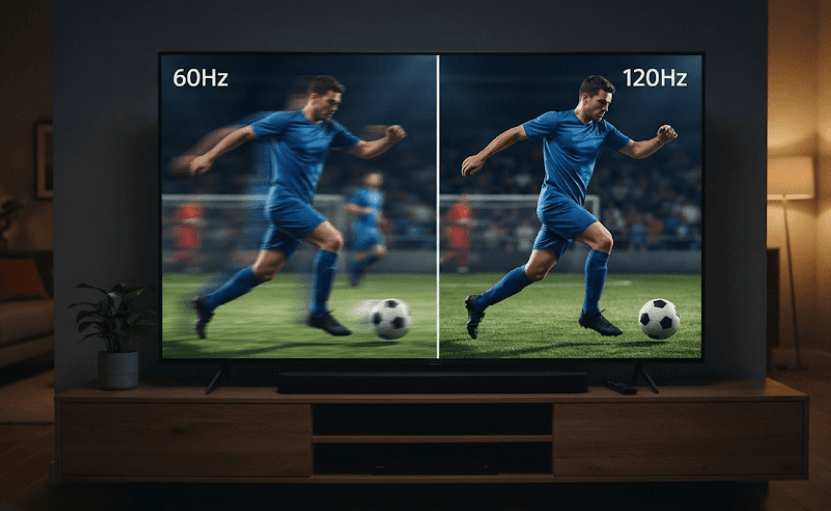
TL;DR: A TV's refresh rate determines how many times its screen updates every second. A 60Hz TV refreshes 60 times per second, while a 120Hz TV refreshes 120 times per second. A higher refresh rate can deliver smoother motion, particularly during sports, action scenes, and gaming. However, terms such as Motion Rate, TruMotion, and Motionflow XR can refer to additional picture-processing technologies rather than the panel's actual refresh rate. If you are buying a TV, check its native refresh rate instead of relying solely on impressive marketing numbers.
What Is Refresh Rate On A TV?
Refresh rate refers to how many times a television screen can update its image every second. It is measured in Hertz (Hz). For example, a 60Hz television refreshes its display 60 times per second, whereas a 120Hz television can refresh it 120 times per second.
Think of it as how frequently your TV can present a new image. When you watch a news broadcast or a slow-moving drama, you might not notice much difference between the two. However, when a footballer sprints across the field or a car races through an action sequence, the difference in motion handling can become easier to spot.
It is also important to understand that refresh rate and frame rate are not the same thing. Refresh rate describes the display's capability, while frame rate refers to how many individual frames a video source sends each second. A 120Hz television does not automatically turn every 30fps video into 120fps content. It may repeat existing frames or use motion interpolation to generate additional ones.
Refresh Rate vs Frame Rate
| Feature | Refresh Rate | Frame Rate |
|---|---|---|
| Meaning | How often the screen updates | How many frames the source produces |
| Measured in | Hertz (Hz) | Frames per second (fps) |
| Controlled by | TV display capabilities | Video source or content |
| Example | 60Hz or 120Hz | 24fps, 30fps or 60fps |
Understanding this difference makes it easier to evaluate television specifications without confusing display capabilities with video performance.
60Hz vs 120Hz TV: What Is The Difference?
The most common refresh rates you will encounter when shopping for a television are 60Hz and 120Hz. Both can provide a good viewing experience, but they serve slightly different needs.
A 60Hz television is generally suitable for everyday entertainment, including watching television channels, streaming movies, following news broadcasts, and viewing most online content. Since a large amount of regular video content is produced at 24fps, 30fps, or 60fps, a 60Hz display is perfectly adequate for many households.
A 120Hz television offers twice as many refresh opportunities per second. This can improve motion clarity and allow compatible content to be displayed at higher frame rates. It is particularly useful for fast-moving sports, action-heavy entertainment, and gaming. However, the improvement depends on the quality of the panel, its response time, video processing, and the frame rate of the source material.
Key Differences Between 60Hz And 120Hz
| Comparison | 60Hz TV | 120Hz TV |
|---|---|---|
| Refreshes per second | 60 | 120 |
| Compatible high-frame-rate gaming | Generally up to 60fps | Up to 120fps, if supported |
| Motion handling | Suitable for everyday viewing | Better potential for smoother motion |
| Sports viewing | Good for regular viewing | Can provide clearer fast-moving action |
| Motion interpolation | Usually supports lower-frame-rate smoothing | Can also interpolate 60fps content |
| Typical use | General entertainment | Gaming, sports and premium viewing |
Which One Looks Smoother?
A 120Hz television can display more updates per second, which helps make compatible fast-moving content appear smoother. It can also reduce persistence blur, where an image remains visible on the screen long enough for your eyes to perceive a blur during movement.
However, a higher refresh rate does not guarantee a completely blur-free picture. Response time, panel technology, and image processing also affect motion clarity. For example, OLED televisions generally have very fast pixel response times, while LCD televisions can vary considerably depending on their panel and implementation.
The practical takeaway is simple: 120Hz offers an advantage, but the complete display specification matters more than one number on a product box.
How Does Refresh Rate Affect Movies, Sports And Gaming?
Refresh rate becomes more noticeable when the content contains frequent movement. The type of content you watch therefore plays an important role in deciding whether upgrading to a 120Hz television is worthwhile.
For movies, the difference is not always dramatic. Many films are recorded at approximately 24 frames per second. A 120Hz display can show each original frame five times, providing an even frame cadence without requiring artificial intermediate frames. Some 60Hz televisions can also handle 24fps content correctly through other display refresh modes, so 120Hz is not an absolute requirement for watching films.
Sports broadcasts are a different story. Football, cricket, tennis, and motorsports involve continuous movement, making motion handling particularly important. A good 120Hz television can provide smoother playback, especially when the source supplies a compatible 50fps or 60fps signal. Nevertheless, the broadcast's frame rate and the TV's processing quality still matter.
Gaming is where the difference can become especially valuable. Modern gaming consoles, including the PlayStation 5 and Xbox Series X, support selected games at up to 120fps. To take advantage of those higher frame rates, you need a television that supports the relevant 120Hz input format, along with compatible HDMI connectivity. A 120Hz panel alone does not guarantee that every HDMI port or resolution supports 4K at 120Hz.
Which Refresh Rate Is Better For Different Activities?
| Usage | Recommended Refresh Rate |
|---|---|
| News and regular TV channels | 60Hz is generally sufficient |
| Netflix and other streaming services | 60Hz is sufficient for most content |
| Movies | 60Hz or 120Hz, depending on cadence handling |
| Cricket and football | 120Hz is preferable for fast action |
| Casual gaming | 60Hz can be sufficient |
| Competitive console gaming | Native 120Hz is preferable |
| High-frame-rate PC gaming | 120Hz or higher, subject to compatibility |
A useful point to remember is that buying a 120Hz TV does not mean every movie, show, or game will run at 120fps. The source must provide compatible content or the television must use processing to create additional frames.
What Is Motion Rate On A TV?
Motion Rate is a term used in television marketing to describe aspects of motion handling. It is not a standardised measurement of a television's native panel refresh rate.
Manufacturers use different names for their motion technologies. Samsung uses Motion Rate terminology on certain models and markets, while LG uses TruMotion and Sony uses Motionflow XR. These technologies can involve a combination of picture processing, motion interpolation, and backlight techniques.
This is where television specifications can become confusing. A product listing might advertise Motion Rate 120 or another seemingly impressive number. However, that number alone does not establish whether the television has a native 120Hz panel. Two televisions with similar motion-related marketing figures may have different actual display capabilities.
For buyers, the safest approach is to look beyond the motion branding. Find the manufacturer's detailed specifications for the exact model and screen size, and check whether it explicitly lists a native refresh rate of 60Hz or 120Hz.
Common TV Motion Technologies Explained
| Technology | Brand Association | What It Does |
|---|---|---|
| Motion Rate | Samsung (certain models and markets) | Marketing terminology associated with motion performance |
| TruMotion | LG | Motion-processing technology, including smoothing features |
| Motionflow XR | Sony | Combines motion processing with techniques for smoother-looking movement |
| X-Motion Clarity | Sony | Uses backlight control and motion-related processing to improve clarity |
These names should not be treated as direct equivalents of native refresh rates. Their implementation and advertised specifications can differ between television generations and models.
What Is The Difference Between Native Refresh Rate And Effective Refresh Rate?
Native refresh rate is the actual refresh frequency supported by the television's display panel. It tells you how many times per second the panel can refresh without relying on marketing multipliers or motion-smoothing claims.
Effective refresh rate, on the other hand, is a term that can describe motion performance after additional processing techniques are considered. Manufacturers may use proprietary calculations or branding to communicate how smoothly a television handles moving images. There is no universal conversion formula that applies across all brands.
For instance, a television advertised with a Motion Rate of 120 should not automatically be assumed to have a native 120Hz panel. Similarly, a high effective motion figure does not necessarily mean that a television accepts a 120fps gaming signal.
The distinction matters because motion processing and native refresh rate solve different problems. Processing can make movement appear smoother by estimating intermediate frames, but it cannot give a 60Hz panel the same native display capability as a true 120Hz panel.
How To Check A TV's Actual Refresh Rate
Before purchasing a television, follow these steps:
- Find the exact TV model number, including its regional variant and screen size.
- Visit the manufacturer's official website.
- Open the detailed specifications or technical specifications section.
- Look for terms such as native refresh rate, panel refresh rate, or supported refresh rate.
- Check the supported HDMI input formats if you intend to use a gaming console or PC.
- Confirm whether the television supports 4K at 120Hz and Variable Refresh Rate (VRR), if those features matter to you.
Always check the exact model rather than relying on a product series name. Manufacturers sometimes sell different screen sizes or regional variants with different display specifications.
Does A 120Hz TV Mean Better Picture Quality?
Not necessarily. Refresh rate is only one part of the overall television experience. A 120Hz panel can improve motion handling, but it does not automatically produce better colours, deeper blacks, higher brightness, or sharper resolution.
Other specifications are equally important. Resolution determines the number of pixels used to create an image, while HDR performance affects how effectively the television displays a wider range of brightness and colours. Panel technology, contrast, local dimming, viewing angles, and image processing also contribute to overall picture quality.
For example, a well-performing 60Hz television with good contrast and accurate colours may offer a better movie-watching experience than a poorly implemented 120Hz television. Similarly, an OLED TV can deliver excellent contrast and fast pixel response, while a high-quality LED or Mini-LED TV may offer greater brightness in certain viewing environments.
Other TV Specifications Worth Comparing
| Specification | Why It Matters |
|---|---|
| Resolution | Determines image detail and sharpness |
| HDR support | Improves the presentation of highlights and shadow detail when properly implemented |
| Panel technology | Influences contrast, brightness, viewing angles and response time |
| Response time | Affects how quickly pixels transition between colours |
| HDMI 2.1 features | Can enable higher-bandwidth gaming formats, including 4K at 120Hz on supported ports |
| VRR | Helps synchronise the display's refresh rate with a compatible gaming source |
A balanced television purchase should consider all these features rather than prioritising refresh rate alone.
How To Choose Between A 60Hz And 120Hz TV
Choosing between 60Hz and 120Hz largely depends on your viewing habits, budget, and the devices you intend to connect. If your television is primarily used for streaming, watching daily programmes, and occasional movies, a good 60Hz model can be more than sufficient.
However, if you regularly watch sports, play console games, or connect a gaming PC, investing in a native 120Hz television makes more sense. The higher refresh rate provides additional flexibility for compatible content and can make fast-moving visuals feel smoother.
It is also worth considering your budget. A 120Hz television may cost more, but the additional expense is worthwhile when you will actually use its capabilities. If it means compromising significantly on contrast, HDR performance, or overall panel quality, compare the complete specifications before making a decision.
Buying Checklist
Before finalising your purchase, check:
- Native refresh rate: 60Hz or 120Hz.
- Exact model and screen-size specifications.
- 4K at 120Hz support, if required.
- HDMI port compatibility and available bandwidth.
- VRR support for compatible gaming devices.
- Motion-processing settings and their effect on picture quality.
- Overall picture performance, including contrast, brightness and HDR.
A little specification checking can save you from paying extra for a feature that exists mainly as a marketing label.
Frequently Asked Questions
Q. Is a 120Hz TV better than a 60Hz TV?
A 120Hz TV can offer smoother motion, better support for high-frame-rate gaming, and improved handling of certain fast-moving scenes. However, a good 60Hz television is sufficient for most everyday viewing.
Q. Can I watch 120fps content on a 60Hz TV?
A 60Hz television cannot display 120 distinct frames per second. It may accept or process certain signals differently depending on the model, but its panel cannot refresh at a native 120Hz.
Q. Does a 120Hz TV make Netflix look better?
Not automatically. Most streaming content is delivered at 24fps, 25fps, 30fps, or 60fps. A 120Hz TV may handle frame cadence more evenly or offer motion interpolation, but it does not improve the original video's resolution or detail.
Q. Is Motion Rate 120 the same as native 120Hz?
No. Motion Rate is a marketing term associated with motion performance. You should check the manufacturer's specifications to confirm the actual native panel refresh rate.
Q. What is the difference between refresh rate and response time?
Refresh rate measures how often the screen updates, while response time measures how quickly pixels transition between display states. Both influence motion clarity, but they describe different aspects of display performance.
Q. Does a higher refresh rate reduce motion blur?
It can reduce persistence blur, particularly when displaying higher-frame-rate content. However, response time, backlight behaviour, and panel technology also influence the amount of visible blur.
Q. Do I need a 120Hz TV for PS5 or Xbox Series X?
You do not need one to play games at 60fps or below. However, a compatible 120Hz television is required to take advantage of supported 120fps gaming modes.
Q. What is the difference between 120Hz and 120fps?
120Hz is the television's refresh rate, while 120fps is the number of frames a video source produces each second. A compatible 120Hz television can display up to 120 distinct frames per second when the source and connection support it.
Q. Can I convert a 60Hz TV into a 120Hz TV using motion smoothing?
No. Motion smoothing can generate intermediate frames to make movement appear smoother, but it cannot change the panel's native refresh-rate capability.
Q. Which refresh rate should I choose for watching sports?
A native 120Hz television is a good choice for sports enthusiasts because it can provide smoother motion with compatible broadcasts. However, the broadcast frame rate and the television's motion-processing quality remain important.
Final Recommendation
For most households, a good 60Hz television is perfectly capable of handling everyday entertainment, streaming, and regular television viewing. You do not necessarily need to spend extra on a 120Hz model if your viewing habits do not involve high-frame-rate gaming or frequent sports viewing.
However, if you are investing in a premium television, a native 120Hz panel is a worthwhile feature to consider. It offers greater flexibility for gaming, smoother handling of compatible fast-moving content, and additional motion-processing capabilities. Just make sure the TV supports the input formats you need, particularly 4K at 120Hz if you plan to use a modern gaming console.
Most importantly, do not let a large Motion Rate or effective refresh-rate number make the buying decision for you. Check the native refresh rate, panel quality, HDMI capabilities, and overall picture performance. A television should deliver a great viewing experience, not just an impressive specification sheet.
Ready to upgrade your tech?
Browse our collection of quality refurbished products at unbeatable prices.