
ThinkPad E14 vs L14 vs T14: Which Line Fits Your Budget and Work?
Compare the Lenovo ThinkPad E14, L14, and T14 to understand their differences in pricing, performance, upgradeability, durability, and battery health before choosing a laptop for work.

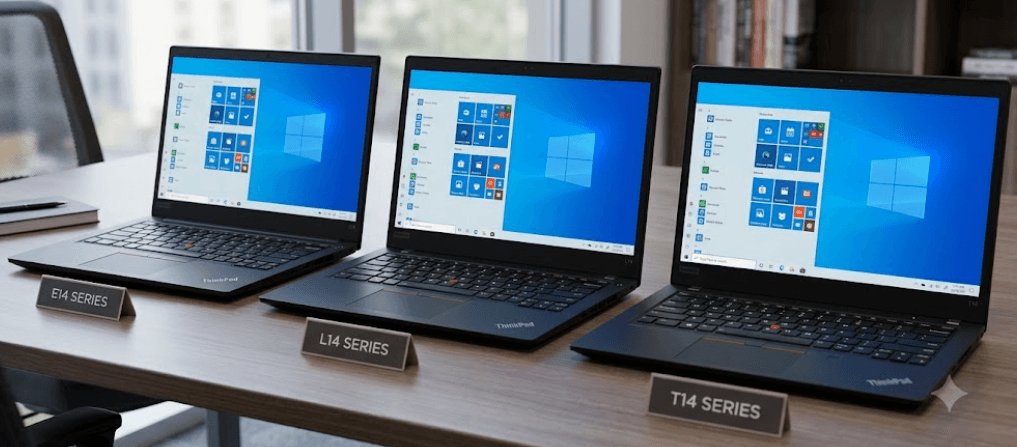
TL;DR The Lenovo ThinkPad E14, L14, and T14 serve different business needs, even though they share the familiar ThinkPad keyboard, professional design, and productivity-focused features. The E14 is generally the budget-conscious choice for students, freelancers, and small businesses, while the L14 offers a practical middle ground for office teams that need business features without paying for a premium configuration. The T14 is positioned for professionals and organizations that value mobility, enterprise management, and a wider selection of premium configurations. Before choosing, compare the exact generation, processor, display, memory upgrade options, warranty, and battery condition. If you are considering a refurbished ThinkPad, battery cycle count and remaining battery capacity deserve just as much attention as the model name.
Understanding The ThinkPad E14, L14, And T14
Lenovo's ThinkPad lineup is designed around productivity, reliability, and business use, but the E14, L14, and T14 are not simply three versions of the same laptop at different prices. The E14 belongs to the more accessible business segment, making it attractive to buyers who need dependable everyday computing without paying for every enterprise-oriented feature. The L14 sits between entry-level business needs and more demanding corporate requirements, while the T14 is designed for professionals who may need greater mobility, additional configuration choices, or advanced business management features. These are general positioning differences rather than guarantees that every T14 will outperform every L14 or E14.
The practical differences become clearer when you consider how each laptop will be used. Someone working with Microsoft Excel, email, browser tabs, video meetings, and accounting software may find an appropriately configured E14 entirely sufficient. An office team purchasing laptops in bulk might prefer the L14 because its configuration options can support a standardized workplace setup. A consultant who travels frequently, connects to external displays, handles confidential business information, and spends long hours working away from a desk may find a suitable T14 configuration more appealing. The right choice depends on the actual hardware and the demands of the job, not the model name alone.
One important detail is that ThinkPad specifications change between generations and processor variants. For example, Lenovo's official specifications for the E14 Gen 7 list Intel Core Ultra 5 and Core Ultra 7 processor options, while T14 Gen 6 configurations can use either soldered LPDDR5X memory or removable DDR5 memory, depending on the processor platform. This means you should not assume that every T14 has upgradeable RAM or that every E14 has the same storage and display options. Always check Lenovo's Product Specifications Reference, commonly called PSREF, using the exact generation and machine type before buying. Lenovo E14 Gen 7 specifications and Lenovo T14 Gen 6 specifications.
ThinkPad E14 Vs L14 Vs T14: Key Differences
The E14 is usually the most sensible starting point when the budget is tight. It is designed for everyday professional tasks, including document creation, spreadsheets, online research, and video conferencing. However, a lower price does not automatically make it the best value. An E14 with limited memory, a basic display, or a short warranty may be less attractive than a discounted L14 with a better configuration. Buyers should compare the complete package instead of choosing purely by the number printed after the ThinkPad name.
The L14 is a practical option for organizations and individuals who want a business laptop without necessarily paying for the T-series positioning. Its value depends on the specific configuration, but the series can offer useful workplace features, including business-oriented security and connectivity options. Lenovo's L14 Gen 5 Intel specifications, for example, list features such as a physical Ethernet port, TPM 2.0 security, and optional infrared camera configurations. These details can matter to office users who need wired networking, secure sign-in, or compatibility with existing workplace systems. Lenovo L14 Gen 5 specifications.
The T14 is generally the premium choice among these three lines, but its advantage is not simply processing speed. The range includes configurations aimed at different professional requirements, and some offer higher-end displays, modern connectivity, or additional enterprise management options. Yet an E14 with a stronger processor and sufficient memory can outperform a lower-powered T14 in a particular workload. For this reason, compare processor models, cooling, RAM configuration, display quality, and warranty coverage before deciding whether the T14's additional cost is justified.
| Feature | ThinkPad E14 | ThinkPad L14 | ThinkPad T14 |
|---|---|---|---|
| General positioning | Budget-friendly business | Mainstream business | Premium business |
| Typical buyer | Students and small businesses | Office teams and professionals | Mobile professionals and enterprises |
| Everyday office work | Well suited | Well suited | Well suited |
| Enterprise features | Configuration dependent | Business-focused options | Broader premium options, depending on configuration |
| RAM upgrades | Depends on generation | Depends on generation | Depends on generation and processor platform |
| Best buying approach | Prioritize value | Balance cost and features | Justify the premium through actual needs |
Performance, Memory, And Upgrade Options
For everyday productivity, all three series can be suitable when configured appropriately. A recent processor, 16GB of RAM, and a solid-state drive are a sensible starting point for multitasking across spreadsheets, browser tabs, messaging applications, and video meetings. Users working with large datasets, development environments, virtual machines, or heavier creative applications may benefit from a more powerful processor and 32GB of RAM or more. However, the processor's exact model and power characteristics matter more than the series name, so compare complete specifications before assuming the T14 is automatically faster.
Memory upgradeability is especially important if you expect your workload to grow. Some ThinkPad configurations use removable SO-DIMM memory, while others use soldered memory that cannot be expanded after purchase. Lenovo's T14 Gen 6 Intel documentation explicitly distinguishes between certain platforms with soldered LPDDR5X memory and other configurations with removable DDR5 slots. This is a useful reminder that even two laptops carrying the same series and generation can offer different upgrade paths. If you plan to keep a laptop for four or five years, check the maximum supported RAM and whether the installed memory can be replaced before making your decision.
Storage deserves similar attention because it affects how much room you have for documents, applications, project files, and offline media. An SSD upgrade may be possible even when RAM is fixed, but the supported drive size, interface, and number of slots vary by configuration. A buyer working primarily with cloud documents may be comfortable with a smaller SSD, whereas a developer or designer may prefer 1TB or more. Before buying, check the official specification sheet and maintenance guide for the exact machine type rather than relying on a general claim about the E14, L14, or T14 family.
Battery Life And Battery Cycles Explained
Battery life depends on more than the laptop's series. Processor efficiency, battery capacity, screen brightness, display resolution, background applications, wireless connectivity, and power settings all affect how long a charge lasts. Two T14 laptops can therefore deliver noticeably different runtimes, just as an E14 with a larger battery may outlast a more expensive model under certain conditions. Manufacturer battery-life figures are useful for comparison, but they are generally based on controlled tests and should not be treated as a guarantee of how many hours you will get during a normal workday.
Battery cycles become particularly important when buying a refurbished ThinkPad. A charge cycle represents the cumulative use of an amount of battery energy equivalent to 100% of its capacity. It does not necessarily mean charging the laptop from empty to full once. For example, using 50% of the battery on Monday and another 50% on Tuesday is approximately one full cycle in total. Likewise, four separate periods of using around 25% of the battery can add up to roughly one cycle. The battery management system tracks this cumulative usage, although reporting details vary by laptop and operating system.
A lower cycle count can be encouraging, but it does not prove that a battery is healthy. Battery age, heat exposure, charging history, and storage conditions also influence how much energy the battery can hold. Check both the cycle count, when available, and the battery's full-charge capacity compared with its original design capacity. Lenovo recommends using Lenovo Vantage to inspect battery health and notes that battery capacity declines with time and use. Lenovo battery health guidance and Lenovo battery cycle-life guidance.
How To Interpret Battery Cycle Count
| Battery information | What it tells you | What to check |
|---|---|---|
| Cycle count | Cumulative equivalent full-battery usage | Compare with age and battery condition |
| Design capacity | Battery capacity when new | Use as the reference value |
| Full-charge capacity | Estimated capacity the battery can hold now | Compare with design capacity |
| Battery health status | System or manufacturer assessment | Check for warnings and abnormal drain |
| Runtime under load | How long the laptop lasts in your actual workload | Test with realistic brightness and applications |
For example, imagine a refurbished T14 reports 150 cycles and retains 90% of its design capacity, while an E14 reports 80 cycles but retains only 68%. The E14's lower cycle count does not automatically make it the better purchase. Its reduced capacity may mean more frequent charging and less useful unplugged time. These figures are illustrative rather than official replacement thresholds. There is no single cycle count that guarantees a battery is good or bad, so consider capacity, age, runtime, warranty, and replacement cost together.
Pricing, Value, And Refurbished Buying
The E14 generally makes the most sense for buyers who want to control spending while covering everyday work. It can be a particularly good option in the refurbished market, where a previous-generation business laptop with adequate memory and a healthy SSD may offer better practical value than a new consumer laptop with weaker build or business features. Still, compare the exact processor, display, installed RAM, battery condition, and warranty. A low advertised price is not necessarily a bargain if the laptop needs immediate repairs or has a poor-quality screen.
The L14 can be the better middle ground when its additional features or configuration justify the price difference over the E14. For example, a business buyer may value Ethernet connectivity, security features, or a particular memory configuration more than a premium finish. For bulk purchases, consistent specifications and service arrangements may also be more useful than paying extra for features employees will rarely use. Compare the total cost of ownership, including warranty coverage, accessories, likely upgrades, and possible battery replacement, instead of comparing purchase prices alone.
The T14 is worth paying more for when its specific advantages support your work. A frequent traveler may value a lighter configuration, a better low-power display, or an appropriate connectivity option, while an IT department may prioritize enterprise management and support. However, not every T14 configuration has all these advantages, and a discounted E14 or L14 may be the more rational choice for straightforward office tasks. In the Indian market, prices and availability can change considerably by generation, seller, and promotional offer, so verify current prices and the machine's exact specifications before publishing or purchasing.
Which ThinkPad Fits Your Work Best?
The best choice becomes easier when you start with your workload rather than your budget alone. Students, freelancers, and small-business owners who mainly use office applications, browsers, and video calls should begin by comparing the E14. If a particular E14 configuration offers enough memory, a comfortable display, and a reasonable warranty, spending more on a higher series may not improve their daily experience significantly. The money saved could be put toward additional storage, a monitor, or a docking accessory that makes the overall setup more useful.
The L14 is worth comparing if you need a practical business machine for regular office use or a team purchase. Its appeal is the balance between business-oriented functionality and cost, but the exact model still determines whether it meets your needs. Check the ports required by your workplace, whether the screen is suitable for long hours, and whether memory can be upgraded later. For an organization purchasing several laptops, standardizing on a configuration with sufficient RAM, reliable support, and a consistent warranty can be more valuable than selecting a model solely because it occupies the middle of the product range.
The T14 is the stronger starting point for professionals who can make use of its premium configurations and business features. Consultants, managers, and employees who travel frequently may benefit from a carefully selected T14 with the right weight, battery, screen, and connectivity. It is also worth considering when the organization requires specific enterprise management or security capabilities. However, if you mostly work at a desk with email, documents, and spreadsheets, an appropriately configured E14 or L14 may deliver everything you need. Choose the T14 when its actual features solve a real problem, not simply because it sits higher in the line-up.
Frequently Asked Questions
Q. Which is better, the ThinkPad E14, L14, or T14?
The E14 is generally the budget-friendly choice, the L14 offers a middle ground for business use, and the T14 targets professionals who need suitable premium configurations. The best option depends on the generation, specifications, and price.
Q. Is the ThinkPad E14 good for office work?
Yes. A well-configured E14 can handle documents, spreadsheets, email, web browsing, and video meetings comfortably. Choose enough RAM and a suitable display for your workload.
Q. Is the ThinkPad L14 better than the E14?
Not automatically. The L14 may offer features that better suit business environments, but an E14 with a stronger configuration can be better value. Compare the exact models before deciding.
Q. Is the ThinkPad T14 worth the extra money?
It can be worth the premium if you benefit from its specific display, portability, connectivity, or enterprise features. For basic office work, a less expensive E14 or L14 may be sufficient.
Q. Can you upgrade RAM on all three ThinkPad models?
No. Upgradeability depends on the exact generation and processor platform. Some configurations use removable memory, while others have soldered RAM. Check Lenovo's official specifications before buying.
Q. What does a laptop battery cycle mean?
One equivalent full cycle represents cumulative battery use equal to 100% of its capacity. It can accumulate over several partial discharges rather than one complete discharge and recharge.
Q. How many battery cycles are acceptable for a refurbished ThinkPad?
There is no universal acceptable number. Consider the cycle count alongside battery age, full-charge capacity, runtime, warranty, and replacement cost. A low cycle count alone does not guarantee good battery health.
Q. How can I check battery health on a ThinkPad?
Lenovo Vantage provides battery information and health status on supported systems. You can also generate a Windows battery report, although the information displayed depends on the device and its firmware.
Q. Is a refurbished ThinkPad T14 better than a new E14?
It depends on the generation, processor, condition, battery health, warranty, and price. A refurbished T14 may offer useful business features, but a new E14 may provide a fresher battery and more warranty coverage.
Q. Which ThinkPad is best for long-term use?
Choose the model with sufficient RAM, a suitable processor, a comfortable display, good battery health, and dependable support. The T14 may suit demanding professional needs, while a well-configured E14 or L14 can also remain practical for years.
Final Recommendation
The ThinkPad E14, L14, and T14 are best viewed as three ways to balance budget, business features, and professional requirements. Choose the E14 if affordability is your priority and you mainly handle everyday productivity. Consider the L14 if you need a practical business laptop with the right connectivity and configuration for regular office use. Choose the T14 if its particular premium features, mobility, or enterprise capabilities justify the additional cost. None of these lines is automatically the best for every buyer, and the generation matters as much as the series.
Before purchasing, verify the exact machine type, processor, RAM upgrade options, SSD configuration, display specifications, and warranty. If you are buying refurbished, check battery cycle count alongside full-charge capacity and real-world runtime, because cycle count alone cannot establish battery health. The smartest purchase is not necessarily the most expensive ThinkPad. It is the one that fits your workload today, offers enough room for your needs to grow, and delivers dependable value over the time you plan to use it.
Ready to upgrade your tech?
Browse our collection of quality refurbished products at unbeatable prices.






