
Surface Pro 7 vs Surface Pro 8: Is the Upgrade Worth It?
Surface Pro 7 vs Surface Pro 8: Compare performance, display, battery life, connectivity, and refurbished value to find out whether Microsoft's newer 2-in-1 is worth the upgrade in 2026.

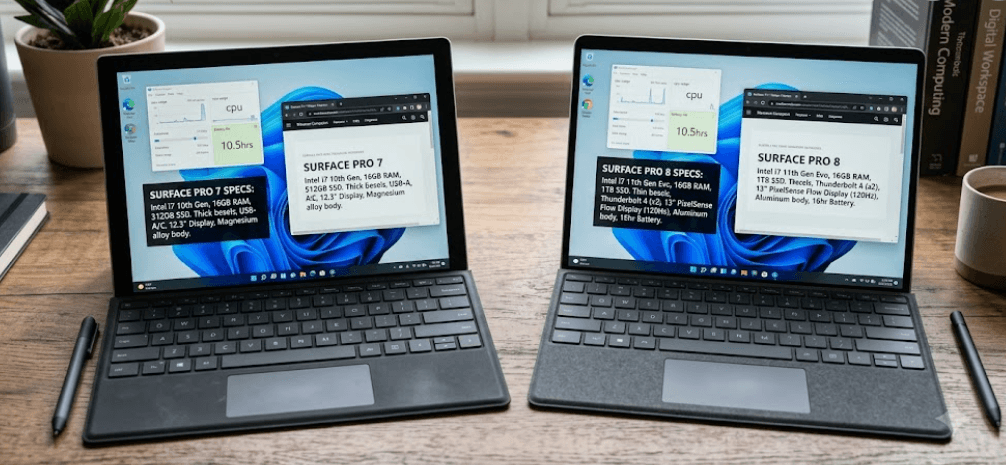
TL;DR The Surface Pro 8 is the better choice for buyers who want a larger 120Hz touchscreen, newer processors, Thunderbolt 4 connectivity, and improved support for modern accessories. The Surface Pro 7 remains a practical budget option for browsing, studying, office work, and everyday productivity, particularly when buying refurbished. However, neither model is a new-generation device in 2026, so battery condition, configuration, warranty, and price should influence your decision. If you already own a Surface Pro 7 that runs smoothly, upgrading is not essential. If you are buying your first Surface, the Pro 8 is generally worth paying extra for when the price difference is reasonable.
Understanding The Surface Pro 7 And Surface Pro 8
The Microsoft Surface Pro 7 and Surface Pro 8 combine a touchscreen tablet with the functionality of a Windows computer. Both support detachable keyboards and compatible Surface pens, making them useful for students, professionals, and people who prefer handwriting notes alongside traditional laptop tasks. Their shared design can make the two devices appear similar, but the Pro 8 introduces several meaningful improvements that affect everyday use, particularly the display, processor generation, and connectivity.
The Surface Pro 7 launched in 2019 with 10th-generation Intel Core processors, while the Surface Pro 8 arrived in 2021 with 11th-generation Intel Core i5 and i7 options. The newer model also received a redesigned chassis and a larger display. These differences matter when you regularly work with multiple applications, attend video meetings, or connect external displays. However, a newer model is not automatically the better purchase if it has less memory, a worn battery, or a significantly higher refurbished price.
In 2026, both models are best evaluated as older Windows 2-in-1 devices rather than current flagship purchases. A well-maintained Surface Pro 7 with 16GB RAM can still handle everyday productivity, while the Surface Pro 8 offers a more modern overall experience. Before purchasing either device, check the exact processor, memory, SSD capacity, physical condition, and installed operating system instead of relying on the model name alone.
Surface Pro 7 Vs Surface Pro 8 Specifications
The clearest differences appear when you compare the specifications side by side. The Surface Pro 8 offers a larger, higher-resolution display, support for refresh rates up to 120Hz, and two Thunderbolt 4-compatible USB-C ports. The Surface Pro 7, on the other hand, retains useful connections that some buyers still prefer, including USB-A and a microSD card reader. These differences can influence your purchase more than the generation number itself.
The Pro 7 was available with 4GB, 8GB, or 16GB RAM, while the Pro 8 offers 8GB, 16GB, or 32GB configurations. Both models have SSD storage options ranging from 128GB to 1TB, depending on configuration. Memory is soldered on these devices, so you should choose enough RAM at the time of purchase. Microsoft lists removable SSD options for the Pro 8, but storage servicing should not be confused with a straightforward user upgrade.
Quick Comparison Table
| Feature | Surface Pro 7 | Surface Pro 8 |
|---|---|---|
| Launch year | 2019 | 2021 |
| Display size | 12.3 inches | 13 inches |
| Resolution | 2736 × 1824 | 2880 × 1920 |
| Refresh rate | Up to 60Hz | Up to 120Hz |
| Processor | 10th-gen Intel Core i3, i5, or i7 | 11th-gen Intel Core i5 or i7 |
| RAM | 4GB, 8GB, 16GB | 8GB, 16GB, 32GB |
| Storage | 128GB to 1TB SSD | 128GB to 1TB SSD |
| USB connectivity | USB-A and USB-C | Two USB-C with Thunderbolt 4 |
| Card reader | microSDXC | No microSD reader |
| Manufacturer battery estimate | Up to 10.5 hours | Up to 16 hours |
Specifications and available configurations vary by model and market. Manufacturer battery estimates are not directly comparable guarantees of real-world runtime.
The table shows why the Pro 8 is the more capable overall device, but it also explains why the Pro 7 can remain attractive. If your daily routine involves Microsoft Word, spreadsheets, browser tabs, and online meetings, the older device may be sufficient. If you need modern docking options, more memory, and a smoother display, the Pro 8 offers a more substantial improvement.
Display And Design Differences
The display is one of the most noticeable upgrades in the Surface Pro 8. Its 13-inch PixelSense Flow screen has a resolution of 2880 × 1920, compared with the Pro 7's 12.3-inch PixelSense display at 2736 × 1824. Both use a 3:2 aspect ratio, which provides useful vertical space for reading documents, reviewing spreadsheets, and browsing websites. The larger screen makes multitasking more comfortable without turning the device into a conventional bulky laptop.
The Pro 8 also supports refresh rates up to 120Hz, although 60Hz is the default setting. A higher refresh rate can make scrolling, pen input, and supported animations appear smoother. This is particularly helpful when taking handwritten notes or navigating lengthy documents. The Pro 7 remains perfectly usable for everyday work, but it does not offer the same high-refresh-rate experience. The improvement is noticeable, although it should not be mistaken for a guarantee of better performance in every application.
Design also affects portability. Microsoft lists the Surface Pro 7 at approximately 775 grams for the i3 and i5 versions, while the Pro 8 weighs approximately 891 grams without its keyboard. The Pro 8 is therefore heavier as a standalone tablet, despite its more contemporary design. If you travel frequently, compare the total weight with the keyboard, charger, and accessories included. The right choice depends on whether you value the Pro 8's larger display more than the Pro 7's lighter tablet body.
Performance And Battery Life
The Surface Pro 8's 11th-generation Intel processors provide a newer hardware platform than the Pro 7's 10th-generation chips. Depending on the configuration, this can improve everyday responsiveness, multitasking, and integrated graphics performance. The Pro 8 uses Intel Iris Xe graphics in its supported i5 and i7 configurations, while the Pro 7 uses Intel UHD Graphics in the i3 version and Intel Iris Plus Graphics in the i5 and i7 versions. Neither device should be treated as a modern gaming workstation, but both can handle light productivity and compatible creative applications.
Memory is equally important when evaluating performance. An older Pro 7 with 16GB RAM may be more comfortable for multitasking than a Pro 8 with 8GB RAM, depending on the applications involved. Since neither model offers a conventional RAM upgrade, check the configuration before purchasing. For students and office users, 8GB may work for lighter workloads, but 16GB is the more sensible target for heavier browser use, multiple applications, and longer ownership.
Battery life requires particular attention in 2026 because these devices may have spent several years in use. Microsoft originally estimated up to 10.5 hours of typical usage for the Pro 7 and up to 16 hours for the Pro 8. These figures come from different testing conditions and should not be treated as a direct comparison of actual runtime. Independent testing has also shown that real-world battery results can fall below advertised estimates. When buying refurbished, ask about battery health and return coverage rather than assuming the original battery claim still applies.
Connectivity And Accessory Compatibility
Connectivity is an area where the Surface Pro 7 can still be more convenient. It includes one USB-A port, one USB-C port, a Surface Connect port, and a microSDXC card reader. These connections are useful if you regularly transfer files from memory cards or connect older USB accessories. For students, photographers, and office users with existing peripherals, the Pro 7 can reduce the need to carry additional adapters.
The Surface Pro 8 replaces that combination with two USB-C ports supporting USB 4.0 and Thunderbolt 4, alongside Surface Connect and a headphone jack. Thunderbolt 4 expands compatibility with supported docks, external storage, and monitors. It is particularly useful if you want to connect your Surface to a desk setup with multiple accessories. However, the Pro 8 does not include USB-A or a microSD reader, so older devices may require a compatible hub or adapter.
Keyboard and pen compatibility also deserve attention. The Pro 7 uses accessories designed for its generation, while the Pro 8 supports the Surface Pro Signature Keyboard and Surface Slim Pen 2 ecosystem. The keyboard and pen are often sold separately, so check the listing before calculating the total cost. A refurbished Pro 8 that appears inexpensive may become less attractive if you need to purchase its keyboard and other accessories separately.
Which Surface Pro Offers Better Value In 2026?
The Surface Pro 7 makes the most sense when its lower purchase price creates a meaningful saving. It is suitable for everyday tasks such as writing assignments, preparing presentations, managing email, browsing the web, and attending video calls. A well-maintained configuration with 8GB or 16GB RAM can still provide a useful Windows experience. However, its age makes battery condition, physical wear, and the seller's warranty particularly important when purchasing refurbished.
The Surface Pro 8 is generally the stronger long-term choice when the price difference is manageable. Its larger display, newer processor generation, higher memory ceiling, and Thunderbolt 4 connectivity give it more flexibility for modern workflows. Buyers who frequently use external monitors, work with several applications, or prefer smoother touchscreen interactions are more likely to appreciate these improvements. A 16GB configuration is a sensible target for users who want additional multitasking headroom.
Neither device should be purchased solely because it is labelled refurbished or offered at a discount. Compare the actual configuration, battery condition, included accessories, return policy, and warranty. Also confirm Windows 11 compatibility and the current update status for the specific device. Standard Windows 10 support ended on October 14, 2025, so a Windows 10 installation should not be treated as equivalent to a fully supported Windows 11 setup. Both Surface models support Windows 11, but future software and hardware support should still be considered.
Best Choice By Use Case
| Your Priority | Better Choice |
|---|---|
| Lower-cost everyday computing | Surface Pro 7 |
| Larger and smoother display | Surface Pro 8 |
| USB-A and microSD connectivity | Surface Pro 7 |
| Thunderbolt 4 and modern docks | Surface Pro 8 |
| More memory options | Surface Pro 8 |
| Existing compatible Pro 7 accessories | Surface Pro 7 |
| Best overall experience | Surface Pro 8 |
Frequently Asked Questions
Q. Is the Surface Pro 8 worth upgrading to from the Surface Pro 7?
The upgrade is worthwhile if you need the larger 120Hz display, newer processor, Thunderbolt 4, or additional memory options. If your Pro 7 still runs smoothly and meets your needs, replacing it may not provide enough practical benefit to justify the expense.
Q. Is the Surface Pro 7 still good in 2026?
Yes. It can still handle browsing, office applications, online classes, video calls, and other everyday tasks. Choose a well-maintained unit with sufficient RAM and a healthy battery, and confirm its Windows installation and update status.
Q. Which Surface Pro has the better display?
The Surface Pro 8 has the better overall display specification, with a 13-inch, 2880 × 1920 screen and refresh rates up to 120Hz. The Pro 7 has a 12.3-inch, 2736 × 1824 display with a standard 60Hz refresh rate.
Q. Does the Surface Pro 8 have better battery life?
Microsoft's original estimates are up to 16 hours for the Pro 8 and up to 10.5 hours for the Pro 7. Actual battery life varies with workload, settings, and battery condition, particularly on refurbished devices.
Q. Can you upgrade the RAM on either Surface Pro?
No. The RAM is soldered to the motherboard on both models and is not designed for conventional user upgrades. Select the memory configuration you need before purchasing.
Q. Does the Surface Pro 7 have USB-A?
Yes. It has one USB-A port, one USB-C port, Surface Connect, and a microSDXC card reader. These features can be useful for older accessories and memory cards.
Q. Does the Surface Pro 8 support Thunderbolt 4?
Yes. It has two USB-C ports with USB 4.0 and Thunderbolt 4 support, providing more flexibility for compatible docks, displays, and external storage.
Q. Are the Surface Pro 7 and Pro 8 keyboards interchangeable?
Do not assume they are interchangeable. Check the exact keyboard model and compatibility with the tablet before buying, particularly when purchasing refurbished accessories separately.
Q. Which Surface Pro is better for students?
The Pro 7 is a reasonable budget option for assignments, research, presentations, and online classes. The Pro 8 is better for students who want the larger display, smoother pen experience, and newer connectivity, provided the additional cost is justified.
Q. Should I buy a refurbished Surface Pro 7 or Surface Pro 8?
Choose based on the total price, RAM, SSD, battery health, included keyboard, cosmetic condition, and warranty. The Pro 8 is generally the better overall device, but a well-priced Pro 7 can offer better value for basic tasks.
Final Recommendation
The Surface Pro 8 is the better choice for most buyers in 2026 because it delivers a larger high-refresh-rate display, newer processors, more memory options, and Thunderbolt 4 connectivity. It is particularly suitable for professionals and students who want a flexible Windows device for documents, meetings, note-taking, and multitasking. Choose a 16GB configuration when your budget allows, and remember to include the keyboard and other accessories in your total purchase cost.
The Surface Pro 7 remains worth considering if you want an affordable device for everyday productivity and find a well-maintained unit at a substantially lower price. Its USB-A port and microSD reader can also be useful if you rely on older accessories. However, battery health and overall condition should take priority over cosmetic appearance alone.
The final decision is simple: buy the Surface Pro 8 for the better overall experience, or choose the Surface Pro 7 when the savings are significant and your workload is modest. Before placing an order, verify the exact configuration, battery condition, Windows update status, included accessories, and warranty. These checks will help you choose the better device for your needs rather than paying extra for a newer model without receiving meaningful everyday benefits.
Ready to upgrade your tech?
Browse our collection of quality refurbished products at unbeatable prices.






