
RAW vs JPEG: Which Format Should Beginners Shoot In?
Learn the difference between RAW and JPEG photography, including image quality, editing flexibility, file size, and everyday use, to choose the right format for your photography journey.

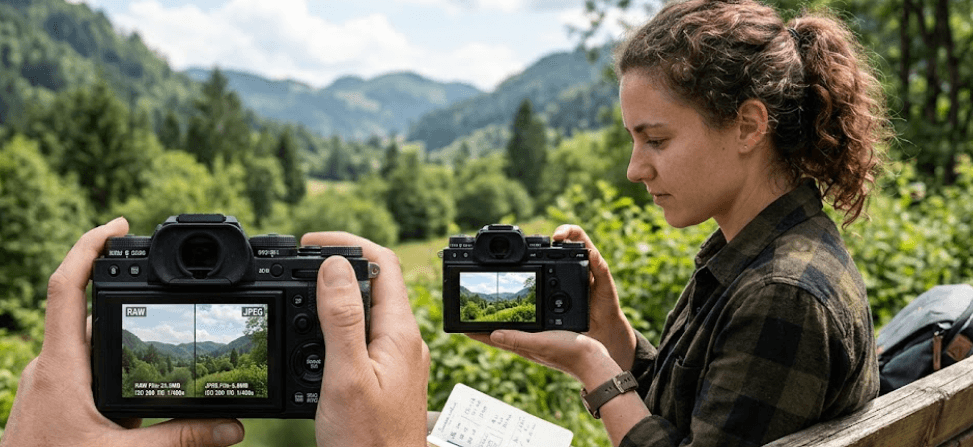
TL;DR: If you are new to photography, choosing between RAW and JPEG depends on how much editing you want to do after taking a picture. JPEG is ideal for beginners who want attractive photos they can share immediately, with smaller file sizes and minimal editing. RAW is better if you want greater control over exposure, white balance, shadows, and highlights during editing. Both formats can produce excellent photographs, so you do not need to master RAW before learning photography. If your camera supports RAW + JPEG, this option lets you keep an easy-to-share image while saving the original RAW data for photographs you may want to edit later.
Understanding RAW And JPEG Photography
RAW and JPEG are two common formats available on digital cameras, and the difference lies in how the captured image data is processed and saved. When you photograph a scene, the camera's sensor records image information. If you choose JPEG, the camera processes that information using settings such as contrast, sharpening, saturation, and white balance before compressing and saving the photograph. The result is a finished image that is generally ready to view, transfer, and share. A RAW file preserves substantially more of the captured sensor information for processing later, giving you more freedom to decide how the final photograph should look.
For beginners, the difference becomes easier to understand when you consider what happens after taking a picture. A JPEG might already have the bright colors and contrast you want, making it convenient for uploading to social media or sending to friends. A RAW photograph may initially look flatter or less polished in some viewing applications because it has not been rendered with the same finished appearance. That does not mean the photograph is worse. Its additional image data gives you more room to adjust the result using compatible software such as Adobe Lightroom or the camera manufacturer's RAW-processing application.
Neither format automatically guarantees a better photograph. Composition, lighting, focus, shutter speed, and exposure still matter, regardless of the file type you choose. A well-exposed JPEG taken in beautiful light can look excellent, while a RAW file cannot magically correct missed focus or recover details that were never captured. The real decision is whether you prefer convenience or greater editing flexibility. Once you understand that distinction, choosing a format becomes a practical decision based on your photography habits rather than a rule about which format every beginner must use.
What Is A RAW File?
A RAW file stores minimally processed image data from the camera sensor, along with relevant metadata. The exact file extension and supported capabilities depend on the camera manufacturer and model. For example, Canon cameras commonly use CR3 or older CR2 formats, Nikon uses NEF, and Sony uses ARW. RAW files usually require compatible software to develop and export them into widely shareable formats such as JPEG. Their larger size reflects the additional information they preserve, which is useful when you want to make substantial changes to an image after taking it.
What Is A JPEG File?
JPEG is a widely supported image format that uses lossy compression to reduce file size. Your camera processes the captured image according to its settings and saves a finished photograph that works with most phones, computers, websites, and editing applications. Although JPEG images can still be edited, repeated editing and saving over the same compressed file can gradually reduce image quality. Working from a separate copy helps avoid that problem. For beginners who want to photograph family gatherings, vacations, pets, or everyday moments without spending hours editing, JPEG is a convenient starting point.
RAW vs JPEG: Key Differences Explained
The most important difference between RAW and JPEG is the amount of editing flexibility available after capture. RAW files generally preserve more tonal information and offer greater latitude for correcting exposure and adjusting white balance. JPEG files have already undergone in-camera processing and compression, so some information is discarded before you begin editing. This becomes particularly noticeable when you attempt to recover bright skies, dark clothing, or subtle details in photographs with challenging lighting. RAW gives you more room to work, although the amount of recoverable detail still depends on the camera, exposure, and whether the highlights or shadows were clipped during capture.
File size and workflow are equally important when choosing between the formats. RAW files are generally larger, which means they occupy more memory card and computer storage space. They can also require additional processing time because you may need to adjust and export them before sharing. JPEG files are smaller and easier to use immediately, making them practical when you take hundreds of photographs during an event or trip. They can also help preserve camera buffer capacity during continuous shooting, although the exact difference depends on the camera and its settings.
The best format therefore depends on what you value most. If you enjoy experimenting with color grading, correcting exposure, and developing a personal editing style, RAW gives you more control. If you want to focus on composition and photography fundamentals without adding an editing workload, JPEG keeps the process simple. Beginners can learn effectively with either format, and there is no requirement to switch to RAW until they feel limited by the editing options available in JPEG.
RAW vs JPEG Comparison Table
| Feature | RAW | JPEG |
|---|---|---|
| Image processing | Minimally processed sensor data | Processed in-camera |
| Editing flexibility | Greater | More limited |
| Exposure recovery | Generally better | More restricted |
| White balance changes | Greater flexibility | Adjustments are possible but more limited |
| File size | Generally larger | Generally smaller |
| Ready to share | Usually requires processing or export | Usually ready to use |
| Software compatibility | Depends on camera format and software support | Widely supported |
| Best for | Editing and important photographs | Everyday photography and quick sharing |
Advantages And Disadvantages Of Shooting RAW
The main advantage of RAW is the freedom it gives you when developing a photograph. Imagine taking a travel photo with a bright sky and a subject standing in the shade. A JPEG may have limited room for recovering both the bright and dark areas if the original exposure was difficult. A RAW file often provides more flexibility to lower highlights, lift shadows, and adjust overall exposure while preserving tonal transitions. This can be valuable when photographing landscapes, portraits, architecture, or scenes with strong contrasts between sunlight and shade.
RAW also gives you more control over white balance, color grading, and noise reduction. If indoor lighting makes a photograph look too yellow or an outdoor image appears too cool, you can adjust the white balance during RAW processing without being as constrained by the camera's original rendering. You can also revisit your processing choices later when using a nondestructive editing workflow. These benefits make RAW useful for learning how colors, contrast, and exposure affect a photograph. However, they do not eliminate the need to expose images carefully or understand basic camera settings.
The disadvantage is that RAW adds work to your photography routine. Larger files fill memory cards and drives more quickly, and you may need to process and export images before sharing them. Editing every photograph from a large family event or holiday can become time-consuming, particularly when you are still learning the software. RAW files may also require compatible applications, especially when you use a recently released camera. If you rarely edit photographs and are happy with your camera's JPEG results, shooting RAW exclusively may create extra work without delivering a noticeable benefit in your everyday pictures.
When Should Beginners Choose RAW?
RAW is a good option when the photograph matters enough to justify additional editing. Landscapes with bright skies, portraits in mixed lighting, and indoor photographs with difficult white balance are examples where the extra processing flexibility can help. RAW is also useful when you want to learn editing through Lightroom or another compatible application. You can experiment with exposure, shadows, highlights, and color without committing immediately to a finished look. Remember that RAW improves your ability to adjust captured information, but it cannot restore every lost highlight or correct fundamental problems such as severe motion blur.
Advantages And Disadvantages Of Shooting JPEG
JPEG is especially beginner-friendly because it reduces the number of decisions you need to make after taking a photograph. The camera applies its image processing and saves a finished image, so you can review your shots, transfer them to your phone, and share them without developing each file individually. This is useful for vacations, birthdays, family events, casual street photography, and everyday memories. When exposure and white balance are handled well, a JPEG can look polished straight out of the camera and provide all the quality you need for online sharing or ordinary prints.
Another advantage is efficient storage. Since JPEG files are generally smaller than RAW files from the same camera, you can store more photographs on a memory card and move them between devices more quickly. JPEG can also be convenient for photographers who take long bursts of images, although performance depends on the camera, card speed, resolution, and selected settings. For beginners learning composition, focusing, and timing, this simpler workflow can make photography more enjoyable. You can spend more time observing the scene and less time managing files or learning editing software.
The trade-off is reduced flexibility when making substantial edits. Because JPEG processing and compression have already discarded some image information, major exposure changes can introduce visible noise, banding, or unnatural tonal transitions. White balance can still be adjusted, but it is generally harder to make substantial corrections cleanly than with RAW. JPEG is not unsuitable for editing; it simply offers less room for aggressive changes. If you regularly photograph scenes with difficult lighting or want to develop a consistent creative style through extensive post-processing, you may eventually benefit from switching to RAW or capturing both formats.
When Is JPEG The Better Choice?
JPEG is ideal when speed and simplicity matter more than extensive editing. It works well for social media posts, casual travel photography, family pictures, and situations where you want to send photographs shortly after taking them. Beginners who are still learning exposure can also use JPEG to understand how metering, white balance, and picture profiles influence the final result. Choosing JPEG does not make you less serious about photography. It simply means your current workflow prioritizes capturing and sharing images efficiently.
Should Beginners Shoot RAW, JPEG, Or Both?
If you are buying your first interchangeable-lens camera or learning photography with an existing camera, start by considering how you actually use your photographs. If you mostly share images with friends, upload them to social media, or keep a personal photo collection, JPEG is a sensible default. You will spend less time editing and managing storage, while learning the fundamentals that make the biggest difference to image quality. Focus on getting the composition, focus, and exposure right before worrying about advanced post-processing.
If you want to learn editing or plan to photograph scenes with challenging light, RAW is worth trying. It gives you greater flexibility to change the look of an image after capture and can help you understand how exposure and color adjustments work. You do not need to edit every RAW image professionally. Start with a few photographs, make small adjustments, and compare the results with your camera's JPEG output. This practical approach helps you discover whether the additional flexibility makes a meaningful difference to your own photography.
For many beginners, RAW + JPEG is the most useful compromise when the camera offers it. The camera saves a RAW file and a processed JPEG for each photograph, giving you a ready-to-share version and a more flexible file for later editing. The trade-off is that both files consume storage, so you should carry a suitable memory card and plan your backups. If your camera has limited storage or you are photographing casually, using JPEG alone is perfectly reasonable. Choose the workflow that encourages you to keep practicing rather than making photography feel unnecessarily complicated.
Which Format Should You Use For Different Situations?
| Photography Situation | Recommended Format | Reason |
|---|---|---|
| Family gatherings | JPEG | Easy to share quickly |
| Travel and everyday photos | JPEG or RAW + JPEG | Convenience with an editing backup if needed |
| Landscapes and sunsets | RAW or RAW + JPEG | Greater highlight and shadow flexibility |
| Portraits | RAW or RAW + JPEG | More control over skin tones and white balance |
| Social media content | JPEG | Ready for quick uploads |
| Photography practice and editing | RAW + JPEG | Lets you compare camera processing with your own edits |
| Fast continuous shooting | JPEG when appropriate | Smaller files may support longer bursts |
Common Mistakes Beginners Make With RAW And JPEG
One common mistake is assuming that RAW automatically produces sharper, more colorful, or more professional-looking photographs. A RAW file contains more information for processing, but its initial appearance depends on how the software interprets the data. A JPEG may look more attractive immediately because the camera has already applied sharpening, contrast, saturation, and other settings. To compare formats fairly, process the RAW file thoughtfully and compare both images at the same viewing size. The goal is not to prove that one file always looks better, but to understand which format provides the result you want with the least effort.
Another mistake is shooting RAW without planning for storage or editing. Larger files can quickly fill memory cards, laptops, and cloud storage, especially during long trips or events. Before switching, check that your computer or phone supports your camera's RAW format and that you have enough room to keep backups. You should also learn a basic editing workflow so that your RAW photographs do not remain unprocessed simply because the process feels unfamiliar. Starting with a small batch of important photographs makes it easier to develop confidence without creating a large backlog.
A third mistake is relying on RAW to fix every exposure problem. RAW can help recover some highlight and shadow detail that remains in the captured data, but it cannot restore information that the sensor did not record. Severe overexposure, missed focus, and motion blur can still ruin an image. Beginners should practice checking exposure, focusing accurately, and watching the light before pressing the shutter. File format is part of the workflow, not a replacement for photographic technique. When you understand these limits, you can use RAW where it helps and JPEG where convenience matters more.
Frequently Asked Questions
Q. Is RAW better than JPEG for beginners?
RAW is better if you want greater editing flexibility and are willing to spend time processing photographs. JPEG is better if you want finished images that are easy to share. Beginners can learn photography successfully with either format.
Q. Do RAW photos look worse than JPEG photos?
RAW files can look flatter or less saturated in some viewers because they have not been rendered with the same camera processing as JPEG. After editing, a RAW image can look excellent. Its initial appearance alone does not determine its quality.
Q. Can I edit JPEG photos?
Yes. You can crop JPEG images, adjust exposure, change colors, sharpen details, and apply filters. However, major edits provide less flexibility than RAW, and repeatedly saving a JPEG over the same compressed file can reduce quality.
Q. Does RAW improve image quality?
RAW preserves more image information for editing, which can help you produce a better final result in challenging conditions. It does not automatically improve focus, composition, sharpness, or lighting, and it does not guarantee that every photograph will look better than JPEG.
Q. Are RAW files larger than JPEG files?
Generally, yes. RAW files retain more captured image information, so they usually require more storage. The exact difference depends on the camera, sensor resolution, file format, compression method, and JPEG quality setting.
Q. Can I upload RAW photos directly to Instagram?
RAW files generally need to be processed or converted into a supported image format before uploading. Exporting the photograph as JPEG is a common option because JPEG is widely supported by social platforms and other services.
Q. What does RAW + JPEG mean?
RAW + JPEG tells a compatible camera to save both formats for the same photograph. You get a ready-to-use JPEG and a RAW file for later editing. The main drawback is that saving two versions requires more storage space.
Q. Does shooting RAW help recover overexposed photos?
RAW can help recover highlights if the captured file still contains detail in those areas. If the highlights are completely clipped and the information was never recorded, RAW cannot recreate the missing detail. Correct exposure remains important.
Q. Should I shoot RAW for travel photography?
RAW is useful for landscapes, sunsets, and difficult lighting where you may want to adjust highlights and shadows later. JPEG is more convenient when you want to share images immediately. RAW + JPEG is a practical compromise if you have enough storage.
Q. Which format should I choose for learning photography?
Choose JPEG if you want to focus on taking photographs without a complicated editing workflow. Choose RAW if you also want to learn post-processing. If your camera supports RAW + JPEG and you have sufficient storage, trying both is a useful way to compare their results.
Final Recommendation: RAW vs JPEG For Beginners
For most beginners, JPEG is the easiest place to start because it produces compact, ready-to-share photographs and lets you focus on learning composition, exposure, lighting, and focus. You do not need to shoot RAW simply because experienced photographers recommend it. If your camera produces JPEG images that meet your needs, there is no reason to add editing work to every photograph. A well-composed, correctly exposed JPEG can be an excellent final image for social media, travel albums, family memories, and everyday use.
Choose RAW when you want greater control over exposure, white balance, highlights, shadows, and color grading, particularly when photographing important scenes or challenging lighting. If you are curious about editing but unsure which format suits you, use RAW + JPEG for a short trial and compare the results. Keep in mind that this option uses more storage, and check that your editing software supports your camera's RAW files. As your skills develop, you can decide whether the extra flexibility is worth the additional time.
Ultimately, RAW vs JPEG is a choice between editing freedom and convenience, not between professional and amateur photography. Start with the format that makes you comfortable taking more photographs, learning from your mistakes, and enjoying the process. You can always change your camera settings as your needs evolve. The best format is the one that fits your workflow and helps you create photographs you are happy to keep and share.
Ready to upgrade your tech?
Browse our collection of quality refurbished products at unbeatable prices.






