
PS4 Slim vs PS4 Pro: Which One Is Worth Buying in 2026?
PS4 Slim vs PS4 Pro in 2026: Compare graphics, performance, storage, power consumption, and used prices to find the better PlayStation console for your budget.

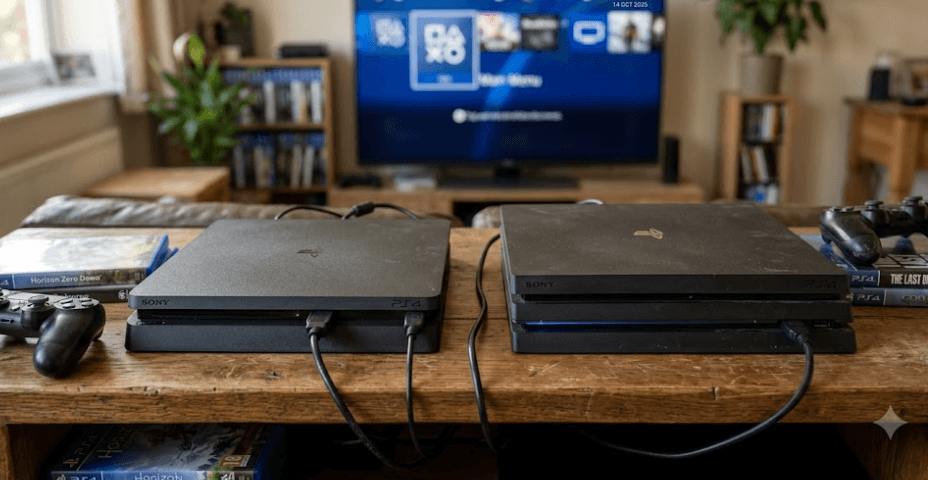
TL;DR: The PS4 Slim is the better choice if you want an affordable, compact console for playing classic PlayStation games on a 1080p TV. The PS4 Pro is worth paying more for if you own a 4K TV and want sharper visuals in supported games, thanks to its more powerful graphics hardware. Both consoles play the same PS4 game library, so the Pro does not unlock an entirely different generation of games. In India, both are primarily second-hand or refurbished purchases, making condition, controller quality, warranty, and price differences just as important as specifications. If the Pro costs substantially more than a well-maintained Slim, consider whether its visual improvements justify the extra expense.
Understanding The PS4 Slim And PS4 Pro
The PlayStation 4 Slim and PlayStation 4 Pro belong to the same console generation, but they were designed for slightly different buyers. Introduced in 2016, the Slim made the original PS4 design smaller, lighter, and more power-efficient. The Pro arrived as the higher-performance option, offering more graphics processing power for games that supported its enhanced features. Neither console replaces the other in terms of game compatibility, which means your decision comes down to visual quality, physical design, and value rather than access to a separate library.
The Slim makes sense for someone who wants to enjoy games such as God of War, Marvel's Spider-Man, The Last of Us Remastered, and Uncharted 4 without spending too much on hardware. It is also easier to fit into a small entertainment setup and produces less maximum power draw than the Pro. For casual players, families, and people returning to gaming after a break, these practical benefits can matter more than a modest graphics improvement.
The Pro is designed for players who want better image quality from supported titles, especially on larger displays. Its stronger graphics processor can deliver higher rendering resolutions, improved image detail, and more stable performance in certain games. However, the results vary by title, and not every game receives a significant upgrade. Sony's own specifications distinguish the Pro's 4K output capabilities from the standard PS4's HD output.
What Makes The Two Consoles Different?
The key distinction is that the Slim focuses on efficient, affordable gaming, while the Pro prioritizes graphics performance. Both use an eight-core AMD Jaguar CPU architecture and 8GB of GDDR5 memory, but the Pro has a substantially more powerful GPU. This difference helps explain why some supported games look sharper on the Pro without making every title run dramatically faster.
PS4 Slim Vs PS4 Pro Specifications
When comparing the PS4 Slim vs PS4 Pro, the specifications show why the Pro remains attractive despite its age. Sony lists the standard PS4 Slim's graphics performance at 1.84 TFLOPS, compared with 4.20 TFLOPS for the Pro. Both have 8GB of GDDR5 memory, but the Pro's graphics hardware can handle enhanced rendering in compatible games. The difference is most noticeable when a game has a dedicated Pro enhancement mode, rather than in every title you install.
Physical dimensions also affect everyday use. The Slim weighs approximately 2.1kg, while the original Pro specification lists approximately 3.3kg. The Slim is easier to move between rooms or fit into a compact TV cabinet. The Pro is larger and heavier, but that does not make it a poor choice if the console will remain in one place. Both include an optical disc drive for physical PS4 games, alongside digital game support.
Storage is another practical difference in common configurations. Sony lists the Slim with 500GB or 1TB options, while the Pro's original specifications list 1TB. Actual usable capacity is lower than the advertised figure because system software and other data occupy space. If you plan to keep several large games installed, check the exact storage capacity of the used console instead of assuming every Slim has the same drive.
Specifications At A Glance
Feature | PS4 Slim | PS4 Pro |
|---|---|---|
CPU | 8-core AMD Jaguar | 8-core AMD Jaguar |
GPU performance | 1.84 TFLOPS | 4.20 TFLOPS |
Memory | 8GB GDDR5 | 8GB GDDR5 |
Common storage | 500GB or 1TB | 1TB |
Maximum listed power consumption | 165W | 310W |
Approximate weight | 2.1kg | 3.3kg |
Display output | Up to 1080p; HDR supported | 4K output in supported content; HDR supported |
Best suited for | Budget and 1080p gaming | Enhanced visuals and 4K displays |
Specifications are based on Sony's published PS4 and PS4 Pro specifications. Storage configurations can vary by model and region. Maximum power consumption is a rated ceiling, not typical power use during every gaming session.
Gaming Performance And Graphics Quality
The biggest reason to choose the PS4 Pro is its graphics performance. On a compatible 4K television, supported games can render at native 2160p or use upscaling techniques to produce an image approaching 4K. Depending on the title, this can make textures, distant objects, and fine details appear clearer. Sony also describes improved image quality and potentially faster or more stable frame rates in supported games. These benefits are game-dependent, so buying a Pro does not guarantee that every title will run at 4K or at a higher frame rate.
The PS4 Slim remains perfectly capable of delivering enjoyable gameplay at 1080p. If your television is Full HD, you may notice less difference between the consoles than someone playing on a large 4K screen. The Slim can also use HDR in compatible games and with a compatible display, so HDR is not an exclusive Pro feature. For someone mainly interested in story-driven games, sports titles, and older PlayStation releases, the Slim still delivers the core PS4 experience.
It is also important to separate graphics quality from raw gameplay performance. Some Pro-enhanced games offer a choice between a higher-resolution mode and a performance-focused mode, while other games receive smaller improvements. A Pro will not automatically turn every 30-frame-per-second game into a 60-frame-per-second experience. If you are buying for competitive gaming or consistently high frame rates, check the specific game's supported modes rather than relying on the console name alone.
Which Console Looks Better On Your TV?
The PS4 Pro is the stronger choice for a 4K television, particularly when you play titles with well-implemented Pro enhancements. The Slim is a more sensible match for a standard 1080p television, where its output already suits the display's native resolution. In either case, television quality, game settings, and viewing distance affect how noticeable the difference will be.
PS4 Slim Vs PS4 Pro Price In India
Price is particularly important in 2026 because these consoles are from an older generation and are generally bought used or refurbished. Current listings vary by seller, storage capacity, condition, included controllers, and warranty. For example, GameNation's pre-owned listings show a 500GB PS4 Slim at around ₹20,499 and a 1TB PS4 Pro at around ₹28,999, although these are listing prices rather than guaranteed market values. Check the live listing before purchasing, since stock and prices can change.
The difference between those example listings is approximately ₹8,500. That is enough to make the Slim attractive to someone who simply wants access to the PS4 library. However, a Pro may offer better value if you have a 4K TV and expect to play graphics-intensive titles regularly. Compare consoles with similar condition, storage, controller count, and warranty coverage before deciding that one is automatically cheaper.
Avoid paying a premium solely because a seller labels a console as rare, refurbished, or like new. Refurbished can mean different things depending on the seller, so check what testing was performed and whether the purchase includes a written return policy or warranty. A lower-priced console with a noisy fan, damaged HDMI port, or unreliable controller can quickly become more expensive than a better-tested unit.
Example Price Comparison
Purchase option | Example listed price | Buying consideration |
|---|---|---|
Pre-owned PS4 Slim 500GB | ₹20,499 | Lower upfront cost |
Pre-owned PS4 Pro 1TB | ₹28,999 | More graphics power and storage |
Price difference | ₹8,500 | Worth paying only if you need the upgrades |
Prices are examples from a retailer's pre-owned listings checked during research, not fixed market prices or a guarantee of current stock.
Power Consumption, Heat, And Noise
The PS4 Slim is the more efficient design on paper, with a maximum rated power consumption of 165W compared with 310W for the Pro. These figures represent maximum ratings, not the amount of electricity each console uses continuously. Actual consumption changes with the game, system activity, and operating conditions. Even so, the Slim's lower power ceiling makes it an appealing option for buyers who prefer a compact, efficient console for everyday gaming.
Noise is a separate consideration because both models are now old enough that their condition can matter more than their original design. Dust buildup, worn fan bearings, dried thermal paste, and poor ventilation can contribute to excessive fan noise or heat. A well-maintained Pro can be quieter than a neglected Slim, so do not assume that the smaller model will always be quieter. Listen to the console while a demanding game is running, not just when it is sitting at the home screen.
Before buying either console, check that the vents are clear and that the unit does not shut down unexpectedly. Keep it on a hard, open surface rather than inside a cramped cabinet. If the seller claims to have serviced the console, ask what was cleaned or replaced and whether there is a service record. A little attention to maintenance can make a bigger difference to your experience than the choice between the two models.
Which Is Better For Everyday Use?
Choose the Slim if you value a smaller footprint, lower rated power consumption, and affordable gaming. Choose the Pro if enhanced visuals are more important and you are comfortable with a larger console. For either model, prioritize its actual condition over assumptions based on its size or original specifications.
Games, Compatibility, And Long-Term Value
One of the most reassuring things about the PS4 Slim vs PS4 Pro comparison is that both consoles belong to the same PS4 ecosystem. Sony confirmed that PS4 games run across the PS4 family, with Pro enhancements available where developers support them. That means the Pro does not give you access to an entirely separate collection of games. If a title is compatible with PS4, the Slim is generally capable of playing it too, although the Pro may provide better visuals or performance in supported titles.
Physical game discs remain useful if you prefer buying pre-owned games, trading titles, or building a collection. Both models have Blu-ray disc drives, but remember that a used console should be tested for disc reading and ejection problems. Digital buyers should check internet connectivity, account access, storage space, and the current availability of the games they want. Do not assume that a game advertised as preloaded by a seller is a permanent, transferable purchase.
Long-term value also depends on your expectations. The PS4 is an older platform, so buyers should not assume that every new release will support it or that it offers the same future prospects as a current-generation console. If you primarily want to revisit established PS4 games on a limited budget, either model can still make sense. If you want the longest possible runway for new releases, saving toward a PS5 may be the smarter financial decision.
Should You Consider A PS5 Instead?
If the Pro's used price is approaching what you can afford for a newer console, compare the total cost before committing. A PS5 offers access to its own generation of games and broader performance improvements, although it costs more upfront. The right choice depends on whether you want an inexpensive way to enjoy the PS4 library or a platform with a longer future ahead.
What To Check Before Buying A Used PS4?
A used PS4 purchase deserves a proper inspection because age and previous use can affect reliability. Start by checking the model number, physical condition, HDMI port, USB ports, disc drive, Wi-Fi connection, and controller pairing. Run a game for at least 15 to 20 minutes and listen for unusually loud fans, grinding noises, or unexpected shutdowns. A console that boots successfully is not necessarily in good condition under sustained load.
Storage and accessories deserve equal attention. Confirm whether the console has a 500GB or 1TB drive, whether the included DualShock 4 controller works correctly, and whether the power and HDMI cables are included. Test the controller's analog sticks for drift, check the buttons and charging port, and make sure the console can connect to the internet. Ask the seller to remove their account and restore the system appropriately before you set it up with your own account.
Finally, compare the seller's return policy and warranty rather than focusing only on the asking price. A refurbished unit from a seller that offers a clear warranty may be worth more than a cheaper private sale with no recourse if something fails. Avoid making advance payments to unverified sellers, and do not rely on claims about included games without checking how those games are licensed. These checks reduce the risk of spending money on a console that needs repairs shortly after purchase.
Frequently Asked Questions
Q. Which is better, PS4 Slim or PS4 Pro in 2026?
The PS4 Pro is better for graphics performance and supported 4K gaming, while the Slim is more affordable, compact, and power-efficient. Your television, budget, and the condition of the used console should determine the final choice.
Q. Does the PS4 Pro support 4K gaming?
Yes. The PS4 Pro supports 4K output and can render select games natively at 2160p. Other supported titles use upscaling or lower resolutions, so not every game runs at native 4K.
Q. Is the PS4 Slim good for a 1080p TV?
Yes. The Slim is a strong match for a Full HD television because it delivers gameplay at up to 1080p. It is a practical option if you want to enjoy PS4 games without paying extra for Pro-specific graphics enhancements.
Q. Do PS4 Slim and PS4 Pro play the same games?
Both consoles support the PS4 game library. Certain games offer improved graphics or performance on the Pro, but the Pro does not have an entirely separate collection of PS4-exclusive titles.
Q. Does the PS4 Slim support HDR?
Yes. Sony supports HDR output on the PS4 Slim as well as the Pro. You need a compatible television and HDR-enabled game or video content to benefit from it.
Q. Is the PS4 Pro worth the extra money?
It can be worth the extra expense if you own a 4K TV and regularly play games with Pro enhancements. If you use a 1080p TV and mainly want affordable access to PS4 games, the Slim is often the better value.
Q. Which PS4 consumes less electricity?
The Slim has a lower maximum rated power consumption of 165W, compared with 310W for the Pro. Actual electricity use depends on the game and operating conditions, so these ratings should not be treated as constant consumption figures.
Q. Is a used PS4 worth buying in India in 2026?
It can be, especially if you want to play established PS4 titles on a limited budget. Compare current used prices, test the console thoroughly, and prioritize a reliable seller with a clear return policy or warranty.
Q. Should I buy a PS4 Pro or save for a PS5?
Choose the Pro if its price is substantially lower and your priority is the PS4 library. Consider saving for a PS5 if you want access to newer games and better long-term platform support.
Q. What should I check before buying a secondhand PS4?
Test gameplay, HDMI output, disc reading, Wi-Fi, USB ports, controller buttons, and analog sticks. Listen for excessive fan noise and ask about repair history, storage capacity, included accessories, and warranty coverage.
Final Recommendation
The PS4 Slim is the better value for most budget-conscious buyers in 2026. It offers the core PlayStation 4 gaming experience in a smaller, more power-efficient design, making it suitable for casual gaming, older exclusives, and 1080p televisions. If you find a well-maintained unit at a fair price, there is little reason to pay extra for the Pro when you do not need its graphics advantages.
The PS4 Pro is worth considering if you own a 4K television, want improved visuals in supported games, and find a reliable used unit at a reasonable price. Its stronger GPU and 1TB standard configuration give it meaningful advantages, but those benefits should be weighed against its larger size, higher power rating, and purchase price.
Choose the PS4 Slim for affordable, straightforward gaming. Choose the PS4 Pro if its enhanced graphics will make a noticeable difference to your setup. Before buying either one, compare the final price, condition, controller quality, and warranty. If the total cost gets too close to that of a PS5, consider saving for the newer console instead.
Ready to upgrade your tech?
Browse our collection of quality refurbished products at unbeatable prices.






