
PS VR2 on PS5 and PC: Is It Worth Buying in 2026?
Is PlayStation VR2 worth buying in 2026? Explore its OLED displays, PS5 gaming experience, SteamVR compatibility, PC adapter requirements, pricing, and key limitations to decide whether it suits your gaming setup.

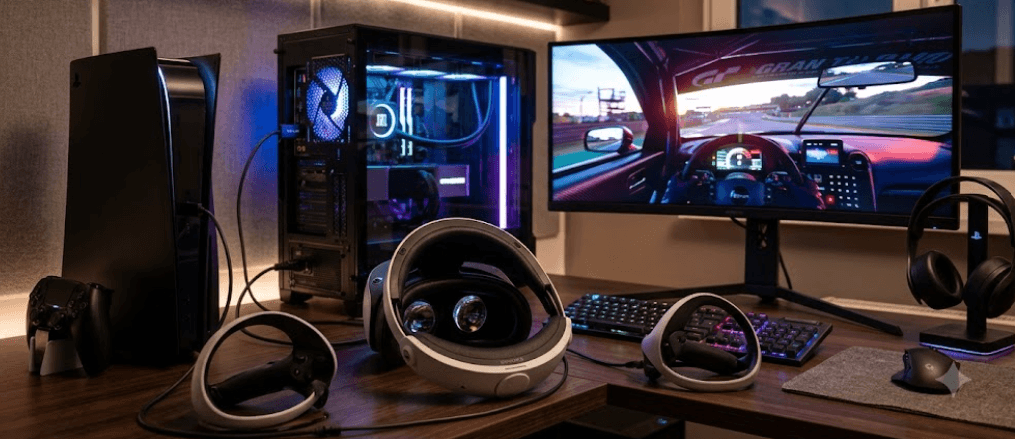
TL;DR: The PlayStation VR2 remains a compelling virtual reality headset in 2026 for gamers who want immersive visuals, responsive motion controls, and access to PS5 VR games. Its OLED displays, eye tracking, and advanced controller feedback make supported games more engaging. It also works with compatible Windows PCs through a separate PS VR2 PC adapter, opening access to SteamVR games. However, PC gaming comes with feature limitations, and the additional adapter and hardware requirements increase the overall cost. If you already own a PS5 and want a dedicated VR gaming experience, PS VR2 is worth considering. PC-only gamers should compare its total cost and compatibility with other VR headsets before buying.
What Is PlayStation VR2?
The PlayStation VR2 is Sony's second-generation virtual reality headset, designed primarily for the PS5. Unlike conventional gaming monitors, it places a separate display in front of each eye, creating an immersive 3D environment that responds to your head movements. This makes supported games feel more immediate, whether you are exploring a virtual world, driving a racing car, or interacting with objects around you.
The headset features OLED displays with a resolution of 2,000 × 2,040 pixels per eye, refresh rates of 90 Hz and 120 Hz, and an approximately 110-degree field of view. It also includes eye tracking, headset vibration, and inside-out tracking through its built-in cameras. The included PS VR2 Sense controllers add motion controls, haptic feedback, and adaptive triggers in supported games, giving players more detailed physical feedback than conventional controller vibration alone.
What makes PS VR2 particularly interesting in 2026 is its ability to work with both a PS5 and a compatible Windows PC. On PS5, it provides access to the PlayStation VR2 game library and supported platform-specific features. On PC, it can run compatible SteamVR games through Sony's PC adapter. However, these two experiences are not identical, so your intended platform should influence your buying decision.
PS VR2 Specifications And Features
Before deciding whether PS VR2 is worth buying, it helps to understand what the hardware offers. Its OLED displays deliver deep blacks and strong contrast, which can make darker game environments feel more immersive. The 90 Hz and 120 Hz refresh rates support smoother motion when a game and the system are configured for the relevant mode. Actual performance varies by game, and higher refresh rates do not guarantee a consistently high frame rate in every title.
The headset also uses inside-out tracking, which means its built-in cameras track your surroundings and movement without requiring separate external tracking stations. Eye tracking enables features such as foveated rendering in supported games, where rendering resources can be prioritized around the area you are looking at. This can improve rendering efficiency without requiring every part of the image to receive the same level of detail.
Comfort and convenience matter just as much as specifications. PS VR2 connects to a PS5 through a single USB-C cable, reducing setup complexity compared with older VR systems that required several external connections. It includes built-in headphones and a microphone, while the headset's adjustable fit helps accommodate different users. Nevertheless, the headset is wired, and individual comfort depends on head shape, fit, session length, and sensitivity to virtual reality.
| Feature | PlayStation VR2 |
|---|---|
| Display | OLED |
| Resolution | 2,000 × 2,040 pixels per eye |
| Refresh Rate | 90 Hz and 120 Hz |
| Field Of View | Approximately 110 degrees |
| Tracking | Inside-out tracking |
| Eye Tracking | Supported |
| Controllers | PS VR2 Sense controllers |
| PS5 Connection | USB-C |
| PC Compatibility | Windows PC with the required adapter and hardware |
Gaming On PS5: Where PS VR2 Shines
Immersive Gameplay And Exclusive Experiences
PS VR2 is particularly attractive to PS5 owners who want games designed around virtual reality rather than traditional flat-screen gaming. Supported titles can use head tracking, motion controls, eye tracking, adaptive triggers, and headset feedback to create more engaging interactions. Instead of simply watching the action on a screen, you can physically look around a virtual environment and use your hands to interact with elements in the game.
Games such as Horizon Call of the Mountain, Gran Turismo 7, and Resident Evil Village illustrate different ways developers can use VR. Horizon Call of the Mountain focuses on exploration and climbing, while the PS VR2 version of Gran Turismo 7 offers an immersive cockpit perspective. The PS VR2 version of Resident Evil Village uses virtual reality to make its horror environments feel more immediate. Availability and supported features should be checked for the particular game and region.
The experience is especially rewarding if you enjoy racing simulations, atmospheric adventures, and games that benefit from spatial awareness. However, not every PS5 game supports PS VR2, and owning the headset does not automatically convert standard games into VR experiences. Check the game's compatibility before purchasing it, particularly if you are buying the headset for one specific title.
Using PS VR2 On PC
What You Need To Get Started
Sony officially supports PS VR2 on compatible Windows PCs through its dedicated PC adapter. To use it, you need the headset, its Sense controllers, the adapter, a compatible DisplayPort 1.4 cable, and a suitable Windows computer. You also need Steam, SteamVR, and the PlayStation VR2 application available through Steam. If your computer does not have suitable Bluetooth connectivity, you may need a compatible Bluetooth adapter for the controllers.
Sony lists Windows 10 64-bit and Windows 11 64-bit, at least 8 GB of RAM, an Intel Core i5-7600 or AMD Ryzen 3 3100-class processor, and supported graphics hardware among the minimum requirements. The processor must meet Sony's stated architecture requirements, and the graphics card must fall within its supported categories. Sony recommends an NVIDIA GeForce RTX 3060 or later, or AMD Radeon RX 6600 XT or later, for better performance. A dedicated DisplayPort 1.4 connection is required; DisplayPort over USB-C is not supported by the adapter.
Once the adapter and software are installed, follow Sony's setup instructions to connect the headset, pair the controllers, configure the play area, and launch SteamVR. You can then play compatible VR games available on Steam. Keep in mind that compatibility and performance depend on the individual game, computer hardware, graphics settings, and controller support. If you are buying PS VR2 specifically for PC gaming, verify that your computer meets the requirements before spending money on the headset and adapter.
PS5 Vs. PC: What Is The Difference?
The biggest distinction between the two platforms is not the headset's physical design but the features available when you use it. On PS5, supported games can use PS VR2's HDR output, eye tracking, headset feedback, and the Sense controllers' advanced haptics and adaptive triggers. Developers can incorporate these features into gameplay, making the experience more integrated with the console.
On PC, the headset opens access to SteamVR's broader selection of compatible virtual reality games. However, Sony confirms that HDR output, eye tracking, headset feedback, and the Sense controllers' haptic feedback and adaptive triggers are not supported through the PC setup. Basic controller vibration remains available. The available VR play-area behavior also differs, so users should not expect the same safety and interaction features across both platforms.
For this reason, PS5 is generally the better choice if you want to experience PS VR2's full feature set in supported games. PC is attractive if you already own a capable gaming computer and want access to SteamVR titles. If you intend to switch frequently between platforms, remember that you may need to reconnect the hardware and adjust settings for each system.
| Consideration | PS5 | Windows PC |
|---|---|---|
| Setup | Connect headset to PS5 | Requires PC adapter and additional setup |
| Game Library | Compatible PS VR2 games | Compatible SteamVR games |
| HDR Output | Supported in compatible games | Not supported |
| Eye Tracking | Supported in compatible games | Not supported |
| Advanced Controller Feedback | Supported in compatible games | Not supported |
| Hardware Requirements | Compatible PS5 console | Compatible Windows PC and graphics hardware |
| Best For | Console VR experiences | Access to SteamVR titles |
Price And Value In 2026
Is PS VR2 Worth The Money?
The value of PS VR2 depends on its current selling price, the games you want to play, and whether you already own a compatible PS5 or gaming PC. In India, Sony's official retail partner ShopAtSC has listed the headset at an MRP of ₹44,999. Treat this as a reference price rather than a guaranteed current street price, since discounts, stock, and retailer offers can change. Check the current price before purchasing.
If you already own a PS5, the headset can be a more straightforward purchase because you do not need to build a separate PC setup. However, remember to budget for games and consider whether you will use the headset regularly. VR hardware can offer excellent immersion, but its value falls if you only play occasionally or the available games do not match your preferences.
PC buyers should calculate the total cost more carefully. The PC adapter and a suitable DisplayPort cable are additional requirements, and a compatible gaming PC can represent a substantial investment. If you already have the necessary computer and want access to SteamVR, PS VR2 may be worth considering. If you need to purchase all the supporting hardware, compare the complete cost against other headsets before making a decision.
Pros And Cons Of PS VR2
One of PS VR2's biggest advantages is its display technology. OLED panels deliver strong contrast, and the headset combines this with a wide field of view, eye tracking, and responsive motion controls. On PS5, compatible games can take advantage of features such as headset feedback and adaptive triggers, making the hardware more than just a pair of screens strapped to your head.
Its limitations are equally important to understand. The headset requires a cable connection, which can restrict movement compared with wireless VR systems. The PC setup needs additional hardware, and several advanced features are unavailable on that platform. Some players may also experience motion sickness or discomfort, particularly in games with artificial movement or long sessions.
The buying decision ultimately comes down to your priorities. If you want high-contrast visuals and immersive PS5 games, PS VR2 offers a compelling experience. If wireless freedom, portability, or unrestricted PC compatibility matters more, compare alternatives before committing. No single VR headset is the best fit for every player.
Final Recommendation And Decision Framework
The PlayStation VR2 is worth buying in 2026 if you own a PS5, enjoy virtual reality, and want an immersive experience in compatible games. Its OLED displays, high refresh rates, eye tracking, and advanced controller features give it a strong technical foundation. For players who regularly enjoy VR racing, horror, exploration, and action games, it can provide a meaningful upgrade over conventional gaming.
For PC gamers, the decision is more nuanced. The PC adapter makes PS VR2 compatible with supported SteamVR games, but the loss of HDR, eye tracking, headset feedback, and advanced controller feedback means that the PC experience is not identical to the PS5 experience. Buyers should also account for the adapter, DisplayPort cable, Bluetooth requirements, and their computer's graphics performance.
Our recommendation: Buy PS VR2 if you already own a PS5 and have several compatible games you genuinely want to play. Consider it for PC gaming if your computer meets Sony's requirements and the SteamVR library appeals to you. If you are starting from scratch, compare the complete cost, game compatibility, comfort, and wireless features of competing headsets before deciding. The best purchase is the one that matches how you actually play, rather than the one with the most impressive specifications on paper.
Frequently Asked Questions
Q. Is PS VR2 worth buying in 2026?
Yes, particularly for PS5 owners who want immersive VR gaming and access to compatible PlayStation VR2 titles. PC gamers should weigh the adapter cost and feature limitations before buying.
Q. Can PS VR2 work on a PC without a PS5?
Yes. You can use PS VR2 with a compatible Windows PC through Sony's PC adapter. A PS5 is not required for this setup.
Q. Do I need a PC adapter to use PS VR2 on a computer?
Yes, Sony's supported PC setup requires the PS VR2 PC adapter, a DisplayPort 1.4 cable, and compatible hardware. You also need the relevant Steam applications.
Q. Does PS VR2 support SteamVR games?
Yes. With the supported PC setup, you can play compatible VR games available on Steam through SteamVR.
Q. Does PS VR2 lose features on PC?
Yes. HDR output, eye tracking, headset feedback, and advanced Sense controller haptics and adaptive triggers are unavailable on PC. Basic controller vibration is supported.
Q. What PC specifications do I need for PS VR2?
Sony lists Windows 10 or 11 64-bit, 8 GB RAM or more, a supported Intel or AMD processor, compatible graphics hardware, USB 3.0, DisplayPort 1.4, and Bluetooth 4.0 or later. Check Sony's official requirements for exact compatibility.
Q. Does PS VR2 support 120 Hz gaming?
Yes. Its displays support 90 Hz and 120 Hz refresh rates. Actual game performance depends on the title, platform, and system configuration.
Q. Can I use PS VR2 with the original PS4?
No. PS VR2 is designed for PS5 and supported Windows PCs, not the original PS4 or PS4 Pro.
Q. Is PS VR2 wireless?
No. The headset connects to the PS5 or PC adapter through a cable. Its controllers operate separately and require charging.
Q. Is PS VR2 better on PS5 or PC?
PS5 is the better choice if you want the full supported feature set and PlayStation VR2 games. PC is attractive if you already have a compatible gaming computer and want access to SteamVR titles.
Ready to upgrade your tech?
Browse our collection of quality refurbished products at unbeatable prices.






