PD vs QC vs PPS: Which Fast-Charging Standard Does Your Phone Need?
PD, QC, and PPS can make phone charging confusing. Learn how each standard works, which phones need PPS or QC, and how to choose the right fast charger.

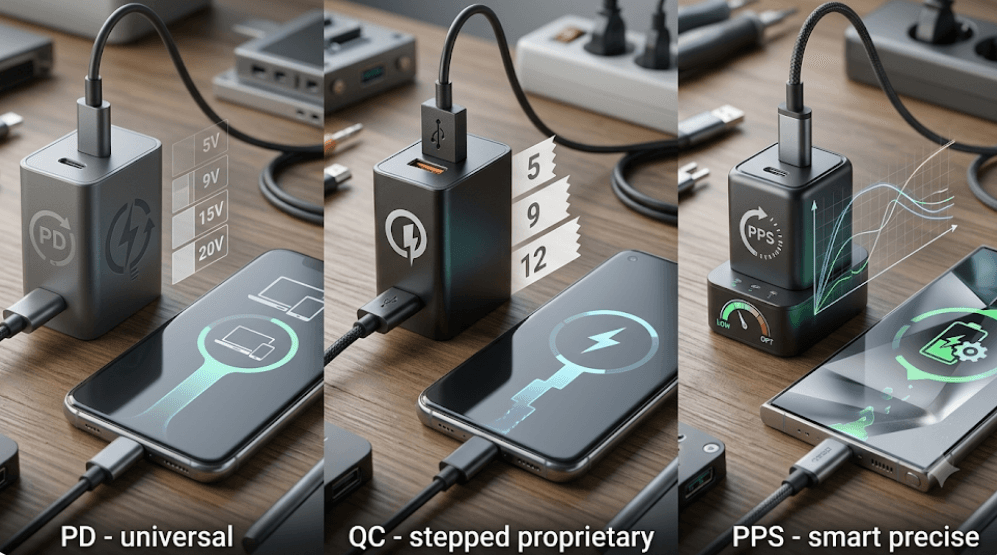
TL;DR: PD, QC, and PPS are different charging technologies, but PPS is actually part of the USB Power Delivery ecosystem rather than a completely separate alternative to PD. USB Power Delivery (PD) is the broadest choice for modern phones, while PPS can be important for reaching the fastest supported charging speeds on phones such as Samsung Galaxy models. Qualcomm Quick Charge (QC) remains relevant for compatible Android devices, particularly older or specific models. The right charger depends less on its maximum wattage and more on whether its charging protocol matches your phone.
What Are PD, QC, And PPS?
Fast charging is not determined by wattage alone. A charger rated at 65W, for example, does not automatically make every phone charge at 65W. Your phone and charger need to communicate and agree on a supported charging mode. This is where standards such as USB Power Delivery, Qualcomm Quick Charge, and Programmable Power Supply come into the picture.
USB Power Delivery (USB PD) is a USB charging standard developed through the USB Implementers Forum (USB-IF). It is designed to support a wide range of devices, from smartphones and tablets to laptops. PD can negotiate an appropriate voltage and current between the charger and the device instead of simply sending the charger’s maximum advertised power.
Quick Charge (QC) is Qualcomm's fast-charging technology. It has evolved through several generations, with newer versions supporting higher power and more advanced charging control. QC is not simply another name for fast charging, and compatibility depends on the specific phone, charger, port, cable, and QC generation involved.
PPS, or Programmable Power Supply, is where things become slightly confusing. PPS is a feature within the USB Power Delivery ecosystem that allows the charger to adjust voltage and current more dynamically. Instead of relying only on fixed voltage levels, a compatible phone can request more precise power adjustments. This can be particularly important for some Samsung Galaxy fast-charging modes.
PD vs QC vs PPS At A Glance
The easiest way to understand the three technologies is to compare what they actually do and where they are commonly used.
| Feature | USB PD | Quick Charge | PPS |
|---|---|---|---|
| Full name | USB Power Delivery | Qualcomm Quick Charge | Programmable Power Supply |
| Standard type | USB charging standard | Qualcomm charging technology | Feature within USB PD |
| Main advantage | Broad compatibility | Fast charging for compatible devices | More precise power adjustment |
| Common connection | USB-C | USB-A or USB-C, depending on generation/device | USB-C |
| Commonly relevant to | iPhones, Pixels, modern Androids, tablets, laptops | Compatible Android devices | Samsung and other compatible modern phones |
| Fixed or adjustable | Fixed PD profiles and other modes depending on specification | Depends on QC generation | Dynamically adjustable |
| Best for | General-purpose charging | Compatible QC devices | Phones that specifically benefit from PPS |
The most important point is that PPS should not be treated as a direct competitor to PD. A charger can support both PD and PPS because PPS operates within the USB PD framework. In practical shopping terms, you will often see chargers advertised as “USB PD PPS.”
The same charger can also support multiple charging technologies. For example, a modern USB-C charger may offer USB PD and PPS, while another port may support additional charging protocols. This is why checking the detailed specifications for each port is more useful than looking only at the large wattage number printed on the box.
How USB Power Delivery Works
USB Power Delivery is one of the most broadly useful charging standards because it is designed for multiple types of USB-powered devices. A PD charger advertises the power profiles it can provide, while the connected device requests a suitable profile.
Traditional fixed PD profiles can use voltage levels such as 5V, 9V, 15V, and 20V, depending on the charger and device. Higher-power versions of USB PD can support considerably more power for compatible equipment. However, a phone will only draw the power it is designed and configured to accept.
This means buying a 100W or 140W charger does not automatically make a phone charge at 100W. If the phone supports only a lower charging rate, the charger does not force that higher power into the device. The phone and charger negotiate an appropriate charging arrangement.
USB PD is especially useful if you own multiple devices. One USB-C PD charger can potentially charge a phone, tablet, headphones, handheld gaming device, or laptop, provided the charger has sufficient output and the devices support the relevant USB-C charging capabilities.
What Makes PPS Different?
PPS adds more flexibility to USB Power Delivery by allowing the output voltage to be adjusted in much smaller increments. USB-IF documentation describes PPS as allowing the source voltage to be adjusted in 20mV steps, with the current limit also adjustable in fine increments.
This finer control is useful because the phone does not always need exactly the same voltage throughout the charging process. The charging system can request adjustments based on the device's requirements rather than being restricted to a small number of fixed voltage levels.
PPS can therefore help compatible devices manage charging more efficiently and can reduce unnecessary conversion between the charger's output and the voltage required by the phone. However, it is important not to turn this into a blanket claim that every PPS charger will always charge every phone faster or cooler. The actual result depends on the phone, charger, cable, battery level, temperature, and charging system.
Samsung is one of the clearest examples of why PPS matters. Samsung states that its Super Fast Charging requires a charger supporting USB PD and PPS. Its current charger specifications list PPS output ranges alongside standard PD profiles. Therefore, a high-wattage PD charger without PPS may not provide the same Samsung charging mode as a PD charger that also supports PPS.
Where Quick Charge Fits In
Qualcomm Quick Charge is another major fast-charging technology, but its compatibility needs to be checked at the device level. Different generations of Quick Charge have different capabilities, so simply seeing “QC” on a charger does not tell you exactly how quickly a particular phone will charge.
Older Android phones commonly used Quick Charge over USB-A, while newer charging ecosystems have increasingly moved toward USB-C and USB Power Delivery. Some newer Qualcomm charging solutions can also work alongside USB-PD-based charging technologies, so the old assumption that “QC and PD never work together” is too simplistic.
This also means that a phone having a Qualcomm Snapdragon processor does not automatically mean you should buy a QC charger. The processor brand alone is not enough to determine charging compatibility. The phone manufacturer's specifications are the better source for identifying the supported charging protocols.
If your phone specifically lists Quick Charge as a supported fast-charging technology, a compatible QC charger can be a sensible choice. If the phone specifies USB PD instead, a PD charger is the safer choice. For maximum speed, always match the exact charging requirements of the phone.
Which Standard Does Your Phone Need?
The answer changes depending on the phone brand and model. There is no universal rule that says every Android phone needs QC or every USB-C phone needs PPS.
For iPhones, USB Power Delivery is the key standard for wired fast charging. Apple currently recommends a USB-C Power Delivery charger for faster wired charging on iPhone 15 and later, while earlier models can use an appropriate USB-C to Lightning setup with a compatible PD adapter. Newer iPhone generations have their own specific power requirements, so checking the model is still important.
For Samsung Galaxy phones, USB PD with PPS is particularly important if you want the phone's Super Fast Charging modes. Samsung's current documentation specifically states that Super Fast Charging requires USB PD and PPS, and its official charger specifications show PPS ranges alongside PD profiles.
For Google Pixel phones, USB PD is broadly supported, and Google also specifically lists PPS adapters as compatible charging options. Current Pixel documentation recommends compatible USB-C PD or PPS chargers depending on the model and charging capability.
| Phone category | What to look for |
|---|---|
| iPhone | USB PD |
| Samsung Galaxy with Super Fast Charging | USB PD + PPS |
| Google Pixel | USB PD; PPS may be supported/recommended depending on model |
| Older compatible QC Android phones | Compatible Quick Charge version |
| Other Android phones | Check the manufacturer's exact charging specification |
For brands such as Xiaomi, OPPO, OnePlus, vivo, and realme, the situation can be more complicated because some models use proprietary high-speed charging systems. A standard PD charger may still charge the phone, but it may not reproduce the manufacturer's headline charging speed. Always check the exact phone model before buying a replacement charger.
Does Higher Wattage Mean Faster Charging?
Not necessarily. Wattage is important, but it is only one part of the charging equation.
Think of the charger as having a maximum capacity and the phone as having its own charging limit. A 65W charger can potentially provide 65W under the right conditions, but a phone designed to accept less will not suddenly charge at 65W. The phone controls how much power it requests.
Charging speed can also change during a charging session. Phones generally do not maintain their maximum charging power from 0% to 100%. The charging system can reduce power as the battery fills, and factors such as temperature, battery condition, background activity, and the cable can affect the actual result.
This is why claims such as “this charger is 100W, so it will charge your phone five times faster” should be treated carefully. Look for the supported protocol, voltage/current profiles, maximum phone charging rate, and cable requirements, rather than relying on wattage alone.
Why The Cable Also Matters
A compatible charger is only one part of the setup. The cable can also affect charging performance, particularly at higher power levels.
Different USB-C cables can have different power capabilities. Some higher-power charging arrangements require cables with appropriate current ratings. Samsung, for example, specifies particular cable requirements for some of its higher-power Super Fast Charging configurations.
A cable that cannot support the required charging conditions can prevent the phone from reaching its intended charging speed. In some cases, the phone may simply charge at a lower rate rather than using the charger's maximum capability.
Therefore, when buying a 45W, 65W, or higher-power charger, do not look only at the adapter. Check whether the included or existing cable is suitable for the charging mode you want to use. This becomes particularly important when charging laptops and high-power devices.
How To Choose The Right Charger
Start with your phone's official specifications. Look for terms such as USB PD, PPS, Quick Charge, Super Fast Charging, or a proprietary charging technology. If the manufacturer specifies a particular protocol, treat that information as more important than generic claims printed on third-party charger packaging.
For most modern users, a good USB-C PD charger is the most versatile starting point. If you use a Samsung Galaxy that supports Super Fast Charging, choose a charger that explicitly lists both PD and PPS. If you use a compatible older QC device, make sure the charger supports the required QC version.
If you own several devices, consider a multi-port charger that supports PD and PPS on its USB-C ports. This can be more useful than buying a charger with a huge wattage rating but limited protocol support. A 65W charger with the right protocols can be more practical than a 100W charger that does not support the charging modes your devices need.
Common Charging Mistakes To Avoid
One common mistake is assuming that USB-C automatically means fast charging. USB-C describes the connector, not a single charging speed or protocol. Two USB-C chargers can have very different capabilities.
Another mistake is choosing a charger based solely on its wattage. A 100W charger may be excellent for a laptop but unnecessary for a phone that supports 25W or 30W. Compatibility should come before maximum wattage.
Finally, do not assume that every “fast charger” supports every fast-charging standard. Check the actual specification for the port you intend to use. A charger may support PD and PPS on one port but have different capabilities on another, particularly on multi-port adapters.
PD vs QC vs PPS: Which One Should You Buy?
If you want a simple rule, USB PD is the best general-purpose standard for most modern devices. It offers broad compatibility and works across phones, tablets, and many laptops.
If you use a Samsung Galaxy with Super Fast Charging, look specifically for USB PD + PPS. PPS is the important addition that can enable Samsung's supported Super Fast Charging modes.
If you have an older or specifically QC-compatible Android phone, a compatible Quick Charge charger can still be appropriate. For newer phones, however, do not choose QC simply because the charger advertises a high wattage.
The best charger is ultimately not the one with the biggest number on the box. It is the one whose protocol, power output, port, and cable all match your phone's requirements.
Frequently Asked Questions
Q. Is PPS better than USB PD?
PPS is not really a replacement for USB PD. It is a feature within the USB Power Delivery ecosystem that enables more precise voltage and current control. A charger can support both PD and PPS.
Q. Is USB PD faster than Quick Charge?
Neither is universally faster. Actual charging speed depends on the phone, charger, supported protocol, cable, temperature, and charging limits.
Q. Does Samsung need PPS for fast charging?
For Samsung's Super Fast Charging modes, Samsung specifies a USB PD charger with PPS support. The exact charging speed still depends on the Galaxy model and charger configuration.
Q. Does an iPhone need PPS?
No. For wired fast charging, Apple's current guidance points to USB Power Delivery. PPS is not a general requirement for iPhone wired fast charging.
Q. Can a PD charger charge a Quick Charge phone?
It may charge the phone, but that does not guarantee the phone will use its maximum Quick Charge speed. The phone and charger need a mutually supported charging mode.
Q. Does every USB-C charger support PD?
No. USB-C is the connector type, while USB Power Delivery is a charging protocol. A USB-C charger can have different power and protocol capabilities.
Q. Does a 65W charger charge every phone at 65W?
No. The phone determines how much power it can accept. A 65W charger simply has the capacity to provide up to that amount under supported conditions.
Q. Do I need a special cable for fast charging?
Sometimes. Cable requirements depend on the charging power and protocol. Higher-power charging can require a cable with an appropriate current rating.
Q. Is Quick Charge still useful?
Yes. Quick Charge remains relevant for compatible devices. However, the exact QC generation and device compatibility should be checked before buying a charger.
Q. What is the best charger for multiple devices?
A USB-C charger supporting USB PD and PPS is a strong choice for a mixed collection of modern phones and other USB-C devices. Check the individual power requirements before purchasing.
Final Recommendation
For most people buying a new phone charger today, USB PD should be the starting point. It provides broad compatibility and is suitable for many modern smartphones, tablets, and laptops. If you own a Samsung Galaxy and want its fastest supported Super Fast Charging mode, upgrade that recommendation to USB PD + PPS. If your phone specifically supports Quick Charge, choose a charger that supports the appropriate QC generation.
Above all, do not buy a charger based only on “65W,” “100W,” or “fast charging” written on the box. Check the charging protocol, supported voltage/current profiles, port specifications, cable rating, and your phone's official charging requirements. That combination, rather than the biggest wattage number, is what determines whether you actually get the charging speed your phone is capable of.
Ready to upgrade your tech?
Browse our collection of quality refurbished products at unbeatable prices.