Nintendo Switch OLED vs Switch Lite: Which Refurbished Console Is Better?
Comparing refurbished Nintendo Switch OLED and Switch Lite consoles? Explore their display quality, battery life, gaming modes, compatibility, and pricing to find the right console for home or portable gaming.

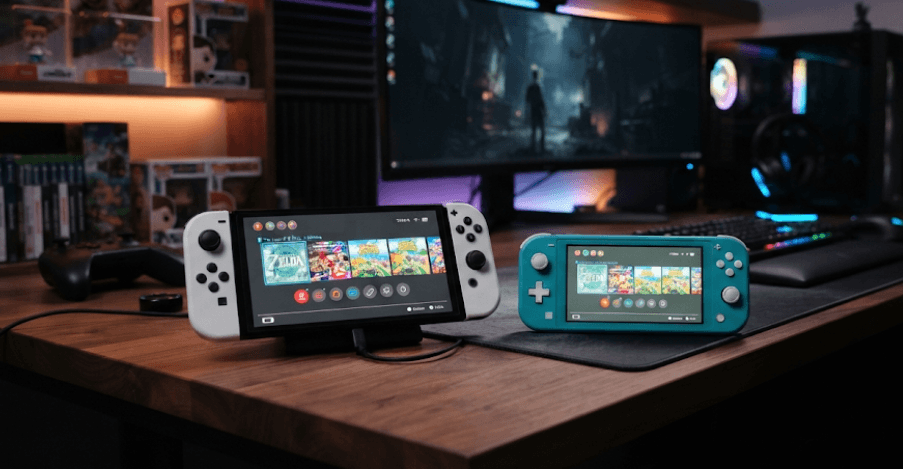
TL;DR: Choosing between a refurbished Nintendo Switch OLED and Nintendo Switch Lite depends on how and where you prefer to play. The Switch OLED offers a larger 7-inch OLED display, detachable Joy-Con controllers, TV connectivity, and 64GB of internal storage, making it a versatile option for home and handheld gaming. The Switch Lite, on the other hand, is smaller, lighter, and designed exclusively for handheld play, with integrated controls and a 5.5-inch LCD screen. Both support a wide range of Nintendo Switch games, but the Lite has some compatibility limitations. When buying refurbished, the decision should also consider battery health, controller condition, screen quality, included accessories, and warranty coverage. If flexibility matters more than price, the OLED is generally the better investment. If affordability and portability are your priorities, the Lite is worth considering.
Understanding The Nintendo Switch OLED And Switch Lite
Nintendo introduced the Switch OLED Model in October 2021 as an upgraded version of its original hybrid gaming console. Its biggest improvement is the 7-inch OLED display, which produces more vibrant colours, deeper blacks, and better contrast than a conventional LCD screen. It also includes detachable Joy-Con controllers, a wider adjustable stand, improved onboard speakers, and a dock with a built-in wired LAN port. These features make it suitable for both personal gaming and shared entertainment at home.
The Nintendo Switch Lite takes a different approach. Released in September 2019, it was designed as a dedicated handheld gaming console rather than a hybrid device. Its controls are built directly into the body, making it smaller, lighter, and easier to carry. The 5.5-inch LCD display is more compact, while the integrated control layout gives it a familiar handheld gaming experience. Unlike the OLED, it cannot connect to a television through the Nintendo Switch dock.
Both consoles belong to the same Nintendo Switch family and use the NVIDIA custom Tegra processor. They support physical Nintendo Switch game cards and digital games, subject to individual game compatibility. However, the OLED offers more flexibility in how games are played, whereas the Lite focuses on portability and a simpler design. These differences become particularly important when comparing refurbished units because the original features, physical condition, and included accessories directly influence their value.
Nintendo Switch OLED Vs Switch Lite: Specifications Compared
Looking at the specifications is a useful starting point when comparing the two consoles. The OLED is designed to deliver a larger and more versatile gaming experience, while the Lite prioritizes a compact form factor. Although both offer a 720p resolution on their built-in screens, their display technologies and physical dimensions are different.
The OLED's 7-inch screen provides more viewing space, which can make games with detailed environments, text, and menus easier to enjoy. Its OLED panel also produces deeper blacks because individual pixels can switch off completely. The Lite uses an LCD panel, which still delivers a 1280 x 720 resolution but does not offer the same contrast characteristics.
Storage and battery specifications also differ. The OLED includes 64GB of internal storage, compared with 32GB on the Lite. Both support compatible microSD cards for additional storage. Nintendo estimates approximately 4.5–9 hours of battery life for the OLED and 3–7 hours for the Lite, although actual performance depends on the game, settings, and battery condition.
Nintendo Switch OLED Vs Switch Lite: Key Specifications
| Specification | Switch OLED | Switch Lite |
|---|---|---|
| Display | 7-inch OLED | 5.5-inch LCD |
| Resolution | 1280 x 720 | 1280 x 720 |
| Processor | NVIDIA Custom Tegra | NVIDIA Custom Tegra |
| Internal Storage | 64GB | 32GB |
| Battery Life (New Unit Estimate) | 4.5–9 hours | 3–7 hours |
| Controllers | Detachable Joy-Con | Integrated controls |
| TV Connectivity | Yes | No |
| Tabletop Gaming | Built-in adjustable stand | Requires a compatible external stand and controllers |
| Audio | Enhanced stereo speakers | Stereo speakers |
| Weight | Approx. 422g with Joy-Con | Approx. 275g |
| Game Cards | Supported | Supported |
| Expandable Storage | Up to 2TB via compatible microSD | Up to 2TB via compatible microSD |
Note: Battery estimates are based on Nintendo's published specifications for these models when new. Refurbished units may deliver shorter battery life.
Display And Gaming Experience: Which One Looks Better?
The display is one of the most noticeable differences between the Switch OLED and Switch Lite. The OLED's 7-inch panel offers more screen space and richer visual output, particularly in colorful games, darker environments, and titles with detailed graphics. Games such as The Legend of Zelda: Breath of the Wild and Super Mario Odyssey can benefit from the improved contrast and larger viewing area when played in handheld mode.
The Switch Lite uses a 5.5-inch LCD display with the same 1280 x 720 resolution. Although it does not reproduce blacks and contrast as effectively as the OLED panel, it remains suitable for everyday handheld gaming. Its smaller screen also makes the console easier to hold and carry. For casual gaming during commutes, travel, or short breaks, the difference may not be a deciding factor for every player.
It is important to understand that the OLED model does not offer a higher resolution or a more powerful processor than the Lite. Its advantage comes primarily from display technology and screen size, not a major increase in graphical processing performance. Therefore, if you are expecting substantially higher frame rates or improved graphics settings, the OLED is not a performance upgrade over the Lite. It is primarily a better display and more versatile gaming experience.
Home Gaming Vs Portable Gaming: Where Each Console Fits
The biggest practical advantage of the Switch OLED is its hybrid design. You can play directly on the console, use the adjustable stand for tabletop gaming, or connect it to a television through the included dock. Its detachable Joy-Con controllers also make local multiplayer easier, allowing two players to use one controller each in supported games. This flexibility makes it a strong option for households where different people may want to use the same console.
The Switch Lite is designed for individual handheld gaming. Its integrated controls mean there are no detachable Joy-Con controllers to manage, and its compact dimensions make it easier to carry in a backpack or gaming case. However, it does not support TV mode and has no built-in kickstand. You can use compatible wireless controllers and a separately purchased stand for supported tabletop games, but this requires additional accessories and is less convenient than the OLED's built-in setup.
For buyers who mainly play at home, the OLED offers greater flexibility. It can move between handheld and television gaming without requiring a second console. For people who primarily play alone and want something easy to carry, the Lite is a practical alternative. The better choice depends on whether you value multiple playing styles or a lightweight handheld design.
Which Console Is Better For Different Gaming Needs?
| Gaming Requirement | Better Choice | Reason |
|---|---|---|
| Home gaming on a television | Switch OLED | Supports TV mode through its dock |
| Handheld gaming during travel | Switch Lite | Smaller and lighter design |
| Local multiplayer | Switch OLED | Detachable Joy-Con controllers |
| Larger and more vibrant display | Switch OLED | 7-inch OLED panel |
| Budget-friendly handheld gaming | Switch Lite | Typically positioned as the more affordable model |
| Flexible family gaming | Switch OLED | Supports handheld, tabletop, and TV modes |
Game Compatibility And Controller Differences
Both consoles support a large selection of Nintendo Switch games, but compatibility is not identical. The Switch OLED supports handheld, tabletop, and TV modes, making it compatible with the full Nintendo Switch game library. The Lite supports games that offer handheld mode, which includes the vast majority of Nintendo Switch titles. However, certain games and gameplay features may not work fully without separate compatible controllers.
The controller design is another important difference. The OLED comes with detachable Joy-Con controllers that include motion controls, HD Rumble, and other features. They can be used independently in supported multiplayer games or connected to the console during handheld play. The Lite has integrated controls and a built-in directional control pad, making its layout more convenient for traditional handheld gaming.
If you enjoy games that depend on motion controls or detachable controllers, the OLED is generally more convenient. Some compatible games can still be played on the Lite using separately purchased Joy-Con controllers, but those controllers need an appropriate charging solution and may require a compatible stand for tabletop play. Always check the individual game's supported play modes before purchasing it, particularly if you are considering the Lite.
Buying A Refurbished Switch: What Should You Check?
A refurbished gaming console can offer good value, but its condition matters more than its advertised discount. Unlike a new device, a refurbished Switch may have already gone through several years of use, charging cycles, and physical handling. Even if the seller confirms that the console powers on, that does not automatically mean its battery, display, controls, and internal components are in excellent condition.
Start by inspecting the screen and body. On the OLED, check for visible scratches, dead pixels, uneven brightness, and possible image retention or burn-in. On the Lite, inspect the LCD for discoloration, pressure marks, and touchscreen problems. Also examine the charging port, game card slot, speakers, buttons, and control sticks. On an OLED unit, test both Joy-Con controllers for loose connections, drifting sticks, and proper wireless operation.
Battery health deserves equal attention. Nintendo states that battery performance gradually declines with repeated charging cycles. A refurbished console may therefore provide less playtime than the manufacturer's original estimate. Ask the seller whether the battery has been tested or replaced, and request the applicable warranty details. It is also worth checking whether the device can connect to Wi-Fi, read game cards, charge correctly, and connect to a television if you are buying the OLED.
Refurbished Console Inspection Checklist
| Component | What To Check |
|---|---|
| Display | Scratches, dead pixels, discoloration, and image retention |
| Battery | Charging behavior, heating, and actual runtime |
| Controls | Button responsiveness and joystick drift |
| Joy-Con (OLED) | Attachment, detachment, wireless pairing, and charging |
| Speakers | Clear audio without distortion |
| Charging Port | Secure connection and consistent charging |
| Game Card Slot | Recognition and loading of physical games |
| Wi-Fi | Stable wireless connectivity |
| Dock (OLED) | HDMI output and charging functionality |
| Warranty | Coverage period, exclusions, and return policy |
Price, Value And Long-Term Ownership
Price is often the deciding factor when purchasing a refurbished gaming console. The Switch Lite is generally the more affordable option because of its smaller display, integrated controls, and handheld-only design. If your primary requirement is playing Nintendo exclusives without spending more on features you will rarely use, it can be a sensible purchase.
The Switch OLED generally costs more in the refurbished market, but it also offers additional functionality. Its larger display, detachable controllers, included dock, and television connectivity provide more ways to use the console. For someone who plans to play both at home and while travelling, the higher purchase price may be justified by the added flexibility.
However, refurbished prices can vary considerably depending on the seller, cosmetic grade, included accessories, storage card, and warranty. Avoid choosing a console based only on the lowest advertised price. A cheaper Lite with a worn battery or unreliable controls may not offer better value than a slightly more expensive, properly tested unit. Compare the total package and the seller's after-sales support before making a decision.
Final Recommendation: Which Refurbished Nintendo Switch Should You Buy?
The Nintendo Switch OLED is the stronger all-round choice for buyers who want a console that works equally well for home and portable gaming. Its larger OLED screen, detachable Joy-Con controllers, TV connectivity, and improved tabletop experience make it more versatile. If you regularly play multiplayer games, enjoy gaming on a television, or prefer a more immersive handheld display, the OLED is worth considering even at a higher refurbished price.
The Nintendo Switch Lite makes more sense if you primarily play alone and want a compact, lightweight console. It offers access to a large selection of Nintendo Switch games without requiring you to pay extra for a dock or detachable controllers that you may not use. For students, casual gamers, and people who travel frequently, its straightforward handheld design can be a practical advantage.
Ultimately, the condition of the refurbished unit should influence your decision just as much as the model itself. A well-maintained Lite with a healthy battery and a reliable warranty can be a better purchase than an OLED with display damage or worn-out Joy-Con controllers. Compare the asking price, included accessories, battery performance, and return policy before committing. If the price difference is reasonable and both consoles are in comparable condition, the Switch OLED is the better long-term choice for most gaming and home entertainment needs.
Frequently Asked Questions
Q. Is the Nintendo Switch OLED better than the Switch Lite?
Yes, for overall versatility. The OLED offers TV connectivity, detachable controllers, a larger screen, and tabletop gaming. The Lite is better suited to affordable, portable handheld gaming.
Q. Can the Nintendo Switch Lite connect to a TV?
No. The Switch Lite does not support TV mode, even when connected to a standard Nintendo Switch dock.
Q. Does the Switch OLED have better graphics than the Switch Lite?
Not in terms of processing performance. Both use the NVIDIA custom Tegra processor and have a 1280 x 720 handheld display resolution. The OLED provides better contrast, deeper blacks, and more vibrant colors.
Q. How much storage do the Switch OLED and Lite offer?
The OLED comes with 64GB of internal storage, while the Lite includes 32GB. Both support compatible microSD cards up to 2TB.
Q. Is a refurbished Nintendo Switch worth buying?
Yes, provided the console has been properly tested and comes with a clear warranty and return policy. Check the battery, screen, controls, charging port, and game card reader before purchasing.
Q. How long does the battery last on a refurbished Switch OLED?
A new OLED has an estimated battery life of approximately 4.5–9 hours. A refurbished unit may last less depending on its age, battery condition, game, and settings.
Q. Can I play all Nintendo Switch games on the Switch Lite?
No. The Lite supports games that offer handheld mode. Most Nintendo Switch games support this mode, but some titles and features require separate controllers or do not support handheld play.
Q. Does the Switch OLED come with detachable controllers?
Yes. It includes two detachable Joy-Con controllers that support motion controls and can be used for compatible multiplayer games.
Q. Can I expand storage on a refurbished Nintendo Switch?
Yes. Both models support compatible microSD, microSDHC, and microSDXC cards. A card with up to 2TB capacity is supported, although it is sold separately.
Q. Which refurbished Nintendo Switch is better for beginners?
The Lite is a good starting point for beginners who want affordable handheld gaming. However, the OLED is a better choice if you want the flexibility to play on a television, enjoy multiplayer gaming, and use different play modes.
Ready to upgrade your tech?
Browse our collection of quality refurbished products at unbeatable prices.