
Nikon F-Mount Lenses on Z Cameras: Everything About the FTZ Adapter
Discover how Nikon's FTZ and FTZ II adapters let you use compatible F-mount lenses on Z-series mirrorless cameras. Explore autofocus compatibility, image quality, stabilization, setup, and key limitations before buying.

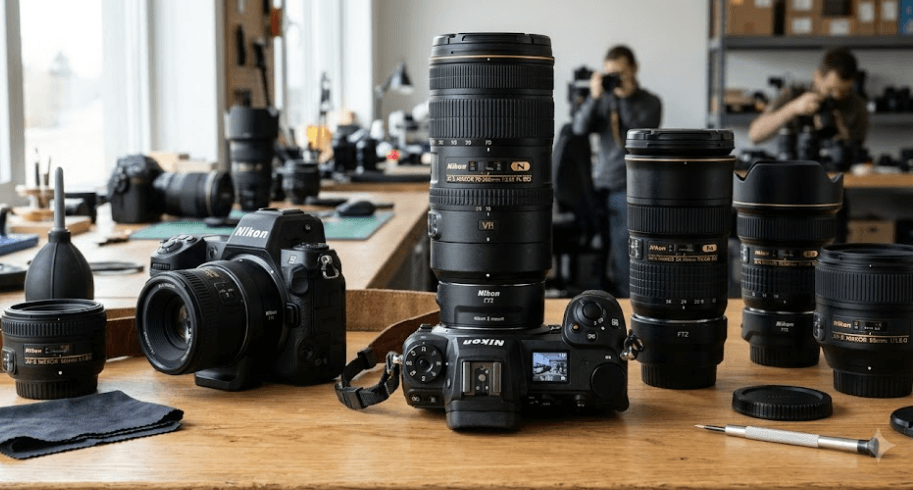
TL;DR: Nikon's FTZ and FTZ II mount adapters let you use compatible F-mount DSLR lenses on Nikon Z-series mirrorless cameras without replacing your entire lens collection. Many lenses retain autofocus, autoexposure, and other functions, but compatibility depends on the lens type. AF-S, AF-P, and AF-I lenses generally offer the most complete support, while older screw-drive AF lenses require manual focusing. The adapters contain no optical elements, so they do not inherently reduce image quality or change a lens's focal length. Before purchasing one, check Nikon's official compatibility list, especially if you own older lenses or use specialized equipment.
What Is The Nikon FTZ Adapter?
The Nikon FTZ adapter connects Nikon F-mount lenses, originally designed for Nikon film cameras and DSLRs, to Nikon Z-mount mirrorless cameras. It allows photographers to continue using compatible lenses when moving from a DSLR system to a mirrorless body. This is particularly useful for photographers who have spent years building a collection of NIKKOR lenses and do not want to replace everything at once.
Nikon offers two versions: the original Mount Adapter FTZ and the updated Mount Adapter FTZ II. Both perform the same essential function of connecting compatible F-mount lenses to Z-mount cameras. The FTZ II has a more streamlined design without the original adapter's tripod foot, providing more room for vertical shooting, camera grips, and certain tripod plates. Nikon specifies a weight of approximately 125 grams for the FTZ II.
One important advantage is that neither adapter contains optical glass. It provides the correct physical connection and maintains the required distance between the lens and the camera sensor. Consequently, the adapter itself does not introduce an additional magnification factor or reduce light transmission. However, the actual functionality of a mounted lens still depends on its design, the camera body, and the features supported by the combination.
Which Cameras And Lenses Are Compatible?
Nikon Z Cameras
The FTZ and FTZ II adapters are designed for Nikon Z-mount cameras, including compatible full-frame FX and APS-C DX models. They are not intended for Nikon F-mount DSLRs or Nikon 1 cameras. Before purchasing, check the exact camera's documentation and ensure that its firmware is up to date.
Nikon F-Mount Lenses
Nikon states that the adapters support approximately 360 NIKKOR F-mount lens types, although this does not mean every lens retains every function. Many AF-S, AF-P, and AF-I lenses support autofocus and automatic exposure. Older lenses can also be useful, but some operate only with manual focus or have restrictions involving metering and exposure modes.
Third-Party Lenses
Some third-party F-mount lenses may work through the adapter, but compatibility can vary by manufacturer, model, and firmware. Do not assume that a Sigma, Tamron, or other third-party lens will behave exactly like a comparable NIKKOR lens. Check the lens manufacturer's compatibility information before relying on autofocus, aperture control, stabilization, or other electronic features.
| Equipment | Compatibility |
|---|---|
| Nikon Z-mount mirrorless cameras | Supported |
| Compatible NIKKOR AF-S lenses | Autofocus and autoexposure generally supported |
| Compatible NIKKOR AF-P lenses | Autofocus and autoexposure generally supported |
| Compatible NIKKOR AF-I lenses | Autofocus and autoexposure generally supported |
| Older screw-drive AF lenses | Manual focus required |
| Compatible manual-focus F-mount lenses | Manual focus; other functions vary |
| Third-party F-mount lenses | Model-specific; verify with the manufacturer |
| Nikon F-mount DSLR bodies | Not supported through FTZ |
| Nikon 1-mount lenses | Not supported |
FTZ Vs. FTZ II: What Is The Difference?
The original FTZ adapter and FTZ II adapter share the same core purpose and provide the same essential lens compatibility. If you already own the original FTZ and it works with your camera and lenses, upgrading to the FTZ II is generally unnecessary purely for performance reasons. The newer version is primarily a design and handling improvement rather than a completely different optical or electronic system.
The most noticeable difference is the removal of the tripod foot on the FTZ II. The original FTZ has a protruding support section, which can interfere with comfortable hand placement or certain accessories. The FTZ II's more compact shape makes it easier to hold the camera vertically and can provide better clearance when using compatible battery grips or wider tripod plates.
Both adapters are designed to preserve the image quality of compatible F-mount lenses. Neither contains optical elements, and neither automatically makes an older lens faster or optically sharper. Your results still depend on the lens, camera sensor, focus accuracy, and shooting conditions. When deciding between the two, consider price, condition, handling preferences, and accessory compatibility rather than expecting a major difference in image quality.
| Feature | FTZ | FTZ II |
|---|---|---|
| Main purpose | Adapts compatible F-mount lenses to Z cameras | Same |
| Optical glass | None | None |
| Core lens compatibility | Broad F-mount support with model-specific limitations | Broad F-mount support with model-specific limitations |
| Tripod foot | Included | Removed |
| Vertical handling | Tripod foot can affect hand placement | More streamlined |
| Autofocus performance | Depends on lens and camera | Depends on lens and camera |
| Best reason to choose | Suitable when already owned or available at a good price | Preferred for updated handling and accessory clearance |
How Autofocus Works Through The FTZ Adapter
Autofocus compatibility is one of the most important things to understand before adapting an older lens. Many Nikon AF-S, AF-P, and AF-I lenses have built-in focusing motors and retain autofocus support when used with compatible Z cameras. These lenses are generally the most straightforward option for photographers who want to continue using their existing glass without changing their shooting habits significantly.
Older Nikon AF and AF-D lenses often rely on a focusing motor inside the DSLR body. Since the FTZ adapter does not contain that motor, these screw-drive lenses cannot autofocus through the adapter. They can still be useful for photography, but you will need to focus manually. Depending on the lens and camera, electronic communication and metering may remain available even when autofocus is not.
Manual focus is not necessarily a disadvantage for every photographer. Portrait photographers, landscape shooters, and macro enthusiasts may be comfortable focusing manually, especially when working with stationary subjects. Nikon Z cameras offer electronic focusing aids on supported configurations, but their availability and behavior depend on the lens and camera. If fast autofocus is essential for sports, wildlife, or unpredictable action, confirm compatibility before purchasing the adapter.
Image Quality, Stabilization, And Exposure
Image Quality And Focal Length
Because the FTZ adapter contains no optical glass, it does not inherently reduce a lens's sharpness, contrast, or light transmission. A compatible lens retains its optical characteristics when mounted on a Z camera. Nevertheless, image quality can vary between camera bodies because of sensor resolution, image processing, focus accuracy, and other factors.
The adapter also does not change the physical focal length of a lens. A 50mm F-mount lens remains a 50mm lens after adaptation. However, the field of view depends on the camera's sensor format. When a DX lens is attached to a full-frame Z camera, the camera generally selects the DX image area automatically, resulting in a cropped image.
Vibration Reduction
Stabilization depends on both the lens and camera body. Compatible F-mount lenses with built-in Vibration Reduction can continue to use supported lens stabilization functions. On Z cameras equipped with in-body vibration reduction, body stabilization can also benefit compatible lenses, including certain lenses without built-in VR.
However, not every Nikon Z camera has in-body stabilization. For example, the Z 50 and Z fc do not have in-body VR. When using a non-CPU manual-focus lens, Nikon recommends registering the lens's focal length and maximum aperture in the camera where supported. Correct lens information helps the camera apply appropriate settings.
Exposure And Metering
Many compatible F-mount lenses retain automatic exposure and metering, but the available functions depend on the lens type. Older non-CPU lenses may require manual exposure or have more limited metering support. Check the official compatibility table before assuming that aperture control, metering, or automatic exposure will work as expected.
How To Attach And Use The FTZ Adapter
Before mounting anything, switch off the camera and prepare a clean, dry workspace. Remove the camera body cap and the rear cap from the adapter, taking care not to touch the electrical contacts or expose the sensor to dust unnecessarily. Align the mounting marks and attach the adapter to the Z camera according to the camera's instructions.
Next, align the F-mount lens with the adapter and rotate it until it locks into place. Do not force the connection if the lens does not fit smoothly. Nikon identifies certain older lenses and accessories as incompatible, and attempting to attach them forcibly can damage the equipment. If you encounter resistance, stop and check the lens model against the official compatibility documentation.
Once the lens is attached, switch on the camera and confirm that it recognizes the lens. Check the aperture display, focus mode, metering, and stabilization settings. Take a few test photographs at different apertures and distances. If autofocus does not operate, verify whether the lens supports autofocus through FTZ before assuming that the adapter or camera is faulty.
Common Limitations And Mistakes To Avoid
One frequent mistake is assuming that every F-mount lens will autofocus because it physically fits the adapter. The adapter supports many lenses, but autofocus depends on the lens's focusing mechanism and electronic compatibility. Older screw-drive AF lenses are a common example: they may remain usable, but they require manual focusing on Z cameras through the FTZ adapter.
Another consideration is lens balance and support. Nikon advises supporting lenses that weigh more than approximately 1,300 grams when handling the camera and lens combination. For telephoto lenses equipped with a tripod collar, attach the tripod to the lens's collar rather than relying on the adapter's tripod socket. This helps reduce strain on the camera and adapter mount.
Finally, check firmware and accessory compatibility before troubleshooting image or focus problems. Some lens functions may behave differently depending on the camera model and firmware version. Keep the contacts clean, avoid moisture, and follow Nikon's care instructions. If you use older specialist lenses, such as certain perspective-control or fisheye models, check the compatibility list carefully because some designs are specifically excluded.
Final Recommendation And Decision Framework
The Nikon FTZ II is a practical choice for photographers moving from a Nikon DSLR to the Z mirrorless system who want to keep using compatible F-mount lenses. It allows you to transition gradually instead of replacing your entire lens collection immediately. For many photographers, this makes the move to mirrorless more affordable while preserving access to familiar focal lengths and established lenses.
If you already own the original FTZ adapter, there is usually little reason to replace it solely for image quality or autofocus performance. The FTZ II makes more sense if you prefer its streamlined design, need additional clearance for a grip or tripod plate, or are buying your first adapter. In either case, verify the exact lens compatibility rather than relying only on the adapter's general compatibility claims.
Before making a purchase, list your lenses and check which features each one retains on your intended Z camera. Pay particular attention to autofocus, exposure control, metering, vibration reduction, and DX crop behaviour. If your collection includes older screw-drive AF lenses, decide whether manual focus will suit your photography. A compatibility check is the simplest way to avoid unnecessary spending and make the most of the equipment you already own.
Frequently Asked Questions
Q. Can I use Nikon F-mount lenses on Nikon Z cameras?
Yes. Compatible F-mount lenses can be attached to Nikon Z cameras using the FTZ or FTZ II adapter. Some lens functions may be limited, so check Nikon's compatibility list.
Q. Is the Nikon FTZ II better than the original FTZ?
The FTZ II has a more streamlined design and no tripod foot, improving handling and accessory clearance. Their core lens compatibility and essential functionality are the same.
Q. Will my Nikon F-mount lens autofocus through the FTZ adapter?
It depends on the lens. Compatible AF-S, AF-P, and AF-I lenses generally retain autofocus, while older screw-drive AF lenses require manual focusing.
Q. Does the FTZ adapter reduce image quality?
The adapter contains no optical glass, so it does not inherently reduce sharpness, brightness, or contrast. Overall results still depend on the lens, camera sensor, focus, and shooting conditions.
Q. Does the FTZ adapter change a lens's focal length?
No. The physical focal length remains unchanged. However, a DX lens on a full-frame Z camera generally activates the DX crop area, changing the captured field of view.
Q. Can I use third-party F-mount lenses with the FTZ II?
Some third-party lenses work, but compatibility varies by model and firmware. Check the lens manufacturer's guidance before relying on autofocus, aperture control, or stabilization.
Q. Will older manual-focus Nikon lenses work with the FTZ II?
Many compatible AI, AI-modified, and Series E lenses can be used manually. Exposure and metering capabilities vary, and certain older non-AI lenses are incompatible.
Q. Does the FTZ adapter support vibration reduction?
Compatible lenses with built-in VR can retain supported stabilization functions. Certain Z cameras also provide in-body VR, but not every Z model includes this feature.
Q. Can I use the FTZ II on a Nikon DSLR?
No. The FTZ II is designed to connect F-mount lenses to Z-mount mirrorless cameras, not to mount Z lenses or adapters on Nikon DSLRs.
Q. Should I buy the FTZ II if I already own the original FTZ?
Usually not if your current adapter works well. Consider upgrading if the FTZ II's slimmer design and improved clearance would make your camera setup more comfortable.
Ready to upgrade your tech?
Browse our collection of quality refurbished products at unbeatable prices.






