
MacBook Pro 16-inch A2485 For Creators In 2026: Photo, Video, And Design Workflows
MacBook Pro 16-inch A2485 remains one of the most comfortable creator MacBooks in 2026 India, especially for long sessions.

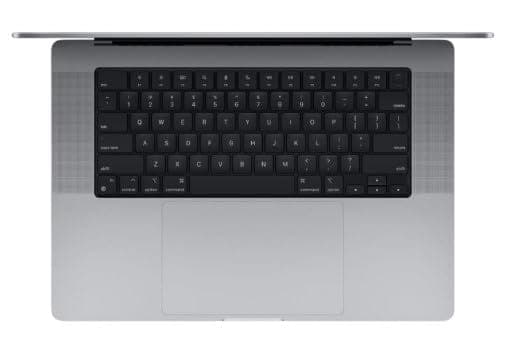
TL;DR If you are evaluating the MacBook Pro 16-inch (Model A2485) as a creator laptop in 2026 India, you are looking at a large-screen MacBook that can still support serious creative workflows even though it is older compared to the latest MacBooks. The 16-inch format makes a huge difference for creators because you get more workspace for timelines, previews, and tool panels, which reduces friction in day-to-day editing and design. This guide explains MacBook for video editing 2026 India through a practical Final Cut Pro workflow lens, covers MacBook for photo editing Lightroom for both Lightroom and Lightroom Classic use cases, and breaks down MacBook for design work Adobe 2026 performance across Creative Cloud tasks like Photoshop and Illustrator. It also evaluates MacBook for podcasting music production with GarageBand, Logic Pro, and Ableton-style sessions, and closes with a creator benchmark view of render times and export speed so you can judge how A2485 fits into modern creator expectations. Throughout, the article keeps context clear by acknowledging that the newest creator-oriented models, including the MacBook M4 Pro for content creators, have pushed the performance baseline higher in 2026, making it important to buy older MacBooks only when the workflow fit and pricing are aligned.
Video Editing on MacBook: Final Cut Pro Workflow
For Indian creators searching MacBook for video editing 2026 India, the real question is whether an older MacBook Pro can still handle modern editing demands without slowing down creativity. The MacBook Pro 16-inch A2485 still holds real creator value in 2026 because it was designed as a serious performance machine and because the 16-inch size makes video editing more comfortable. Even when an older MacBook is not the fastest anymore, comfort matters. A larger screen gives you more room for timeline control, smoother previewing, and fewer compromises when you need to work quickly.
Final Cut Pro workflows on A2485 can still feel highly usable for creators working with 1080p and 4K content, especially if the workflow is planned properly. If you are cutting YouTube content, client reels, marketing videos, or wedding highlights, the machine can still deliver a reliable editing experience. The workflow stays smooth when you keep your timeline organized, avoid excessive plugin stacking, and use proxies when dealing with heavy camera files. In 2026, the difference between a smooth workflow and a frustrating workflow often comes down to planning rather than raw power, especially when you are using an older device.
The biggest advantage of A2485 in India is that it supports creators who work for long sessions. Many creators edit for hours, switching between cuts, audio adjustments, subtitles, and exports. The large display reduces fatigue because you can see more without constantly zooming and resizing panels. This makes real creative work feel easier. When creators compare a 16-inch MacBook to a smaller laptop, they usually notice that the 16-inch device feels less cramped and more professional, even if the internal hardware is not the newest.
However, you still need to acknowledge what has changed in 2026. Newer Apple Silicon models deliver better sustained export speed and handle heavier effects more comfortably. This is why you must evaluate A2485 based on the kind of creator you are. If you do steady content production with structured workflows, A2485 can still be reliable. If you do heavy multi-layer edits, advanced motion effects, and high-volume exports daily, newer machines can save time and reduce friction significantly.
A2485 Video Editing Fit In 2026 India
| Creator Workflow Type | A2485 Editing Comfort | What Keeps It Smooth |
|---|---|---|
| YouTube and social content | Strong | Clean timeline workflow |
| 4K edits with grading | Very good | Proxy workflow helps |
| Multi-layer effect-heavy edits | Moderate | Limit plugin overload |
| Multi-cam production | Good but variable | Needs organized project structure |
| Studio-level daily exports | Limited vs new Macs | Newer Macs save time |
Photo Editing: Lightroom vs Adobe Lightroom Classic
Creators who search MacBook for photo editing Lightroom are often looking for two things at once. They want editing to feel smooth while working, and they want exports to finish quickly when the job is done. In 2026 India, the MacBook Pro 16-inch A2485 can still deliver a strong photo editing experience for many creators, especially because the large screen makes editing feel more comfortable. Viewing and adjusting photos on a 16-inch display reduces eye fatigue and makes it easier to judge composition, exposure, and fine detail without constantly zooming.
Lightroom workflows on A2485 are usually comfortable for creators who manage moderate photo volumes. Editing shoots, applying presets, adjusting colors, and exporting batches remains a smooth experience as long as the catalog workflow is managed properly. The moment you start handling extremely large RAW libraries, complex edits, and heavy exports while editing actively, the machine’s age can become more noticeable compared to the newest MacBooks. But A2485 still remains capable for a large segment of creators in India who do regular client work and do not run extreme workloads every day.
Lightroom Classic workflows often represent a more demanding and structured professional approach, especially for photographers managing long-term catalogs. A2485 can handle Lightroom Classic workflows well, but organization matters. External SSD usage, clean catalog management, and smart file sorting can make the machine feel far faster and smoother. Many creators underestimate that Lightroom performance depends heavily on file organization and storage setup, not just CPU and RAM.
The best way to frame A2485 for Lightroom in 2026 India is that it is still a strong creator laptop for photographers and content creators, especially for those who value screen comfort and stable editing sessions. It may not export as fast as the newest machines, but it still supports professional results and steady creative output without feeling outdated.
Lightroom Workflows On A2485 In 2026
| Lightroom Workflow | A2485 Experience | Best Use Case |
|---|---|---|
| Casual editing sessions | Strong | Students and hobby creators |
| Batch editing 200 to 800 photos | Very good | Client work and events |
| Large RAW libraries | Good with planning | Weddings and commercial shoots |
| Exporting while editing | Moderate | Needs workflow discipline |
| High-volume studio workflows | Limited vs latest Macs | Faster on newer models |
Design Work: Adobe Creative Cloud Performance
When creators in India search MacBook for design work Adobe 2026, the real need is reliability. Designers want a laptop that does not lag when switching between tools, importing assets, exporting files, and working in multi-app creative workflows. The MacBook Pro 16-inch A2485 still performs strongly for many design workflows because it provides both capability and comfort. The large screen matters here, because design work often involves managing multiple panels, artboards, and references. A bigger workspace reduces friction and improves speed even if the internal hardware is older.
Photoshop and Illustrator workflows on A2485 remain comfortable for many creators in 2026 India. Social creatives, brand design, marketing deliverables, UI assets, and product design workflows can still run smoothly. A2485 works well for creators who need to handle real client files, multi-layer projects, and regular export cycles. The overall experience remains stable, which is important because design work is not only about peak performance. It is about day-to-day usability.
However, modern context matters again. Creative Cloud workloads have grown heavier in 2026, and file sizes have increased. The newest MacBooks, especially those positioned as creator machines, handle large assets more effortlessly. This is where the MacBook M4 Pro for content creators becomes a meaningful reference point. It sets the modern standard for creators who want minimal friction across heavy Photoshop compositions, advanced Illustrator projects, and multi-app creative pipelines. A2485 can still be a solid design laptop, but it will not always feel as effortless under extreme loads.
The best approach is to match the laptop to your design style. If you do regular professional design work and want a large-screen MacBook that still feels premium in daily use, A2485 remains a strong option. If your design work includes extremely heavy assets, 3D workflows, or motion-heavy pipelines that demand constant headroom, newer machines may reduce delays and improve productivity.
A2485 Design Performance In 2026 India
| Design Workflow | A2485 Performance Feel | Who It Suits Best |
|---|---|---|
| Photoshop assets | Strong | Marketers and creators |
| Illustrator vector work | Strong | Brand designers |
| Multi-app creative workflow | Very good | Agency work |
| Huge layered projects | Moderate | Advanced designers |
| Motion and 3D-heavy workflows | Limited vs new Macs | Better on newer Pro models |
Music Production: GarageBand, Logic Pro, Ableton
Creators searching MacBook for podcasting music production often need a laptop that feels stable for long editing sessions and recording sessions. In 2026 India, A2485 remains a strong machine for music-related work, especially because MacBooks are known for stable creative workflows and predictable performance. For podcast creators, this matters more than peak speed. A smooth editing session without glitches is more valuable than saving a few minutes on export time.
GarageBand remains an excellent fit for A2485 users who are building podcasts, editing audio clips, layering simple music tracks, and creating content without extreme plugin loads. Logic Pro sessions also work well for mid-level music production workflows when you keep the session size practical. If you are using multiple virtual instruments, layered tracks, and some third-party effects, A2485 can still manage well as long as you do not push it into extreme complexity.
Ableton-style workflows depend heavily on your style of production. If your work involves loop-based production, quick layering, and creative sessions with moderate track counts, A2485 remains comfortable. If you are producing very large sessions with heavy plugin chains, the machine may show its age, and newer Macs will offer more headroom. In India, many independent creators do not need extreme production environments. They need a stable daily work machine that supports consistent output. A2485 continues to provide that.
The main advantage of A2485 for music production is the comfort of long sessions. The big screen makes it easier to manage timelines, waveforms, and plugin panels. For many creators, this improves workflow quality even without being the newest machine. If your production style is steady and structured, A2485 can remain a reliable part of your creator setup in 2026 India.
A2485 Music Production Fit In 2026 India
| Music Workflow | A2485 Comfort Level | Best For |
|---|---|---|
| Podcast editing and publishing | Strong | Podcasters and educators |
| GarageBand projects | Very good | Beginner creators |
| Logic Pro mid-level sessions | Good | Indie music creators |
| Plugin-heavy large sessions | Moderate | Advanced producers |
| Studio-grade production loads | Limited vs new Macs | Better on newer models |
Creator Benchmark: Render Times, Export Speed
In 2026 India, creators measure laptops by time-to-output. Export speed matters because it affects how quickly you can publish content or deliver client projects. This is where older machines must be evaluated with honesty. A2485 can still export content reliably, but it will not match the speed expectations created by the newest MacBooks. The creator baseline has shifted, and today’s creators often compare everything against newer performance standards, including the MacBook M4 Pro for content creators category.
In practical terms, A2485 still works well for creators producing weekly content and steady client deliverables. If you are editing a YouTube video, exporting social content, or delivering client design assets, the machine will still get the work done without feeling unusable. Where the difference becomes clear is in high-volume output workflows. If you export multiple videos every day, handle multiple client projects simultaneously, and run heavy edits regularly, the time cost becomes real. Newer Macs save time consistently in these cases.
The best way to evaluate A2485 is to align it with your creator rhythm. If you produce content in a controlled schedule, A2485 remains practical. If your workflow is high intensity and speed-focused, the gap becomes harder to ignore. In 2026 India, many creators buy older MacBooks because they want premium build quality and reliable macOS workflows at a lower cost. That logic remains valid, but the laptop must be priced correctly for its age and output speed.
A2485 remains one of the most comfortable older creator MacBooks because the large screen improves workflow comfort, even if export speed is not the fastest. For many creators, comfort is a productivity advantage because it reduces fatigue and keeps workflows smoother over long sessions.
Creator Export Speed Expectations In 2026 India
| Creator Need | A2485 Outcome | Best Buying Logic |
|---|---|---|
| Weekly content output | Reliable | Solid choice at fair price |
| Client deliverables | Good | Works with structured workflow |
| High-volume exports | Moderate | Newer Macs save time |
| Heavy effect-heavy edits | Slower | Proxy workflow helps |
| Studio-grade workflows | Limited | Better with new Pro models |
Final Verdict + Quick Decision Making
The MacBook Pro 16-inch A2485 remains a strong creator MacBook in 2026 India because it still supports real creative workflows across video editing, photo editing, design work, and music production. For creators searching MacBook for video editing 2026 India, A2485 remains reliable for Final Cut Pro workflows when you manage timelines smartly. For MacBook for photo editing Lightroom, it delivers a comfortable editing experience, especially because the large screen improves editing comfort. For MacBook for design work Adobe 2026, it still handles Creative Cloud tasks well for most creators and agencies. For MacBook for podcasting music production, it remains stable for GarageBand workflows and mid-level Logic Pro sessions.
The most important context is that A2485 is an older MacBook in 2026 India, and the newest MacBooks set higher standards for export speed and heavy creative headroom. That is why the modern creator baseline often references the MacBook M4 Pro for content creators, which represents the faster, smoother experience creators can get today. A2485 still holds value when it is priced correctly and when the workflow fit matches your creative intensity.
To decide quickly, focus on your creator life. If you want a large-screen MacBook that still feels premium for editing, design, and content production in 2026 India, A2485 remains one of the most comfortable older choices. If you want maximum export speed and heavy workflow headroom for daily production, newer MacBooks will reduce friction. A2485 is still a creator laptop, but it is best when chosen as a balanced, comfort-first creator machine.
Refurbo's Shop:
Here are all the MacBook laptops listed on that Refurbo's Apple page, with a direct link for each laptop:
- Apple Macbook A2442 - Refurbished
- Apple Macbook Pro A2485 - Refurbished
- MacBook Air 13" (2017) - Refurbished
- MacBook Pro 13" (2018) - Refurbished
- MacBook Pro 13" (2020) - Refurbished (Core i5)
- MacBook Pro 13" (2020) - Refurbished (Core i7)
- MacBook Pro 15" (2018–19) - Refurbished
- MacBook Pro 16" (2019) - Refurbished (Core i7)
- MacBook Pro 16" (2019) - Refurbished (Core i9)
- MacBook Air 13" M1 - Refurbished
- MacBook Pro 13" M1 - Refurbished
- MacBook Pro 14" M1 Pro - Refurbished
- MacBook Pro 16" M1 Pro - Refurbished
FAQ
Q. Is MacBook for video editing 2026 India still worth it on MacBook Pro A2485?
A. Yes, MacBook for video editing 2026 India is still worth it on A2485 for 1080p and 4K workflows, especially with proxy editing and organized projects.
Q. Is MacBook for photo editing Lightroom good on A2485 in 2026 India?
A. Yes, MacBook for photo editing Lightroom works well on A2485 for regular edits and batch exports, but extremely large catalogs feel faster on newer Macs.
Q. How does MacBook for design work Adobe 2026 perform on A2485?
A. MacBook for design work Adobe 2026 performs strongly on A2485 for Photoshop and Illustrator projects, with the 16-inch screen improving workflow comfort.
Q. Is MacBook for podcasting music production stable on A2485 in 2026 India?
A. Yes, MacBook for podcasting music production is stable on A2485 for GarageBand and mid-level Logic Pro sessions, especially for podcast-focused workflows.
Q. Is MacBook M4 Pro for content creators a major upgrade over A2485 in 2026?
A. Yes, MacBook M4 Pro for content creators is a major upgrade for heavy exports and high-volume creative work, while A2485 suits steady creator schedules well.






