
MacBook Pro 16-inch A2141 Battery Life In 2026: Health, Backup, And Charging Real Life Usage
MacBook Pro 16-inch A2141 battery life in 2026 India depends more on battery health and cycles than on the Pro brandin

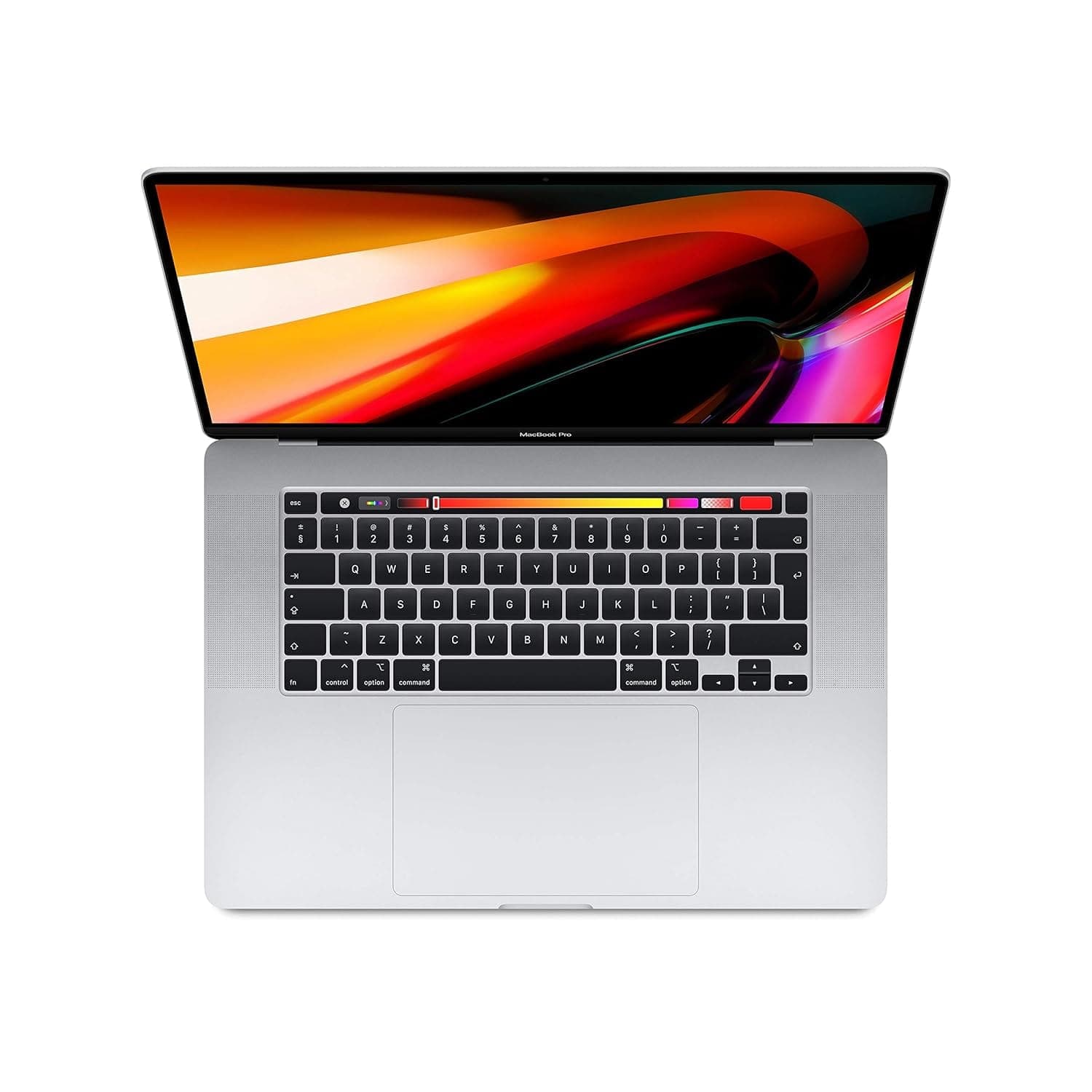
TL;DR If you are researching MacBook battery life 2026 real usage for the MacBook Pro 16-inch (Model A2141), you need to evaluate it as an older MacBook in 2026 India rather than as a current-generation flagship. The A2141 can still feel premium and reliable for long sessions, especially because the 16-inch screen delivers real productivity comfort, but battery backup will vary widely based on battery health percentage and cycle count. In 2026, newer MacBooks set higher expectations for efficiency, which means A2141 buyers should understand exactly what they are getting. This guide explains whether Does MacBook battery last all day is still a realistic expectation for A2141 users, how Apple’s battery health percentage translates into day-to-day usage, and how cycle count is calculated and why it matters. It also explains why MacBooks are widely seen as laptops that need less frequent plug-in, largely because macOS manages power usage efficiently. Finally, it covers practical MacBook battery backup charging tips, a clear approach to MacBook battery health management 2026, and India-specific backup power solutions for commuting, long workdays, and power cut scenarios.
Real-World Battery Test: 8-16 Hours?
The 16-inch MacBook Pro category has always been associated with comfort and heavy work rather than being the “smallest and longest-lasting” battery laptop. But MacBooks have built a reputation of lasting longer than expected even under serious usage. That is why many people still look up MacBook battery life 2026 real usage for older 16-inch models like A2141. In 2026 India, the honest answer is that A2141 can still deliver a strong battery experience if its battery health is solid, but the performance will not be identical across all units. Since this is an older MacBook model, battery condition is a larger deciding factor than the model name.
In everyday productivity work, A2141 can still feel efficient. Reading-heavy workflows, research, documents, presentations, and routine browser usage often drain the battery in a stable and predictable way. This stability is one of the reasons MacBooks feel easier to live with in real life. However, because the laptop has a large display, brightness becomes a major factor. A 16-inch screen looks excellent at high brightness, but it also consumes significantly more power. In Indian environments where people often work in bright rooms, cafés, or shared office spaces, the temptation is to keep brightness high. For older batteries, that can reduce real backup noticeably.
Video calls also change battery performance dramatically. If your day includes Zoom or Teams meetings with screen sharing, you will see higher drain. Add multiple browser tabs, cloud syncing, and hotspot usage, and backup can fall faster than expected. This is the key difference between a new laptop battery and an older one. A new battery may still handle these workloads comfortably. An older battery with reduced health may not. That is why Does MacBook battery last all day is no longer a pure yes or no question for older 16-inch Pros. It becomes a condition-based question.
In 2026, A2141 also faces a modern comparison problem. Newer MacBooks are more efficient and often deliver “all day” backup under mixed workloads more consistently. That means A2141 should be treated as a premium big-screen laptop that is still capable, but not necessarily the best battery benchmark anymore. It can still be excellent, but its backup depends heavily on battery health percentage and cycle count. A well-maintained A2141 can still feel impressive. A heavily used A2141 may feel average.
A2141 Battery Reality In 2026 India By Use Case
| Daily Work Pattern | Typical Battery Experience | What Changes It Most |
|---|---|---|
| Docs, browsing, research | Strong for big-screen work | Brightness and tab load |
| Meetings-heavy day | Moderate backup | Camera use and WiFi stability |
| Coding with multiple tools | Good but variable | IDE load and background activity |
| Media streaming | Consistent drain | Brightness and speaker volume |
| Travel with hotspot usage | Faster drain | Network conditions and standby loss |
Battery Health Tips: Extend Lifespan
For older MacBooks in 2026, battery health is not just a “nice to know” detail. It is the main factor that determines whether the laptop still feels premium. This is why MacBook battery health management 2026 is essential for A2141 owners and buyers. Battery health percentage is Apple’s way of estimating how much maximum capacity the battery can still hold compared to when it was new. If your A2141 shows 88 percent battery health, it means the battery holds about 88 percent of the energy it could store originally. This directly affects real backup, especially in long work sessions.
Cycle count is equally important, and it is often misunderstood. A cycle does not equal one charging session. Apple counts a battery cycle when a total of 100 percent battery capacity has been used, even if that usage happens through multiple partial discharges. For example, if you use 50 percent today and 50 percent tomorrow, that counts as one cycle. If you use 20 percent across five different sessions, that also counts as one cycle. This system makes cycle count a strong indicator of long-term battery wear. It tells you how much total work the battery has done over its lifetime, which helps predict how stable it will remain going forward.
In India, heat is a major factor that can accelerate degradation. This matters for A2141 because it is a larger laptop, and users often run heavier workloads on it. Charging while doing heavy tasks increases heat exposure. Using the laptop in warm environments without proper ventilation also increases wear. These issues are not unique to Apple, but they become more visible when you are buying an older machine in 2026. The best way to extend battery lifespan is to avoid the combination of heat and aggressive charging habits. A battery can tolerate some stress, but long-term stress patterns reduce health steadily.
The most effective MacBook battery backup charging tips involve reducing extremes. Avoid running the battery to 0 percent often. Avoid keeping the laptop at 100 percent charge for long durations in heat. Use optimized charging features, and keep charging patterns stable. The goal is not perfect battery preservation. The goal is dependable daily backup. For older models like A2141, dependable backup is what makes the laptop feel worth using in 2026.
Battery Health And Cycle Count Interpretation For A2141
| Metric | What It Represents | Why It Matters In 2026 |
|---|---|---|
| Battery Health Percentage | Remaining max capacity | Defines backup reliability |
| Cycle Count | Total lifetime usage wear | Predicts long-term stability |
| Heat exposure | Accelerates battery aging | Common in Indian weather |
| Deep discharge frequency | Increases wear faster | Reduces future backup comfort |
| Balanced charging habits | Preserves battery health | Makes older Macs usable longer |
Charging Strategy: Fast Charge vs Trickle
Charging habits are one of the biggest hidden reasons older MacBooks feel better or worse in 2026. Many A2141 users treat it like a desk workstation and keep it plugged in constantly. Others use it fully unplugged and only charge when it becomes low. Both patterns can be practical, but both can also create long-term wear if combined with heat. That is why MacBook battery backup charging tips should focus on a balanced approach that supports daily confidence and long-term battery stability.
Fast charging is useful when you need to leave quickly and want extra backup. It is practical for Indian professionals and students who have busy routines. But fast charging generates heat, and repeated heat exposure can reduce battery health faster over time. This does not mean fast charging should be avoided completely. It should be used when needed rather than as the default daily method. Older batteries benefit more from stable, moderate charging routines.
Trickle charging happens when the laptop is always plugged in, often staying at 100 percent charge for long hours. Some people do this because it feels convenient and “safe.” The problem is that keeping a battery at full charge continuously, especially in warm conditions, can contribute to capacity loss over time. A better strategy is to let macOS optimized charging reduce full-charge exposure, and to ensure that the laptop stays cool and ventilated.
A practical approach for A2141 in 2026 is to keep charge levels between 20 percent and 80 percent for most daily usage, while charging to 100 percent only when you need maximum backup. This approach reduces long-term stress and increases battery confidence. For a 16-inch MacBook Pro, battery confidence matters because the laptop is often used for serious work. A predictable battery is more valuable than a theoretical maximum number.
Charging Strategy For A2141 Buyers In India
| Charging Pattern | Short-Term Convenience | Long-Term Result |
|---|---|---|
| Regular deep discharges | Feels normal | Higher long-term wear |
| Always plugged at 100 percent | Easy desk setup | Can reduce battery lifespan |
| Stable 20 to 80 percent routine | Needs awareness | Best for longevity |
| Fast charge when needed | Useful for travel days | Balanced usage |
| Charging while under heavy load | Saves time | Adds heat and speeds aging |
macOS Battery Management Features
MacBooks are often considered laptops that need less frequent plug-in because macOS manages power efficiently. Apple controls hardware and software together, which allows for optimized performance scaling, stable standby behavior, and reduced background drain. This is why Does MacBook battery last all day became a common question around MacBooks. Even in 2026, many older MacBooks can still feel efficient compared to alternatives, especially for productivity tasks.
One major reason MacBooks feel efficient is controlled sleep behavior. Many laptops lose battery rapidly in sleep mode due to background wake cycles. MacBooks usually handle sleep more predictably, which matters for daily life in India. Students close their laptops between classes. Professionals close their laptops between meetings. If battery drain during sleep is high, your day becomes stressful. MacBooks tend to do better here, which improves confidence.
Performance scaling also makes a difference. macOS typically reduces unnecessary power usage when you are doing light tasks like reading, typing, or browsing. Instead of keeping all performance systems fully active, it adjusts. This reduces battery drain. Optimized battery charging is another key feature tied to MacBook battery health management 2026. When enabled, macOS learns your charging routine and delays charging beyond 80 percent until it predicts you will need full charge. This reduces the time your battery sits at 100 percent, which helps slow degradation.
The last reason MacBooks need less frequent plug-in is that they feel smooth on battery. Many laptops slow down sharply when unplugged, forcing users to plug in to regain responsiveness. MacBooks tend to stay smooth for normal tasks, so users naturally remain unplugged longer. For A2141 in 2026, this advantage is still meaningful, but battery condition decides how long that comfort lasts. macOS can make power usage efficient, but it cannot restore an already degraded battery.
Why MacBooks Need Less Frequent Plug-In (Practical Reasons)
| Reason | What You Notice In Daily Use | Why It Matters For A2141 In 2026 |
|---|---|---|
| Efficient background behavior | Stable drain | Keeps older Macs practical |
| Better sleep standby | Less overnight loss | Supports daily confidence |
| Performance scaling | Smooth battery experience | Feels premium in productivity use |
| Optimized charging | Preserves battery capacity | Important for older batteries |
| Stable system behavior | Less random drain | Predictable day-to-day use |
Backup Power Solutions: External Chargers
In 2026 India, power planning matters even if you own a MacBook, especially when your model is older. The A2141 can still deliver strong battery backup when it is in good condition, but real life includes meetings, travel, long days, and power cuts. Backup planning ensures you do not feel stress even when the battery is not at its peak. This is especially relevant for a 16-inch Pro because many buyers treat it as their primary work machine, and running out of power mid-day can be disruptive.
The first approach is to control battery drain through habits. Brightness management can extend backup significantly. Closing unnecessary apps and avoiding heavy background tasks improves efficiency. But if your day involves long video calls and heavy multitasking, drain is unavoidable. In those cases, the simplest solution is still to carry the charger and plan charging moments during breaks. This is the most reliable approach for students and professionals.
For Indian homes with power cut scenarios, a small UPS setup can be extremely effective. It can keep your laptop and router stable for short durations, preventing disruptions. For travel-heavy users, relying on stable wall outlets and carrying the original charger is safer than using random charging solutions. For emergencies, high-output charging options can provide peace of mind, but they must be stable and compatible to avoid risk.
The core idea is that MacBook battery life 2026 real usage is not only about maximum hours. It is about confidence. A2141 can still be a confident daily laptop if battery health is good and you plan power correctly for your lifestyle.
Backup Power Options For A2141 Owners
| Situation | Best Backup Solution | Why It Helps |
|---|---|---|
| Meetings-heavy day | Start full charge + carry charger | Prevents sudden battery anxiety |
| Long workday outside home | Top up during breaks | Keeps day stable |
| Remote work with power cuts | UPS for laptop and WiFi | Reduces downtime |
| Frequent travel schedule | Original charger + stable outlets | Safest approach |
| Emergency backup planning | High-output charging support | Adds peace of mind |
Final Verdict + Quick Decision Making
The MacBook Pro 16-inch A2141 can still deliver a strong battery experience in 2026 India, but it must be evaluated as an older MacBook rather than a modern benchmark. The key determinant is battery condition. Battery health percentage and cycle count decide whether A2141 feels like a premium laptop that can last through long sessions or a device that needs frequent charging. If battery health is strong and cycles are reasonable, A2141 can still feel like a MacBook that needs less frequent plug-in. This is because macOS power management remains efficient and daily drain stays predictable.
However, buyers must understand what they are getting in 2026. Newer MacBooks set a higher standard for efficiency, and A2141 will not always match that. But the 16-inch workflow comfort and stable MacBook experience can still be worth it for many users. The best way to make A2141 feel reliable is to follow balanced charging habits, avoid heat exposure, and use optimized charging features to reduce long-term wear.
To decide quickly, check battery health and cycle count. If both are strong, A2141 is still a dependable big-screen MacBook for Indian professionals and students who want comfort and stability. If battery health is weak or cycles are high, you must budget for replacement or skip the purchase. In 2026 India, the best older MacBook decision is the one where battery condition matches your real-world routine.
Refurbo's Shop:
Here are all the MacBook laptops listed on that Refurbo's Apple page, with a direct link for each laptop:
- Apple Macbook A2442 - Refurbished
- Apple Macbook Pro A2485 - Refurbished
- MacBook Air 13" (2017) - Refurbished
- MacBook Pro 13" (2018) - Refurbished
- MacBook Pro 13" (2020) - Refurbished (Core i5)
- MacBook Pro 13" (2020) - Refurbished (Core i7)
- MacBook Pro 15" (2018–19) - Refurbished
- MacBook Pro 16" (2019) - Refurbished (Core i7)
- MacBook Pro 16" (2019) - Refurbished (Core i9)
- MacBook Air 13" M1 - Refurbished
- MacBook Pro 13" M1 - Refurbished
- MacBook Pro 14" M1 Pro - Refurbished
- MacBook Pro 16" M1 Pro - Refurbished
Frequently Asked Questions
Q. How realistic is MacBook battery life in 2026 for the MacBook Pro 16-inch A2141?
Battery life on the A2141 in 2026 is highly condition dependent rather than model dependent. A unit with strong battery health and a reasonable cycle count can still deliver reliable all-day productivity backup, while a worn battery may only provide average endurance. Brightness, browser tabs, video calls, and hotspot usage make the biggest real-world difference.
Q. Can the MacBook Pro A2141 still last all day in 2026?
Yes, all-day usage is still possible for light to moderate productivity workflows such as documents, browsing, research, and presentations, provided the battery health is strong. However, Zoom calls, coding tools, exports, and hotspot-based workdays can reduce backup noticeably on older batteries.
Q. Why do battery health percentage and cycle count matter so much on the A2141?
Battery health percentage shows the remaining maximum capacity compared to when the MacBook was new, while cycle count reflects how much lifetime wear the battery has already gone through. In 2026, these two metrics are the best indicators of whether an older A2141 will still feel dependable for long work sessions.
Q. What are the best charging habits to preserve A2141 battery life in 2026?
The most effective habit is to avoid extreme charging patterns. Try to keep the battery between 20 per cent and 80 per cent for regular use, avoid frequent deep discharges, reduce charging heat, and let macOS Optimised Charging handle long desk setups. Charge to 100 per cent only when you genuinely need maximum backup.
Q. Is it safe to keep the MacBook Pro A2141 plugged in all day?
It is safe for desk usage, but keeping it at 100 per cent continuously in warm conditions can slowly reduce battery capacity over time. The better approach is to use optimised charging and ensure proper ventilation, especially in Indian weather where heat can accelerate ageing.
Q. How much worse is the A2141 battery compared to newer MacBooks in 2026?
Newer MacBooks, especially Apple Silicon models, are far more power efficient and consistent under mixed workloads. The A2141 can still feel premium, but it should now be treated as a big-screen, comfort-first productivity machine rather than a battery benchmark leader.
Q. What is the best backup power plan for A2141 users in India?
For long workdays, the best strategy is to start with a full charge, carry the original charger, and top up during breaks. For remote work and power-cut scenarios, a small UPS for both Wi-Fi and laptop charging is the most dependable solution.
Q. Is the A2141 still worth buying in 2026 if battery health is below 85 per cent?
It can still be worth buying if the price reflects the weaker battery condition, but you should factor in the cost of a future battery replacement. If your work depends on long unplugged sessions, it is better to prioritise units with higher battery health and lower cycle counts.
Ready to upgrade your tech?
Browse our collection of quality refurbished products at unbeatable prices.






