MacBook Air vs MacBook Pro: Which One Do You Actually Need?
Confused between the MacBook Air and MacBook Pro? Compare performance, display quality, battery life, portability, and pricing to find out which Apple laptop actually suits your needs.

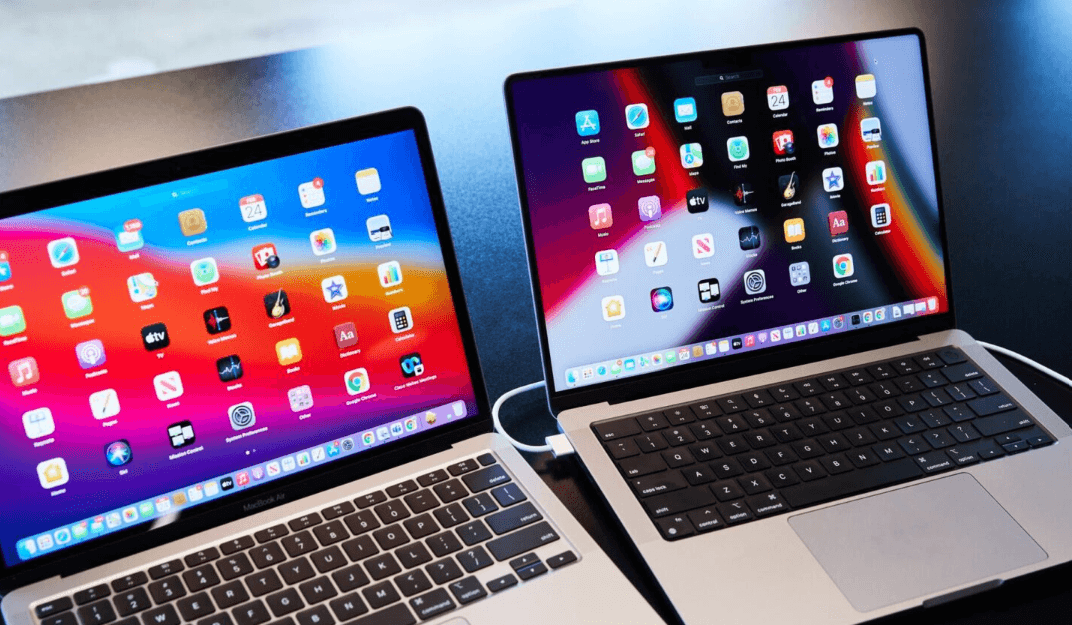
TL;DR: Choosing between the MacBook Air and MacBook Pro comes down to how you plan to use your laptop, not simply which one has better specifications. The MacBook Air, powered by Apple's M5 chip, is an excellent choice for students, office professionals, writers, and everyday users who value portability, battery life, and affordability. The MacBook Pro is designed for people who regularly handle demanding workloads, such as professional video editing, software development, 3D rendering, and intensive creative projects. With the latest M6, M5 Pro, and M5 Max configurations, the Pro lineup offers more performance headroom, a brighter 120Hz display, and additional connectivity. But if your daily routine involves browsing, presentations, spreadsheets, and multitasking, the Air may be all the laptop you actually need.
MacBook Air vs MacBook Pro: Understanding The Difference
At first glance, the MacBook Air and MacBook Pro look quite similar. Both feature Apple's aluminium design, high-resolution displays, macOS, and Apple silicon processors. They also support everyday productivity applications, video calls, creative software, and multitasking. The real difference becomes noticeable when you look at their performance capabilities, cooling systems, displays, and the kind of work they are designed to handle.
The MacBook Air focuses on portability and efficiency. Its M5 chip provides plenty of processing power for everyday activities without making the laptop unnecessarily bulky. It is available in 13-inch and 15-inch sizes, making it suitable for people who frequently travel, attend classes, work remotely, or carry their laptops between meetings. Its fanless design also means it operates silently during normal use.
The MacBook Pro takes a different approach. It prioritises sustained performance, professional display quality, and connectivity. The current range includes the 14-inch M6 model and higher-performance M5 Pro and M5 Max configurations in 14-inch and 16-inch models. These machines are better suited to workloads that demand more processing and graphics power over extended periods.
MacBook Air vs MacBook Pro: Specifications Compared
Before deciding which model deserves your money, it helps to understand what separates their hardware. Apple's current lineup includes different chip configurations, screen sizes, memory options, and storage capacities. Therefore, comparing the product families rather than assuming every Pro model has identical specifications is important.
The following table provides a practical overview of the current models available in November 2026.
| Feature | MacBook Air | MacBook Pro |
|---|---|---|
| Current base chip | Apple M5 | Apple M6 |
| Higher-performance chips | M5 | M5 Pro and M5 Max |
| Display sizes | 13.6 and 15.3 inches | 14.2 and 16.2 inches |
| Display technology | Liquid Retina | Liquid Retina XDR |
| Refresh rate | Standard 60Hz | Adaptive ProMotion up to 120Hz |
| Cooling | Fanless | Active cooling |
| Starting memory | 16GB | 16GB on M6 |
| Maximum configurable memory | 32GB | Up to 128GB on M5 Max |
| Starting storage | 512GB | 1TB on M6 |
| Ports | Two Thunderbolt 4, MagSafe, headphone jack | Thunderbolt, HDMI, SDXC, MagSafe, headphone jack |
| Best suited for | Everyday productivity | Professional workloads |
Specifications vary by configuration, particularly across M6, M5 Pro, and M5 Max MacBook Pro models. The table describes the current product families rather than suggesting that every configuration offers identical capabilities.
Performance: How Much Power Do You Really Need?
MacBook Air Performance
The M5 MacBook Air is more capable than many people need for everyday computing. It can comfortably handle multiple browser tabs, Microsoft Office applications, online meetings, presentations, photo editing, and everyday content creation. For students and professionals who regularly switch between applications, it offers a responsive experience without requiring a professional-grade processor.
Its fanless design is another important consideration. Because there is no internal cooling fan, the laptop operates silently. However, demanding tasks performed over extended periods can cause the system to manage performance through thermal limits. This does not make the Air unsuitable for creative work, but it is worth considering if you regularly export large video projects or run intensive applications.
MacBook Pro Performance
The MacBook Pro is designed for users who need more processing headroom. The standard M6 configuration is already powerful enough for demanding productivity and creative applications, while M5 Pro and M5 Max configurations offer additional CPU, GPU, and memory capabilities for more intensive workflows. This makes the Pro particularly useful for professional developers, video editors, designers, and engineers.
The active cooling system helps the laptop sustain performance during longer workloads. For example, rendering a lengthy video, compiling a large software project, or working with complex 3D models can put sustained pressure on the processor. The Pro's cooling system helps manage this heat rather than relying solely on passive cooling.
Display Quality: Is The Pro Screen Worth It?
The MacBook Air comes with Apple's Liquid Retina display, which is more than sufficient for most everyday activities. The M5 models offer up to 500 nits of brightness, P3 wide colour support, and True Tone technology. Text looks sharp, images appear detailed, and videos are enjoyable to watch. Whether you are editing documents, attending online classes, or watching movies, the display offers a pleasant experience.
The MacBook Pro takes display quality further with its Liquid Retina XDR technology. It supports ProMotion, which dynamically adjusts the refresh rate up to 120Hz, making scrolling and animations look smoother. It also delivers significantly higher brightness, including up to 1,600 nits peak brightness for supported HDR content. This makes a noticeable difference when working with HDR footage, detailed visuals, and colour-sensitive projects.
For everyday users, however, the difference may not justify the additional expense. If you primarily use your laptop for documents, spreadsheets, browsing, and streaming, the Air's display is already excellent. The Pro's screen becomes more valuable when visual accuracy, HDR playback, smoother motion, or working in challenging lighting conditions are important to your workflow.
Battery Life And Portability: Which One Travels Better?
Portability is one of the biggest reasons people choose the MacBook Air. The 13-inch model is particularly convenient for students, frequent travellers, and professionals who carry their laptops throughout the day. The 15-inch version provides a larger working area without moving into the heavier MacBook Pro category.
Battery life is another strength of the Air. Apple rates the current M5 models for up to 18 hours of video streaming and up to 15 hours of wireless web use under its testing conditions. Actual results depend on brightness, applications, network activity, and other usage patterns. For typical productivity work, the Air offers excellent battery efficiency.
The MacBook Pro also delivers impressive battery life, with the M6 14-inch model rated for up to 24 hours of video streaming and 16 hours of wireless web use. However, Pro models are generally heavier and less convenient to carry around, particularly the 16-inch version. If you frequently move between classrooms, offices, and meetings, the Air may feel more practical even though the Pro offers a larger battery.
Ports And Connectivity: A Small Difference That Matters
The MacBook Air keeps its design simple with two Thunderbolt 4 USB-C ports, a MagSafe 3 charging port, and a 3.5mm headphone jack. This is sufficient for many users who connect a charger, external drive, or monitor occasionally. However, people who regularly connect multiple accessories may find themselves relying on a USB-C hub or adapter.
The MacBook Pro offers a more flexible selection of physical connections. The 14-inch M6 model includes three Thunderbolt 4 ports, an HDMI port, an SDXC card slot, MagSafe 3, and a headphone jack. The M5 Pro and M5 Max configurations also offer Thunderbolt 5, which supports higher data-transfer bandwidth. These connections are particularly useful for photographers transferring memory cards, editors using external storage, and professionals working with multiple displays.
The practical difference is convenience. With the Pro, you can connect an external monitor through HDMI or transfer camera footage directly through the SDXC slot without necessarily carrying additional adapters. If your workflow involves several peripherals, this can make your daily setup considerably easier.
Which MacBook Should You Buy Based On Your Work?
MacBook Air: Best For Students And Everyday Professionals
The MacBook Air makes sense for college students, MBA aspirants, office professionals, writers, researchers, and people working in marketing or business operations. It handles everyday applications such as Microsoft Excel, PowerPoint, Word, Google Workspace, and browser-based tools comfortably. It is also suitable for online classes, video calls, assignments, and general productivity.
Content writers, SEO professionals, and digital marketers can also work comfortably on the Air. Tasks such as managing spreadsheets, writing articles, conducting keyword research, handling CMS platforms, and reviewing website analytics do not normally require a high-end professional processor. A suitable memory and storage configuration will matter more than purchasing the most expensive chip.
The 15-inch Air is particularly attractive if you prefer a larger display for multitasking but do not want the added weight and cost of a Pro. For most students and general professionals, it provides a sensible balance of performance, portability, and value.
MacBook Pro: Best For Creative And Technical Professionals
The MacBook Pro is a stronger choice for professional video editors, photographers, software developers, music producers, 3D artists, and engineers. These users often work with demanding applications that benefit from additional GPU power, sustained processing performance, more memory, and better display capabilities.
For example, someone editing high-resolution footage in Final Cut Pro or Adobe Premiere Pro may benefit from the Pro's stronger media-processing capabilities and active cooling. Similarly, developers working with large codebases, virtual machines, or complex development environments may appreciate the additional memory and performance available in higher-end configurations.
The M5 Pro and M5 Max models are particularly relevant when the workload genuinely demands professional-level hardware. However, not every creative professional needs an M5 Max. The standard M6 MacBook Pro may already be sufficient for many demanding workflows, so choose the chip based on the applications you actually use.
Price And Value For Money: Where Should Your Budget Go?
The MacBook Air is generally the more affordable entry point into Apple's laptop range. Its lower starting price makes it attractive to students and professionals who want a reliable laptop without paying for features they may never use. It also offers a strong combination of performance and battery efficiency for everyday computing.
The MacBook Pro carries a higher price because of its display technology, cooling system, connectivity, and available high-performance processors. The M5 Pro and M5 Max configurations can become significantly more expensive as memory and storage increase. However, that additional investment makes sense when it saves time or supports work that the Air cannot handle as efficiently.
When comparing prices in India, check the exact processor, memory, and SSD configuration rather than comparing only the model names. Education pricing, bank offers, exchange programmes, and seasonal discounts can also affect the final purchase price. Spending more on a higher memory or storage configuration may be more useful than purchasing a Pro simply because it sounds like the premium option.
Final Recommendation: Which MacBook Should You Actually Buy?
If your daily work involves browsing, writing, spreadsheets, presentations, online meetings, and moderate creative tasks, the MacBook Air is the smarter purchase. The M5 chip provides more than enough capability for these activities, and its lightweight, fanless design makes it a convenient everyday laptop. Choose the 13-inch version if portability is your priority or the 15-inch version if you prefer additional screen space.
If your work regularly involves professional video editing, complex software development, 3D rendering, large creative projects, or intensive multitasking, the MacBook Pro deserves consideration. Its XDR display, active cooling, additional ports, and higher-performance configurations make it better equipped for demanding workloads. The standard M6 model is worth considering before moving up to M5 Pro or M5 Max.
Ultimately, the best MacBook is not necessarily the most expensive one. It is the one that comfortably handles your current workload, leaves enough room for your future needs, and fits your budget. For most students and everyday professionals, the Air is enough. For people whose work genuinely demands more, the Pro is an investment in performance rather than simply a more premium-looking laptop.
Frequently Asked Questions
Q. Is the MacBook Air powerful enough for everyday professional work?
Yes. The M5 MacBook Air can comfortably handle office applications, spreadsheets, presentations, browser-based tools, online meetings, and moderate creative work.
Q. Is the MacBook Pro worth the extra money?
It is worth considering if you regularly perform demanding tasks such as professional video editing, 3D rendering, software development, or complex creative work. For everyday productivity, the Air usually offers better value.
Q. Which is better for students, MacBook Air or MacBook Pro?
The MacBook Air is generally the better choice for students because it is lightweight, offers excellent battery life, and handles assignments, research, presentations, and online classes comfortably.
Q. Can I edit videos on a MacBook Air?
Yes. The M5 MacBook Air supports video editing, including moderate creative workflows. However, users working regularly with high-resolution footage, complex effects, and lengthy exports may benefit from a MacBook Pro.
Q. Does the MacBook Air have a fan?
No. The current M5 MacBook Air uses a fanless cooling design, which allows it to operate silently. The MacBook Pro uses active cooling to manage heat during demanding workloads.
Q. Which MacBook has a better display?
The MacBook Pro has the more advanced Liquid Retina XDR display, with higher brightness, HDR support, and ProMotion refresh rates up to 120Hz. The Air's Liquid Retina display is still excellent for everyday use.
Q. Is the 15-inch MacBook Air better than the 14-inch MacBook Pro?
It depends on your priorities. The 15-inch Air offers a larger display and a lightweight design, while the 14-inch Pro provides a more advanced display, additional ports, and stronger professional capabilities.
Q. Which MacBook has better battery life?
The M5 MacBook Air offers up to 18 hours of video streaming, while the 14-inch M6 MacBook Pro offers up to 24 hours under Apple's testing conditions. Actual battery life varies with usage and configuration.
Q. Is 16GB RAM enough for a MacBook?
For everyday productivity, browsing, office applications, and moderate creative work, 16GB of unified memory is a reasonable starting point. Users handling larger projects, professional editing, or demanding development environments may benefit from 24GB, 32GB, or more.
Q. Should I buy a MacBook Air or MacBook Pro for long-term use?
Both can be good long-term investments. Choose the Air for everyday productivity and portability, or the Pro if your workload requires greater performance, memory capacity, and professional connectivity. Consider your future software requirements before finalising the configuration.
Ready to upgrade your tech?
Browse our collection of quality refurbished products at unbeatable prices.