
Logitech MX Master 4: The Mouse That Quietly Redefines Productivity in 2026
Logitech MX Master 4 vs 3S 2026 comparison covering features ergonomics pricing and which mouse offers better value.

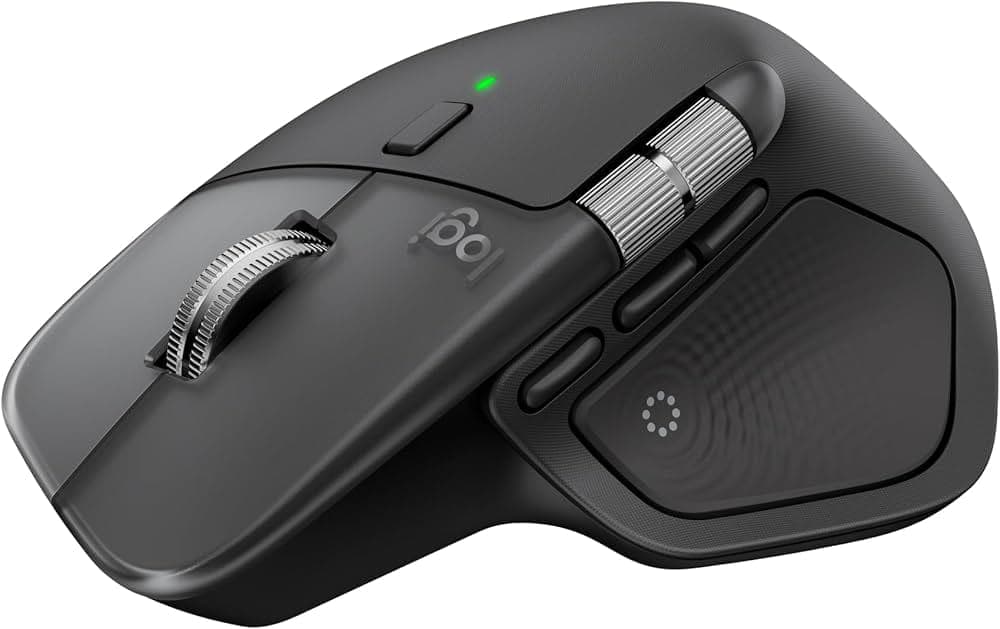
TL;DR The Logitech MX Master 4 refines an already excellent productivity mouse with better ergonomics, haptic feedback, and the new Actions Ring for faster workflows. It delivers outstanding comfort, precision, and multi device support, making it ideal for professionals who work long hours. However, at ₹12,000, it sits firmly in the premium category. The MX Master 3S, now available around ₹7,000, offers nearly the same core experience including design, sensor, and scrolling. For most users, the 3S is a better value, while the MX Master 4 is worth it only for power users who will benefit from its advanced features.
The Evolution of a Legendary Productivity Mouse
The Logitech MX Master series has long been considered the benchmark for productivity focused mice, especially among developers, designers, and professionals who spend extended hours working on computers. With the MX Master 4, Logitech has chosen refinement over reinvention, focusing on improving an already successful formula rather than changing it entirely. This approach results in a device that feels familiar initially but reveals meaningful improvements the longer you use it in real workflows.
The MX Master 4 continues to prioritise comfort, control, and efficiency, which are the core reasons behind the series’ popularity. It is not designed for gaming or flashy performance metrics, but for consistent and reliable everyday usage. This makes it especially valuable for people who rely on their mouse for productivity tasks throughout the day.
In 2026, the MX Master 4 stands out because it focuses on the fundamentals that matter most. Logitech has carefully refined ergonomics, button placement, and workflow features to create a more polished experience. The result is a mouse that feels like a natural extension of your hand rather than just another peripheral.
Design and Ergonomics That Feel Effortless
The design of the MX Master 4 is one of its strongest aspects, and it immediately feels comfortable when you place your hand on it. The ergonomic shape is sculpted to support the natural resting position of your palm, reducing strain during long working hours. Your fingers naturally fall onto the buttons and scroll wheels, which makes the mouse intuitive to use from the very beginning.
Unlike lighter mice, the MX Master 4 has a noticeable weight that contributes to stability. This weight helps in achieving controlled and precise movements rather than overly sensitive or jittery cursor behaviour. Over time, this stability becomes an important factor in improving productivity, especially for tasks that require accuracy.
Logitech has also improved the materials and finish of the mouse. The surface feels premium and more durable, addressing long term wear concerns seen in earlier models. The grip texture enhances comfort and ensures that the mouse remains secure even during extended use.
Precision and Performance That Feels Natural
The MX Master 4 delivers highly consistent performance that makes everyday tasks feel smoother and more controlled. It features a high precision sensor that works reliably across different surfaces, including glass. This flexibility means users are not restricted to using a mouse pad and can work comfortably in various environments.
Cursor movement is fluid and predictable, which is critical for productivity and creative tasks. Whether you are navigating spreadsheets, editing documents, or working on design projects, the mouse responds accurately. This level of consistency helps reduce errors and improves efficiency over time.
The MagSpeed scroll wheel continues to be one of the defining features of the MX Master series. It allows users to switch seamlessly between precise scrolling and high speed scrolling. This makes navigating large documents or datasets significantly faster and more convenient.
Features That Actually Improve Your Workflow
The MX Master 4 introduces features that are genuinely useful rather than being added for marketing purposes. One of the most notable additions is the Actions Ring, which allows users to access shortcuts through a circular interface. This reduces the need to rely heavily on keyboard shortcuts or navigate through menus repeatedly.
The mouse also supports extensive customisation through programmable buttons. Users can assign specific functions based on the applications they use, making the mouse adapt to their workflow. This flexibility is particularly beneficial for professionals who use specialised software regularly.
Another important addition is haptic feedback, which provides subtle tactile responses during interactions. This feature enhances the overall experience by making actions feel more responsive and intuitive. Over time, these small improvements contribute to a smoother and more efficient workflow.
Multi Device Connectivity That Matches Modern Workflows
Modern work environments often involve multiple devices, and the MX Master 4 is designed to handle this seamlessly. The mouse can connect to multiple devices simultaneously and allows users to switch between them effortlessly. This feature is particularly useful for professionals who use a laptop, desktop, and tablet as part of their daily workflow.
Switching between devices is quick and does not interrupt your work. You can move from one system to another without needing to reconnect or reconfigure the mouse. This improves productivity by eliminating unnecessary interruptions.
The wireless connectivity is also reliable and stable, even in environments with multiple devices. The mouse maintains consistent performance, ensuring a smooth user experience. For those who prefer wired usage, the option to use the mouse while charging adds further flexibility.
Battery Life That Supports Long Work Sessions
Battery life is one of the most reliable aspects of the MX Master 4. The mouse is designed to last for several weeks on a single charge, which reduces the need for frequent charging. This makes it highly dependable for users who rely on it for daily work.
Even when the battery runs low, the fast charging capability ensures minimal downtime. A short charging session can provide several hours of usage, which is particularly useful during busy work schedules. This feature ensures that the mouse is always ready when needed.
The efficient power management system reflects Logitech’s focus on practicality. Users do not have to constantly monitor battery levels, allowing them to focus entirely on their work. This contributes to a seamless and uninterrupted workflow.
MX Master 4 vs MX Master 3S: Value vs Upgrade Decision
| Feature | MX Master 4 | MX Master 3S |
|---|---|---|
| Price (India) | ₹12,000 | ₹7,000 |
| Design | Refined ergonomic | Proven ergonomic |
| Sensor | High precision | High precision |
| Scroll Wheel | MagSpeed | MagSpeed |
| New Features | Haptics and Actions Ring | None |
| Connectivity | Improved | Excellent |
| Battery Life | Similar | Similar |
The comparison between the MX Master 4 and MX Master 3S is where most buyers will spend their time deciding. Both mice share the same core strengths, including excellent ergonomics, precise tracking, and a smooth scrolling experience. This means that the fundamental usability of both devices is very similar in day to day use.
The MX Master 4 introduces new features such as haptic feedback and the Actions Ring. These features enhance productivity by making interactions faster and more intuitive. However, they are not essential for every user, especially those with simpler workflows.
At ₹12,000, the MX Master 4 is positioned as a premium upgrade. Meanwhile, the MX Master 3S at ₹7,000 offers nearly the same core experience at a significantly lower price. For most users, the MX Master 3S represents a better value, while the MX Master 4 is ideal for power users who can fully utilise its advanced features.
Why It Is a Staple on Every Tech Desk
The MX Master series has become a common sight on desks across the tech industry. This popularity is driven by its consistent performance and ability to improve everyday workflows. Professionals rely on it because it delivers comfort, precision, and reliability without requiring a learning curve.
Developers, designers, and writers benefit from its customisation features and ergonomic design. These aspects make long working hours more manageable and reduce fatigue. Over time, this translates into better productivity and a more enjoyable work experience.
The mouse also fits well into modern workspace setups. Its professional design and practical features make it suitable for both home and office environments. This combination of functionality and aesthetics contributes to its widespread adoption.
Should You Buy MX Master 4 in 2026
The Logitech MX Master 4 is one of the best productivity mice available in 2026. It builds upon a strong foundation and introduces meaningful improvements that enhance the user experience. The focus on refinement rather than reinvention ensures that the mouse remains reliable and practical. However, the pricing plays a significant role in the decision. At ₹12,000, it is a premium product that may not be necessary for everyone. The MX Master 3S at ₹7,000 offers exceptional value and delivers most of the same benefits.
For users who want the latest features and are willing to pay for them, the MX Master 4 is a worthwhile upgrade. For those looking for the best value, the MX Master 3S remains a smarter choice.
Frequently Asked Questions
Q. Is Logitech MX Master 4 worth ₹12,000 in 2026
It is worth it for power users who need advanced features like haptics and Actions Ring, but not essential for everyone.
Q. Is MX Master 3S a better deal than MX Master 4
Yes the MX Master 3S offers almost the same core experience at ₹7,000 making it a much better value for most users.
Q. What is the biggest upgrade in MX Master 4
The main upgrades are haptic feedback and the Actions Ring which improve workflow efficiency and shortcut access.
Q. Is MX Master 4 better for coding and office work
It is slightly better due to new features but the MX Master 3S already handles coding and office work extremely well.
Q. Which mouse should I buy in 2026 MX Master 4 or 3S
Buy MX Master 4 if you want the latest features and premium experience, otherwise MX Master 3S is the smarter value choice.






