
Lens Mounts Explained: EF, EF-S, F, Z and E Mount for Beginners
Confused by EF, EF-S, F, Z, and E lens mounts? Learn how Canon, Nikon, and Sony lens systems differ, which lenses fit your camera, and how adapters affect compatibility.

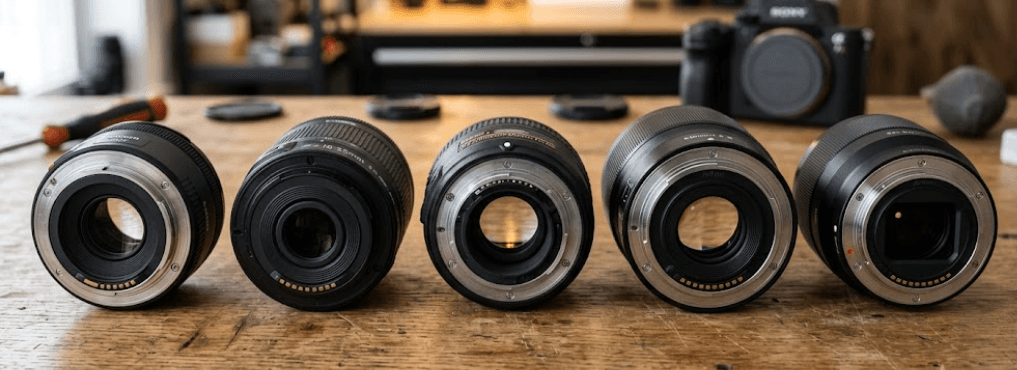
TL;DR Understanding lens mounts is essential when buying a camera or choosing a new lens, especially if you are a beginner investing in your first interchangeable-lens system. Canon EF and EF-S, Nikon F and Z, and Sony E are different mounting standards that determine how a lens physically connects to a camera and communicates with its electronics. EF lenses are designed for Canon's DSLR system, while EF-S lenses are intended for compatible APS-C DSLRs. Nikon F is its older DSLR mount, whereas Nikon Z is designed for mirrorless cameras. Sony E is the mount used across its APS-C and full-frame mirrorless cameras. Adapters can help you reuse certain lenses, but compatibility with autofocus, exposure control, and other features depends on the specific combination.
What Is a Camera Lens Mount?
A lens mount is the mechanical and electronic connection between a camera body and a lens. It allows the lens to attach securely while positioning its optical elements at the correct distance from the camera's image sensor. The mount also provides the connection through which compatible cameras and lenses exchange information for functions such as autofocus, aperture control, and lens identification. Without a compatible mounting system, a lens may not attach properly or communicate with the camera as intended.
Different manufacturers have developed their own mounts, and some manufacturers use multiple mounts for different generations or types of cameras. Canon's EF and EF-S mounts are associated with its DSLR cameras, Nikon's F mount belongs to its DSLR system, and Nikon Z and Sony E are mirrorless camera mounts. These systems differ in physical design, flange distance, electronic contacts, and compatibility rules. Consequently, a lens that fits one camera system will not necessarily fit another, even when both products come from the same general camera category.
For beginners, the important point is that a lens mount is not the same as a lens's focal length, aperture, or sensor coverage. A 50mm lens describes its focal length, while a designation such as EF or E identifies its mounting system. Two lenses may offer similar focal lengths and image quality but still be incompatible with the same camera body. Checking the mount before purchasing a lens helps prevent unnecessary spending and makes it easier to build a camera system that suits your photography needs.
Why Lens Mount Compatibility Matters
Lens mount compatibility determines which lenses you can use directly, which require an adapter, and which cannot be used with a particular camera. It also influences your long-term equipment budget because lenses often remain useful longer than camera bodies. If you already own several lenses, choosing a new camera within the same compatible system can reduce the cost of upgrading. However, switching manufacturers or moving between different mount generations may require additional accessories or new lenses.
Canon EF and EF-S Mounts Explained
Canon EF and EF-S are related but distinct mounts developed for Canon DSLR cameras. The EF mount was introduced in 1987 and became the foundation of Canon's autofocus EOS SLR and DSLR systems. EF lenses were designed to cover full-frame sensors and can also be used on compatible APS-C Canon DSLRs. This makes EF lenses particularly versatile for photographers who want to move between compatible camera bodies without necessarily replacing their entire lens collection.
The EF-S mount was introduced for Canon's APS-C DSLR cameras. These lenses use a smaller image circle suited to the smaller sensor format and a shorter back-focus design. EF-S lenses are designed for compatible APS-C bodies and are not compatible with Canon's traditional full-frame EF DSLR bodies. The distinction matters because a lens that works on one Canon DSLR may not fit or function on another. Before buying a used lens, check the exact camera model and the lens's mount designation rather than relying on the Canon brand name alone.
Both systems offer a wide selection of lenses for portraits, landscapes, sports, and everyday photography. EF lenses can be a practical choice for photographers who already own compatible Canon DSLRs or want access to the used-lens market. EF-S lenses can be more affordable and compact for APS-C users. Canon also offers mirrorless systems with different mounts, so EF and EF-S compatibility should not be confused with direct compatibility on newer mirrorless bodies.
EF vs. EF-S at a Glance
| Feature | Canon EF | Canon EF-S |
|---|---|---|
| Primary camera system | Canon DSLR | Compatible Canon APS-C DSLR |
| Sensor coverage | Full-frame and APS-C bodies | APS-C format |
| Fits compatible EF DSLR bodies | Yes | No |
| Fits compatible APS-C EF-S DSLRs | Yes | Yes |
| Direct fit on Canon RF mirrorless bodies | No | No |
| Adapter options | Available for compatible systems | Available for certain compatible systems |
Canon's support documentation explains the EF and EF-S mounting distinctions and the restrictions on using EF-S lenses with full-frame DSLR bodies. See Canon's EF-S lens compatibility guide.
Nikon F and Z Mounts Explained
Nikon F is the company's long-running DSLR lens mount, introduced in 1959. Over the decades, Nikon developed a large collection of F-mount lenses, including autofocus lenses and older manual-focus designs. This extensive lens history is useful for photographers buying used equipment or continuing to use lenses they already own. However, Nikon F lenses do not all offer identical compatibility, because autofocus motors, electronic contacts, aperture mechanisms, and lens generations vary.
Nikon Z is the mount designed for the company's mirrorless cameras. Its shorter flange distance and wider mount opening provide a different optical and mechanical design from the older F system. Nikon Z cameras support native Z-mount lenses, which are designed specifically for the mirrorless system. If you are buying a new Nikon mirrorless camera, native Z lenses are generally the most straightforward choice because they avoid the additional compatibility considerations associated with adapting older equipment.
Photographers moving from Nikon DSLRs to Nikon Z cameras can use the FTZ or FTZ II adapter with many compatible F-mount lenses. However, an adapter does not guarantee that every older lens will retain autofocus or every other camera function. Nikon's official compatibility guidance distinguishes between supported lens types and the functions available with each. This is particularly important for older lenses that rely on a camera body's autofocus motor or have limited electronic communication.
Nikon F vs. Nikon Z
| Feature | Nikon F | Nikon Z |
|---|---|---|
| Primary camera system | Nikon DSLR | Nikon mirrorless |
| Native lens type | NIKKOR F lenses | NIKKOR Z lenses |
| Direct fit on Nikon Z bodies | No | Yes |
| Adapter availability | FTZ and FTZ II | Not required for native Z lenses |
| Older lens compatibility | Depends on camera | Depends on lens and adapter support |
| Best suited to | DSLR users and existing lens owners | New mirrorless buyers and Z-system users |
Nikon confirms that the FTZ II allows many F-mount NIKKOR lenses to be used on Z-mount cameras, with some limitations depending on the lens. Review the official Nikon F-mount compatibility guide before purchasing an adapter.
Sony E Mount Explained
Sony E is the mount used by Sony's interchangeable-lens mirrorless cameras, including its APS-C and full-frame models. Unlike Canon EF and EF-S, which belong to its DSLR system, Sony E is built around mirrorless camera bodies. Sony's APS-C cameras, such as models in the Alpha 6000 series, use E-mount lenses designed for that sensor format. Its full-frame mirrorless cameras also use E mount, with full-frame lenses commonly identified by the FE designation.
This shared mount creates useful flexibility. A Sony FE lens can be used on a compatible Sony APS-C E-mount camera, although the smaller sensor captures a narrower field of view. Sony E APS-C lenses can also be mounted on compatible full-frame E-mount bodies, but the camera generally needs to use an APS-C or Super 35mm crop mode to avoid dark corners or vignetting. The result is that physical mount compatibility does not always mean the lens uses the entire sensor area.
For beginners, Sony E can be a practical system because it offers a range of lenses for everyday photography, travel, portraits, and video. However, it is important to distinguish E-mount from Sony A-mount, an older system associated with its DSLR and translucent-mirror cameras. These mounts are not directly interchangeable, although specific adapters support certain combinations. Before buying a lens, check whether it is E-mount or A-mount and whether it is designed for APS-C or full-frame coverage.
Sony E vs. FE Lenses
| Feature | Sony E Lens | Sony FE Lens |
|---|---|---|
| Intended sensor format | APS-C | Full-frame |
| Fits compatible Sony E-mount APS-C cameras | Yes | Yes |
| Fits compatible Sony full-frame E-mount cameras | Yes, with crop-mode considerations | Yes |
| Full-frame sensor coverage | Not generally intended | Yes |
| Typical advantage | Smaller, lighter designs | Full-frame coverage and flexibility |
Sony confirms that E and FE lenses can be used across compatible APS-C and full-frame E-mount bodies, with crop-mode considerations for APS-C lenses on full-frame cameras. Read Sony's official E-mount compatibility guide.
Comparing EF, EF-S, F, Z and E Mounts
The biggest difference between these mounts is the camera system they belong to. Canon EF and EF-S were developed for DSLRs, Nikon F is Nikon's DSLR mount, and Nikon Z and Sony E are mirrorless mounts. These distinctions influence which lenses attach directly and whether an adapter is required. They also affect the available selection of native lenses, the cost of expanding a kit, and the practicality of carrying older lenses into a newer camera system.
It is important not to assume that a newer mount automatically makes every older lens obsolete. Nikon's FTZ adapters, for example, let photographers use many compatible F-mount lenses on Z cameras. Sony's E-mount system accommodates both APS-C and full-frame lenses, although sensor coverage affects how an image is captured. Canon EF and EF-S lenses can also be adapted to compatible mirrorless systems, but the appropriate adapter depends on the camera mount. Functionality must be checked for the specific lens, body, and adapter combination.
For a beginner, the most useful comparison is not simply which mount is newer or more advanced. Consider the camera you own, the lenses you already have, your budget, and the type of photography you intend to do. A photographer who already owns several Nikon F lenses may save money by using an FTZ II adapter, while someone buying a new mirrorless camera from scratch may prefer native lenses designed for that system. Choosing based on the whole setup is more practical than comparing mount names alone.
Lens Mount Comparison Table
| Mount | Manufacturer | Camera System | Main Compatibility Consideration |
|---|---|---|---|
| EF | Canon | DSLR | Works on compatible EF and EF-S DSLR bodies |
| EF-S | Canon | APS-C DSLR | Not compatible with full-frame EF DSLR bodies |
| F | Nikon | DSLR | Z cameras require a compatible FTZ adapter |
| Z | Nikon | Mirrorless | Native Z lenses fit directly |
| E | Sony | Mirrorless | Supports compatible APS-C and full-frame E-mount lenses |
How to Choose the Right Lens Mount
If you are buying your first camera, start with the camera body rather than choosing a lens based only on price or specifications. Check the mount listed in the manufacturer's product documentation, then look for lenses made for that system. A lens that is physically compatible with a camera may still have restrictions related to autofocus, sensor coverage, image stabilization, or electronic aperture control. Verifying those details before purchase helps you avoid unexpected limitations.
If you already own lenses, list their exact model numbers before upgrading your camera. Nikon DSLR owners should check the compatibility table for their specific F-mount lenses when considering a Z camera and FTZ adapter. Sony users should distinguish E and FE lenses and understand when crop mode applies. Canon DSLR owners should confirm whether each lens is EF or EF-S and whether the intended body supports it. These small checks can save a substantial amount of money when building a kit.
Budget should also include more than the price of the camera and lens. An adapter adds cost and may affect handling, balance, or supported features. Buying a native lens can simplify the setup, while adapting an existing lens may be better value if it preserves the functions you need. If you are purchasing used equipment, check the mount, inspect the lens for damage, and verify compatibility using the manufacturer's documentation before completing the transaction.
Frequently Asked Questions
Q. What is the difference between EF and EF-S mounts?
EF is Canon's DSLR lens mount used with compatible full-frame and APS-C DSLR bodies. EF-S lenses are designed for compatible APS-C DSLRs and are not compatible with Canon's full-frame EF DSLR bodies.
Q. Can I use Nikon F lenses on a Nikon Z camera?
Yes, many Nikon F-mount lenses can be used on Nikon Z cameras with an FTZ or FTZ II adapter. However, autofocus and other features depend on the exact lens, so check Nikon's compatibility guide first.
Q. Are Sony E and FE mounts different?
E and FE refer to APS-C and full-frame lens formats within Sony's E-mount system. Both fit compatible E-mount cameras, but APS-C lenses may require crop mode on a full-frame body.
Q. Can I use a Canon EF lens on a Sony E-mount camera?
A compatible third-party adapter may allow this, but autofocus, aperture control, and other functions vary by lens and adapter. Confirm support for your exact equipment before buying.
Q. Does a lens mount affect image quality?
The mount itself does not determine image quality. Lens optics, sensor size, focus accuracy, aperture, and shooting conditions have a greater direct effect, although mount design influences which lenses and features are available.
Q. Can I use an EF-S lens on a full-frame Canon DSLR?
No. Canon EF-S lenses are not compatible with its full-frame EF DSLR bodies. Check the camera's official compatibility information before attaching a lens.
Q. Is Nikon Z better than Nikon F?
Neither is automatically better for every photographer. Nikon Z is designed for mirrorless cameras and native Z lenses, while Nikon F offers a large legacy DSLR lens collection that may remain useful with compatible cameras or adapters.
Q. What should beginners check before buying a used lens?
Check the exact mount, camera compatibility, autofocus support, aperture operation, optical condition, and whether the lens covers your sensor format. Also confirm whether an adapter is required.
Q. Can I use a full-frame Sony FE lens on an APS-C camera?
Yes, a compatible FE lens can be used on a Sony APS-C E-mount camera. The smaller sensor captures a narrower field of view than a full-frame camera would with the same lens.
Q. Should I buy an adapter or a native lens?
A native lens is usually the simplest option because it is designed for the camera system. An adapter can save money if you already own compatible lenses, but check supported functions and handling before deciding.
Final Recommendation
For beginners, the best lens mount is the one that matches the camera you own or the system you intend to use for the next several years. Canon EF and EF-S remain relevant to compatible DSLR users, while Nikon F lenses can extend the usefulness of an existing Nikon collection when paired with a supported FTZ adapter. Nikon Z and Sony E provide native mirrorless lens systems, with Sony's E-mount offering flexibility across APS-C and full-frame bodies when sensor coverage is considered.
Before buying a lens, confirm its exact mount, sensor-format compatibility, and support for autofocus and aperture control. Do not assume that lenses from the same brand are interchangeable or that an adapter guarantees every feature will work. If you are starting from scratch, compare the camera bodies, native lens selection, prices, and upgrade options together. That approach will help you choose a compatible system, avoid unnecessary purchases, and build a lens collection that continues to serve your photography as your skills develop.
Ready to upgrade your tech?
Browse our collection of quality refurbished products at unbeatable prices.






