
Lenovo ThinkPad T Series T495 Performance Guide in 2026 India
ThinkPad T495 performance guide India explaining Ryzen Pro speed multitasking RAM SSD graphics thermals coding ability and real world productivity experience clearly.

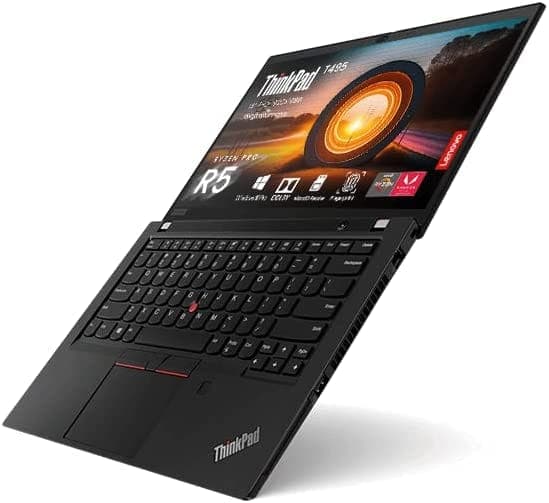
TL;DR The Lenovo ThinkPad T495 remains a reliable and efficient business laptop in 2026, powered by AMD Ryzen PRO processors and offering up to 16 GB RAM with fast NVMe SSDs. It handles office productivity, web multitasking, coding, and light content creation smoothly while maintaining low heat and quiet operation. Its integrated AMD Radeon Vega graphics support casual media tasks, and the laptop’s thermal design ensures consistent performance over extended use. For Indian users seeking a durable, responsive, and upgradeable mid-range laptop, the T495 delivers strong value compared to newer budget or mid-range alternatives.
Overview of ThinkPad T495 Performance in 2026
The Lenovo ThinkPad T495 remains a dependable performer for office, coding, and multitasking workloads in 2026. Its standout feature is the use of AMD Ryzen PRO processors, which combine efficient multi-core performance with strong power management. This allows the T495 to handle daily productivity tasks,like emails, spreadsheets, cloud collaboration, and video conferencing,without lag. Unlike some ultra-thin laptops that throttle under load, the T495 delivers consistent responsiveness across multiple applications.
Beyond raw processing power, the T495 benefits from upgradable RAM and fast storage options, which enhance its ability to multitask and handle larger files. For Indian users who often rely on cloud apps or run multiple productivity tools simultaneously, this ensures a smooth experience. Even when handling web-based tools or lightweight coding environments, the laptop maintains fluid performance.
Additionally, the power-efficient Ryzen architecture keeps heat and fan noise low during typical office workloads. This is particularly useful in Indian work environments where extended hours of usage are common and ambient temperatures may be high. The combination of performance and efficient power consumption makes the T495 a practical choice for users who need a balance of speed, reliability, and battery efficiency.
CPU Performance: Ryzen 3, 5, and 7 PRO Comparison
The ThinkPad T495 is offered with three main AMD Ryzen PRO CPU options: Ryzen 3 PRO, Ryzen 5 PRO, and Ryzen 7 PRO. Each caters to a different performance tier, allowing users to choose according to workload requirements. Ryzen 3 PRO models handle everyday productivity tasks like emails, Office apps, and light web browsing efficiently. They provide sufficient performance for students or professionals who don’t require heavy multitasking.
The Ryzen 5 PRO is often considered the sweet spot. It provides enhanced multitasking capabilities, handling larger Excel sheets, multiple browser tabs, and cloud-based productivity applications smoothly. The higher base and boost clock speeds compared to Ryzen 3 help keep workflow transitions quick and responsive. This model is ideal for Indian office users, developers, and small business owners who need reliable day-to-day performance.
For those requiring maximum performance headroom, the Ryzen 7 PRO offers superior multi-threaded capabilities. It can manage more demanding tasks like moderate content creation, light analytics, and multitasking with multiple IDEs or virtual machines. While the T495 isn’t a high-end workstation, the Ryzen 7 PRO ensures users experience minimal lag during extended workloads, which is a significant advantage for professionals and students working with heavier data sets or coding projects.
T495 CPU Comparison for Productivity Tasks
RAM and Multitasking: 8 GB vs 16 GB in Real Workloads
RAM is a critical factor in determining how smoothly a laptop handles multiple applications at once. The ThinkPad T495 typically comes with 8 GB or 16 GB of DDR4 RAM, both sufficient for general productivity, but with noticeable differences under heavier multitasking conditions. 8 GB is enough for routine office tasks, moderate web browsing, and casual media playback. For students or office users with limited tabs open and basic applications, 8 GB provides reliable day-to-day performance.
However, in modern work scenarios, applications have become more memory-intensive. Running multiple browser tabs, cloud collaboration tools, and background services simultaneously can create noticeable slowdowns on an 8 GB system. In such cases, 16 GB RAM ensures smoother switching between apps, faster responsiveness in Excel or IDEs, and fewer delays during multitasking-heavy workflows. This makes it particularly relevant for Indian users who rely on Google Workspace, Microsoft Office, or other web-based productivity suites.
Upgrading to 16 GB RAM also future-proofs the T495 for evolving software requirements. As applications demand more memory over the next few years, the extra headroom helps maintain consistent performance without the system feeling outdated. For most users, 16 GB ensures a lag-free experience for multitasking, coding, and productivity in 2026.
SSD Speed and Responsiveness: NVMe vs SATA
The ThinkPad T495 benefits significantly from modern storage options, which influence both system responsiveness and long-term usability. Early T495 models often shipped with SATA SSDs, which already improved boot times and application loading compared to traditional HDDs. However, in 2026, NVMe SSDs have become the preferred option due to their substantially higher read and write speeds. An NVMe SSD can reduce boot times to under 15 seconds and allow applications to launch almost instantly, enhancing productivity for Indian users working with cloud services, large spreadsheets, or multiple productivity tools simultaneously.
For daily use, both SATA and NVMe SSDs offer reliable performance, but NVMe drives shine in file transfer speed, multitasking, and handling larger datasets. Users who frequently move files between external storage devices or work on multiple projects at once will notice the difference. Additionally, NVMe drives are typically more energy-efficient, contributing to longer battery life during office and remote work scenarios.
Reliability is another consideration. SSDs, unlike HDDs, have no moving parts, reducing the risk of mechanical failure. In the Indian context, where laptops may face variable temperature and humidity conditions, SSDs provide better long-term stability. Upgrading older SATA SSDs to NVMe is straightforward on the T495, allowing users to maximize both performance and longevity.
SSD Performance Comparison in T495
Integrated Graphics Performance: AMD Radeon Vega Series
The ThinkPad T495 features integrated AMD Radeon Vega graphics, which are suitable for casual multimedia tasks and light content creation. While it is not a gaming laptop or meant for heavy graphics workloads, the Vega series handles HD video playback, photo editing, and casual video editing efficiently. Streaming platforms such as YouTube, Netflix, and other HD services run smoothly without stutter, making it reliable for presentations and online meetings in Indian offices and classrooms.
For users working with lightweight graphics applications, such as Canva, Photoshop for minor edits, or basic video editing in Premiere Rush, the integrated Vega graphics are adequate. They allow productivity without the need for an additional GPU, helping maintain the laptop’s thin profile and low power consumption. However, it is important to note that the T495 will struggle with 3D modeling, rendering, or modern AAA games, so buyers should not expect performance comparable to discrete GPUs.
The Vega graphics also contribute to efficient power management, as they are tightly integrated with the AMD Ryzen PRO CPUs. This integration helps maintain longer battery life during graphics-intensive tasks, which is particularly relevant for Indian users who may work remotely or travel frequently. Overall, the Vega series strikes a practical balance between productivity and efficiency without compromising mobility.
Thermal Management and Sustained Performance
The ThinkPad T495 is designed to manage heat effectively, even under sustained workloads. Its dual-fan cooling system and heat-pipe architecture ensure that the CPU and integrated GPU remain within safe temperature ranges. During extended use,such as coding sessions, video streaming, or multitasking with multiple applications,users will notice the laptop stays relatively cool and quiet, reducing fatigue from fan noise.
Thermal management is especially important in India, where ambient temperatures can be high, and air-conditioned office environments are not always guaranteed. The T495’s design allows it to maintain consistent CPU performance without significant throttling, even when placed on desks with minimal airflow. Users performing long development cycles, spreadsheet-heavy calculations, or cloud-based tasks will benefit from the laptop’s ability to sustain performance over time.
Furthermore, efficient thermal design indirectly contributes to battery longevity and overall hardware health. By keeping the CPU and RAM cooler, the T495 reduces the risk of thermal-induced degradation over years of use. Combined with the AMD Ryzen PRO processors’ power efficiency, the laptop can deliver stable, predictable performance while keeping heat and energy consumption under control.
Office Productivity Benchmarks
The ThinkPad T495 continues to excel in office productivity tasks in 2026, making it a reliable choice for students, professionals, and small business users in India. Whether working in Microsoft Office, Google Workspace, or LibreOffice, the laptop handles multiple documents, spreadsheets, and presentations smoothly. For instance, opening a complex Excel file with hundreds of formulas or several tabs in Google Sheets does not significantly slow the system, particularly when equipped with 16 GB RAM and an NVMe SSD.
Word processing, email management, and video conferencing also perform seamlessly on the T495. Users can participate in HD Zoom calls or Google Meet sessions while simultaneously running other productivity apps without noticeable lag. This capability makes the laptop particularly useful for Indian professionals working in remote setups or hybrid office environments, where multitasking across several tools is common.
When comparing T495 to similar mid-range laptops in 2026, its balanced CPU-GPU combination and high-quality keyboard provide a productivity edge. Tasks that take longer to complete on entry-level laptops, such as loading large spreadsheets or rendering embedded charts, are executed faster on the T495. This makes it an ideal choice for users who prioritize speed, reliability, and smooth multitasking over flashy specifications.
Coding, Development, and Light Analytics Performance
For coding and development, the ThinkPad T495 proves capable and dependable. Its Ryzen 5 PRO or Ryzen 7 PRO CPUs provide sufficient multi-threaded performance to handle modern IDEs like Visual Studio Code, PyCharm, or Eclipse, as well as compilation tasks for small to medium-sized projects. Running scripts, testing code, or maintaining lightweight databases can be done without major slowdowns, especially when paired with 16 GB RAM.
The laptop also performs well for light analytics and entry-level data processing. Tools like Excel with pivot tables, Google Sheets, or Python scripts for small datasets run efficiently. While it is not designed for heavy AI workloads or large-scale data analysis, the T495 remains reliable for students, developers, and office analysts handling moderate computational tasks.
Additionally, the integrated AMD Radeon Vega graphics assist with visualization and chart rendering in analytics tools, reducing minor UI lags. Indian users who need a laptop capable of coding, web development, and light analytics will find the T495 a balanced machine, offering longevity and consistency without requiring a higher-priced modern workstation.
Battery and Performance Consistency
The ThinkPad T495 maintains a consistent performance-to-battery ratio, even during extended office or remote work sessions. With its integrated 3-cell battery and optional external Power Bridge battery, users can expect 5-7 hours of typical usage, depending on workload and screen brightness. This is ideal for Indian professionals working in offices, cafés, or traveling, where uninterrupted battery life is crucial.
Performance on battery remains largely consistent thanks to the Ryzen PRO CPUs’ power efficiency. Unlike older processors that throttle heavily when unplugged, the T495 continues to handle productivity and multitasking without major slowdowns. Running multiple tabs in Google Workspace, editing documents, and casual video streaming can all be sustained for several hours without the need for immediate charging.
For long-term users, maintaining battery health is relatively straightforward. Both internal and removable batteries can be replaced if necessary, and using NVMe SSDs further reduces power draw, indirectly extending runtime. Overall, the T495 delivers a reliable balance between battery life and sustained performance, which is particularly important for Indian users who may face power fluctuations or work remotely in locations with limited charging access.
Comparing ThinnkPad T495 Performance with Contemporary Budget and Midrange Laptops
The ThinkPad T495 continues to hold its ground against budget and mid-range laptops available in India in 2026. While newer laptops often feature slightly higher clock speeds or the latest integrated GPUs, the T495’s combination of AMD Ryzen PRO processors, Vega graphics, and business-grade build gives it a practical edge in real-world productivity. Entry-level laptops may advertise similar specs on paper, but often suffer from throttling, lower battery life, and reduced multitasking reliability.
When comparing 8 GB vs 16 GB RAM models, the T495 often outperforms contemporary laptops with similar memory but weaker CPUs. Its efficient thermal design ensures that performance remains consistent even under sustained workloads, whereas some newer budget models experience noticeable slowdowns under multitasking. This is particularly relevant for Indian users who frequently switch between cloud apps, multiple browser tabs, and office productivity tools.
Additionally, the upgradability and long-term usability of the T495 make it a strong value proposition. Unlike many modern ultrabooks that have soldered RAM or non-replaceable storage, the T495 allows users to upgrade RAM and SSDs as workloads grow, ensuring the laptop remains capable for several more years. For students, developers, and office professionals in India, this combination of reliable performance, upgrade flexibility, and durability makes the T495 a practical alternative to similarly priced modern laptops.
Performance Comparison Table: T495 vs Contemporary Midrange Laptops
Frequently Asked Questions
Q. How good is the ThinkPad T495 performance in 2026
It delivers reliable performance for office work coding multitasking and web applications especially with Ryzen five or Ryzen seven Pro processors.
Q. Which processor variant offers the best performance on the T495
Ryzen five Pro provides the best balance for most users while Ryzen seven Pro is better for heavier multitasking development workloads.
Q. Is eight gigabytes RAM enough for modern productivity tasks
Eight gigabytes works for basic office use but sixteen gigabytes is recommended for smoother multitasking coding and long term usability.
Q. Does upgrading to an NVMe SSD improve performance noticeably
Yes NVMe storage significantly improves boot speed file transfer responsiveness and application loading compared to SATA drives.
Q. Can the ThinkPad T495 handle coding and development work
Yes it performs well for programming web development light analytics and running modern IDEs especially with sufficient RAM and SSD storage.
Q. How capable are the integrated Radeon Vega graphics
They handle video playback presentations casual editing and light creative work but are not suitable for gaming or heavy rendering tasks.
Q. Does the ThinkPad T495 overheat during long workloads
No its efficient cooling system keeps temperatures controlled allowing consistent performance during extended office multitasking or coding sessions.
Q. How does T495 performance compare with modern budget laptops
It often provides more stable multitasking and sustained performance due to better thermals build quality and business focused hardware design.
Q. Does battery usage affect performance on the T495
Performance remains fairly consistent on battery because Ryzen Pro processors are power efficient and designed for business productivity scenarios.
Q. Is the ThinkPad T495 still a good performance choice in India in 2026
Yes it remains a strong mid range productivity laptop for students professionals and developers needing reliable speed upgrade flexibility and durability.






