
Lenovo ThinkPad T Series T450 Reliability Guide in 2026 India
Comprehensive ThinkPad T450 reliability guide explaining durability maintenance thermal performance storage lifespan battery longevity and long term usability for productivity users in India

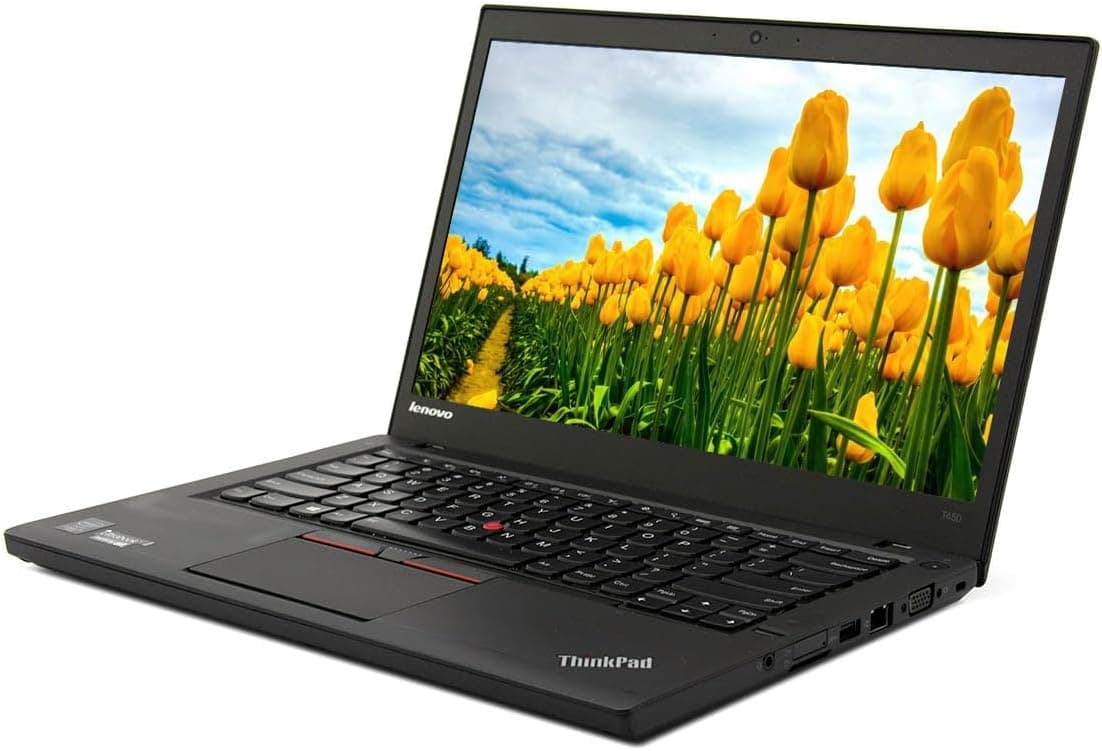
TL;DR The Lenovo ThinkPad T450 remains one of the most reliable business laptops available in India in 2026. Its magnesium-reinforced chassis, spill-resistant keyboard, and robust build make it highly durable for long-term use. With 5th-generation Intel Broadwell processors, upgradeable RAM up to 16GB, and SSD storage, the T450 handles office workloads, web applications, and light programming efficiently. Battery options including the 3-cell, 6-cell, and Power Bridge system offer 3-6 hours of real-world usage depending on configuration and age. With proper care, including regular battery checks, keyboard cleaning, and dust removal from cooling vents, the T450 can remain fully functional for 5-7 years or more, making it a cost-effective investment. Its modular design also makes maintenance straightforward: RAM, storage, and batteries are user-replaceable, allowing for easy upgrades and extending lifespan. For students, coders, and office professionals looking for a reliable, long-lasting laptop at a reasonable price, the T450 continues to be a practical choice.
Overview of Lenovo ThinkPad T450 Reliability in 2026
The ThinkPad T450, released in 2015, was designed as a continuation of Lenovo’s enterprise-focused T Series, prioritizing durability, maintenance ease, and long-term reliability. Even in 2026, it continues to be valued for its sturdy construction, predictable performance, and extensive upgrade options, which make it suitable for Indian buyers who want a machine that lasts. Its design philosophy focused on business environments, meaning the laptop was built to withstand years of daily handling without significant deterioration.
Durability is one of the main reasons the T450 remains relevant. The laptop’s chassis incorporates magnesium-reinforced internal frames and robust plastic composites, which resist bending, flexing, and minor impacts. Lenovo’s attention to hinge quality and keyboard resilience ensures that the machine maintains structural integrity even after years of frequent use. Compared to modern ultra-thin laptops, the T450 may feel heavier, but this weight contributes directly to long-term reliability.
Another factor in the T450’s continued usefulness is its serviceability and upgrade potential. RAM can be expanded up to 16GB, and the laptop supports 2.5-inch SATA SSDs, which extend usability for modern workloads. The modular design also allows battery replacement, keyboard swaps, and other maintenance without professional assistance. For Indian buyers seeking longevity and dependable performance, the T450 offers a combination of hardware resilience, maintainability, and predictable behavior under daily business workloads.
Build Quality and Chassis Durability
The ThinkPad T450 maintains Lenovo’s reputation for rugged enterprise laptops. Its chassis is reinforced with magnesium alloy, which strengthens the frame and reduces flex during transport or daily handling. The laptop can withstand minor knocks and bumps, a feature particularly useful for professionals who commute frequently or work in shared office spaces. Over years of usage, the T450’s frame remains stable, and the lid and base are resistant to warping compared to cheaper budget laptops.
The hinges are another highlight of the T450’s build quality. Designed to last tens of thousands of open-close cycles, they allow the screen to stay firm at any angle while resisting wobble. This contributes to a stable typing experience and prevents stress damage to the screen and internal components. Even after years of use, second-hand T450 units in India generally show minimal hinge wear if maintained properly.
Spill-resistant keyboard protection adds another layer of durability. Minor liquid spills are unlikely to damage the internal components, which is a distinct advantage over modern ultra-thin laptops without protective features. The laptop’s base design also provides easy access to memory, storage, and battery compartments, allowing users to maintain or upgrade the device themselves. Collectively, the build and chassis durability ensure that the T450 remains a reliable choice for business and productivity use in 2026.
Keyboard and TrackPoint Reliability
The ThinkPad T450 keyboard continues to be one of the laptop’s strongest reliability features. Known for its tactile feedback, deep key travel, and durable build, it can endure years of heavy typing without key loosening or failure. Users in India often report that retain their excellent typing experience, making the T450 suitable for programmers, writers, and office professionals who spend long hours typing. The spill-resistant design also adds peace of mind, as minor liquid exposure does not typically damage the underlying components.
The TrackPoint,Lenovo’s signature red pointing stick,also maintains consistent performance over time. Unlike cheaper trackpads, the TrackPoint does not degrade quickly, and its buttons remain responsive after years of use. Regular maintenance, such as cleaning dust and debris from the key gaps, ensures longevity. For buyers who prefer a mouse-less workflow, the TrackPoint provides precise cursor control and reduces strain on the wrists, which is particularly useful for coding or spreadsheet work.
Longevity is further supported by the modular keyboard assembly. In rare cases of key failure, the entire keyboard can be replaced without dismantling the laptop extensively. This design choice contributes to the T450’s reputation as a laptop that retains core usability over a decade. The combination of a durable keyboard and TrackPoint ensures that daily business and productivity tasks are handled efficiently, even in a refurbished unit.
Thermal Performance and Cooling System
The ThinkPad T450 uses a single heat pipe and fan system to manage heat produced by the 5th-generation Intel Broadwell U-series CPUs. Despite the age of these processors, the T450 remains thermally efficient, thanks to its low-voltage design and business-class thermal engineering. Under typical office workloads, like coding, web browsing, and document editing, the laptop maintains moderate temperatures and minimal fan noise, contributing to a comfortable working environment.
During heavier workloads, such as running multiple virtual machines or video conferencing while multitasking, the fan may become audible but remains within acceptable levels for indoor use. Lenovo’s thermal design ensures that the CPU throttles minimally under load, reducing the risk of heat-related performance degradation over the years. Buyers in India can expect consistent performance as long as air vents are kept clean, which is particularly important in dust-prone environments.
Over time, the thermal paste applied between the CPU/GPU and the heat sink can dry out, reducing heat transfer efficiency. This can lead to higher temperatures and slightly louder fan activity under load. Users maintaining or refurbishing a T450 should check the thermal paste every 3–5 years, especially for laptops that run near 75–80°C under heavy workloads. Reapplying high-quality thermal paste can restore optimal heat dissipation and prolong the lifespan of both the CPU and integrated GPU.
The cooling system also supports long-term CPU and GPU reliability. Regular cleaning of fan assemblies, vents, and heat sinks, combined with timely thermal paste replacement, ensures stable temperatures and prevents premature component wear. Even refurbished T450 units with several years of use generally retain stable thermal performance, demonstrating that Lenovo’s engineering prioritized long-term reliability and comfort—a crucial factor for professional users.
T450 Thermal Performance Overview
CPU and RAM Stability Over Time
The ThinkPad T450 is powered by Intel 5th generation Haswell Core i5 and i7 U-series processors. These low-voltage CPUs were designed for efficiency and longevity, and in 2026 they continue to deliver stable, predictable performance for productivity workloads. Users running office applications, coding environments, and web-based tools generally do not experience significant performance degradation even after several years of usage.
RAM reliability is equally strong. Most units ship with 8GB DDR3L RAM, upgradeable to 16GB via two slots. Memory modules of this generation have proven durable, with very low failure rates reported over years of heavy use. For multitasking, upgraded RAM ensures that users can maintain smooth system responsiveness, even with multiple browser tabs, spreadsheets, and programming tools open simultaneously.
CPU upgrades are not feasible as the processors are soldered onto the motherboard. Therefore, buyers should prioritize units with higher-end CPUs and maximum RAM during purchase. Storage upgrades with SSDs can complement CPU and RAM, improving overall system responsiveness. With proper care and maintenance, the T450’s CPU and RAM provide reliable performance for business and educational workloads, making it a practical choice for Indian users in 2026.
T450 CPU & RAM Reliability Table
Storage and SSD/HDD Longevity
The ThinkPad T450 supports both 2.5-inch SATA HDDs and SSDs, allowing users to choose between cost-effective storage and faster, more durable options. Mechanical HDDs, while still functional in many units, have a higher failure rate over time, especially after five to seven years of use. Wear and tear on moving parts, vibration, and heat can cause gradual degradation. This makes SSD upgrades essential for buyers who require long-term reliability and consistent performance.
SSDs in T450 units significantly improve boot times, application responsiveness, and overall workflow efficiency. Modern 256GB or 512GB SATA SSDs are highly reliable, with average endurance ratings exceeding 200-300 TBW (terabytes written), sufficient for daily office and educational use in 2026. Unlike HDDs, SSDs have no moving parts, making them resistant to shocks and reducing the likelihood of catastrophic failure, which is particularly useful for users who transport their laptops frequently in India.
Maintenance plays a key role in storage longevity. Regular backups, firmware updates for SSDs, and proper handling ensure that drives last well beyond their original life expectancy. For refurbished T450 units, most sellers provide tested SSDs with verified health status, giving buyers confidence in their investment. Choosing a T450 with an SSD is the most effective way to combine reliability, speed, and modern usability, ensuring the laptop remains functional for years.
T450 Storage Longevity Table
Battery Longevity and Charging Reliability
Battery reliability is a critical factor for ThinkPad T450 buyers. The T450 supports three main configurations: a standard 3-cell battery, a 6-cell battery, and the innovative Power Bridge system, which allows hot-swapping between an internal and external battery. Over time, lithium-ion batteries naturally degrade, reducing maximum capacity and runtime. Lenovo units are tested for cycle count and health, with worn batteries typically replaced to maintain usability.
A 6-cell battery in good condition can deliver approximately 4-5 hours of typical productivity usage, while the Power Bridge system can extend runtime to 6-7 hours, depending on workload. Users running web applications, document editing, or programming tools benefit from consistent battery performance, which remains stable if the laptop is properly maintained. Charging reliability is also robust, with the T450 supporting standard Lenovo AC adapters, ensuring that replacement adapters are widely available in India.
Long-term battery maintenance is straightforward. Users are advised to avoid deep discharge cycles, keep vents unobstructed, and occasionally calibrate the battery. Removable batteries also allow easy replacement without professional assistance, giving the T450 a longevity advantage over many modern ultrabooks with sealed batteries. With proper care, T450 units can maintain reliable charging and extended uptime for several more years.
T450 Battery Performance Table
Display and Screen Durability
The ThinkPad T450 display comes in HD (1366x768) or HD+ (1600x900) configurations, both with an anti-glare coating to reduce reflections and improve visibility under bright lighting. These panels have proven durable over time, resisting minor scratches and color degradation. Proper maintenance ensures that pixel persistence and backlight performance remain within acceptable limits even after many years of use.
Hinge stress is another factor affecting screen longevity. The T450’s hinges are designed for tens of thousands of open-close cycles, maintaining stability without wobbling. This ensures that repeated opening and closing of the lid does not affect screen alignment or structural integrity. For professionals in India who frequently transport their laptops, the sturdy hinge design contributes to long-term reliability.
Maintenance tips include keeping the screen clean, avoiding pressure on the display, and gently opening/closing the lid. With these precautions, a refurbished T450 can provide years of reliable display performance, making it suitable for office work, programming, and web-based applications without display-related disruptions.
Connectivity and Port Longevity
The ThinkPad T450 is equipped with a wide range of connectivity options that remain relevant even in 2026. Ports include USB 3.0, USB 2.0, mini DisplayPort, VGA, Ethernet, and docking connectors, all of which were designed for heavy business use. The robust build of these ports ensures that frequent plugging and unplugging over years does not cause looseness or failure, a common issue in cheaper laptops. This makes the T450 a practical choice for users who connect multiple peripherals, external monitors, or network cables on a daily basis.
USB ports and Ethernet connectors are reinforced to withstand repeated insertion cycles, are typically tested to ensure that all ports function correctly. Mini DisplayPort and VGA connectors maintain consistent signal output, supporting external monitors for productivity and presentation tasks. Docking station connectors are particularly durable, enabling business users to expand their workspace without worrying about port damage over time.
Maintenance is straightforward and crucial for longevity. Regularly inspecting ports for dust, using soft brushes to clean connectors, and avoiding excessive force during cable insertion can prevent premature wear. Overall, the T450’s connectivity reliability remains a strong selling point, providing versatile options for business and educational users in India without frequent failures or disruptions.
Common Reliability Issues and Maintenance Tips
While the ThinkPad T450 is known for its long-term durability, certain issues may arise over time, especially in units that are several years old. Battery degradation is the most common concern, with lithium-ion cells naturally losing capacity after hundreds of charge cycles. Replacing the battery with a tested, high-quality unit resolves this issue and restores productivity. Users are also advised to avoid deep discharge cycles and to calibrate the battery periodically to maintain accuracy in charge readings.
Keyboard and trackpad reliability, though excellent, can occasionally show minor signs of wear. Dust accumulation under keys may reduce responsiveness, and sticky or uneven keys can occur if spills were not promptly addressed. Cleaning the keyboard with compressed air and using mild solutions for surface cleaning can prevent long-term issues. Similarly, keeping the fan and vents free of dust prevents overheating and ensures thermal consistency, which preserves CPU and SSD lifespan.
Storage devices, particularly HDDs in older units, are prone to failure due to mechanical wear. Upgrading to a SATA SSD significantly mitigates this risk. Maintaining software updates, periodically running disk health checks, and ensuring proper shutdown procedures also contribute to long-term reliability. Following these simple maintenance practices allows the T450 to deliver stable performance, durability, and usability for several more years, making it a trusted choice for students, office professionals, and programmers.
Frequently Asked Questions
Q. How long can a ThinkPad T450 last in 2026 with proper maintenance
A. With SSD upgrades battery replacement and regular cleaning a T450 can remain productive for seven to ten years after launch
Q. Can the CPU be upgraded in the Lenovo ThinkPad T450
A. No the processor is soldered to the motherboard so performance upgrades are limited to RAM and storage improvements
Q. What battery life should users expect from the T450 today
A. A healthy six cell battery provides around four to five hours while Power Bridge setups extend usage to six or seven hours
Q. Is the ThinkPad T450 keyboard reliable after many years of use
A. Yes ThinkPad keyboards are known for durability tactile feedback and consistent typing performance even after heavy long term usage
Q. Are the ports and connectors durable on the ThinkPad T450
A. Yes reinforced USB Ethernet VGA and mini DisplayPort connectors are designed to handle frequent daily connections without loosening
Q. Should buyers choose SSD or HDD for better reliability
A. SSD storage is strongly recommended because it improves speed reduces mechanical failure risk and enhances overall system stability
Q. Can the ThinkPad T450 still run modern productivity software smoothly
A. Yes with eight to sixteen gigabytes RAM and SSD storage it handles office tools coding environments and web applications efficiently
Q. How durable are the hinges and display panel on the T450
A. Hinges are engineered for thousands of open close cycles and the anti glare display remains usable for long term productivity
Q. What common reliability issues occur in older ThinkPad T450 units
A. Typical concerns include battery wear dust buildup in cooling vents and aging hard drives which can be resolved with maintenance
Q. Who should consider buying a ThinkPad T450 in India in 2026
A. Students programmers office professionals and budget buyers seeking a durable upgradeable and long lasting productivity laptop
Ready to upgrade your tech?
Browse our collection of quality refurbished products at unbeatable prices.






