
Lenovo ThinkPad T Series T14 Performance Guide in 2026 India
ThinkPad T14 performance guide India 2026 covering CPU RAM SSD graphics thermal efficiency and real world usage performance for buyers.

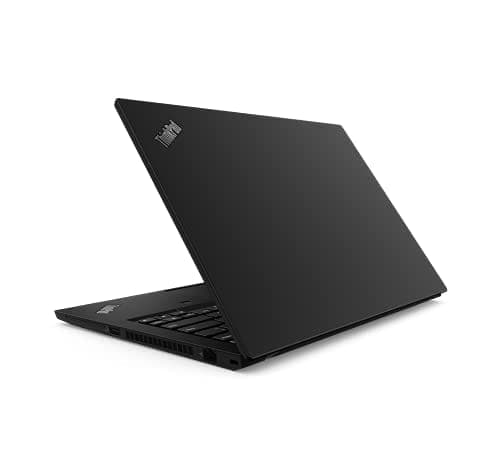
TL;DR The Lenovo ThinkPad T14 delivers balanced performance for everyday computing, professional productivity, and light creative tasks in 2026. Whether you choose the Intel Core i5 or i7 or the AMD Ryzen 5 or Ryzen 7 configuration, the T14 consistently handles office suites, web browsing, collaboration tools, and cloud workflows with ease. With adequate RAM and SSD storage, users can expect smooth multitasking and fast responsiveness. Its integrated graphics are capable for video streaming and basic content creation, while thermal efficiency ensures sustained performance in typical workloads. For students, office professionals, and light creators in India, the ThinkPad T14 strikes a strong balance of performance, battery life, and reliability without over‑engineering.
Real‑World Performance Expectations of the ThinkPad T14
The ThinkPad T14 offers performance that aligns with the needs of mainstream users in 2026. In daily tasks such as document editing, web conferencing, cloud collaboration, and spreadsheet work, the T14 feels responsive and brisk. This is largely due to its modern processors from Intel’s 11th/12th generation lineup or AMD’s Ryzen 5000 series, paired with sufficiently fast solid‑state drives (SSDs) and optimized power profiles. Students working on research papers, professionals attending online meetings, and office users managing emails and calendars will notice minimal delays during routine work.
For most Indian users who spend their day switching between multiple browser tabs, Microsoft Office or Google Workspace apps, and cloud‑based platforms, the ThinkPad T14 handles common workflows without stutters. The keyboard and trackpad responsiveness also contribute to a seamless experience. Lighter tasks such as video streaming, media playback, and casual photo editing are smooth, thanks to efficient processor cores and integrated graphics. The laptop also wakes quickly from sleep, adds to productivity, and minimizes waiting time between tasks.
However, users should set expectations according to their chosen configuration. The standard T14 with 8 GB RAM and a dual‑core processor provides excellent basic performance but may feel constrained under heavy multitasking. Upgrading to 16 GB or 32 GB RAM and selecting a higher‑tier CPU improves responsiveness in multitasking and more demanding applications. In essence, the T14 delivers performance that meets or exceeds the expectations of general users, professionals, and creators who are not running high‑end gaming or specialized AI software.
Processor Performance Breakdown: Core i5 vs Core i7 vs Ryzen 5 vs Ryzen 7
When choosing a T14 in India in 2026, the processor is one of the most crucial components affecting performance. The Intel Core i5 models typically offer 4 cores and 8 threads, providing fast performance for everyday computing and professional tasks. These CPUs strike a balance between speed and battery efficiency, making them ideal for most office work, multitasking with multiple apps, and browser‑heavy workflows that Indian users often rely on.
The Intel Core i7 options step up performance with higher clock speeds and more cache memory, which benefits tasks that require sustained performance such as large spreadsheet calculations, heavier multitasking, or more demanding data processing. However, the real difference between i5 and i7 becomes noticeable only when users consistently push the laptop with heavy loads. For students and regular office use, the i5 is often sufficient; professionals dealing with large datasets or complex Excel models may appreciate the extra headroom of the i7.
On the AMD side, the Ryzen 5 models in the T14 provide similar real‑world performance to Intel’s i5, often excelling in multi‑core workloads and energy efficiency. They handle cloud tools, browsers, and productivity software fluidly. The Ryzen 7 configurations offer a stronger multi‑core advantage, which can benefit tasks involving lightweight content creation, real‑time collaboration tools, and multitasking with many apps open concurrently. Because AMD’s integrated Radeon graphics tend to perform slightly better in graphics‑heavy workloads than Intel’s integrated solutions, users who experience multimedia creation, light video editing, or creative tool usage might notice a smoother experience on Ryzen variants.
Processor Performance Comparison (General Workloads)
All processors in the T14 lineup handle typical 2026 workloads confidently, but choosing the right one depends on the user’s daily demands and budget.
RAM and Multitasking Efficiency: 8 GB vs 16 GB vs 32 GB
Memory (RAM) plays a crucial role in how smoothly a laptop handles multiple tasks at once. The ThinkPad T14 typically ships with 8 GB, 16 GB, or 32 GB of DDR4 memory, depending on configuration. For most Indian users including students and office professionals, 8 GB RAM is sufficient for everyday productivity like editing documents, web browsing with several tabs open, video calling, and running cloud‑based platforms. In basic usage scenarios, you will experience responsive performance with minimal lag especially when paired with an SSD.
However, as workload intensity increases, the advantage of additional memory becomes clear. With 16 GB RAM, the T14 can more comfortably handle more demanding multitasking ,such as switching between dozens of browser tabs, editing large spreadsheets, and running multiple productivity apps simultaneously. This configuration also provides better longevity, as modern operating systems and web browsers increasingly use more memory. For users who often keep many applications open or work with browser‑based collaboration tools and virtual meetings concurrently, 16 GB offers a noticeably smoother experience.
For power users and future‑proofing, 32 GB RAM provides the highest multitasking headroom available on the T14. This level of memory is most beneficial for those running memory‑intensive tasks like local virtual machines, large datasets, and advanced analytical workflows. Although 32 GB may be more than most regular users need in 2026, professionals who work with complex simulations, large research datasets, or enterprise‑scale software may appreciate the additional capacity. The T14’s support for up to 32 GB makes it a reliable choice for users expecting to keep their laptop productive for several years.
RAM Capacity Comparison
Storage Performance: SSD Speeds and Impact on Productivity
Storage technology has a direct impact on how fast a laptop feels in everyday use. The ThinkPad T14 uses NVMe SSDs (PCIe‑based solid‑state drives) in most modern configurations. These drives offer much faster read and write speeds compared with older SATA SSDs or traditional hard drives. In real use, this means the laptop boots into Windows in around 10 to 15 seconds, applications open nearly instantly, and large files can be transferred and indexed without delays. This speed difference significantly improves perceived performance for Indian users who rely heavily on cloud storage, video conferencing, and media access.
The SSD performance also plays an important role in productivity tools like Microsoft Office, Adobe Acrobat, and design applications. When launching multiple apps back‑to‑back, an NVMe SSD ensures the T14 shifts between tasks without lag. This is especially helpful for professionals who need to switch quickly between spreadsheets, presentations, and browsers with dozens of tabs open. In workplaces where time equals money, the added responsiveness from an NVMe SSD results in less waiting and more doing.
Another advantage of using NVMe SSDs in the ThinkPad T14 is reliability and endurance. Without moving parts, SSDs are less prone to mechanical failure than traditional hard drives. This makes them a durable choice for long‑term productivity in mobile environments, such as fieldwork, travel, or campus use. For Indian users who carry their laptops daily, the SSD’s ruggedness combined with fast performance ensures a consistently smooth experience over many years.
Typical SSD Performance in T14 (NVMe)
Graphics Performance: Integrated GPU Capabilities in 2026
The ThinkPad T14 relies primarily on integrated graphics rather than discrete GPUs. For Intel‑based configurations, this means Intel Iris Xe Graphics (when present) or Intel UHD Graphics in lower‑tier models. AMD‑based T14 laptops use Radeon Graphics integrated into Ryzen processors. These integrated graphics solutions are not designed for gaming but are very capable for everyday visuals and media tasks.
In real world use, both Intel Iris Xe and AMD Radeon integrated graphics handle high‑definition video streaming, multiple display outputs, and casual media editing with ease. Users can watch 1080p or even 4K video content smoothly and connect to external monitors for presentations or extended desktop setups without noticeable lag. These graphics are also sufficient for light creative tasks such as photo editing in applications like Adobe Lightroom, basic video trimming in apps like Premiere Rush, and design work in Canva.
For Indian users who might occasionally work with visual content but do not require heavy graphical horsepower, integrated GPUs on the T14 offer practical performance. They enable efficient rendering of complex web content, animations in modern productivity apps, and seamless playback for conference calls with background virtualizations. While they are not built for high‑end gaming or professional 3D rendering, integrated graphics in the T14 accurately meet the needs of most everyday workflows in 2026.
Integrated Graphics Capability Summary
Application Performance: Office, Browsers, and Cloud Workloads
The ThinkPad T14 excels in daily applications used by Indian users across offices, educational institutions, and startups. With its modern Intel or AMD processors paired with SSD storage, tasks such as Microsoft Office, Google Workspace, and browser-based apps run smoothly without lag. Spreadsheet-heavy workflows in Excel, multiple Google Chrome tabs, and cloud-based collaboration tools like Microsoft Teams, Zoom, or Slack perform reliably even under extended use. Users rarely notice bottlenecks when switching between applications, provided they have at least 16 GB of RAM for heavier multitasking.
Web-based workloads are increasingly common in India, from online classes to digital banking and business software. The T14’s combination of fast RAM, efficient CPU, and integrated graphics ensures that web applications, video streaming, and lightweight browser-based editing tools respond quickly. Even when multiple video conferences or cloud applications run simultaneously, the laptop maintains a stable performance profile. This makes it ideal for students, office professionals, and freelancers who rely on cloud-based workflows.
However, while the T14 can handle everyday software efficiently, users should remember its integrated graphics limitations. High-end 3D modeling, GPU-accelerated AI workloads, or professional video rendering in Premiere Pro or DaVinci Resolve will be noticeably slower compared to laptops with discrete GPUs. For typical office, academic, and content consumption scenarios, the T14 strikes an excellent balance between speed, efficiency, and portability.
Performance in Creative Workflows: Light Video Editing and Photo Editing
For light creative tasks, the ThinkPad T14 is surprisingly capable despite lacking a dedicated graphics card. Photo editing in Adobe Lightroom, Canva, or Photoshop (light edits) is smooth with Intel Iris Xe or AMD Radeon integrated graphics. Exporting smaller projects, applying filters, or resizing images happens quickly, though batch processing large image libraries will take longer. Students, bloggers, and content creators who work on presentations, social media graphics, or marketing visuals will find the T14 adequate.
Light video editing in apps like Adobe Premiere Rush or CapCut can be handled effectively for short clips, YouTube videos, or school projects. The integrated GPUs allow real-time playback of 1080p timelines and simple transitions. However, users should avoid projects with multiple 4K clips or heavy effects, as this can lead to dropped frames or longer render times. Using SSD storage and sufficient RAM (16 GB recommended) enhances editing performance and reduces project load times.
The T14’s thermal efficiency also supports sustained creative work. Its chassis design and fan system maintain reasonable temperatures during photo and video editing, preventing the system from throttling excessively. For Indian users creating content at home or in co-working spaces, this means the T14 can handle moderate creative workloads without overheating or throttling, making it a versatile laptop for productivity and light content creation.
Thermal Performance and Sustained Speed Under Load
The ThinkPad T14 is engineered to maintain steady performance under extended workloads. Its thermal management system, consisting of dual heat pipes and intelligent fan control, ensures that the CPU and integrated GPU do not throttle excessively during normal office work or content creation. Users will notice that even during prolonged video calls, spreadsheet calculations, or moderate photo editing, the laptop remains relatively quiet and cool to the touch.
In India’s hotter climates, maintaining low temperatures is particularly important. The T14’s thermal design keeps internal components safe and stable, allowing for consistent performance throughout the day. Unlike some ultrathin laptops that reduce clock speeds aggressively under heat, the T14 provides a balanced approach, prioritizing reliability and comfort over extreme performance spikes.
It is important to note that while the T14 performs well under everyday workloads, sustained heavy tasks such as rendering long 4K videos or running virtual machines for hours may cause temperatures to rise, which can lead to minor throttling. However, this does not affect typical productivity, cloud workflows, or casual content creation. For students, professionals, and creators using standard workloads in India, the T14’s thermal efficiency ensures long-term stable performance without sudden slowdowns.
Battery vs Performance: Efficiency Profiles for Mobile Use
The ThinkPad T14 balances performance and battery efficiency, which is crucial for Indian users who often work remotely or in mobile environments. On battery power, the laptop automatically adjusts CPU performance and screen brightness to extend runtime. With typical office tasks,like document editing, video conferencing, and web browsing,the T14 achieves 7-9 hours of real-world battery life on the standard 50 Wh or 57 Wh battery, depending on configuration. Users opting for the larger 63 Wh battery can extend this to up to 10 hours, making it suitable for full-day work without charging.
Performance on battery remains stable for standard workflows. The laptop may slightly reduce CPU clock speeds during sustained heavy workloads, but this throttling is rarely noticeable in tasks such as multi-tab browsing, office applications, or light content editing. Efficiency profiles in Windows allow users to choose “Better Battery” or “Best Performance”, offering flexibility depending on whether mobility or peak responsiveness is prioritized.
For professionals and students in India who often work in cafes, libraries, or during travel, the T14 offers reliable on-the-go performance. The combination of efficient processors, integrated graphics, and SSD storage ensures that applications launch quickly even on battery power. Users can confidently work for extended periods without worrying about sudden slowdowns or battery drain affecting productivity.
Performance Compared to Competing Productivity Laptops in India
In 2026, the ThinkPad T14 competes with laptops like the Dell Latitude 5000 series, HP ProBook 450 G9, and ASUS ExpertBook B1 series in the Indian market. Across general productivity and office workflows, the T14 often matches or slightly outperforms competitors due to its optimized combination of processor efficiency, SSD speed, and stable thermal design.
For example, while the Dell Latitude 5000 may have similar Intel Core i5/i7 or AMD Ryzen configurations, the T14 offers better keyboard ergonomics and trackpad experience, which significantly enhances daily usability for students and professionals. In multitasking scenarios, T14’s memory support (up to 32 GB) provides greater future-proofing compared to some competing models limited to 16 GB RAM. Battery efficiency also remains competitive, with the T14 maintaining longer real-world battery runtimes under similar workloads.
In terms of multimedia and light content creation, the AMD Ryzen variants of the T14 slightly outperform Intel UHD configurations in integrated graphics workloads, making them more versatile for Indian users who occasionally edit photos or short videos. Overall, the ThinkPad T14 combines reliability, keyboard comfort, long battery life, and balanced performance, positioning it as a top choice for general productivity users in India without entering high-end gaming or workstation territory.
Frequently Asked Questions
Q. How is the performance of the Lenovo ThinkPad T14 in 2026?
The Lenovo ThinkPad T14 continues to deliver highly dependable performance for office productivity, browser-heavy workflows, cloud tools, video conferencing, and light creative work. For students, professionals, analysts, and remote workers in India, it remains one of the safest productivity laptops because its CPU efficiency, SSD responsiveness, and strong thermals keep day-to-day usage smooth even under long working sessions.
Q. Which processor is better for the ThinkPad T14: Intel or AMD?
The better choice depends on your workload. Intel variants are excellent for stable office workflows, enterprise software compatibility, and predictable battery behavior, while AMD Ryzen models usually provide stronger multi-core performance and slightly better integrated graphics. If your usage includes heavier multitasking, browser tabs, and occasional creative work, AMD often offers better value.
Q. How much RAM is ideal for the ThinkPad T14 in 2026?
For most buyers, 16GB RAM is the smartest sweet spot because it balances long-term smoothness with cost efficiency. It comfortably handles multiple browser tabs, Office apps, Zoom calls, Excel sheets, and cloud software simultaneously. While 8GB is still acceptable for basic tasks, 16GB is the safer future-ready choice, and 32GB makes sense only for power users working with VMs, datasets, or enterprise-level multitasking.
Q. Is SSD storage important for ThinkPad T14 performance?
Yes, SSD storage is one of the biggest reasons the T14 feels fast in real-world usage. NVMe SSDs dramatically improve boot times, file transfers, application launches, and overall responsiveness. In practical use, this means the laptop wakes quickly, loads heavy spreadsheets faster, and shifts between multiple tasks without the lag associated with older hard drives.
Q. Can the ThinkPad T14 handle video editing and creative work?
Yes, but within a clearly defined productivity-focused range. The T14 is excellent for light photo editing, Canva workflows, social media creatives, short-form video edits, and 1080p timeline work in lightweight editors. It is not designed for heavy 4K rendering, advanced color grading, or professional GPU-intensive creative pipelines, so creators with heavier workloads should look at workstation-class alternatives.
Q. Does the ThinkPad T14 overheat during long workloads?
No, one of the T14’s strongest advantages is its stable thermal behavior. During office tasks, long meetings, spreadsheet analysis, and moderate editing, the laptop remains cool and consistent. Under sustained heavy workloads like long exports or virtual machine usage, minor throttling may occur, but for mainstream productivity buyers this rarely affects the actual work experience.
Q. Does performance drop when using the ThinkPad T14 on battery?
For normal productivity tasks, the performance remains highly stable on battery power. Activities like document editing, browser research, cloud dashboards, online classes, and meetings remain smooth. Only during sustained heavy workloads such as rendering or prolonged data simulations may the system slightly reduce CPU speed to improve battery efficiency and thermal stability.
Q. Is integrated graphics enough for daily productivity use?
Absolutely. The integrated Intel Iris Xe, UHD, or AMD Radeon graphics in the T14 are more than enough for office work, 4K streaming, multiple monitor setups, presentations, browser-heavy dashboards, and light creative applications. For the average student or office professional, dedicated graphics are unnecessary.
Q. How fast is the ThinkPad T14 SSD in real-world use?
In practical terms, the NVMe SSD makes the laptop feel instantly responsive. Boot times are typically around 10–15 seconds, apps launch almost immediately, and even large file movements remain quick. This speed directly improves workflow continuity, especially for professionals who frequently switch between presentations, Excel, browsers, and communication tools.
Q. Who should choose the ThinkPad T14 for performance in 2026?
The ThinkPad T14 is ideal for students, office professionals, consultants, startup teams, analysts, researchers, and light creators who need reliable multitasking, strong battery-backed performance, and long-term dependability. It is especially well-suited for buyers who want a professional laptop that prioritizes real productivity over unnecessary gaming-focused hardware.
Ready to upgrade your tech?
Browse our collection of quality refurbished products at unbeatable prices.






