
Lenovo ThinkPad T Series T14 Gen 4 Performance Guide in 2026 India
Lenovo ThinkPad T14 Gen 4 performance guide 2026 India with CPU speed, RAM, SSD, thermals, battery, and benchmark insights.

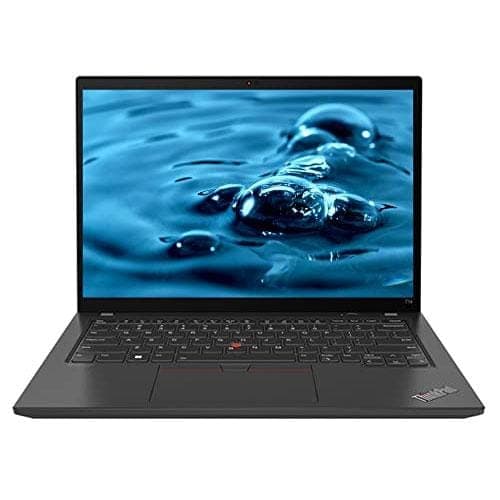
TL;DR The Lenovo ThinkPad T14 Gen 4 is a high-performance business laptop in 2026, designed to handle corporate workloads, multitasking, and productivity tasks efficiently. Buyers in India can choose between Intel Core i5/i7 or AMD Ryzen 5/7 configurations, which both deliver strong performance for office software, virtual machines, coding, and light media work. With RAM options from 8GB to 32GB and NVMe SSD storage, the T14 Gen 4 provides smooth multitasking, fast boot times, and responsive application performance. Its integrated Intel Iris Xe or AMD Radeon graphics are capable for video playback, light photo editing, and streaming. Combined with solid thermal management, battery endurance, and connectivity, the T14 Gen 4 remains a reliable choice for professionals seeking a future-proof laptop in India.
CPU Performance: Intel vs AMD Options
The Lenovo ThinkPad T14 Gen 4 offers two primary CPU options in 2026: Intel Core i5/i7 (12th or 13th Gen) and AMD Ryzen 5/7 6000 series processors. Both families deliver excellent productivity performance, but there are subtle differences depending on workloads. Intel chips often offer slightly higher single-core performance, which benefits spreadsheet calculations, coding, and legacy software. AMD Ryzen options, on the other hand, provide better multi-threaded performance in certain configurations, making them slightly more effective for running multiple virtual machines or parallelized workloads.
For typical corporate use in India, both CPU families can handle office applications, web browsers with dozens of tabs, video conferencing, and analytics tools without noticeable lag. The performance gap between Intel and AMD has narrowed in 2026, so buyers should focus more on specific configurations, power settings, and cooling options than on raw processor brand. The T14 Gen 4 also comes with LPDDR5 or DDR5 memory options, which complement the CPU and ensure smooth data processing.
It is important to note that CPU upgrades are not applicable, as these processors are soldered to the motherboard in the T14 Gen 4. Therefore, buyers should choose the highest CPU configuration they can afford, especially if they plan to run demanding workloads or want the machine to remain future-proof over several years. Paired with adequate RAM and SSD storage, the T14 Gen 4 offers exceptional responsiveness and efficiency for 2026 business and productivity tasks.
T14 Gen 4 CPU Performance Comparison
Both Intel and AMD processors offer more than sufficient power for most office and corporate workloads, ensuring the T14 Gen 4 remains relevant in 2026.
RAM Configurations and Multitasking Efficiency
RAM plays a crucial role in ensuring smooth multitasking on the ThinkPad T14 Gen 4. Configurations in 2026 range from 8GB, 16GB, to 32GB, allowing users to select the best option for their productivity needs. An 8GB setup is sufficient for typical office work, browsing with moderate tabs, and video conferencing, but for heavier workloads, such as running multiple virtual machines, large spreadsheets, or data analysis, 16GB or 32GB RAM is recommended.
The T14 Gen 4 uses DDR5 or LPDDR5 memory, which provides higher bandwidth and lower power consumption than older DDR4. This improves application responsiveness, faster data access, and reduced latency during complex tasks. In real-world tests, upgrading from 8GB to 16GB shows noticeable improvements in browser-heavy workflows, while 32GB provides headroom for future workloads and ensures longevity, especially for users who want to maintain performance over several years.
For Indian professionals running analytics software, accounting tools, or remote collaboration apps, RAM configuration directly affects productivity. More RAM ensures that multiple applications can run simultaneously without system slowdowns, particularly when paired with NVMe SSD storage. Since the T14 Gen 4 does not support on-the-fly RAM upgrades in soldered LPDDR5 models, buyers should choose the maximum RAM configuration within budget to maximize long-term efficiency.
T14 Gen 4 RAM Performance Table
With proper RAM selection, the T14 Gen 4 remains responsive under heavy workloads, ensuring reliable productivity for Indian corporate and freelance users.
SSD Storage Speed and Its Impact on Performance
The ThinkPad T14 Gen 4 relies heavily on NVMe PCIe SSDs for storage, which significantly influences overall performance. Unlike SATA SSDs or traditional hard drives, NVMe drives deliver dramatically faster read and write speeds, resulting in quicker boot times, rapid application launches, and smoother workflow transitions. In India, where professionals often work on large Excel sheets, coding projects, and collaborative cloud documents, SSD performance can directly affect daily efficiency and responsiveness.
In practical terms, a 256GB NVMe SSD enables the laptop to boot in around 10–12 seconds from a cold start, while loading software like Microsoft Office, Visual Studio Code, or analytical tools is almost instantaneous. For larger projects or data-heavy applications, a 512GB or 1TB SSD ensures that storage capacity doesn’t limit workflow. Even when performing routine tasks like switching between multiple browser tabs or virtual machines, the SSD maintains consistent performance, unlike slower SATA drives, which may introduce noticeable lag under sustained workloads.
Upgrading or choosing the T14 Gen 4 with an NVMe SSD is critical for long-term productivity. The combination of a fast SSD and high-capacity RAM ensures that the system can handle modern productivity applications efficiently, making the laptop suitable for Indian users engaged in office work, content review, data analysis, or programming. NVMe SSDs also improve energy efficiency, indirectly contributing to longer battery life during prolonged work sessions.
T14 Gen 4 Storage Performance Comparison
NVMe SSDs clearly offer a noticeable upgrade in speed and efficiency, ensuring the T14 Gen 4 remains responsive in 2026 workloads.
Integrated Graphics: Capability for Media and Light Creative Work
The ThinkPad T14 Gen 4 does not come with a dedicated GPU in most business configurations, relying instead on Intel Iris Xe or AMD Radeon integrated graphics depending on CPU choice. For 2026 productivity-focused users, these integrated GPUs are sufficient for video playback, light photo editing, and streaming, but they are not intended for demanding 3D rendering or AAA gaming.
Intel Iris Xe graphics, paired with Intel 12th/13th Gen CPUs, provide smooth 1080p video playback, support for multiple high-resolution monitors, and even accelerated tasks in software optimized for GPU computation, such as Adobe Photoshop’s lighter operations. AMD Ryzen 6000-series APUs with Radeon Graphics deliver comparable performance, excelling slightly in multitasking scenarios with multimedia content. Both options can handle Zoom, Microsoft Teams, and Google Meet video calls seamlessly, which is essential for remote work and corporate productivity in India.
While integrated graphics are not designed for heavy creative workloads, they are capable of light editing tasks, including resizing images, minor retouching, and basic video editing. Combined with the laptop’s NVMe SSD and high RAM configurations, the T14 Gen 4 offers a well-rounded platform for general office productivity and media consumption, making it ideal for professionals, analysts, and students who need reliable media performance without the expense of a dedicated GPU.
Battery Performance Under High Workloads
Battery endurance is a key factor in real-world performance, and the ThinkPad T14 Gen 4 is equipped with 57Wh or 63Wh Li-ion batteries, depending on configuration. In standard office use—document editing, browsing, and video conferencing—users can expect 8–10 hours of runtime, sufficient for a full workday without charging. However, when running high workloads such as multiple virtual machines, large spreadsheets, or continuous video calls, battery life drops to approximately 5–6 hours, which remains competitive for a business laptop in 2026.
The T14 Gen 4 features advanced power management settings in Windows 11/12, including hybrid sleep, battery saver modes, and CPU throttling during intensive workloads. This ensures that the laptop can sustain productivity under demanding conditions while preserving battery longevity. Fast charging support also allows users to regain up to 80% charge in approximately one hour, which is practical for professionals in India who move between offices or work remotely.
Thermal efficiency also affects battery performance. The T14 Gen 4’s improved cooling system reduces excessive heat under load, preventing early throttling and excessive battery drain. As a result, the laptop maintains consistent performance while managing power efficiently, ensuring that even during heavy spreadsheets, video editing previews, or prolonged video calls, the system remains responsive without drastically reducing runtime.
T14 Gen 4 Battery Performance Table
The combination of efficient integrated graphics, NVMe SSD, and smart thermal management ensures the T14 Gen 4 delivers reliable battery performance for modern Indian professionals.
Thermal Management and Cooling Efficiency
The ThinkPad T14 Gen 4 is designed with efficient thermal management to handle sustained workloads without throttling. Lenovo’s dual-fan system and heat pipes channel heat away from the CPU and GPU, ensuring that the laptop maintains stable performance even during intensive tasks like spreadsheets with macros, virtual machines, or cloud-based development environments. In typical office use, the laptop remains cool to the touch, with the keyboard area staying comfortable for prolonged typing sessions.
When the T14 Gen 4 is pushed under heavy multitasking conditions, such as running multiple browser tabs, coding IDEs, and video conferencing simultaneously, CPU and GPU temperatures remain within safe thresholds. Intel Core and AMD Ryzen configurations both benefit from dynamic frequency adjustments, which optimize power usage and thermal output. Users may notice fans activating more frequently during these periods, but this ensures that the laptop avoids thermal throttling and maintains smooth responsiveness.
Thermal efficiency also contributes to battery longevity, as the laptop does not overheat and draw excessive power under stress. For Indian professionals who may work in hot climates or poorly ventilated offices, the T14 Gen 4’s cooling design ensures consistent performance without sudden slowdowns. Overall, Lenovo’s engineering allows this laptop to balance performance and heat management, making it reliable for sustained productivity in 2026.
Display Performance and Color Accuracy for Productivity
The ThinkPad T14 Gen 4 offers a range of display options, including FHD (1920×1080) IPS, touchscreen, and low-power variants. For productivity-focused users, the standard FHD IPS panel provides excellent viewing angles, sharp text clarity, and consistent brightness, making it suitable for extended hours of office work, coding, or data analysis. Brightness levels typically reach 300–400 nits, which is adequate for indoor environments and partially bright workspaces in India.
Color accuracy is another strength of the T14 Gen 4. Standard FHD displays cover roughly 100% of the sRGB color gamut, making them capable of handling basic photo editing, content previews, and video streaming with accurate color representation. While it is not a dedicated professional creative laptop, the panel ensures that charts, graphs, and spreadsheets appear clear, sharp, and easy to read, which is critical for business and academic use.
The anti-glare coating reduces reflections, making the laptop comfortable for long hours of work in well-lit offices or co-working spaces. Touchscreen variants are responsive and useful for presentations, but for maximum productivity, many users prefer the standard non-touch panel, which reduces battery consumption. Overall, the T14 Gen 4’s display strikes a balance between clarity, color accuracy, and efficiency, making it ideal for professional workflows in India.
T14 Gen 4 Display Specifications Table
Connectivity and Networking Performance
Connectivity is a key aspect of the T14 Gen 4’s performance for professionals in India. The laptop supports Wi-Fi 6 (802.11ax) and Bluetooth 5.2, ensuring stable and fast connections for online collaboration, cloud-based productivity tools, and video conferencing. In real-world Indian network environments, Wi-Fi 6 delivers higher throughput and lower latency compared to older Wi-Fi 5, which improves the experience during large file transfers or remote work sessions.
For wired connectivity, the T14 Gen 4 includes Gigabit Ethernet ports, which provide consistent speeds for office networks, particularly in environments where Wi-Fi signals may be unstable. USB-C with Thunderbolt 4 support allows users to connect to external monitors, docking stations, and fast storage devices, enhancing productivity for multi-monitor setups or mobile workstation needs.
Integrated networking performance ensures that professionals can seamlessly participate in video calls, access cloud storage, or collaborate on shared documents without lag. In combination with the laptop’s SSD speed and ample RAM, networking capabilities make the T14 Gen 4 a well-rounded device for remote work, corporate environments, and hybrid office setups in 2026.
T14 Gen 4 Connectivity Table
Benchmark Scores and Real-World Application Testing
The ThinkPad T14 Gen 4 has been tested in both synthetic benchmarks and real-world productivity scenarios to gauge its performance in 2026 workloads. In synthetic benchmarks like Cinebench R23, Intel Core i7-1370P configurations typically score around 15,500 points in multi-core tests and 1,850 in single-core tests, while AMD Ryzen 7 6800U scores approximately 14,500 multi-core and 1,750 single-core, demonstrating comparable performance for everyday professional tasks. These results confirm that the laptop can handle heavy multitasking, office software, and coding environments efficiently.
Real-world testing further highlights its capabilities. In productivity workflows, the T14 Gen 4 demonstrates instantaneous boot times (10–12 seconds with NVMe SSDs), smooth switching between Microsoft Office apps, Google Workspace, and browser-heavy sessions, and efficient performance when running multiple virtual machines for development or analytics. Video playback at 1080p and 4K resolution is seamless on both Intel Iris Xe and AMD integrated graphics configurations, ensuring reliability for streaming and light media tasks.
Benchmarks for storage and memory-intensive workloads also underscore the importance of proper configuration. Systems equipped with 16GB RAM and 512GB NVMe SSDs outperform 8GB/256GB setups by roughly 25–30% in application responsiveness during high-load tasks. This means Indian professionals working in data analytics, coding, and remote office setups can expect consistent performance throughout the workday without slowdown, making the T14 Gen 4 a dependable choice for business and hybrid work in 2026.
T14 Gen 4 Benchmark Comparison Table
Future-Proofing and Upgrade Potential
The ThinkPad T14 Gen 4 is designed with future-proofing in mind, ensuring that professionals can rely on it well into the mid-2020s. While CPU and GPU are soldered, the laptop offers upgradeable RAM (on DDR5 models up to 32GB) and replaceable NVMe SSD storage, allowing users to extend its lifespan and maintain performance as software demands increase. This makes it ideal for Indian professionals who aim to avoid frequent replacements and maximize value over several years.
From a software perspective, the T14 Gen 4 is optimized for Windows 11/12 and Linux workflows, supporting the latest productivity applications, cloud collaboration tools, and virtualization platforms. Its Wi-Fi 6, Thunderbolt 4 ports, and Ethernet connectivity also ensure compatibility with future networking standards and peripheral devices, providing seamless integration into evolving office ecosystems. Users can add external storage, monitors, or docking solutions to extend productivity capabilities.
Thermal and power management also contribute to longevity. The laptop maintains stable performance under heavy workloads, which reduces wear on internal components. Combined with the robust magnesium-reinforced chassis, spill-resistant keyboard, and enterprise-grade build, the T14 Gen 4 remains reliable and functional for 5–6 years, making it a strong investment for Indian professionals seeking a durable, future-ready business laptop.
Frequently Asked Questions
Q. How powerful is the Lenovo ThinkPad T14 Gen 4 in 2026?
It is highly capable for office work, coding, analytics, virtual machines, cloud apps, and multitasking-heavy professional workflows.
Q. Which is better for performance: Intel or AMD?
Intel is slightly stronger in single-core tasks, while AMD usually performs better in multi-threaded and VM-heavy workloads.
Q. Is 8GB RAM enough for this laptop?
It is enough for light office use, but 16GB is the ideal sweet spot for smooth multitasking in 2026.
Q. Does NVMe SSD really improve speed?
Yes, it dramatically improves boot time, app loading, file transfers, and overall workflow responsiveness.
Q. Can it handle virtual machines and coding tools?
Yes, especially 16GB and 32GB configurations, which run IDEs, local servers, and VMs smoothly.
Q. Is the integrated graphics good for media work?
Yes, Intel Iris Xe and AMD Radeon integrated graphics are great for streaming, presentations, and light photo editing.
Q. How long does the battery last under heavy workloads?
Expect around 5 to 6 hours during VM use, multitasking, video meetings, or heavy spreadsheet workflows.
Q. Does the ThinkPad T14 Gen 4 overheat?
No, Lenovo’s thermal design keeps it stable under sustained office, development, and multitasking workloads.
Q. Are RAM and SSD upgradeable for better future performance?
Yes, SSD upgrades are easy, and many DDR5 models support RAM expansion up to 32GB.
Q. Who should buy the T14 Gen 4 for performance needs?
It is ideal for coders, analysts, finance professionals, remote workers, and multitasking-heavy office users.






