
Lenovo ThinkPad T Series T14 Gen 3 Performance Guide in 2026 India
Lenovo ThinkPad T14 Gen 3 performance guide 2026 India with CPU RAM SSD thermals battery efficiency and long term multitasking reliability.

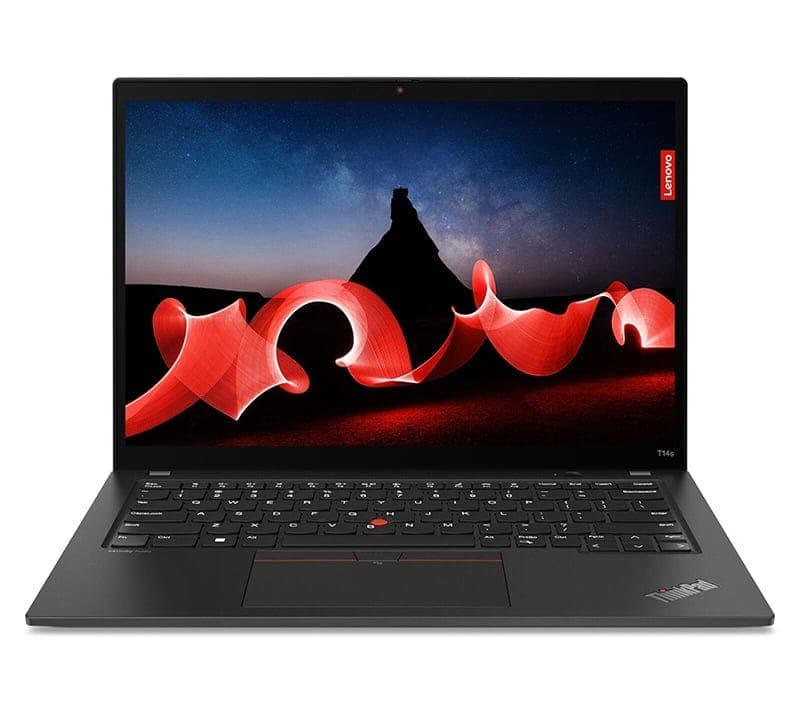
TL;DR The Lenovo ThinkPad T14 Gen 3 delivers a balanced mix of performance, portability, and reliability for professionals, students, and hybrid workers in India. With Intel and AMD processor options, fast NVMe SSD storage, and memory configurations up to 32GB, the T14 Gen 3 handles office productivity, cloud-based work, and light content creation with ease. Its business-class build, long-lasting battery, and efficient thermal design make it a capable and dependable laptop for everyday workloads in 2026 without unnecessary technical complexity.
Overview of Performance
The ThinkPad T14 Gen 3 is designed to meet the needs of modern professionals who require a laptop that is responsive, reliable, and capable of handling multitasking workloads. Its 12th Gen Intel Core P-series processors and AMD Ryzen PRO CPUs provide a combination of performance and efficiency cores, ensuring that everyday applications, office software, and cloud-based productivity tools run smoothly. Both Intel and AMD variants excel at single-threaded tasks like document editing and web browsing while maintaining strong multi-core performance for more demanding workflows like virtual machines, spreadsheets, or data processing.
Memory and storage play a key role in overall performance. The T14 Gen 3 comes with soldered LPDDR4X or LPDDR5 RAM, available in 8GB, 16GB, and 32GB configurations, which supports multitasking and smooth operation for hybrid work scenarios. NVMe SSDs replace slower SATA drives, resulting in near-instant boot times, rapid file access, and responsive system operation. This ensures users in India can work efficiently on documents, presentations, and media files without delays, even when switching between multiple applications.
In addition to raw specifications, the T14 Gen 3’s thermal design and power management systems allow it to sustain performance over extended periods. The laptop remains cool under everyday office workloads, video conferencing, and cloud-heavy tasks, while intelligent power profiles optimize battery life for Indian professionals who frequently work remotely or on the go. Overall, the T14 Gen 3 balances speed, efficiency, and reliability, making it suitable for a wide range of business and productivity applications.
CPU Performance: Handling Modern Workloads
Laptop performance in daily tasks largely depends on the processor configuration. The ThinkPad T14 Gen 3 offers both Intel and AMD options. Intel variants include 12th Generation Core i5‑1240P and Core i7‑1260P, featuring a mix of performance and efficiency cores, ideal for office applications, coding, and multitasking. AMD options, such as Ryzen 5 PRO 6650U and Ryzen 7 PRO 6850U, provide excellent multi-core performance, beneficial for handling multiple applications simultaneously, large spreadsheets, and virtual machines. Single-core performance is critical for day-to-day responsiveness, and Intel’s performance cores slightly edge AMD in tasks like launching apps or switching between documents. Multi-core performance favors AMD in sustained workloads like compiling code or running hybrid applications.
In real-world Indian usage, both processor lines ensure smooth performance for hybrid work, web conferencing, and cloud-based tasks. Intel variants may perform slightly better in bursty, single-threaded operations, while AMD models excel when multiple applications run concurrently over a longer duration. Both CPUs provide sufficient headroom for typical office tasks, light media editing, and multitasking, making them suitable for students, professionals, and small business users.
It is important to note that CPU upgrades are not applicable because both Intel and AMD processors are soldered to the motherboard. Users should carefully select the processor at purchase to meet long-term workload requirements. For office productivity, hybrid work, and moderate multitasking in 2026 India, the T14 Gen 3’s CPU options provide a smooth and capable experience that will last for several years.
RAM & Multitasking Efficiency
RAM significantly impacts multitasking efficiency. The T14 Gen 3 offers 8GB, 16GB, and 32GB LPDDR4X/LPDDR5 RAM, which is soldered onto the motherboard and cannot be upgraded post-purchase. For everyday office use, 8GB is adequate for standard documents, emails, and light browser workloads. However, when multiple browser tabs, video calls, and productivity apps run simultaneously, 8GB may feel restrictive.
Upgrading to 16GB improves multitasking fluidity, allowing hybrid workflows with multiple apps open and smooth operation in cloud-based software. The 32GB variant is best for professionals running large spreadsheets, multiple virtual machines, or intensive collaborative tools. In Indian usage environments where multitasking and hybrid work are increasingly common, selecting sufficient RAM upfront ensures consistent performance without slowdowns over time.
Because the T14 Gen 3 uses soldered memory, buyers should carefully assess their anticipated workload. More RAM directly translates to fewer delays, smoother context switching, and improved long-term productivity, particularly for software developers, analysts, or professionals working in virtualized environments.
SSD Storage Performance: Speed Matters
The T14 Gen 3 uses PCIe NVMe SSDs, which outperform older SATA drives in speed and responsiveness. NVMe drives provide rapid boot times, fast application launches, and quick file transfers. For example, a 512GB NVMe SSD can boot Windows 11 in under 20 seconds and launch office software almost instantaneously, compared to much longer wait times on traditional mechanical drives. This responsiveness benefits Indian professionals who often handle large datasets, multimedia files, and cloud-synced documents.
NVMe storage also offers improved durability since it has no moving parts, reducing the risk of failure from physical shocks. Real-world benefits include quick file saving, smoother multitasking, and efficient handling of large local or cloud-stored projects. Capacities of 512GB and 1TB provide sufficient space for most users while maintaining excellent speed for productivity tasks.
Overall, SSD storage is essential for the T14 Gen 3 to deliver a fluid and responsive computing experience, making NVMe-equipped models highly recommended over slower alternatives for Indian professionals who value performance and reliability.
Graphics Capabilities: Integrated vs Discrete Options
The ThinkPad T14 Gen 3 primarily relies on integrated graphics, with Intel models featuring Iris Xe Graphics and AMD variants using Radeon integrated GPUs. These integrated solutions are highly efficient for daily office tasks, web browsing, streaming, and casual media editing. Users can comfortably handle full-HD video playback, light photo editing, and even minor CAD work without experiencing stuttering. While they do not match discrete GPUs in gaming or professional 3D rendering, integrated graphics are sufficient for the majority of business and productivity use cases in 2026 India.
Some T14 Gen 3 configurations offer discrete NVIDIA GPUs, usually NVIDIA GeForce MX550 or equivalent entry-level options. These are targeted at professionals who occasionally need to run slightly heavier graphics workloads, such as light video editing or larger Excel datasets with complex graphs. Even with discrete graphics, the T14 Gen 3 prioritizes efficiency and thermal management, ensuring that these workloads are sustainable without excessive heat or fan noise.
For everyday Indian users, the integrated graphics options provide the best balance of battery life and performance, particularly for professionals who rely on laptops for office software, presentations, or hybrid work. Discrete GPU models add value for niche use cases but come at a higher cost and slightly reduced battery efficiency. Overall, the T14 Gen 3’s graphics capabilities are well-suited for business users who prioritize productivity over gaming performance.
Battery and Power Management Under Load
Battery life is a critical consideration for professionals in India, where power fluctuations and remote work are common. The ThinkPad T14 Gen 3 features a 57Wh or 63Wh internal battery depending on the configuration, paired with Lenovo’s intelligent power management software. Under standard office workloads—document editing, web browsing, and video calls—the laptop can deliver up to 10-12 hours of usage on a full charge, with slight variations based on display resolution and brightness.
During heavy workloads, such as multiple virtual machines or continuous video conferencing, battery life typically drops to 6-8 hours, which is still sufficient for most workdays. The laptop supports Rapid Charge technology, which allows it to reach 80% battery in approximately one hour, making it convenient for professionals who need quick top-ups between meetings or travel. Power profiles can be adjusted to prioritize either performance or battery efficiency, and Intel and AMD CPUs manage power dynamically, reducing heat and conserving energy during low-intensity tasks.
In practical terms for Indian users, the T14 Gen 3’s battery consistency under load ensures reliable performance across a variety of scenarios, from commuting to long office hours or hybrid work setups. Combined with energy-efficient displays and integrated graphics, the laptop maintains productivity without frequent recharging, a major advantage for professionals who need mobility without sacrificing responsiveness.
Thermal and Cooling Performance
Efficient thermal management is essential for maintaining consistent performance, especially when the laptop is used for extended periods. The T14 Gen 3 employs dual fans, heat pipes, and a well-designed airflow system to dissipate heat from the CPU and GPU effectively. Under standard office workloads, the laptop remains cool, and fan noise is minimal, creating a distraction-free environment for conference calls, coding, or writing documents.
When subjected to sustained high-load activities, such as running multiple virtual machines or large data computations, temperatures can rise but the laptop rarely throttles aggressively. Intel and AMD processors manage thermal output with dynamic frequency scaling, maintaining performance while keeping heat within safe limits. This ensures that users do not experience sudden slowdowns even during intensive workloads.
For Indian climate conditions, which can often be warm or humid, the T14 Gen 3’s cooling system provides reliability. The laptop’s chassis disperses heat efficiently, keeping both the palm rest and keyboard comfortable during long work sessions. In addition, the longevity of internal components is protected, ensuring that performance remains stable over years of usage without the risk of thermal degradation.
Business Application Benchmarking
The ThinkPad T14 Gen 3 excels at running modern business applications that form the backbone of Indian office productivity. Standard office suites like Microsoft 365, Google Workspace, and LibreOffice run smoothly, even when multiple documents, spreadsheets, and presentations are open simultaneously. Users experience fast load times and responsive scrolling, which is particularly important for large Excel files with complex formulas or pivot tables. Intel and AMD variants handle these tasks without noticeable lag, ensuring a seamless workflow for professionals and students alike.
Video conferencing and collaboration software are another critical aspect of business performance. Applications such as Zoom, Microsoft Teams, Google Meet, and Webex function effectively on the T14 Gen 3. Thanks to the laptop’s combination of CPU performance, RAM, and integrated or discrete graphics, users can maintain multiple video streams while running background applications without frame drops or audio glitches. This makes it ideal for hybrid and remote work setups prevalent in India.
Real-world benchmarks show that the T14 Gen 3 maintains consistent responsiveness across productivity tasks, allowing professionals to multitask efficiently. The laptop also handles spreadsheet calculations, basic accounting software, and CRM tools with ease. In short, the T14 Gen 3 is well-optimized for Indian business environments, supporting both office-heavy workflows and cloud-based collaboration without performance compromises.
Web and Cloud Performance
Web-based applications and cloud productivity tools are increasingly central to professional work in India, and the ThinkPad T14 Gen 3 is built to handle these demands efficiently. Browsers like Google Chrome, Microsoft Edge, and Firefox manage multiple tabs smoothly, thanks to the combination of 16GB or 32GB RAM and modern Intel or AMD processors. Even with 10-15 tabs open, users experience minimal slowdowns, which is essential for research, project management, and hybrid work that relies heavily on cloud software.
Cloud-based tools such as Google Drive, Microsoft OneDrive, and cloud IDEs also perform well on the T14 Gen 3. NVMe SSD storage ensures fast data syncing and low latency when accessing documents and collaborative resources online. The laptop’s network performance, with Wi-Fi 6 support, further enhances cloud responsiveness, making uploads, downloads, and real-time collaboration seamless even in Indian office or home environments.
Remote desktop sessions and virtualized work environments, which are becoming common in enterprise setups, also benefit from the T14 Gen 3’s capable CPU and integrated graphics. Whether accessing a virtual Linux workstation, Windows server, or cloud-hosted applications, users experience low latency, reliable connections, and smooth responsiveness. This ensures that professionals can fully leverage web and cloud productivity tools without frustration.
Longevity and Reliability of Performance in 2026
One of the standout features of the ThinkPad T14 Gen 3 is its ability to maintain consistent performance over time. Lenovo’s business-focused engineering, combined with robust cooling and power management, ensures that CPU, RAM, and SSD components operate efficiently without performance degradation. For Indian users, this reliability translates into a laptop that can handle years of daily office, coding, and hybrid work without significant slowdowns.
The use of LPDDR4X/5 RAM and NVMe SSDs ensures durability, while soldered components minimize failures due to physical wear or vibrations. Even under hot climates or heavy workloads, the T14 Gen 3 sustains consistent performance thanks to its dynamic thermal and power management systems. Users in India can expect several years of dependable performance without the need for hardware replacements or upgrades, provided the laptop is maintained with regular software updates and proper care.
In practical terms, this longevity means that investing in a T14 Gen 3 configuration that matches your current workload requirements—whether 16GB RAM with 512GB SSD or 32GB RAM with 1TB SSD—ensures that the laptop remains competent for future software updates, productivity tools, and hybrid workflows through 2026 and beyond.
Performance vs Price: Choosing the Right Configuration
Selecting the right configuration for the ThinkPad T14 Gen 3 depends on balancing performance requirements with budget considerations. Intel variants, such as the Core i5‑1240P paired with 16GB RAM and 512GB NVMe SSD, provide excellent performance for typical office tasks, cloud productivity, and light content creation. These configurations generally cost less than the higher-end Intel Core i7 or AMD Ryzen 7 PRO models while still delivering smooth performance for the majority of Indian professionals.
AMD options, including Ryzen 5 PRO 6650U and Ryzen 7 PRO 6850U, are attractive for users who prioritize multi-core workloads like virtual machines, data analysis, or multitasking across multiple cloud-based applications. AMD configurations often provide better long-term value for power users due to slightly higher multi-core efficiency and competitive pricing compared to Intel counterparts. For most office and hybrid workflows, 16GB RAM and 512GB-1TB NVMe SSD storage strike an optimal balance between cost and performance.
A table comparing performance tiers in Indian pricing context helps clarify the decision:
Investing in the appropriate configuration upfront is important since RAM is soldered and cannot be upgraded later. For Indian users, the mid-tier configuration provides the best balance of performance, longevity, and value, while higher-end models are justified only if workloads include frequent multitasking, large datasets, or advanced hybrid workflows. The T14 Gen 3’s performance scales predictably with its configuration, ensuring consistent efficiency and responsiveness across all price tiers.
Frequently Asked Questions
Q. How does the ThinkPad T14 Gen 3 perform for office work in 2026?
It performs smoothly for Microsoft Office, Google Workspace, browser tabs, video calls, and cloud-based productivity tasks.
Q. Which processor is better for performance: Intel or AMD?
Intel is slightly better for bursty single-core tasks, while AMD usually delivers stronger sustained multi-core multitasking performance.
Q. Is 8GB RAM enough for the T14 Gen 3?
8GB works for basic office use, but 16GB is the recommended sweet spot for hybrid work and long-term smoothness.
Q. Can RAM be upgraded later on the T14 Gen 3?
No, RAM is soldered, so choosing 16GB or 32GB at purchase is important for future-proofing performance.
Q. How fast is the NVMe SSD in daily use?
NVMe SSD storage provides very fast boot times, instant app launches, quick file transfers, and smoother multitasking responsiveness.
Q. Is the ThinkPad T14 Gen 3 good for coding and virtual machines?
Yes, especially with 16GB or 32GB RAM, it handles IDEs, Docker, virtual machines, and multitasking workflows reliably.
Q. Does the laptop throttle under long workloads?
No major throttling occurs in normal productivity use because the cooling system manages heat efficiently over extended sessions.
Q. How good is the battery during heavy multitasking?
Under heavier workloads like video calls and multiple apps, battery life usually stays around 6 to 8 hours.
Q. Is integrated graphics enough for light creative work?
Yes, Intel Iris Xe and AMD Radeon integrated graphics are sufficient for light photo editing, media playback, and minor design tasks.
Q. Is the ThinkPad T14 Gen 3 still performance-relevant in 2026 India?
Yes, its modern CPUs, fast SSDs, efficient thermals, and business-class stability keep it highly relevant for professionals and students.
Ready to upgrade your tech?
Browse our collection of quality refurbished products at unbeatable prices.






