
Lenovo ThinkPad T Series T14 Gen 2 Reliability Guide in 2026 India
Lenovo ThinkPad T14 Gen 2 reliability guide 2026 India with durability lifespan battery aging SSD safety and long term serviceability.

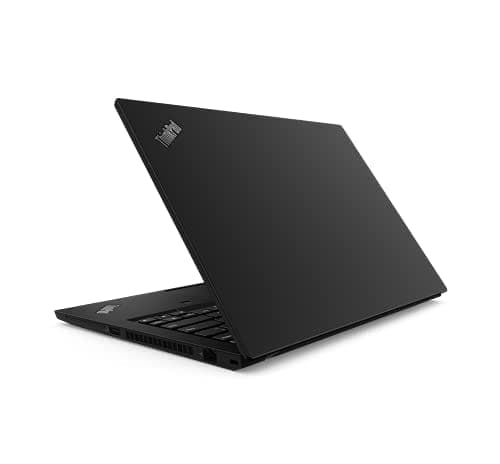
TL;DR The ThinkPad T14 Gen 2 remains a highly reliable business laptop in 2026, designed for durability, consistent performance, and long-term daily use. Built with a strong chassis, dependable keyboard, efficient cooling system, and modern SSD storage, it is capable of lasting 5 to 7 years or more with proper care. For Indian users such as students, professionals, and remote workers, the laptop offers stable performance, predictable battery behavior, and easy serviceability through widely available parts and service centers. Overall reliability is considered above average in its class, especially compared with thin consumer laptops focused more on style than longevity.
Build Quality and Structural Durability , Designed to Last Years
The ThinkPad T14 Gen 2 was engineered as part of Lenovo’s enterprise ThinkPad lineup, which prioritizes reliability and durability over flashy design. The laptop uses a combination of high-strength plastic reinforced with magnesium or aluminum, depending on the configuration. This construction helps protect internal components from daily stress such as travel, minor drops, and frequent opening and closing. The chassis is firm with minimal flex, which prevents long-term structural damage.
One of the defining reliability features is the hinge mechanism. The hinges on the T14 Gen 2 are designed to withstand tens of thousands of open-and-close cycles, which is critical for users who open their laptop multiple times each day. Over time, weaker laptops often develop loose hinges or screen wobble, but ThinkPad models are known for maintaining tight hinge tension even after several years of use. This stability contributes significantly to the laptop’s long lifespan.
The laptop also meets several MIL-STD-810H durability tests, which simulate environmental stress such as vibration, temperature changes, and humidity exposure. While this does not make the laptop indestructible, it does mean the device is built to tolerate everyday conditions found in offices, classrooms, and travel environments across India. This level of structural reliability is one reason many organizations continue to deploy ThinkPad systems for long-term use.
Chassis and Durability Overview
These design elements collectively ensure the ThinkPad T14 Gen 2 remains structurally reliable for years of continuous use.
Keyboard and Input Reliability , The Long-Term Typing Advantage
The ThinkPad T14 Gen 2 continues the long-standing reputation of ThinkPad keyboards, which are widely recognized for reliability and comfort. The keyboard uses high-quality mechanical dome switches designed for extended typing sessions, making it suitable for professionals, students, and writers who spend many hours working on their laptops. Key travel is consistent, and feedback remains stable even after years of heavy usage.
Key lifespan is another important reliability factor. Typical ThinkPad keyboards are rated for millions of keystrokes, meaning the keys maintain responsiveness and accuracy over long periods. This durability reduces the risk of stuck or worn-out keys, a common issue in lower-cost consumer laptops. The keyboard is also spill-resistant, which provides additional protection against accidental liquid exposure during everyday use.
The touchpad and TrackPoint system are also built for long-term reliability. The touchpad surface uses durable materials that resist wear and maintain smooth movement over time. The TrackPoint, positioned between the keyboard keys, allows precise navigation without relying heavily on the touchpad, reducing wear on both components. For users in India who depend on their laptop daily, this consistent input reliability supports productivity without frequent repairs.
Keyboard Reliability Characteristics
Reliable input devices are critical because they are used constantly, and the ThinkPad T14 Gen 2 delivers consistent performance in this area.
Performance Stability Over Time - Consistency Without Slowdowns
The ThinkPad T14 Gen 2 is powered by modern processors from the Intel 11th Generation Core series or AMD Ryzen 5000 series, depending on configuration. These processors are designed for efficient multitasking and long-term performance stability. Unlike older systems that slow down quickly as software becomes more demanding, the T14 Gen 2 maintains smooth performance for everyday workloads such as office applications, web browsing, programming, and video conferencing.
RAM capacity also plays a major role in long-term reliability. The laptop typically supports up to 48GB RAM on Intel models and up to 40GB on AMD models, combining onboard memory with a single upgrade slot. This flexibility allows users to increase memory as workloads grow, helping maintain system responsiveness over several years. CPU upgrades are generally not possible, because the processor is soldered to the motherboard in modern thin business laptops. However, the existing processors are powerful enough to remain usable well into the future.
Performance stability is also influenced by efficient system architecture and modern storage technology. The use of NVMe SSD storage ensures fast data access and minimal mechanical wear, reducing the likelihood of performance degradation. Combined with efficient processors and sufficient RAM, the laptop provides consistent responsiveness throughout its lifespan, which is essential for reliability-focused users.
Typical Performance Configuration
These specifications allow the ThinkPad T14 Gen 2 to maintain stable performance for many years without noticeable slowdowns.
Battery Health and Aging , What to Expect After Years of Use
The ThinkPad T14 Gen 2 uses modern lithium-ion batteries designed for reliability over several years of daily charging and usage. Most units ship with a battery capacity between 50 Wh and 57 Wh, depending on configuration. Under normal office workloads such as browsing, document editing, and video calls, users in India can expect 6 to 9 hours of battery life when new. Over time, all laptop batteries gradually lose capacity, but the decline in this model tends to be predictable rather than sudden.
Battery aging is measured in charge cycles, with most lithium-ion batteries designed to retain about 70 to 80 percent capacity after 500 charge cycles. In real-world terms, this usually translates to 3 to 4 years of regular daily use before noticeable reduction in runtime occurs. After that point, users may see shorter usage time between charges, but the laptop itself remains fully functional. This gradual aging pattern is considered normal and does not indicate hardware failure.
Another important reliability factor is replacement feasibility. The battery in the ThinkPad T14 Gen 2 is internal rather than removable, but it is still serviceable by authorized technicians. Replacement batteries are widely available in India through Lenovo service centers and third-party suppliers. This accessibility ensures that long-term reliability remains high because users can restore battery performance without replacing the entire laptop.
Battery Aging Expectations
This predictable aging behavior supports the reputation of the ThinkPad T14 Gen 2 as a dependable long-term laptop.
Thermal Management and Cooling Reliability
Thermal management plays a major role in long-term reliability because excessive heat can shorten the lifespan of electronic components. The ThinkPad T14 Gen 2 uses an efficient cooling system consisting of a heat pipe and a single low-noise fan. This system is designed to maintain safe operating temperatures during everyday workloads such as office tasks, web browsing, and video conferencing.
In practical usage, the laptop rarely becomes excessively hot during normal productivity tasks. The processors used in this model, including Intel 11th Generation Core and AMD Ryzen 5000 series, are built with energy-efficient designs that generate less heat than older processors. As a result, the cooling system does not need to run at high speed constantly, which helps extend the lifespan of the fan and internal components.
Fan durability is another reliability advantage. In business laptops like the ThinkPad T14 Gen 2, cooling fans are typically rated to operate for several years of continuous use without failure. Periodic cleaning of dust buildup, especially in environments with higher dust levels such as some regions of India, helps maintain airflow and cooling efficiency. With basic maintenance, the thermal system can remain reliable throughout the expected lifespan of the laptop.
Cooling System Reliability Indicators
Stable temperature control ensures the ThinkPad T14 Gen 2 maintains consistent performance over many years.
Storage Reliability , SSD Durability and Data Safety
The ThinkPad T14 Gen 2 uses modern NVMe solid-state drives, which are significantly more reliable than older mechanical hard drives. Unlike traditional hard drives that rely on spinning disks, SSDs store data electronically, reducing the risk of physical wear. This design makes SSD storage more resistant to shocks, vibrations, and accidental movement during travel, which is important for professionals and students who carry their laptops frequently.
SSD lifespan is typically measured using a metric called terabytes written (TBW). Most NVMe drives used in business laptops are designed to handle hundreds of terabytes of data writes over their lifetime. For average users performing everyday tasks such as document editing, browsing, and media streaming, this capacity usually translates into five to ten years of reliable operation. Failures are relatively rare when drives are used within normal operating conditions.
Another reliability advantage is upgrade flexibility. The ThinkPad T14 Gen 2 supports standard NVMe storage modules that can be replaced or upgraded if needed. This means that even after several years, users can install a larger or faster drive without replacing the entire system. Data reliability is further supported by built-in health monitoring tools that warn users about potential storage issues before failure occurs.
SSD Reliability Overview
These characteristics ensure the ThinkPad T14 Gen 2 provides dependable storage performance and data safety over long-term use.
Ports and Connectivity Longevity , Everyday Reliability of Hardware Interfaces
The ThinkPad T14 Gen 2 includes a wide range of modern ports designed for long-term daily usage. Unlike many thin consumer laptops that rely heavily on adapters, this model maintains physical connectivity options such as USB-A, USB-C, HDMI, Ethernet, and audio jack, which remain relevant in offices, colleges, and remote work setups across India. These ports are engineered to handle repeated plugging and unplugging without loosening or failing prematurely.
USB and charging ports are among the most frequently used components on any laptop, and their reliability directly affects long-term usability. The USB-C port on the ThinkPad T14 Gen 2 supports Power Delivery and DisplayPort, allowing it to handle charging and external display connections simultaneously. These connectors are reinforced internally to reduce wear from frequent cable use. In real-world conditions, port failure is uncommon unless the laptop experiences physical damage or excessive force during connection.
Wireless connectivity components are equally important for reliability. The laptop supports Wi-Fi 6 and Bluetooth 5.x standards, which provide stable connections and compatibility with modern routers and devices. Over time, wireless modules generally maintain consistent performance because they have no moving parts. This reliability ensures that the laptop remains fully functional for internet access, video calls, and file transfers throughout its lifespan.
Connectivity Reliability Overview
These connectivity features help the ThinkPad T14 Gen 2 remain reliable in professional environments for many years.
Maintenance, Repairs, and Serviceability in India
The ThinkPad T14 Gen 2 was designed with business environments in mind, which means maintenance and repairs are relatively straightforward compared with many consumer laptops. Internal components such as the SSD and RAM are accessible through the bottom panel, allowing technicians to perform upgrades or replacements without complex procedures. This service-friendly design contributes significantly to long-term reliability because issues can be resolved quickly without replacing the entire device.
Spare part availability is another major reliability factor in India. Lenovo maintains a wide network of service centers and authorized repair providers across major cities and regional areas. Common replacement components such as batteries, keyboards, cooling fans, and storage drives are widely available. This accessibility reduces downtime and ensures the laptop can continue functioning even after several years of use.
Routine maintenance also plays a role in extending lifespan. Simple steps such as cleaning the cooling vents, updating system software, and replacing worn components when necessary help maintain performance stability. For most users, professional servicing once every one to two years is sufficient to keep the laptop running reliably. These maintenance practices make the ThinkPad T14 Gen 2 a practical choice for long-term ownership.
Serviceability and Upgrade Support
This level of serviceability ensures the ThinkPad T14 Gen 2 remains usable and maintainable throughout its expected lifespan.
Realistic Lifespan , How Long the ThinkPad T14 Gen 2 Can Last
The ThinkPad T14 Gen 2 is built for professional reliability, and its realistic lifespan is longer than that of most consumer laptops. Under normal usage conditions such as office work, academic tasks, and remote work, the laptop can remain functional for 5 to 7 years, and in many cases even longer. This extended lifespan is supported by durable construction, efficient cooling, and modern hardware components that age gradually rather than failing suddenly.
Software support is another factor influencing longevity. The processors used in this model meet the requirements for modern operating systems and security updates, ensuring compatibility with current applications. Even as software becomes more demanding, the laptop can maintain acceptable performance for everyday productivity tasks. This compatibility helps protect the long-term value of the device.
Usage habits also affect lifespan. Keeping the system clean, avoiding overheating, and replacing the battery when capacity declines can significantly extend operational years. For students, professionals, and small business users in India, the ThinkPad T14 Gen 2 offers a predictable and dependable computing experience over time. This reliability makes it a strong investment for users who prioritize stability rather than frequent upgrades.
Expected Lifespan by Usage Type
This durability profile confirms that the ThinkPad T14 Gen 2 is designed for long-term reliability rather than short replacement cycles.
Frequently Asked Questions
Q. Is the ThinkPad T14 Gen 2 reliable for long-term use in India?
Yes, it is built as a business-class laptop with durable materials, stable thermals, and serviceable parts, making it highly reliable.
Q. How many years can the ThinkPad T14 Gen 2 realistically last?
With proper maintenance, most users can expect around 5 to 7 years of reliable use, and sometimes even longer.
Q. Does the hinge and chassis stay durable after years of use?
Yes, the reinforced chassis and strong hinge design are built for repeated daily opening, closing, and commuting stress.
Q. Is the keyboard reliable for heavy daily typing?
Yes, the ThinkPad keyboard is known for long keystroke life, spill resistance, and consistent tactile feedback over years.
Q. Does the ThinkPad T14 Gen 2 overheat during office work?
No, its cooling system is efficient enough to maintain safe temperatures during normal productivity and hybrid work tasks.
Q. Is the SSD storage reliable for long-term data safety?
Yes, NVMe SSDs in this laptop are highly durable, shock-resistant, and typically last 5 to 10 years with normal usage.
Q. Can RAM and SSD be replaced later?
Yes, one RAM slot and the NVMe SSD are accessible, making upgrades and replacements easy for long-term ownership.
Q. Are spare parts and repairs easy in India?
Yes, Lenovo service centers and third-party repair shops widely support batteries, keyboards, SSDs, fans, and other parts.
Q. How does battery health age over time?
Battery capacity usually remains around 70 to 80 percent after 3 to 4 years, and replacement restores near-original endurance.
Q. Is the ThinkPad T14 Gen 2 still a good reliability-focused buy in 2026?
Yes, its durability, predictable aging, and easy maintenance make it one of the safest long-term business laptop choices.
Ready to upgrade your tech?
Browse our collection of quality refurbished products at unbeatable prices.






