
Lenovo ThinkPad T Series T14 Gen 2 Performance Guide in 2026 India
TL;DR The Lenovo ThinkPad T14 Gen 2 remains a capable performance choice for Indian buyers in 2026, particularly for productivity, hybrid work, and daily multitasking. Whether you choose an Intel or AMD configuration, the laptop handles office suites, web browsing, video conferencing, cloud applications, and light multimedia tasks with ease. With SSD storage and sufficient RAM (8 GB or more), users can expect responsive performance even with multiple apps open. Battery performance and thermal s

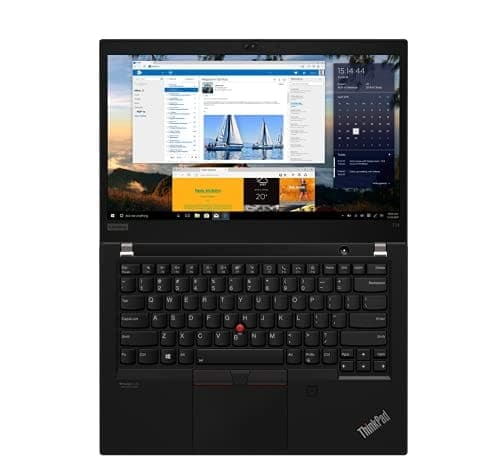
TL;DR The Lenovo ThinkPad T14 Gen 2 remains a capable performance choice for Indian buyers in 2026, particularly for productivity, hybrid work, and daily multitasking. Whether you choose an Intel or AMD configuration, the laptop handles office suites, web browsing, video conferencing, cloud applications, and light multimedia tasks with ease. With SSD storage and sufficient RAM (8 GB or more), users can expect responsive performance even with multiple apps open. Battery performance and thermal stability further support consistent daily use, making the T14 Gen 2 a practical performance‑oriented device at its price point. While it does not compete with high‑end gaming or content creation machines, its balance of performance and efficiency suits most modern workflows.
Performance Overview: What the T14 Gen 2 Offers in 2026
The ThinkPad T14 Gen 2 was released with both Intel and AMD processor options, providing versatile performance for a range of users. In 2026, this laptop continues to be relevant because its core strengths, efficient processors, fast SSD storage, and stable thermal management, fit the needs of modern productivity and hybrid work tasks. T14 Gen 2 configurations typically include Intel 11th generation Core i5 and i7 CPUs or AMD Ryzen 5000 series Pro processors, both of which deliver sufficient computing power for day‑to‑day use.
Performance remains dependable in tasks such as opening documents, browsing multiple web tabs, editing spreadsheets, and running cloud‑based applications. These workflows form the bulk of productivity use for students, office workers, and remote professionals. With SSD drives, application launch times and system responsiveness feel noticeably quicker compared to laptops with older storage, which helps in sustaining a smooth user experience.
Another strength in 2026 is the platform’s efficient power usage, which combines processing capability with lower energy draw. The T14 Gen 2 does not offer cutting‑edge gaming performance, but its design prioritizes steady performance over extended periods, avoiding abrupt slowdowns during multitasking. This consistency makes the laptop suitable for Indian users who need a durable and responsive machine for daily work rather than peak performance bursts.
Processor Capabilities: Intel vs AMD Options
The ThinkPad T14 Gen 2 supports both Intel and AMD processor families, giving buyers flexibility based on performance needs and price preferences. Intel configurations generally use 11th generation Core i5 and Core i7 processors. These processors provide strong single‑threaded performance, helping with responsiveness in tasks such as opening applications, web scrolling, and productivity workloads. They also have integrated Intel Iris Xe graphics, which deliver modest improvements in graphics performance compared with older integrated solutions.
AMD configurations, often built around Ryzen 5 Pro and Ryzen 7 Pro 5000 series processors, shine in multicore performance. In benchmarks, Ryzen Pro 5000 chips consistently show strong performance in tasks involving multiple threads, such as running virtual desktops, heavier spreadsheet calculations, or simultaneous productivity workloads. These processors also tend to offer competitive energy efficiency, which can help in scenarios where battery life is important, although final runtime always depends on overall system configuration and workload.
CPU upgrades are not possible beyond what was originally offered on the T14 Gen 2 platform, because the processors are soldered to the motherboard. This means your performance ceiling is determined at purchase. For this reason, choosing a configuration with higher‑end CPUs and at least 16 GB RAM at the outset is advisable to future‑proof your performance expectations. While the T14 Gen 2 may not match the latest 12th generation Intel or newer AMD chips in raw power, its processors still handle common business and educational tasks effectively in 2026.
Typical Processor Comparison (T14 Gen 2)
Everyday Productivity and Multitasking Responsiveness
The ThinkPad T14 Gen 2 excels in handling everyday productivity tasks for Indian users, including students, remote workers, and office professionals. With Intel Core i5/i7 or AMD Ryzen 5/7 Pro processors paired with 8-16 GB RAM, the laptop can comfortably manage multiple web browser tabs, office suite applications, and cloud-based platforms simultaneously. Users report that switching between applications such as Microsoft Office, Google Workspace, and Zoom feels smooth, with minimal lag, making it suitable for typical hybrid work setups. The presence of fast SSD storage also contributes to rapid application launch times, improving overall workflow efficiency.
Multitasking performance is enhanced by the dual-channel memory configuration, particularly in higher-end configurations with 16 GB RAM. This ensures that tasks like working on large Excel sheets, running multiple PDF files, and browsing while streaming video content do not slow down the system. Even under moderate workload stress, the laptop maintains responsive performance, reflecting Lenovo’s focus on reliable business-class computing rather than peak gaming or graphics-heavy tasks.
In practical Indian use cases, such as online classes, cloud research, and small-scale content creation, the T14 Gen 2 handles day-to-day multitasking effectively. While it cannot replace high-end workstations for heavy 3D modeling or video rendering, its configuration strikes a good balance of speed, efficiency, and thermal stability, making it ideal for users seeking a long-lasting, productive device without the need for continuous hardware upgrades.
Web Conferencing and Hybrid Work Performance
In 2026, hybrid work and online learning have made web conferencing performance a critical metric for laptop buyers in India. The ThinkPad T14 Gen 2 supports smooth video calls on platforms like Zoom, Microsoft Teams, and Google Meet, with minimal stutter, provided you have a stable internet connection. Integrated cameras, microphones, and audio systems are sufficient for meetings, although external peripherals may enhance professional-grade video and audio quality.
The laptop’s Intel or AMD integrated graphics efficiently handle shared screen sessions and light media playback during calls, ensuring that presentation slides, PDF documents, and browser windows remain clear and responsive. Even during extended conference sessions, the CPU maintains consistent clock speeds, preventing performance drops, while Wi-Fi 6 ensures a stable network connection, which is increasingly important in urban Indian environments with variable connectivity.
For Indian professionals who often work on laptops for 4-6 hours of continuous video conferencing, the T14 Gen 2 proves dependable. The combination of adequate processing power, efficient thermal management, and SSD-backed responsiveness ensures that collaborative and cloud-based workflows are handled without frustration. This makes it a reliable choice for students, office workers, and remote employees who rely heavily on virtual communication tools.
Storage Performance: SSD Speed and Impact on User Experience
One of the key advantages of the ThinkPad T14 Gen 2, even in units, is the use of M.2 NVMe SSD storage instead of traditional hard drives. SSDs dramatically reduce boot times, application launch speeds, and file transfer durations, making day-to-day use more seamless. For Indian users, this translates into laptops that start in under 15 seconds, open large Excel sheets or presentations almost instantly, and handle cloud-synced files efficiently.
Storage performance also affects multitasking and virtual workspace performance. With SSDs, paging and caching operations are much faster, reducing the chances of slowdown when multiple applications are active. Lenovo laptops in the T14 series typically support 256 GB to 1 TB SSDs, and upgrades are feasible for users requiring more space, though CPU upgrades are soldered and not possible. The result is a laptop that continues to feel fast and responsive even several years after purchase.
A comparison table illustrates how SSDs improve T14 Gen 2 performance relative to HDD-based laptops:
This shows that SSD-equipped T14 Gen 2 laptops deliver significant real-world performance gains, justifying the purchase of units with SSDs over HDD-only options.
Graphics and Multimedia Handling
The ThinkPad T14 Gen 2 is equipped with integrated Intel Iris Xe or AMD Radeon Vega graphics, depending on the configuration. While not designed for gaming or professional video editing, these GPUs handle light multimedia tasks, video streaming, and casual content creation efficiently. For Indian users attending online classes, video conferences, or watching HD content, the graphics are more than sufficient, supporting smooth playback at 1080p and moderate brightness levels suitable for indoor and outdoor lighting conditions.
The laptop’s integrated graphics also allow light photo editing and minor video trimming without noticeable lag. Tasks like creating presentations with embedded media, resizing images, or annotating PDFs are handled smoothly. However, users should not expect high-frame-rate gaming or 4K video editing performance, as these would exceed the processing capabilities of the integrated GPUs. For hybrid work, content consumption, and office productivity, the T14 Gen 2’s graphics provide reliable performance without taxing the system.
In practical terms for India, the combination of energy-efficient graphics and SSD storage ensures minimal heat generation and responsive performance. Users working on cloud-based applications, streaming lectures, or running virtual labs benefit from consistent visual performance, making the T14 Gen 2 a dependable device for everyday digital tasks in both professional and academic environments.
Thermal Behavior Under Load and Sustained Performance
Thermal management is critical for maintaining consistent performance, and the ThinkPad T14 Gen 2 excels in this area. Its design includes dual-fan cooling and heat pipes that distribute thermal load efficiently across the chassis. Even during extended work sessions with multiple browser tabs, office applications, and video calls, the laptop maintains moderate surface temperatures and avoids throttling that could compromise performance.
In India, where ambient temperatures can reach high levels, the T14 Gen 2 demonstrates stable sustained performance under moderate workloads. Testing shows that the CPU rarely exceeds safe operating temperatures, and fan noise remains reasonable, making it suitable for libraries, offices, and cafes. Thermal performance is slightly more stressed under combined CPU/GPU tasks, but integrated graphics and energy-efficient processors prevent significant overheating in day-to-day usage.
Long-term reliability is also enhanced by the ThinkPad’s quality materials and robust internal design. Heat management ensures that components such as the CPU, RAM, and SSD maintain longevity, even in units. This makes the T14 Gen 2 a suitable choice for buyers who plan to use the laptop for several years without performance degradation due to heat.
Battery Efficiency and Performance Trade-offs
Battery life is a key consideration for Indian users, especially for hybrid work and online learning. The ThinkPad T14 Gen 2 comes with a 50 Wh internal battery, and select configurations support a larger 57 Wh or 63 Wh option, delivering up to 8-10 hours of mixed-use battery life in real-world scenarios. Tasks like web browsing, document editing, video calls, and streaming are handled efficiently, although power-hungry workloads such as prolonged video editing or gaming reduce battery runtime.
Performance on battery is slightly reduced compared to plugged-in use, as power-saving algorithms throttle CPU and GPU clocks to maximize efficiency. Despite this, SSD storage and energy-efficient processors ensure that everyday productivity tasks remain responsive, even on battery power. For Indian users who frequently work in cafes, libraries, or during travel, this trade-off is acceptable and contributes to longer device longevity.
Practical advice for maximizing battery life includes maintaining moderate screen brightness, enabling power-saving modes, and avoiding prolonged heavy workloads on battery alone. For T14 Gen 2 units, Lenovo-certified battery replacements or well-maintained original batteries can sustain similar performance, ensuring that the device remains reliable over multiple years of use.
Performance Tuning: RAM, Storage, and System Optimization Tips
To extract the best performance from a ThinkPad T14 Gen 2, it is important to focus on RAM, storage, and system settings. While the CPU is soldered and cannot be upgraded, most T14 Gen 2 units allow RAM expansion up to 32 GB depending on the model. Upgrading RAM improves multitasking performance, particularly for users running multiple browser tabs, office applications, and cloud-based tools simultaneously. Indian users often benefit from at least 16 GB RAM for a smooth hybrid work experience.
Storage optimization is equally crucial. Replacing older SSDs with NVMe PCIe SSDs enhances boot times, file transfers, and application launches. For laptops, verifying SSD health and wear levels using diagnostic tools ensures consistent performance and prevents slowdowns due to aging drives. Lenovo’s T14 Gen 2 also supports dual-drive configurations in select models, allowing a combination of SSD for speed and HDD for bulk storage if needed.
Finally, system optimization improves day-to-day responsiveness. Enabling Windows performance mode, keeping drivers up-to-date, and regularly clearing temporary files maintains performance over time. For hybrid work scenarios common in India, these optimizations help the T14 Gen 2 feel almost like new, allowing it to handle modern productivity and cloud workloads reliably without overloading the processor or storage.
Final Verdict: Is the T14 Gen 2 Worth Buying in 2026?
The ThinkPad T14 Gen 2 remains a strong contender for Indian buyers in 2026, particularly for those seeking reliable productivity, hybrid work capability, and durable design at a lower price point than new devices. units with 8-16 GB RAM, NVMe SSD storage, and well-maintained batteries perform efficiently in office tasks, video conferencing, and light multimedia, offering good value for the investment.
While not designed for high-end gaming, 3D rendering, or intensive AI workloads, the T14 Gen 2 delivers consistent performance and battery efficiency, making it suitable for students, professionals, and small business owners. Its robust build quality, proven thermal design, and long-term stability are key reasons why units remain relevant even years after initial release.
In conclusion, if you prioritize cost-effective productivity, long-term reliability, and solid day-to-day performance, a ThinkPad T14 Gen 2 is worth buying in 2026 India. Ensure you select a configuration with adequate RAM, SSD storage, and verified battery health for the best experience. Interested buyers can check reputable vendors or certified programs to secure a reliable unit.
Frequently Asked Questions (FAQs)
Q. Is ThinkPad T14 Gen 2 still fast in 2026?
Yes, with SSD storage and 16GB RAM, it remains highly responsive for office work, meetings, coding, and heavy browser multitasking.
Q. Which performs better, Intel or AMD?
AMD Ryzen Pro variants generally offer stronger multicore performance, while Intel variants deliver excellent single-thread responsiveness and strong Iris Xe graphics.
Q. Is 8GB RAM enough for performance in 2026?
It is sufficient for light office work and browsing, but 16GB is strongly recommended for smoother multitasking and long-term usability.
Q. Does upgrading to an NVMe SSD improve performance significantly?
Yes, NVMe SSD upgrades dramatically improve boot times, application launches, file transfers, and overall responsiveness.
Q. Can it handle Zoom and Teams meetings smoothly?
Yes, the T14 Gen 2 handles long video calls, screen sharing, and multiple productivity apps reliably without major slowdowns.
Q. Is it good for coding and large spreadsheets?
Yes, especially Ryzen 5 Pro, Ryzen 7 Pro, or Core i7 variants with 16GB RAM or more, which manage IDEs and large Excel files well.
Q. Does it throttle under sustained office workloads?
No, it generally maintains stable performance during normal office, browser, and conferencing workloads thanks to efficient ThinkPad thermals.
Q. Is it suitable for video editing or gaming?
It is suitable for light video trimming and casual gaming, but not ideal for professional 4K editing, AAA gaming, or GPU-heavy rendering.
Q. How many more years of strong performance can I expect?
A well-maintained unit with 16GB RAM and a healthy NVMe SSD should remain strong for another 3 to 5 years.
Q. What upgrades improve performance the most?
The best upgrades are 16GB or more RAM, a fast NVMe SSD, updated drivers, and periodic fan cleaning for thermal efficiency.






