
AI Laptops in India: Best Picks Compared
The best AI laptops combine efficient processors, OLED displays, strong battery life, and AI-ready hardware for students, professionals, creators, and multitasking users seeking long-term productivity and practical everyday performance.

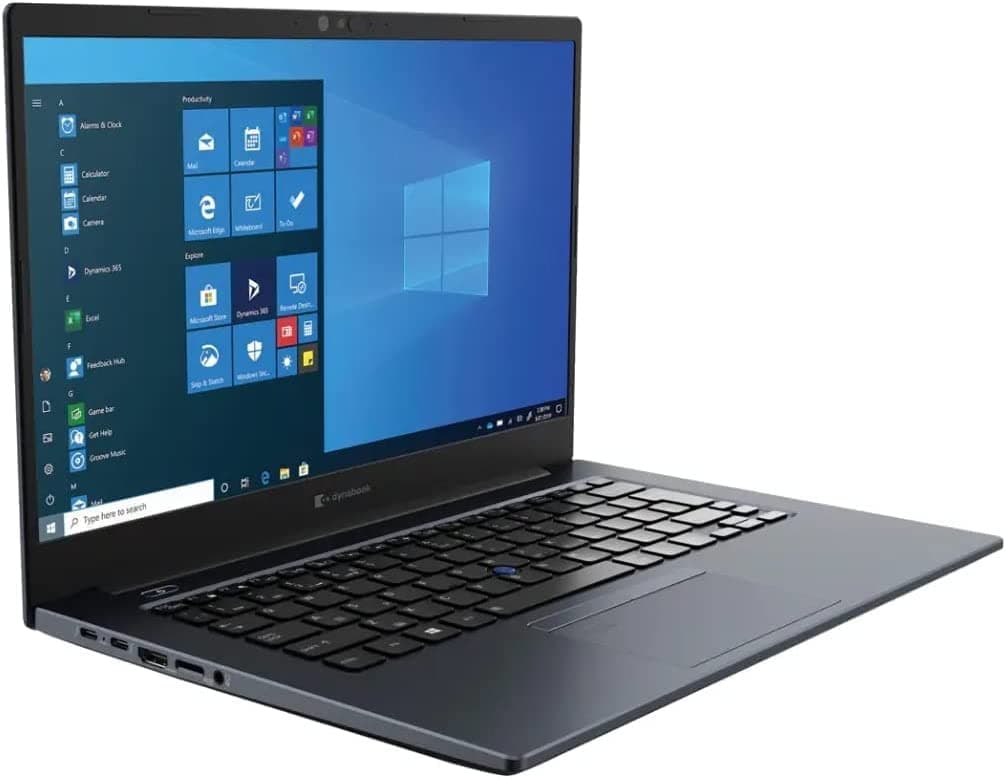
TL;DR The best AI laptops for most students and professionals in India start with the HP OmniBook X Flip 14-fm0100TU. It combines 47 TOPS of AI performance, 16 GB LPDDR5x RAM, a 1 TB SSD, and a 3K OLED touch display, making it one of the strongest Copilot+ PC options in 2026. The Lenovo ThinkPad T14s Gen 6 is the battery-life leader at 21 hours and 3 minutes, while the Dell XPS 16 (2026) is the premium multitasking choice with up to 32 GB RAM and a 2.8K OLED touchscreen.
AI laptops matter because they can process AI-assisted tasks directly on-device using dedicated NPUs (Neural Processing Units), improving battery efficiency, responsiveness, transcription, note summarization, and creative workflows in apps like Microsoft Teams, Adobe Photoshop, and Windows Copilot.
Key Factors to Consider When Choosing the Hardware
The first thing to judge is how much performance you actually need. A machine that looks powerful on paper can still feel wrong if it is too heavy, too expensive, or too focused on gaming. The best builds are the ones that match your daily apps, not the ones with the flashiest spec sheet. If you work from home, the right chip also decides whether the fan stays quiet during a long Zoom call or starts ramping up during simple multitasking. A quick test can help you see whether the laptop feels right in real use.
Processor Options for AI Laptops
The Lenovo IdeaPad Slim 3x uses a Qualcomm Snapdragon X processor, the Samsung Galaxy Book 5 Pro NP940XHA-LG1IN uses an Intel Core Ultra 5 226V, and the ASUS Vivobook S16 uses an Intel Core Ultra 5 225H. Intel Core Ultra is the safest choice for mainstream Windows use.
RAM and Storage Needs
RAM is where these components either stay smooth or start feeling cramped. The HP OmniBook X Flip 14-fm0100TU includes 16 GB LPDDR5x RAM and a 1 TB SSD, while the Dell XPS 16 (2026) goes up to 32 GB RAM with 512 GB to 1 TB SSD storage. Storage also matters more than people think. A 1 TB SSD gives you room for coursework, photos, and project files without constantly deleting old data.
Choosing the Right Display
Display quality changes how tiring the laptop feels after a few hours. The HP OmniBook X Flip 14-fm0100TU has a 3K OLED touch display, the Samsung Galaxy Book 5 Pro NP940XHA-LG1IN uses a 14.0-inch AMOLED panel at 2880 x 1800, and the Dell XPS 16 (2026) has a 16-inch 2.8K OLED touchscreen. Touch support is useful when you annotate PDFs, sign documents, or mark up slides. It is not essential for everyone, but it is worth considering if you work from home and want a cleaner way to review content without reaching for the mouse all the time.
Battery Life Expectations
The Lenovo ThinkPad T14s Gen 6 lasts 21 hours and 3 minutes, while the Acer Aspire 14 AI lasts 14 hours. That gap is worth more than a small spec bump because it changes how you plan a commute, a class day, or a day of client meetings. The ThinkPad is the best pick for people who hate carrying chargers, while the Acer Aspire 14 AI is still worth buying if your day stays mostly near a socket.
Budget vs Features
A student using Google Docs, PowerPoint, and a few browser tabs does not need the same machine as someone editing in Premiere Pro or training machine learning models.
- Choose 16 GB RAM if you keep multiple apps open.
- Choose a 1 TB SSD if you store files locally.
- Choose a touchscreen if you annotate notes or review creative work.
- Choose a stronger NPU if you use on-device AI tools often.
That setup is worth more than chasing a premium badge. A MacBook Air can be a good reference point for people who want a lighter, simpler option, but the right choice still depends on your workload.
Top AI Laptops and Their Core Strengths
The strongest way to compare the system is to line up the hardware and see where each model is genuinely better. The best choice depends on whether you work at home, on campus, or on the move. The HP OmniBook X Flip 14-fm0100TU is the most clearly AI-focused model here because it pairs 16 GB LPDDR5x RAM, a 1 TB SSD, and 47 TOPS of AI performance. That is worth noting if you want a machine that stays responsive while handling local AI features. The 14.0-inch 3K OLED touch display also makes it a strong pick for Word, OneNote, and Photoshop. The rtx-level AI headroom gives it an edge over more basic thin-and-light laptops, especially for on-device summarization or transcription in Microsoft Teams. For home use, the 1 TB SSD is especially useful because you can keep files, downloads, and media in one place without running out of room too quickly.
HP OmniBook X Flip 14-fm0100TU
The 47 TOPS figure gives it stronger AI headroom than basic thin-and-light laptops, and that matters when you use on-device summarization or transcription in Microsoft Teams. Its 16 GB LPDDR5x RAM and 1 TB SSD also make it a balanced pick for school and work.
Lenovo ThinkPad T14s Gen 6
If your workday is mostly Microsoft Outlook, Google Docs, and browser research, this is the best machine for staying unplugged. It is a low-friction choice for long work sessions, especially if you want a simple setup without extra distractions. Its 21 hours and 3 minutes of battery life make it the mobility leader in this list.
Dell XPS 16 (2026)
The 16-inch 2.8K OLED touchscreen gives you more room for timelines and side panels. That extra space is worth it for creators and analysts, because it cuts down on constant window switching. It is not the cheapest choice, but it is the best premium Windows option in this set, with enough rtx-class polish to stand out. Up to 32 GB RAM also gives it the most headroom for heavier multitasking.
MSI Prestige 13 AI Evo A1MG-051IN
Its value is in balance, not spectacle. The 16 GB LPDDR5 RAM and 1 TB SSD make it a practical compact option for buyers who want a smaller machine without giving up core storage.
ASUS Vivobook S16 and Acer Aspire 14 AI
The ASUS Vivobook S16 is priced at ₹65,990 and uses an Intel Core Ultra 5 225H processor, while the Acer Aspire 14 AI uses an Intel Core Ultra 5 226V processor and lasts 14 hours. The Acer Aspire 14 AI is worth it if you want a simple, lighter machine for study and office work. Its 14-hour battery life is good enough for a long day at home or on campus, even if it does not lead the pack. For buyers comparing Intel Arc-based options, this is the more straightforward pick for everyday use.
- MSI Prestige 13 AI Evo is the best compact all-rounder.
Display and Processor Technologies in the Hardware
The display is not just about looking good on a spec sheet. A 14.0-inch 3K OLED panel, a 16-inch 2.8K OLED touchscreen, and a 14-inch AMOLED display each change how the laptop feels in daily use. That is worth thinking about if you spend hours in documents, dashboards, or creative tools on a page. It can also matter when comparing a MacBook to other laptops, since the screen is part of the everyday experience. The AI PC category is also shaped by the processor, not just the screen. Intel, AMD, and Qualcomm all approach performance differently, and that affects battery life, thermals, and how hard the machine can push through sustained work.
OLED and AMOLED Display Technologies
OLED and AMOLED panels produce strong contrast, which makes text, charts, and dark UI themes easier to view. The Samsung Galaxy Book 5 Pro NP940XHA-LG1IN uses a 14.0-inch AMOLED display with 2880 x 1800 resolution, while the ASUS Zenbook S 14 (UX5406) uses a 14-inch, 2880 x 1800, 120Hz OLED touchscreen. The better contrast also helps at home when you work late and want less eye strain on a page.
Intel Core Ultra Processors Explained
Intel Core Ultra chips show up often because they are tuned for modern Windows workloads and AI features. The MSI Prestige 13 AI Evo A1MG-051IN uses an Intel Core Ultra 7 155H, the Acer Aspire 14 AI uses an Intel Core Ultra 5 226V, and the ASUS Zenbook S 14 (UX5406) uses an Intel Core Ultra 7 258V. That spread is worth comparing carefully.
Qualcomm Snapdragon for AI Laptops
The Lenovo ThinkPad T14s Gen 6 uses a Qualcomm Snapdragon X Elite XIE-78-100, and the Lenovo IdeaPad Slim 3x uses a Qualcomm Snapdragon X processor. That matters if you want a machine that stays cool at home, on a train, or in a library.
Processor Comparison for AI Tasks
- Intel Core Ultra is the best mainstream Windows fit.
- AMD Ryzen AI is worth it for mixed workloads.
Pricing Tiers and Value Analysis
Price is where the system stops being abstract and becomes a real purchase decision. In India, the gap between ₹61,990 and ₹1,39,990 is wide enough to separate student-friendly machines from premium productivity laptops.
Affordable AI Laptops under ₹70,000
It is worth buying if your work is mostly browsing, assignments, and light AI features at home. These models offer the clearest value for a student budget this year.
Mid-Range AI Laptops ₹70,000 to ₹1,15,000
For plain office work, it is harder to justify than the Zenbook or Vivobook options. The ASUS Zenbook 14 OLED Intel Core Ultra at ₹1,06,990 is the clearest premium-display choice in this band.
Premium AI Laptops Above ₹1,15,000
The ASUS Zenbook S14 UX5406SA at ₹1,39,990 is the most expensive model in the set. It belongs in the premium bucket for a reason.
- Best premium buy: ASUS Zenbook S14 UX5406SA at ₹1,39,990.
- For most students in India, the ASUS Vivobook 14 is the sensible starting point.
- If you want an NVIDIA-focused gaming option, the MSI Katana A17 AI sits in a different category.
Common Mistakes to Avoid When Buying the System
The biggest mistake is buying on processor branding alone and ignoring whether the machine actually fits your workload. An AI PC only feels useful when the rest of the system is balanced, including RAM, SSD, display quality, and battery life. A capable gpu also matters if your work depends on graphics-heavy apps or smoother visual performance. If a laptop does not clearly state its AI capability, you are guessing about real-world behavior. HP says systems can perform over 40 TOPS, and the HP OmniBook X Flip 14-fm0100TU delivers 47 TOPS, which gives you a concrete performance reference. A laptop with too little memory can feel slow long before the processor becomes a problem. The Dell XPS 16 (2026) goes up to 32 GB RAM and 1 TB SSD storage, while the MSI Prestige 13 AI Evo A1MG-051IN includes 16 GB LPDDR5 RAM and a 1 TB SSD. A weak display makes long study or work sessions harder than they need to be. OLED and AMOLED panels are easier to live with for reading, editing, and watching content, and battery life decides whether the laptop is useful on the move or chained to a charger.
Skipping Needs Assessment
HP says 73% of AI PC buyers report better satisfaction when they assess their needs before purchase.
- Check ai performance numbers instead of trusting brand language.
- Match RAM and SSD capacity to your files and apps.
- Treat battery life as a hard requirement if you travel or attend classes.
Verify processor compatibility with the software you use most. The smartest buying guide is simple: choose the machine that matches your workload, not the one with the loudest spec sheet. AI laptops in India are best judged by how well they match your workload, and the strongest picks here make that trade-off clear. If you want a cheaper starting point, the ASUS Vivobook 14 at ₹61,990 is the budget option, while the Dell XPS 16 (2026) is the premium choice with up to 32 GB RAM and a 2.8K OLED touchscreen.
Conclusion
The clearest value picks are the ASUS Vivobook 14 at ₹61,990, the ASUS Vivobook S16 at ₹65,990, and the HP OmniBook 5 16 at ₹69,990. If you want the most capable all-rounder, the HP OmniBook X Flip 14-fm0100TU stands out with 47 TOPS, 16 GB LPDDR5x RAM, a 1 TB SSD, and a 3K OLED touch display. For buyers who want the longest unplugged use, the Lenovo ThinkPad T14s Gen 6 leads with 21 hours and 3 minutes.
Students should start with the ASUS Vivobook 14, while office users who want a larger screen can move up to the ASUS Vivobook S16 or HP OmniBook 5 16. Creators and power users should look at the Dell XPS 16 (2026) or the ASUS Zenbook S14 UX5406SA if they want premium displays and more memory headroom. If your work is mostly browsing, documents, and meetings, the mid-range models are enough.
Choose the model that matches your battery, display, and memory needs, then compare the final shortlist by price and portability. If you are ready to buy, start with the budget, battery, and premium picks above and narrow down from there.
Frequently Asked Questions
What is an AI laptop?
An AI laptop combines a modern processor, an NPU, and software support for local AI tasks. That matters in Microsoft Teams calls, Google Docs note-taking, and Adobe cleanup tools because the machine can handle more work without leaning on the cloud for every small job. For home use, that usually means quieter operation, smoother multitasking, and fewer battery swings during a long session.
Which processor is best for AI laptops in India?
The ASUS Zenbook S 14 (UX5406) uses an Intel Core Ultra 7 258V, the HP OMEN Gaming Laptop 16-ap0183AX uses an AMD Ryzen AI 7, and the Lenovo ThinkPad T14s Gen 6 uses a Qualcomm Snapdragon X Elite XIE-78-100. Intel Core Ultra is the safest choice for mainstream Windows use, while Qualcomm is the battery-first option in this group.
Are OLED and AMOLED displays worth it?
Yes, OLED and AMOLED panels are worth it if you read, edit, or watch content for hours. The HP OmniBook X Flip 14-fm0100TU has a 35.6 cm (14) diagonal 3K OLED, UWVA touch display, and the Samsung Galaxy Book 5 Pro NP940XHA-LG1IN uses a 14.0-inch AMOLED panel with 2880 x 1800 resolution. That sharper contrast is worth the extra spend when you spend a lot of time in Word, Excel, or Photoshop.
What is the best budget AI laptop in this group?
The ASUS Vivobook 14 at ₹61,990 is the best budget pick here. It is worth considering if your work is mostly browsing, assignments, and light AI features at home. The ASUS Vivobook S16 at ₹65,990 is the next step up if you want a larger screen without moving into premium pricing.
Do AI laptops improve battery performance?
Yes, AI laptops can improve battery performance by up to 40% for AI tasks processed directly on the device. That is worth knowing because it changes how long the laptop lasts during note summarization, transcription, and local assistance in Windows apps. The Lenovo ThinkPad T14s Gen 6 shows the practical side of that idea with 21 hours and 3 minutes of battery life.
Is the Dell XPS 16 (2026) worth the premium?
The Dell XPS 16 (2026) is worth the premium if you want a large, polished Windows machine with up to 32 GB RAM and 512 GB to 1 TB SSD storage. For home office use, it is overkill unless you need the extra screen space and memory headroom. Its 16-inch 2.8K OLED touchscreen also makes it the most spacious display option in this set.






