
Lenovo ThinkPad L490 Review: Business-Class Reliability Meets Compact Design
Lenovo L490, Core i5 8th Gen, 16GB RAM, 512GB SSD. Reliable for work and heavy tasks.

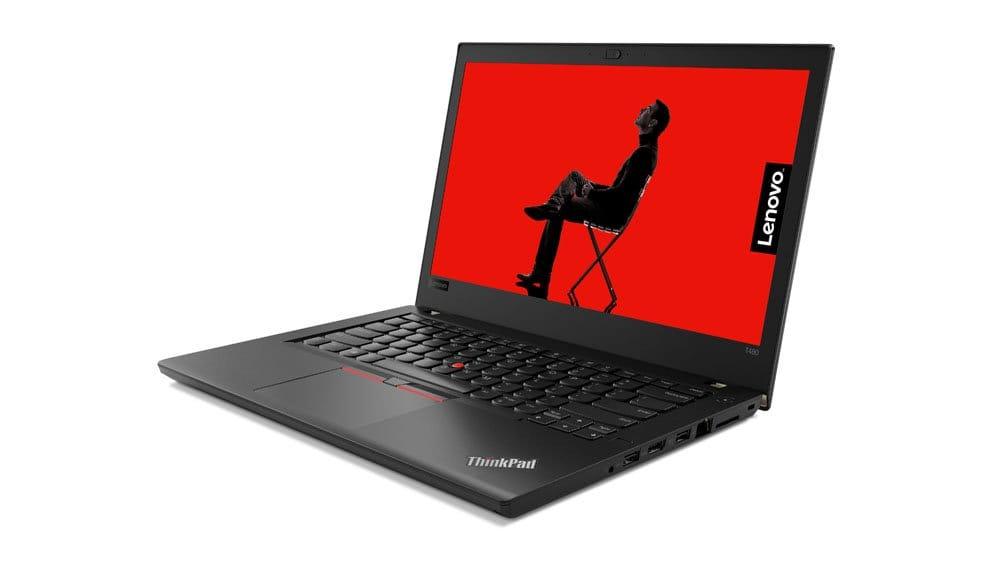
TL;DRThe Lenovo ThinkPad L490 remains one of the most dependable entry-level business laptops in the refurbished market in 2026, offering a balanced mix of durability, performance, and portability for students, office professionals, and remote workers. With its 8th Gen Intel Core i5 processor, 16 GB RAM, and fast SSD storage, the L490 handles everyday productivity tasks smoothly, including multitasking, video conferencing, document editing, and web-based workflows. Its compact 14-inch form factor, strong keyboard, and enterprise-grade security features make it especially attractive for hybrid work environments and academic use. For buyers seeking a reliable refurbished business laptop under a controlled budget, the ThinkPad L490 delivers excellent long-term value, consistent performance, and proven reliability well into 2027.
Introduction
Lenovo’s ThinkPad series has earned a reputation for being durable, reliable, and productivity-focused, consistently delivering laptops that meet the rigorous demands of business professionals. Within the lineup, the ThinkPad L-series occupies a sweet spot, combining enterprise-grade features with a budget-conscious approach. The ThinkPad L490 is one such device, designed for professionals, students, and remote workers who require a laptop that balances performance, portability, and affordability.
In 2026, the demand for dependable refurbished business laptops has increased significantly as organizations, students, and freelancers prioritize cost efficiency without compromising reliability. The ThinkPad L490 fits perfectly into this trend, offering enterprise-grade stability and proven hardware performance at a fraction of the cost of newer models.
Equipped with an 8th Gen Intel Core i5 processor, 16 GB of DDR4 RAM, and a 512 GB SSD, the L490 promises smooth multitasking, rapid file access, and long-lasting reliability. In this review, we will examine the L490’s performance, display, build quality, connectivity, and battery life, while also comparing it to Lenovo’s larger sibling, the ThinkPad T580, to help you decide which laptop best fits your workflow.
This comparison is particularly useful for buyers evaluating refurbished business laptops in 2026, where choosing the right balance between portability, performance, and upgrade potential directly impacts long-term usability and return on investment.
Specifications Overview
Design and Build Quality
Compact and Sturdy
The ThinkPad L490 carries Lenovo’s signature black, no-frills aesthetic, with reinforced plastic that feels durable without being bulky. Its sturdy chassis can handle daily commuting, occasional drops, and the rigors of professional use, making it suitable for students and office professionals alike. While it lacks the premium metal feel of higher-end ThinkPads, its reliability is consistent with Lenovo’s reputation.
For refurbished buyers in 2026, build durability remains one of the most important decision factors, and the L490 continues to stand out for its ability to withstand years of daily use in offices, classrooms, and work-from-home setups. This reliability significantly reduces maintenance costs and extends device lifespan.
Typing Comfort
One of the standout features of the L490 is its keyboard. With deep key travel, precise feedback, and a familiar layout, typing on the L490 is a joy, whether drafting emails, writing reports, or coding. The TrackPoint remains useful for users who prefer minimal hand movement, and the touchpad is accurate for gestures and navigation.
Even in 2026, ThinkPad keyboards remain a major productivity advantage, especially for professionals who spend long hours typing reports, preparing presentations, or managing spreadsheets. The comfortable typing experience directly contributes to better workflow efficiency and reduced fatigue during extended work sessions.
Portability
Weighing approximately 1.4 kg and measuring just under 1.8 cm thick, the L490 is highly portable. Its compact form factor makes it ideal for remote work, students, and business travelers, easily fitting into backpacks and briefcases.
This lightweight design is particularly valuable in hybrid work environments, where users frequently move between home, office, and campus settings. The L490’s portability ensures consistent productivity without the burden of carrying a heavier workstation-class laptop.
Display
FHD IPS Panel
The L490’s 14-inch FHD IPS display (1920×1080) delivers sharp text, clear visuals, and wide viewing angles. For office work, web browsing, and video calls, the panel performs well. Colors are adequate for general use, though not as vibrant as premium displays.
For productivity-focused users in 2026, the Full HD resolution remains the practical standard for everyday tasks such as document editing, online meetings, web research, and cloud-based applications. The display provides reliable clarity for long working hours without placing unnecessary strain on the system’s hardware resources.
Limitations
While Notebookcheck notes improved sharpness over previous models, the L490’s contrast and brightness remain average. Outdoor visibility in direct sunlight can be challenging, and the display may not be ideal for professional photo or video editing. For casual users and office professionals, however, it is sufficient.
Users working primarily indoors—such as students, corporate employees, and remote professionals—will find the display perfectly adequate for routine productivity tasks, making it a practical choice for budget-conscious buyers prioritizing reliability over premium visual performance.
Performance
CPU and Multitasking
The 8th Gen Intel Core i5 processor ensures smooth performance for productivity tasks. Users can run multiple applications, browser tabs, and office tools simultaneously without noticeable lag. Though Notebookcheck observed throttling under sustained heavy workloads, this is unlikely to impact typical office or school tasks.
In real-world 2026 usage scenarios, the processor comfortably handles modern workloads such as Microsoft Office, Google Workspace, Zoom or Teams meetings, browser-based tools, and light data analysis. For most users, the performance remains stable and responsive throughout the workday.
RAM and Storage
With 16 GB of DDR4 RAM, the L490 excels at multitasking and demanding workflows. The 512 GB SSD ensures fast boot times and quick application launches. For additional storage, a secondary drive bay allows users to expand as needed.
This configuration is particularly valuable for professionals and students managing large files, multiple browser tabs, and cloud-synced applications, ensuring smooth operation even during busy work sessions. The upgrade flexibility also extends the laptop’s usable life well beyond 2027.
Graphics
The integrated Intel UHD 620 graphics is sufficient for light photo editing, streaming, and office tasks. It is not suited for heavy gaming or professional graphics work but supports everyday multimedia requirements effectively.
For typical productivity workflows—including presentations, video playback, web design previews, and online collaboration—the graphics performance remains reliable and energy efficient, helping maintain stable battery life during extended usage.
Thermals and Noise
The L490 maintains a quiet profile, even under moderate workloads. Lenovo’s conservative cooling strategy minimizes fan noise but may introduce mild CPU throttling during continuous heavy tasks. For most professional scenarios, the laptop remains comfortable and cool to use.
In everyday 2026 work environments, this quiet operation becomes especially valuable during video meetings, online classes, and shared office spaces where excessive fan noise can be distracting. The thermal management prioritizes stability and longevity, which is a key advantage for refurbished business laptops expected to run reliably for several years.
Connectivity
Even in 2026, having multiple physical ports remains a major productivity advantage, especially for professionals using external displays, wired networks, USB drives, or presentation equipment. This versatility reduces the need for additional accessories and supports seamless workstation setups in offices, classrooms, and remote work environments.
The L490 comes with a comprehensive array of ports:
- USB-C (with DisplayPort and Power Delivery)
- 3× USB 3.1 ports
- HDMI
- RJ-45 Ethernet
- microSD card reader
- Headphone/mic combo
These ports provide flexibility for connecting external monitors, storage devices, and peripherals, ensuring users can work efficiently without adapters.
Wireless Connectivity
Built-in Wi-Fi and optional LTE support keep users connected on the go, making the L490 suitable for hybrid work environments and students needing reliable connectivity.
Reliable wireless connectivity is essential for modern workflows that depend on cloud platforms, video conferencing, and online collaboration tools. The L490’s connectivity options ensure stable performance for remote work, online learning, and business communication throughout 2026 and beyond.
Battery Life
Battery life is an essential consideration for professionals and students. The L490 offers 8–10 hours of real-world battery life, enough to power through a full workday. Lenovo’s power optimization settings allow for longer usage during light tasks, and the compact design ensures the device remains portable throughout the day.
For refurbished laptop buyers in 2026, battery efficiency directly impacts daily productivity, especially for users working in classrooms, offices, or travel scenarios where charging access may be limited. The L490 delivers dependable battery performance for routine workloads such as document editing, browsing, and virtual meetings, making it a practical choice for all-day usage.
Security Features
In 2026, data security and privacy protection are more important than ever, particularly for remote workers and organizations managing confidential information. The built-in security features of the L490 help safeguard user data while maintaining compliance with standard workplace security requirements.
The L490 is equipped with business-focused security features:
- TPM 2.0 for hardware encryption
- Fingerprint reader for secure login
- ThinkShutter webcam cover for privacy
- Optional Smart Card reader
These features make the L490 suitable for corporate environments, students handling sensitive data, and privacy-conscious users.
Lenovo ThinkPad L490 vs. ThinkPad T580
Analysis:
From a value perspective in 2026, both models deliver strong long-term usability, but the choice ultimately depends on whether portability or expanded performance capability is the higher priority. Buyers focused on mobility and everyday productivity often prefer the L490, while users handling heavier workloads or multitasking across larger screens may benefit more from the T580.
- The L490 is compact and slightly more portable, with higher base RAM and storage, making it ideal for multitasking.
- The T580 offers a larger screen, optional discrete GPU, and greater RAM expansion, appealing to users who need more screen real estate or graphics performance.
- Both laptops are excellent candidates for refurbished purchase, providing business-grade features at an affordable price.
Real-World Usage Scenarios
Students: Lightweight, long battery life, and excellent typing comfort make the L490 ideal for note-taking, assignments, and online learning.
In modern academic settings, students frequently rely on multiple browser tabs, learning platforms, and video lectures simultaneously, and the L490 handles these tasks reliably without performance interruptions.
Office Professionals: Smooth multitasking and productivity-oriented design make it suitable for spreadsheets, documents, and video conferencing.
Its dependable performance and durable build quality make it particularly useful for daily office operations, including report preparation, email communication, and collaborative meetings.
Remote Workers: Quiet operation, robust connectivity, and compact form factor enable productive work from home or coworking spaces.
The laptop’s balance of portability and performance supports flexible work routines, allowing professionals to maintain productivity whether working from home, office, or shared work environments.
Light Creative Work: Supports photo editing and basic content creation but not recommended for professional-grade tasks.
For entry-level creative users such as bloggers, students, or social media managers, the system provides sufficient capability for basic editing, presentations, and content preparation.
Why Buying Refurbished Makes Sense
Refurbished units of the L490 and T580 offer premium business laptops at significantly lower prices. With warranty coverage, tested components, and verified functionality, refurbished laptops are ideal for budget-conscious professionals, students, and small businesses. Refurbo lists these laptops at a fraction of the original price, making them accessible without sacrificing enterprise-grade features or reliability.
In 2026, refurbished laptops have become a mainstream purchasing choice as organizations and individuals prioritize cost efficiency, sustainability, and dependable performance. Choosing a professionally refurbished ThinkPad allows buyers to access business-class hardware while significantly reducing upfront investment.
Additionally, refurbished devices typically undergo quality testing, component verification, and performance checks, ensuring reliable operation and minimizing the risks often associated with second-hand electronics. This combination of affordability and reliability makes refurbished ThinkPads a smart long-term investment.
Pros and Cons
Pros
- Durable and reliable ThinkPad build
- Excellent keyboard and typing experience
- Generous RAM and SSD storage
- Wide array of ports for connectivity
- Quiet operation and long battery life
- Enterprise-grade security features
Strong long-term reliability for everyday professional and academic workloads
Cons
- CPU throttling under sustained heavy workloads
- Display brightness and color could be improved
- Plastic chassis feels basic compared to T-series
- Not suited for heavy gaming or professional graphics work
Limited performance for intensive workloads such as advanced video editing, 3D rendering, or high-end gaming
Buying a Smartphone Safely Starts With Warranty Verification
A smartphone purchase today is no longer just about checking the display, battery health, or cosmetic condition. Whether you are buying a brand-new phone, a refurbished device, or a pre-owned flagship, the real confidence comes from knowing the phone is genuine, officially supported, and still protected against unexpected hardware faults. This is exactly why warranty verification should always be treated as a non-negotiable step before payment.
The biggest advantage of checking warranty status is clarity. It instantly tells you whether the seller’s claims match reality. A phone advertised as “barely used” may reveal an activation date from over a year ago. A seller promising “company warranty” may actually be offering only a short in-store service promise. These differences matter because they directly affect resale value, repair costs, and long-term peace of mind.
For Indian buyers, this becomes even more important in the refurbished and used smartphone market, where excellent deals exist but so do grey-market imports, unofficial repairs, duplicate parts, and IMEI mismatches. A quick IMEI or serial number check on the official brand website can reveal activation history, remaining support period, and in many cases whether the device belongs to another region. This protects you from paying extra for a phone that may later become difficult or expensive to service.
Refurbished phones deserve an extra layer of caution. A smart buyer should never rely only on marketplace labels like “renewed” or “seller warranty included.” The safest approach is to confirm the remaining brand warranty first, then clearly understand what the seller warranty covers after that period ends. A trustworthy refurbished purchase should always come with invoice proof, clear replacement timelines, and a transparent claim process.
At the end of the day, the smartest smartphone buyers are not the ones who simply find the lowest price. They are the ones who verify warranty, confirm authenticity, understand repair eligibility, and calculate future ownership risk before paying. This one habit can protect your money, prevent hidden repair costs, and ensure your phone remains supported long after the purchase is complete.
Frequently Asked Questions
Q. What is the safest way to check smartphone warranty before buying?
The safest method is to use the brand’s official support page and enter the phone’s IMEI or serial number. This directly confirms activation date, remaining warranty, and service eligibility without relying on seller claims.
Q. Can a used smartphone still have official company warranty?
Yes, if the original warranty period has not expired, the remaining coverage usually continues through the IMEI or serial number, regardless of ownership change.
Q. Is seller warranty enough for refurbished phones?
Seller warranty can be useful, but official brand warranty is always more reliable because repairs happen through authorised service centres. Seller warranty should be treated as an additional safety layer, not the primary trust factor.
Q. How do I know if the IMEI has been tampered with?
Always compare the IMEI shown in Settings, the SIM tray, and the retail box. If the numbers do not match, the device may have had unofficial repairs, motherboard replacement, or possible tampering.
Q. Why is activation date important during warranty check?
The activation date helps verify how old the phone actually is. This prevents sellers from misrepresenting older devices as recently purchased units.
Q. Does warranty cover screen damage or water damage?
Standard warranty usually does not cover physical damage, cracked displays, dents, or liquid exposure unless the phone also includes accidental protection or extended warranty coverage.
Q. Are imported smartphones risky to buy in India?
They can be, especially if the brand does not provide India-region warranty support. Always verify region eligibility through the IMEI check page before buying.
Q. Can refurbished iPhones still show Apple coverage?
Yes, many refurbished iPhones still retain remaining Apple limited warranty or AppleCare eligibility depending on the original purchase date.
Q. What should I do if warranty details are missing online?
Ask the seller for the original invoice, replacement history, and service proof. If the seller cannot provide clear documentation, it is safer to avoid the purchase.
Q. Is extended warranty worth it for refurbished flagship phones?
Yes, especially for premium devices where motherboard, OLED display, or camera repairs are expensive. Extended coverage reduces long-term ownership risk significantly.
Ready to upgrade your tech?
Browse our collection of quality refurbished products at unbeatable prices.






