Lenovo ThinkCentre M720q vs M920q: Which Tiny PC Should You Buy?
Compare the Lenovo ThinkCentre M720q Tiny and M920q Tiny to find the right compact desktop for your needs. Explore performance, specifications, upgrade options, business features, and refurbished buying tips before making your decision.

TL;DR: The Lenovo ThinkCentre M720q Tiny and M920q Tiny are compact business desktops designed for offices, home workspaces, and everyday computing. Both use Intel processors from the same general generation, support DDR4 memory, and offer upgradeable storage in a remarkably small chassis. The M920q is the more premium business platform, with an Intel Q370 chipset and additional optional connectivity features, while the M720q offers a practical alternative for buyers focused on value. However, performance depends heavily on the exact processor, RAM, SSD, and condition of the unit you purchase. If the M720q costs considerably less and meets your needs, it can be the smarter buy. If you need specific business-management features or expansion options, compare the M920q's configuration before paying extra.
Understanding The Two Tiny PCs
What Is The ThinkCentre M720q Tiny?
The Lenovo ThinkCentre M720q Tiny is a small-form-factor desktop built for everyday office computing. Despite its compact size, it can handle routine tasks such as document editing, spreadsheets, web browsing, video meetings, and business applications. Lenovo offered this platform with several processor options, including selected eighth- and ninth-generation Intel Core processors, depending on the configuration.
The M720q uses the Intel B360 chipset and supports up to 32GB of DDR4-2666 memory according to Lenovo's platform specifications. Its storage options include an M.2 SSD and, in compatible configurations, a 2.5-inch SATA drive. This flexibility makes it useful for people who want a compact computer that can be upgraded instead of replaced immediately.
For a student, small business owner, or office employee, the M720q can be a sensible choice when the price is right. It is not designed as a high-end gaming machine, but it can provide dependable performance for common productivity workloads. When buying a refurbished unit, however, check the exact processor and installed storage rather than assuming every M720q offers the same performance.
What Is The ThinkCentre M920q Tiny?
The Lenovo ThinkCentre M920q Tiny belongs to the same general family of compact business desktops but uses the higher-tier Intel Q370 chipset. Lenovo offered configurations with processors ranging from selected entry-level Intel chips to Core i9 models, depending on the machine type and market. That broad range means two M920q computers can perform quite differently, even when their external appearance is almost identical.
The M920q also supports up to 32GB of DDR4-2666 memory under Lenovo's published platform specifications. It offers M.2 storage, support for a compatible 2.5-inch drive, and a selection of optional connectivity features. Certain configurations include Intel vPro capabilities, which can help organisations manage and troubleshoot supported computers remotely. These features are particularly relevant to business IT teams.
The M920q is worth considering if you need a compact workstation for regular office use, multitasking, or a managed business environment. However, the model name alone does not guarantee premium specifications. Before paying more for it, verify the processor, RAM, SSD, wireless connectivity, and any management features included in the specific unit.
Lenovo M720q Vs M920q: Specifications Compared
The biggest difference between these computers is their underlying business platform, not their size. Both belong to Lenovo's Tiny desktop range, and both have configurations that are suitable for everyday productivity. The following comparison uses Lenovo's published platform specifications rather than assuming that every refurbished listing contains identical hardware.
Feature | ThinkCentre M720q Tiny | ThinkCentre M920q Tiny |
|---|---|---|
Chipset | Intel B360 | Intel Q370 |
Processor options | Selected Intel Celeron, Pentium, Core i3, i5 and i7 options, depending on model | Selected Intel Celeron, Pentium, Core i3, i5, i7 and i9 options, depending on model |
Memory | Up to 32GB DDR4-2666 | Up to 32GB DDR4-2666 |
Memory slots | 2 SO-DIMM slots | 2 SO-DIMM slots |
Storage | M.2 SSD and compatible 2.5-inch drive | M.2 SSD and compatible 2.5-inch drive |
Graphics | Integrated graphics, depending on processor | Integrated graphics, depending on processor |
Network | Gigabit Ethernet; Wi-Fi varies by configuration | Gigabit Ethernet; Wi-Fi and vPro availability vary by configuration |
Form factor | Tiny, approximately 1 litre | Tiny, approximately 1 litre |
What Do These Differences Mean In Everyday Use?
For everyday work, the processor and memory configuration usually matter more than the chipset name. An M720q with a capable Core i5 processor and an SSD can be a better practical purchase than an M920q with a weaker processor, limited RAM, or a slow hard drive. The same principle applies when comparing two M920q units with different processors.
The M920q has an advantage in platform capabilities, particularly where supported business-management features matter. However, features such as Intel vPro depend on the processor, wireless adapter, and configuration. They should not be treated as standard inclusions on every M920q.
For most buyers, the sensible approach is to compare the actual hardware first, then consider the model's extra features and price. Both systems are older platforms, so their present-day value depends heavily on their condition, configuration, and intended workload.
Performance And Multitasking
Which PC Is Faster?
The M920q can offer higher performance in configurations equipped with processors such as the Core i7 or Core i9 options listed in Lenovo's specifications. For example, Lenovo documented an M920q configuration with an Intel Core i9-9900T, an eight-core, sixteen-thread processor. That is a much more powerful CPU configuration than an entry-level dual-core option. However, this example does not mean that every M920q is faster than every M720q.
For browsing, email, online meetings, presentations, and standard office applications, a suitably configured M720q may already deliver everything you need. An SSD and sufficient RAM can make a noticeable difference to responsiveness, especially when several applications and browser tabs are open simultaneously. If you mainly use Microsoft Office, accounting software, or a web-based business platform, spending extra on a more powerful processor may not produce a proportionate improvement.
The M920q becomes more attractive when your workload benefits from a stronger compatible CPU. Large spreadsheets, heavier multitasking, and certain development or data-processing tasks may run better on a higher-tier configuration. Neither model should be purchased for demanding modern gaming or intensive GPU-based creative work, as these Tiny systems generally rely on integrated graphics.
How Much RAM And Storage Do You Need?
For basic tasks, 8GB of RAM can work, although 16GB is a more comfortable target for modern multitasking. Buyers who regularly work with larger spreadsheets, numerous browser tabs, or several productivity applications should consider 16GB or more, subject to budget and compatibility. Both platforms have two SO-DIMM memory slots and officially support up to 32GB under Lenovo's published specifications.
An SSD is equally important. A computer with an SSD generally starts up and loads applications faster than an otherwise comparable system with a mechanical hard drive. Both models support M.2 SSD storage, and compatible configurations can also accommodate a 2.5-inch SATA drive. Check whether the seller has included the necessary drive bracket, cable, and other hardware if you plan to install an additional drive.
If you are buying used, prioritise a healthy SSD, sufficient RAM, and a processor suited to your workload. These are tangible benefits you will notice in daily use, unlike a model-number upgrade that may not translate into a meaningful improvement for your particular tasks.
Design, Ports And Upgradeability
Compact Design For Small Workspaces
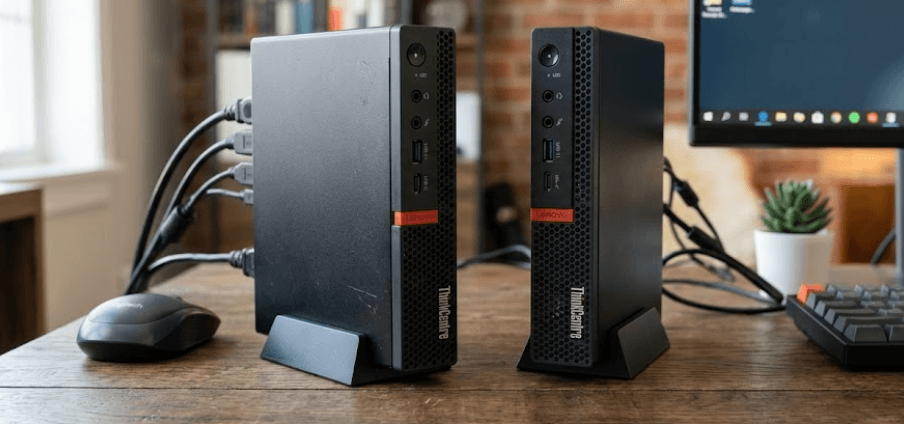
Both computers use Lenovo's Tiny form factor, making them suitable for desks where a full-sized tower would take up too much space. Their compact chassis can also be useful in reception areas, classrooms, retail counters, and office environments where several computers need to fit into a limited area. Lenovo's published specifications list dimensions of approximately 179 × 183 × 34.5–37mm for these Tiny systems, depending on the configuration and feet.
Their small size does not mean they are completely sealed or impossible to upgrade. Compatible configurations provide access to the memory and storage components, allowing users to increase RAM or replace an SSD when needed. This is an advantage for buyers who want to extend the useful life of an affordable refurbished desktop.
Both platforms can also be used with compatible VESA mounting accessories. Depending on the accessory and monitor, this can help keep the desk clear. Before purchasing a mounting kit, confirm that it is included or compatible with the particular system, because accessories are not guaranteed to come with every used unit.
Ports And Connectivity
The M720q platform provides front USB connectivity, a USB-C port, and audio connections, alongside rear USB ports, HDMI, DisplayPort, and Ethernet. The M920q also offers a range of USB and display connections, with optional ports available on certain configurations. The precise selection can vary, so buyers should inspect the photographs and specification sheet for the actual machine.
For a typical office desk, HDMI or DisplayPort support can be enough to connect a monitor, while USB ports accommodate a keyboard, mouse, webcam, and external storage. If you use two monitors, check the available display outputs and supported display configuration before buying. Some models can support up to three independent displays when the required outputs are present.
Wireless connectivity deserves the same attention. Wi-Fi and Bluetooth availability can differ between units, and some machines may be supplied without a wireless adapter. If you depend on wireless internet or Bluetooth peripherals, confirm that these features work rather than assuming they are included because the model is a business desktop.
Price, Value And Refurbished Buying Advice
Which Offers Better Value For Money?
Because both models are older business desktops, refurbished pricing can make a substantial difference to the buying decision. The M720q may be the better value when it offers sufficient processing power at a lower price. The M920q may justify a premium if it includes a noticeably stronger processor, better connectivity for your needs, or verified business-management capabilities.
There is no single price difference that automatically makes one model the better deal. Prices vary by seller, location, processor, memory, storage, warranty, and cosmetic condition. Rather than relying on a generic online price, compare listings with similar specifications and check what the quoted price actually includes.
Also consider the total cost of ownership. A computer sold without an SSD, Wi-Fi adapter, power adapter, or mounting accessories may require additional spending. A slightly more expensive unit with a tested SSD, adequate RAM, a compatible power adapter, and a reliable warranty can be the more economical purchase over time.
What To Check Before Buying A Refurbished Unit
Start by confirming the complete processor name, installed RAM, SSD capacity, and operating system. Ask the seller for the machine type or model number and compare it with Lenovo's official specifications. This is particularly important because both product families have multiple configurations and regional variants.
Next, inspect the physical condition and ask whether the machine has been tested for overheating, unexpected shutdowns, and storage errors. Check the USB ports, display outputs, Ethernet connection, and wireless connectivity where applicable. If you plan to use the PC for long working hours, reliable cooling and stable performance matter more than a few cosmetic marks.
Finally, check the warranty, return policy, and Windows licensing status. Both product families are from an older generation, and Lenovo's published listings mark representative configurations as withdrawn. Confirm operating-system support and security-update requirements before committing to either device. A low price is not a good deal if the system cannot safely or reliably support your intended use.
Which Tiny PC Should You Choose?
Choose The M720q If You Want Practical Value
The M720q is a sensible choice for students, home-office users, and small businesses that need a compact computer for everyday productivity. A well-configured unit with a suitable Intel Core processor, 16GB of RAM, and an SSD can handle routine office tasks without requiring a premium business-PC budget.
It is also worth considering if you are building a low-cost workstation for browsing, online classes, presentations, invoicing, or administrative work. Since both platforms have broadly similar memory and storage upgrade options, you do not necessarily need the more premium model to get a useful, upgradeable desktop.
The key is to buy based on actual specifications rather than choosing the M720q simply because it is cheaper. If the unit has insufficient RAM, an unsuitable processor, or an unreliable storage drive, its initial savings may disappear after upgrades and repairs.
Choose The M920q If You Need More Capability
The M920q is the stronger candidate if you find a configuration with a higher-performance processor and need that extra processing capacity. It is also worth considering for organisations that benefit from supported remote-management features, provided the exact machine includes the required hardware and configuration.
Its Q370 chipset and wider range of documented processor options give it an advantage for buyers seeking particular business-platform capabilities. However, these advantages are most relevant when they match a genuine requirement, not simply because M920q is the higher model number.
Before paying more, compare the two specific machines side by side. If the M920q has a substantially better processor and the same or better RAM, SSD, condition, and warranty, the premium may be justified. If the specifications are nearly identical and the M720q is considerably cheaper, the less expensive model may be the more sensible purchase.
Frequently Asked Questions
Q. Is the Lenovo ThinkCentre M920q better than the M720q?
The M920q has a higher-tier Q370 chipset and offers additional processor and business-management options on selected configurations. However, the better purchase depends on the exact processor, RAM, storage, condition, and price.
Q. Which is faster, the M720q or M920q?
An M920q with a higher-performance processor can be faster, but the model name alone does not guarantee better performance. Compare the exact CPU specifications before buying.
Q. Can the Lenovo M720q and M920q run Windows 11?
Neither model should be assumed to support Windows 11 solely because it has an Intel Core processor. Compatibility depends on the exact processor and other requirements, including TPM 2.0 and Secure Boot. Check Microsoft's supported processor list and the specific PC's compatibility before installing Windows 11.
Q. How much RAM can these Tiny PCs support?
Lenovo's published platform specifications list support for up to 32GB of DDR4-2666 memory on both platforms, using two SO-DIMM slots. Check the specific machine and its configuration before upgrading.
Q. Can I upgrade the SSD in these computers?
Yes, both platforms support compatible M.2 SSDs. Configurations that support a 2.5-inch drive can also accommodate a compatible SATA HDD or SSD. Check the existing hardware and required mounting accessories first.
Q. Are the M720q and M920q suitable for gaming?
They are primarily business desktops with integrated graphics in typical configurations. They can handle light games that match their hardware capabilities, but they are not ideal for demanding modern games or graphics-intensive workloads.
Q. Can these computers support dual monitors?
Yes, compatible configurations can support multiple displays. Check the actual HDMI, DisplayPort, and optional video connections, as the available outputs determine which monitors you can connect.
Q. Do the M720q and M920q include Wi-Fi and Bluetooth?
Not necessarily. Wireless connectivity varies by configuration, and some units may not include a wireless adapter. Verify Wi-Fi and Bluetooth availability with the seller.
Q. Is a refurbished ThinkCentre Tiny PC worth buying?
It can be a good value for everyday computing if the hardware is healthy, the price is competitive, and the seller offers a reasonable return policy or warranty. Check the SSD, cooling, ports, operating-system compatibility, and included accessories.
Q. Which Lenovo Tiny PC should I buy for office work?
For routine office tasks, choose the model with the best balance of processor performance, 16GB of RAM if affordable, an SSD, reliable condition, and warranty. The M720q is often worth considering for value, while a suitably configured M920q may be preferable when you need additional performance or business-management features.
Final Recommendation And Decision Framework
The Lenovo ThinkCentre M720q Tiny and M920q Tiny remain practical options for buyers looking for compact, upgradeable business desktops. Neither is a universal winner, and the right choice depends on what you expect the computer to do every day.
For students, home-office users, and small businesses, the M720q is a strong value-oriented option when it comes with a capable processor, sufficient RAM, and a healthy SSD. For buyers who need stronger processing performance or specific business-management features, the M920q deserves closer consideration, particularly when its price premium is reasonable.
Before making your final decision, compare the actual configurations, check Windows compatibility, verify the condition of the refurbished unit, and review the seller's warranty. Our recommendation is to choose the best-configured, best-maintained PC within your budget rather than paying extra for the model name alone.
Ready to upgrade your tech?
Browse our collection of quality refurbished products at unbeatable prices.