
Lenovo Tab K11 with Keyboard Review: Budget Productivity Tablet for Students and Everyday Work
The Tab K11 adds stylus and keyboard, unlike the M11. Specs are same; you mostly pay extra for the keyboard, which budget users may skip.

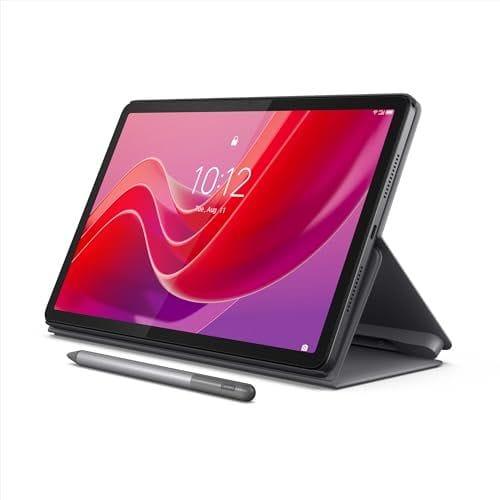
TL;DR The Lenovo Tab K11 with Keyboard is a budget-friendly productivity tablet that combines an 11-inch FHD+ display, keyboard support, and stylus compatibility for students and light work users. It handles everyday tasks like browsing, note-taking, and streaming efficiently, but is not designed for heavy multitasking or gaming workloads.
Why the Lenovo Tab K11 with Keyboard Matters in the Budget Tablet Market
The tablet market has increasingly shifted toward productivity-focused devices rather than purely entertainment screens. Users now expect tablets to handle tasks such as note-taking, typing, attending online classes, and light office work without needing a full laptop. This change in usage behaviour has created demand for affordable tablets that can act as lightweight work devices.
The Lenovo Tab K11 with Keyboard fits directly into this trend by offering a bundled or optional keyboard experience at an accessible price point. This makes it appealing for students and entry-level users who want a hybrid device without investing in premium tablets. It reflects the growing need for budget productivity solutions.
Another important factor is software experience, as buyers now value clean interfaces and long-term usability. The Tab K11 benefits from near-stock Android, which improves stability and reduces unnecessary bloatware. This ensures smoother performance over time.
Lenovo Tab K11 Specifications and What They Mean in Real Usage
The Lenovo Tab K11 is designed to deliver balanced performance for everyday tasks rather than focusing on high-end specifications. Its configuration reflects a focus on usability, battery life, and affordability.
| Specification | Details |
|---|---|
| Processor | MediaTek Helio G88 |
| Memory | 8GB RAM |
| Storage | 128GB |
| Stylus | Supported, sold separately |
| Display | 11-inch FHD+ |
| Battery | 7040 mAh |
| Price | ~₹20,000 INR |
The MediaTek Helio G88 processor is capable of handling basic workloads such as browsing, streaming, and document editing without major issues. It ensures smooth performance for routine tasks but is not built for heavy processing or gaming. This makes it suitable for light productivity.
The 8GB RAM helps maintain smooth app switching under moderate usage conditions, while the 128GB storage provides sufficient space for apps, files, and media. These specifications create a balanced setup for everyday users. It ensures stability within its category.
Display and Media Experience for Daily Use
The 11-inch FHD+ display is well-suited for both productivity and entertainment tasks, offering a comfortable viewing size for reading, typing, and watching content. The resolution ensures clear text and decent visual quality, which improves usability during long sessions. This makes it suitable for students and casual users.
In real-world usage, the display performs well for streaming, online classes, and reading documents. The screen size provides enough workspace for multitasking without feeling cramped. This enhances productivity for basic tasks.
The inclusion of Dolby Atmos-tuned speakers improves the media experience by delivering clearer sound and better immersion. While it does not replace high-end audio systems, it is more than adequate for everyday usage. This adds to its overall value.
Performance and Multitasking Capabilities
The Lenovo Tab K11 is designed for light to moderate workloads, including browsing, note-taking, video calls, and document editing. It performs reliably in these scenarios without major slowdowns. This ensures a smooth experience for typical users.
However, the tablet is not built for heavy multitasking or demanding applications, as the processor has limitations under sustained load. Users may experience lag when running multiple heavy apps simultaneously. This makes it important to align expectations.
For students and casual users, the performance is sufficient because their workloads are generally lighter and less resource-intensive. The tablet delivers consistent results within its intended use case. This makes it practical for everyday usage.
Keyboard and Productivity Experience
The keyboard support is one of the most important features of the Lenovo Tab K11, as it transforms the device into a basic productivity tool. This allows users to type documents, attend meetings, and work on assignments more efficiently. It bridges the gap between tablets and laptops.
Depending on the variant, the keyboard may be included or sold separately, which is an important consideration for buyers. When paired with the keyboard, the tablet becomes significantly more useful for work-related tasks. This enhances its functionality.
While it cannot fully replace a laptop for advanced workflows, it performs well for basic productivity tasks such as writing, browsing, and communication. This makes it suitable for students and entry-level users. It improves versatility.
Battery Life and Everyday Efficiency
The 7040 mAh battery is designed to support a full day of moderate usage, including browsing, streaming, and note-taking. This ensures that users can rely on the tablet without frequent charging interruptions. It improves convenience.
In real-world usage, battery performance depends on the type of tasks being performed, with lighter workloads delivering longer usage times. This makes it suitable for daily routines such as classes or casual work. It supports flexibility.
Charging speeds are moderate, which means users may need to plan charging sessions accordingly. However, the overall battery performance remains reliable for its category. This ensures practicality.
Software Experience and Long-Term Usability
The Lenovo Tab K11 runs on a near-stock Android experience, which improves performance stability and reduces unnecessary bloatware. This creates a smoother user experience compared to heavily customised interfaces. It enhances usability.
Software updates play an important role in maintaining device relevance, and a clean software experience ensures better compatibility with apps over time. This helps maintain performance consistency. It supports long-term usability.
The reduced background processes also contribute to better efficiency, ensuring that the tablet remains responsive even after extended use. This improves overall user experience. It makes it more dependable.
Limitations and Realistic Expectations
Despite its strengths, the Lenovo Tab K11 has limitations that buyers should consider before making a purchase. The processor is not designed for heavy workloads, which restricts its use for demanding applications. This limits performance.
The keyboard, while useful, does not fully replicate the experience of a laptop, especially for advanced productivity tasks. Users may find certain workflows less efficient compared to traditional laptops. This affects versatility.
The stylus is sold separately, which adds to the total cost if note-taking is a priority. Buyers should factor this into their decision. This ensures informed purchasing.
Who Should Buy the Lenovo Tab K11 with Keyboard
The Lenovo Tab K11 is best suited for students who need a device for online classes, note-taking, and light productivity tasks. It provides a balanced experience that supports both learning and entertainment. This makes it a strong academic tool.
It is also suitable for casual users who want a tablet for browsing, streaming, and occasional work. The combination of display, battery, and keyboard support makes it versatile for everyday usage. This improves value.
Users who require high performance for gaming, editing, or heavy multitasking should consider more powerful devices. The Tab K11 is designed for specific use cases. It works best within its category.
Why the Lenovo Tab K11 with Keyboard Is a Practical Budget Productivity Tablet and What Buyers Should Consider Before Buying
The most important takeaway is simple, the Lenovo Tab K11 with Keyboard succeeds because it delivers a balanced combination of affordability, usability, and productivity-focused features. It provides enough performance for everyday tasks while offering additional functionality through keyboard and stylus support. This makes it a practical option for budget-conscious users.
Its value lies in enabling basic productivity without requiring the cost of a full laptop, which is particularly important for students and entry-level users. The combination of display quality, battery life, and clean software ensures a stable experience for daily use. This enhances its appeal.
At the same time, buyers should clearly understand its limitations, especially in terms of performance and multitasking capability. It is not designed to replace a laptop for advanced workflows or demanding applications. For users with realistic expectations, the Lenovo Tab K11 remains a smart and dependable choice.
Frequently Asked Questions
Q. Does the Lenovo Tab K11 come with a keyboard included?
It depends on the variant, as some bundles include the keyboard while others require it to be purchased separately. Buyers should verify the package details before making a purchase. The keyboard significantly enhances productivity.
Q. Is the Lenovo Tab K11 suitable for online classes and studying?
Yes, it works well for online classes, video calls, reading PDFs, and note-taking. The display and battery support long study sessions without major issues. This makes it ideal for students.
Q. Does the tablet support a stylus for writing and drawing?
Yes, it supports stylus input, but the stylus is usually sold separately. This allows users to use it for note-taking and creative tasks. Buyers should consider the additional cost.
Q. How well does it handle multitasking?
The tablet can handle light multitasking such as switching between apps and browsing. However, heavy multitasking may cause slowdowns due to processor limitations. This makes it suitable for moderate usage.
Q. Can the Lenovo Tab K11 replace a laptop completely?
It can replace a laptop for basic tasks such as typing, browsing, and attending meetings. However, it is not suitable for advanced workflows or heavy applications. This limits its replacement capability.
Q. Is the Lenovo Tab K11 worth buying?
Yes, it is a good option for users with basic to moderate requirements who want an affordable productivity tablet. It offers a balanced experience within its price segment. This makes it a practical choice.
Ready to upgrade your tech?
Browse our collection of quality refurbished products at unbeatable prices.






