
Lenovo Lenovo ThinkPad T Series T460 Performance Guide in 2026 India
ThinkPad T460 performance in 2026 explained with Skylake CPU RAM upgrades SSD impact multitasking ability and long term usability

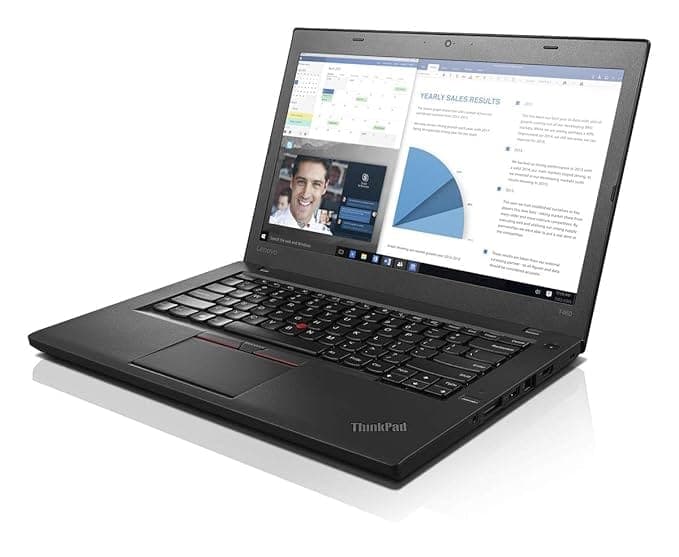
TL;DR The Lenovo ThinkPad T460 remains a capable productivity machine in 2026 when configured correctly with SSD storage and at least 8GB or 16GB RAM. Powered by 6th generation Intel Skylake processors, it handles office work, coding, browsing, and multitasking reliably, though it is not designed for gaming or heavy graphics workloads. Performance depends heavily on configuration, especially RAM and storage upgrades, as the CPU is not upgradeable. For Indian users seeking a stable, efficient, and budget-friendly business laptop, the T460 still delivers consistent real-world performance.
What’s Inside the T460: Understanding the Skylake CPU Advantage
The ThinkPad T460 is powered by Intel’s 6th generation Skylake processors, typically the Core i5-6300U and Core i7-6600U. These are dual-core CPUs with Hyper-Threading, allowing them to handle four threads simultaneously. While this may seem limited compared to modern multi-core processors, Skylake brought significant improvements in efficiency, thermal management, and instruction-level performance, which still hold up for productivity tasks in 2026.
One of the most important aspects to understand is that the CPU in the T460 is soldered to the motherboard, meaning it cannot be upgraded later. This makes the initial configuration critical when purchasing the device. The i5 variant is already capable of handling most daily workloads such as document editing, spreadsheets, web browsing, and light programming. The i7 variant offers slightly higher clock speeds and better sustained performance under load, but the difference is not dramatic in everyday usage.
In real-world conditions, Skylake CPUs remain efficient because many modern applications rely more on SSD speed and RAM availability than raw CPU power. For Indian users working on cloud-based tools, browser-heavy workflows, or office software, the T460’s processor continues to provide a balanced mix of performance and power efficiency. This ensures smooth usage without excessive heat or battery drain.
T460 CPU Overview
i5 vs i7: CPU Comparisions
When choosing between the Core i5 and Core i7 variants of the ThinkPad T460, many buyers assume the i7 will provide a significant performance boost. In reality, the difference is more subtle. Both processors share the same dual-core architecture, and the primary difference lies in slightly higher clock speeds and cache in the i7 model.
In everyday tasks such as browsing with multiple tabs, working on Microsoft Office, attending online classes, or running lightweight coding environments, the difference between i5 and i7 is often barely noticeable. This is because these tasks are not CPU-bound but instead rely more on RAM capacity and SSD performance. For most Indian users, the i5 configuration already delivers smooth and responsive performance.
However, the i7 variant becomes useful in scenarios involving sustained workloads, such as compiling code, running multiple applications simultaneously, or handling large datasets. Even then, the improvement is typically around 10-20 percent, not a complete transformation. Given the price difference in the second-hand market, many buyers find that investing in more RAM or a better SSD provides better value than upgrading from i5 to i7.
i5 vs i7 Comparison
RAM Matters More Than You Think: 8GB vs 16GB vs 32GB
The ThinkPad T460 supports up to 32GB DDR4 RAM across two slots, making it significantly more future-proof than many modern budget laptops with soldered memory. RAM plays a crucial role in performance, especially in 2026 where users rely heavily on browsers, cloud tools, and multitasking environments.
An 8GB configuration is the minimum recommended for basic usage. It is sufficient for students, light office work, and moderate browsing. However, users may notice slowdowns when running multiple browser tabs, background applications, or heavier software. This makes 8GB suitable only for entry-level productivity.
Upgrading to 16GB RAM transforms the experience. Multitasking becomes smooth, applications remain responsive, and users can comfortably run development environments, virtual machines, or large spreadsheets. For most users in India, 16GB provides the best balance between cost and performance. The 32GB configuration is ideal for advanced users, such as developers working with multiple environments or professionals handling data-heavy workflows, ensuring long-term usability for the next several years.
RAM Performance Impact
RAM upgrades are one of the most effective ways to extend the life and performance of the T460, making it a smart investment for buyers planning long-term use.
The Single Biggest Performance Upgrade
When evaluating the ThinkPad T460, the most important upgrade is not the CPU but the storage type. Many older units originally shipped with mechanical hard drives, which significantly limit performance in 2026. A traditional HDD operates with spinning platters, resulting in slower read/write speeds, longer boot times, and higher failure risk over time.
Switching to a SATA SSD transforms the T460 completely. In benchmark testing, the T460 with SSD achieved file transfer speeds of around 175 MB/s, significantly faster than typical HDD performance . Boot times drop to roughly 15-25 seconds, applications open almost instantly, and overall responsiveness improves dramatically. This is why SSD is considered the single biggest performance upgrade for this machine.
From a reliability perspective, SSDs are also superior because they have no moving parts, making them less prone to failure during travel or long-term use. For Indian users who carry laptops between college, office, or home, this durability is critical. Additionally, SSDs consume less power, which contributes to slightly better battery life and lower heat output.
SSD vs HDD Performance Comparison
For any buyer in 2026, a T460 without an SSD will feel slow, while a T460 with SSD will feel fast and responsive for daily tasks.
Can the T460 Handle Multitasking in 2026 Workloads?
Multitasking is where the ThinkPad T460 still performs surprisingly well, especially when configured properly. Despite having only dual-core CPUs, the presence of Hyper-Threading allows it to handle multiple tasks simultaneously without major slowdowns. However, the key factor here is not the CPU but RAM and SSD combination.
With 8GB RAM, the T460 can handle moderate multitasking such as 8-10 browser tabs, office applications, and background apps. However, once you push beyond that, performance can start to degrade. With 16GB RAM, multitasking becomes smooth, allowing users to run browsers with many tabs, coding environments, and communication tools simultaneously. At 32GB RAM, the system becomes highly capable for advanced workflows like running virtual machines or large datasets.
Real-world usage shows that the T460 performs best when workloads are balanced rather than CPU-intensive. Tasks like Google Docs, Excel, Zoom, Slack, and Chrome-based workflows run smoothly together. This is because modern applications rely more on memory and storage speed rather than raw CPU power.
For Indian users working in hybrid environments, attending online classes, or managing multiple tools at once, the T460 offers consistent multitasking reliability, provided it is configured with enough RAM and an SSD.
Multitasking Capability by RAM
Coding, Office Work, and Browsing: Real-World Performance Tested
In real-world scenarios, the ThinkPad T460 continues to perform reliably for productivity tasks. Benchmark testing shows strong spreadsheet performance, completing complex macro operations faster than many laptops in its category . This indicates that the CPU, while older, is still efficient for structured workloads like Excel, analytics, and office tools.
For coding, the T460 handles light to moderate development environments effectively. IDEs such as VS Code, IntelliJ (light projects), and Python environments run smoothly with 16GB RAM. Compilation times are slower compared to modern quad-core CPUs, but still acceptable for students and entry-level developers. Web development, scripting, and database work are well within its capabilities.
Browsing performance is also stable. With an SSD and 16GB RAM, the T460 can handle 15-25 browser tabs, streaming, and cloud apps without freezing. Video streaming in Full HD works smoothly, and the Intel HD 520 GPU supports hardware acceleration for media playback.
However, users must understand the limits. Heavy workloads like Android development, large-scale machine learning, or 4K video editing will push the system beyond its comfort zone. But for typical Indian use cases such as studying, freelancing, office work, and coding, the T460 delivers consistent and reliable performance.
Real-World Task Performance
How the T460 Handles Windows 10 and Windows 11 in 2026
The ThinkPad T460 was originally designed for Windows 10, and it continues to run this operating system smoothly and reliably in 2026. With proper configuration, especially 16GB RAM and SSD storage, Windows 10 delivers a responsive experience with fast boot times, smooth navigation, and stable multitasking. Driver support for Skylake processors remains mature, which means fewer compatibility issues and stable long-term usage.
Running Windows 11 on the T460 is slightly more complex. Officially, the Intel 6th generation Skylake CPUs are not supported under Microsoft’s strict hardware requirements, mainly due to TPM and processor compatibility guidelines. However, many users install Windows 11 using bypass methods. Once installed, the system can run Windows 11 reasonably well, but performance depends heavily on RAM and SSD configuration.
In real-world usage, Windows 11 on the T460 feels slightly heavier than Windows 10. Animations, background services, and newer UI elements consume more resources. With 8GB RAM, users may notice occasional lag, while 16GB RAM provides a stable experience. For Indian users prioritizing stability and long-term support, Windows 10 remains the safer choice, while Windows 11 is viable for those who want a modern interface and are comfortable with unofficial installation methods.
Windows Compatibility Overview
Integrated Graphics Reality: What Intel HD 520 Can and Can’t Do
The ThinkPad T460 relies on Intel HD Graphics 520, an integrated GPU built into the Skylake processor. This GPU is designed for efficiency rather than performance, making it suitable for basic graphical tasks, media playback, and light workloads. It supports hardware acceleration for video decoding, allowing smooth playback of Full HD content and even some 4K video streams with optimized settings.
For everyday tasks, the HD 520 performs reliably. It handles YouTube streaming, presentations, light photo editing, and UI rendering without issues. Software like Photoshop can run for basic editing, but performance drops when dealing with large files or complex layers. Similarly, casual games and older titles may run at low settings, but modern gaming is not feasible on this hardware.
Where the limitations become clear is in GPU-intensive workloads. Tasks such as 3D rendering, video editing in 4K, CAD applications, and AI workloads require dedicated graphics, which the T460 does not have. For Indian users focused on productivity, learning, or office work, this limitation is not a major issue. However, buyers must clearly understand that the T460 is a productivity machine, not a graphics workstation.
Intel HD 520 Capability Breakdown
Thermal Performance Under Load: Does It Slow Down Over Time?
Thermal performance is a key factor in long-term reliability, and the ThinkPad T460 performs well in this area due to its efficient Skylake processors and balanced cooling system. The laptop uses a single fan and heat pipe design, which is sufficient for its low-power CPU. Under normal usage such as browsing, office work, or coding, the system remains cool and quiet, with minimal fan noise.
Under heavier workloads, such as running multiple applications or compiling code, the system does generate more heat. However, due to the low TDP of the processor, temperatures typically remain within safe limits. Unlike high-performance laptops, the T460 rarely experiences aggressive thermal throttling. Instead, it maintains consistent performance without sudden drops, which is crucial for reliability.
Over time, dust accumulation and thermal paste degradation can affect cooling efficiency. However, the T460’s serviceable design allows easy cleaning and maintenance, which helps restore optimal thermal performance. For Indian conditions where dust and heat are common, periodic cleaning can ensure that the laptop continues to perform reliably for years.
Thermal Behavior Overview
Performance Longevity: Will the T460 Stay Usable for the Next 3-4 Years
The ThinkPad T460 continues to offer solid performance longevity in 2026, especially when configured with 16GB or more RAM and SSD storage. While the 6th generation Skylake CPUs are no longer cutting-edge, they are still efficient for productivity tasks that dominate real-world usage. Since most modern workflows rely heavily on browsers, cloud tools, and lightweight applications, the T460 remains relevant for a significant portion of users in India.
Over the next 3-4 years, the T460 is expected to handle office work, coding, online learning, and web-based applications without major issues. The presence of DDR4 RAM support up to 32GB ensures that the system can adapt to increasing memory demands. Additionally, SSD upgrades allow users to maintain fast performance even as software evolves. This upgrade flexibility is one of the key reasons why the T460 outlasts many entry-level modern laptops.
However, limitations will become more noticeable over time. Applications that demand multi-core processing, AI acceleration, or advanced graphics will gradually outgrow the T460’s capabilities. Windows updates may also become heavier, especially if using Windows 11. Despite this, for users focused on productivity rather than high-performance workloads, the T460 remains a reliable and usable machine well into the late 2020s, provided it is maintained properly.
Longevity Outlook
Why the Lenovo ThinkPad T460 Still Remains a Smart Productivity Choice in 2026 and What to Expect Moving Into 2027
The most important takeaway is simple. The Lenovo ThinkPad T460 continues to remain relevant in 2026 because it delivers consistent, predictable performance for real-world productivity workloads when configured correctly with SSD storage and sufficient RAM.
This is not a laptop built for peak performance or modern high-end workloads. Instead, it is designed around stability, efficiency, and long-term usability. For users focused on office work, coding, browsing, and structured multitasking, the T460 still provides a smooth and reliable experience. The combination of Skylake efficiency, upgradeable RAM, and SSD storage ensures that the system remains responsive even in today’s browser-heavy and cloud-driven workflows.
What becomes even more important in 2026 is understanding how to extract maximum value from older hardware. The T460 proves that performance is no longer just about the processor. Memory capacity and storage speed now play a far bigger role in day-to-day usability. A well-configured system with 16GB RAM and SSD storage can outperform poorly configured newer devices in practical scenarios, especially in productivity-focused environments.
Looking ahead into 2027, the limitations of the T460 will become more visible, particularly in areas such as heavy multitasking, modern software optimisation, and operating system support. Windows 10 remains the most stable environment for this device, while newer software ecosystems will continue to demand more resources over time. This means the T460 should be viewed as a transitional productivity machine rather than a long-term future-proof investment.
For Indian users, the value proposition remains strong. It offers a dependable, cost-efficient solution for students, freelancers, and professionals who prioritise stability over cutting-edge performance. When expectations are aligned with its capabilities, the ThinkPad T460 continues to be a practical and reliable choice heading into the next phase of computing evolution.
Overall Performance Summary
Frequently Asked Questions
Q. Is ThinkPad T460 performance still good in 2026
A. Yes with SSD storage and at least sixteen gigabytes RAM it remains smooth for office work browsing and coding
Q. Can the processor be upgraded on ThinkPad T460
A. No the Intel Skylake CPU is soldered so upgrades are limited to RAM and storage
Q. How much RAM is recommended for best performance
A. Sixteen gigabytes offers the best balance while thirty two gigabytes suits advanced multitasking
Q. Does installing an SSD really make a big difference
A. Yes SSD dramatically improves boot time application speed and overall responsiveness
Q. Is ThinkPad T460 suitable for programming tasks
A. Yes it handles web development scripting and lightweight development environments efficiently
Q. Can ThinkPad T460 run Windows eleven smoothly
A. It can run with workarounds but Windows ten usually provides better stability and performance
Q. How capable are the integrated graphics in daily use
A. Intel HD graphics support Full HD streaming presentations and basic editing but not gaming
Q. How well does the laptop handle multitasking workloads
A. With sixteen gigabytes RAM it can manage many browser tabs office tools and communication apps smoothly
Q. Will ThinkPad T460 remain usable for several more years
A. Yes for productivity focused users it can remain practical for the next three to four years
Q. Who should consider buying ThinkPad T460 in 2026
A. Students freelancers office professionals and budget buyers needing reliable productivity performance






