
Learn Photography at Home in 30 Days: A Beginner's Roadmap With a DSLR
Learn photography at home in 30 days with a practical DSLR roadmap covering camera settings, exposure, composition, lighting, and editing. Build confidence through simple daily exercises without buying expensive equipment.

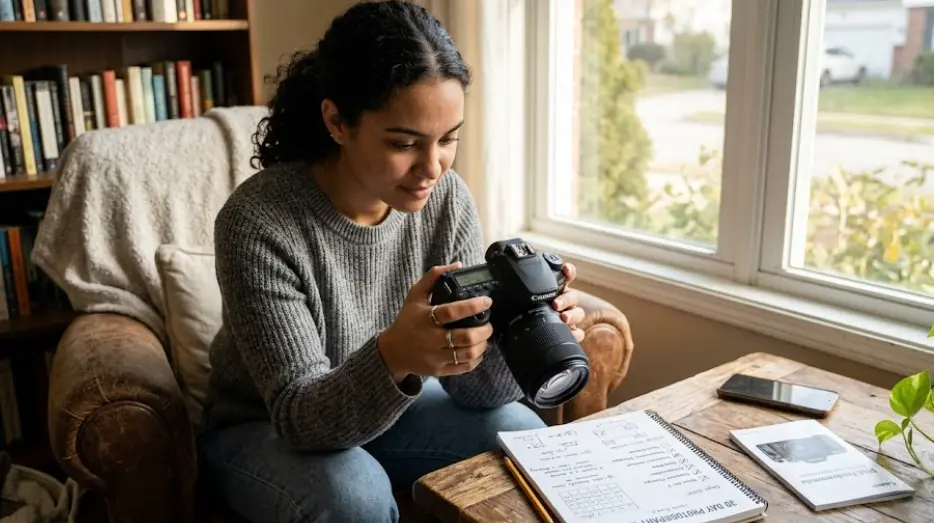
TL;DR Learning photography at home in 30 days is a realistic way to build a strong foundation with your DSLR camera, even if you have never adjusted a camera setting before. Start by understanding your camera controls, then practice aperture, shutter speed, ISO, composition, lighting, and basic editing through short daily exercises. You do not need expensive lenses or professional equipment to get started. A kit lens, natural window light, everyday household objects, and consistent practice are enough to help you understand how photographs are made. By the end of the month, you should be more comfortable using your DSLR, recognizing common mistakes, and making deliberate creative choices, although developing a consistent photographic style will take longer.
Understanding DSLR Photography for Beginners
Learning DSLR photography at home starts with understanding what your camera can do beyond taking pictures automatically. A digital single-lens reflex camera uses a mirror system to direct light toward an optical viewfinder, allowing you to see the scene through the lens. When you take a photograph, the mirror moves so light can reach the image sensor. This design gives you control over important settings, including focus, aperture, shutter speed, and ISO. You do not need to master everything on the first day. Your initial goal should be to understand the camera's buttons, menus, and basic shooting modes so you can make adjustments confidently.
One advantage of learning at home is that you can repeat the same exercise without worrying about missing an important moment. Place a cup, book, plant, or fruit near a window and photograph it from different angles. Review the images on your camera screen, then compare them on a computer if available. Notice which photographs look sharp, which appear too dark, and which backgrounds distract from the subject. These observations help you connect camera settings with visible results instead of memorizing technical terms without understanding them.
You also do not need to purchase additional equipment immediately. A standard kit lens is sufficient for learning exposure, framing, focus, and everyday photography. Before practicing, charge the battery, format your memory card after backing up any existing files, and read the relevant sections of your camera's manual. Check how to change shooting modes, adjust ISO, select autofocus points, and review photographs. Camera controls vary between manufacturers and models, so your manual is the most reliable reference for model-specific instructions.
Essential Equipment for Your First Month
Keep your setup simple and affordable. Start with the following equipment and add accessories only when your practice reveals a genuine need.
| Equipment | Purpose |
|---|---|
| DSLR camera and kit lens | Learn core camera controls and framing |
| Memory card | Store photographs during practice |
| Charged battery | Avoid interruptions during exercises |
| Window light or a household lamp | Practice lighting without studio equipment |
| Tripod, if available | Keep the camera steady for stationary subjects |
| Computer or laptop | Review images and practice editing |
Your 30-Day DSLR Photography Learning Plan
A structured schedule makes learning easier because it gives each week a clear purpose. During the first seven days, concentrate on camera controls, image review, focus, and basic framing. In the second week, work on exposure and learn how aperture, shutter speed, and ISO influence your photographs. During the third week, practice composition and lighting, using household objects, plants, portraits, and scenes around your home. The final week should bring these skills together through small photography projects and a review of your progress.
Aim to practice for around 20 to 45 minutes each day, depending on your schedule. Consistency matters more than the number of photographs you take. For example, photographing the same object at three different apertures can teach you more about background blur than taking 100 unrelated pictures on automatic mode. Keep a simple record of the settings you used and what you noticed. This will help you identify patterns and avoid repeating the same mistakes without understanding why they happened.
The 30-day target is a learning framework, not a promise that you will become a professional photographer in one month. Your progress will depend on how frequently you practice, how carefully you review your images, and the types of photographs you want to create. By the end of the plan, aim to understand the basic controls, make intentional exposure choices, compose a cleaner frame, and complete a small collection of photographs that demonstrate what you have learned.
Week-by-Week Photography Roadmap
| Days | Learning Focus | Practical Exercise |
|---|---|---|
| 1–3 | Camera controls and shooting modes | Photograph five household objects |
| 4–7 | Focus, framing, and image review | Practice sharp focus and different angles |
| 8–14 | Aperture, shutter speed, and ISO | Photograph one subject using different settings |
| 15–21 | Composition and lighting | Shoot portraits, still life, and window-light scenes |
| 22–26 | Everyday photography projects | Practice food, product, or nature photography |
| 27–30 | Editing and portfolio review | Select and edit your best 10 photographs |
Master Aperture, Shutter Speed, and ISO
The exposure triangle is one of the most important concepts to learn when practicing DSLR photography. Aperture controls the size of the opening in the lens, shutter speed determines how long light reaches the sensor, and ISO controls the sensor's signal amplification. Together, these settings influence image brightness, but each also affects the photograph's appearance. A wider aperture can create a blurred background, a faster shutter speed can freeze movement, and a higher ISO can help in low light while increasing visible image noise. Understanding these relationships helps you choose settings according to the photograph you want to create.
Begin with aperture-priority mode, commonly labeled A or Av depending on the camera brand. This mode lets you choose the aperture while the camera selects a shutter speed for the exposure. Photograph a stationary subject at different f-numbers and compare how much of the background remains in focus. A lower f-number generally creates a shallower depth of field, while a higher f-number generally keeps more of the scene in focus, depending on the lens, subject distance, and framing. This exercise is particularly useful for portraits, product photographs, and close-up compositions.
Next, experiment with shutter speed and ISO. Photograph a moving subject, such as a person walking across the room or water pouring into a glass, using different shutter speeds. Faster shutter speeds can freeze movement, while slower ones can create motion blur. Then take photographs in bright and dim conditions at different ISO settings, keeping other settings as consistent as practical. Review the results at full size to check for blur and noise. There is no single ideal setting for every situation, so learn to balance the three controls according to your subject and available light.
Exposure Settings to Practice
| Setting | What It Controls | Beginner Exercise |
|---|---|---|
| Aperture | Light entering the lens and depth of field | Compare f/4 and f/8 when available |
| Shutter speed | Exposure duration and motion rendering | Compare 1/60 and 1/250 second |
| ISO | Sensor signal amplification and image noise | Compare ISO 100 and ISO 800 |
| Aperture-priority mode | Aperture selection with automatic shutter speed | Photograph a stationary object |
| Shutter-priority mode | Shutter speed selection with automatic aperture | Photograph a moving subject |
These are practice examples, not universal recommended settings. Available apertures depend on your lens, and the right shutter speed and ISO depend on the lighting, subject movement, and desired result.
Improve Composition and Lighting at Home
Technical settings help you capture an image, but composition determines how you arrange the visual elements within the frame. Start with the rule of thirds by imagining a grid that divides your photograph into nine sections. Place your main subject near a grid intersection or along a line, then compare the result with a centered composition. Neither approach is automatically better. The purpose is to understand how subject placement changes the balance and emphasis of a photograph. You can also experiment with leading lines, symmetry, negative space, and different shooting angles to create more intentional images.
Lighting deserves equal attention because even a well-composed photograph can look flat when the light is uninteresting. Position a household object beside a window and observe how its appearance changes when the light comes from the front, side, or back. Side lighting can reveal texture, while backlighting can create silhouettes or bright edges around a subject. Avoid assuming that brighter light always produces a better photograph. Soft light can be useful for portraits and product images, while directional light can create dramatic shadows and stronger contrast.
Your home can provide plenty of subjects for developing these skills. Photograph a meal near a window, a plant against a plain wall, a family member sitting in natural light, or everyday objects arranged on a table. Try changing only one compositional element at a time, such as camera height, subject position, or background. This makes it easier to understand why one image works better than another. Before taking each photograph, check the edges of the frame for distracting objects and make sure the background supports rather than competes with your subject.
Composition and Lighting Exercises
| Technique | How to Practice | What to Observe |
|---|---|---|
| Rule of thirds | Move your subject away from the center | Balance and visual emphasis |
| Leading lines | Photograph a table edge or hallway | How lines guide the viewer's eye |
| Side lighting | Place an object beside a window | Texture and shadow detail |
| Backlighting | Position the subject between the camera and a light source | Silhouettes and bright edges |
| Negative space | Leave uncluttered space around your subject | Simplicity and subject separation |
Learn Basic Photo Editing and Review Your Progress
Editing is the next step after capturing a photograph, but it should support the image rather than hide problems caused by poor focus or unsuitable exposure. Begin by reviewing your photographs and removing obvious duplicates or unsuccessful shots. Choose a few images that have a clear subject and reasonably good focus. Then use an editing application to make small adjustments to exposure, contrast, highlights, shadows, white balance, and cropping. Free or paid software can work for beginners, so there is no need to purchase an expensive editing package before you understand your requirements.
White balance is particularly useful when photographs look too yellow, blue, or otherwise unnatural under different lighting conditions. Most DSLRs provide automatic white balance as well as presets for common light sources. Start with automatic white balance, then compare the result with another appropriate setting when the colors look inaccurate. When editing, avoid pushing saturation or contrast so far that skin tones and everyday objects look unnatural. If your camera supports RAW files, you can experiment with RAW editing after you understand the basics, while JPEG files remain convenient for simple workflows and sharing.
During the last few days, select your 10 strongest photographs from the month and review them together. Ask yourself whether the subject is clear, whether the image is sharp where it should be, whether the exposure suits the scene, and whether the composition feels deliberate. Compare your early photographs with your recent work to identify improvements and areas that still need attention. A small, carefully selected portfolio is more useful for learning than a large folder of images you have never reviewed.
A Simple Photo Review Checklist
| Check | Question to Ask |
|---|---|
| Focus | Is the intended subject sharp? |
| Exposure | Are important highlights or shadows losing detail? |
| Composition | Is the subject easy to identify? |
| Lighting | Does the light support the mood and subject? |
| Editing | Do the colors and contrast look natural? |
| Progress | What would I change if I took this photograph again? |
Common Mistakes Beginners Should Avoid
One common mistake is switching to manual mode immediately and trying to adjust every setting at once. Manual mode is valuable, but it can make the learning process unnecessarily confusing when you are still discovering what aperture, shutter speed, and ISO do. Start with aperture-priority or shutter-priority mode, depending on the exercise, and move toward manual mode as your understanding improves. Also, do not assume that a photograph is successful simply because it looks good on the camera's small screen. Zoom in to check focus and review the image on a larger display when possible.
Another mistake is blaming equipment for problems that come from technique. A more expensive lens will not automatically fix poor composition, incorrect focus, or unsuitable lighting. Likewise, increasing ISO is not always wrong, and a slightly noisy but sharp photograph may be more useful than a clean image ruined by motion blur. Learn to identify the problem before changing the settings. When a photograph fails, take another version with one deliberate adjustment and compare the results.
Finally, avoid measuring progress only by likes, followers, or the number of photographs taken. Photography develops through observation, experimentation, and honest review. Some exercises will produce disappointing results, and that is part of the learning process. Keep your original files, record settings when useful, and revisit earlier exercises after a week or two. Repeating the same task with better understanding often reveals more progress than constantly moving to a new technique.
Frequently Asked Questions
Q. Can I learn DSLR photography at home in 30 days?
Yes, you can build a useful foundation in 30 days by practicing regularly. You can learn camera controls, basic exposure, composition, lighting, and introductory editing. Becoming consistently skilled takes additional practice.
Q. Do I need an expensive DSLR to start learning photography?
No. An entry-level DSLR with a working lens and manual controls is enough to learn the fundamentals. Good technique and careful observation matter more than owning an expensive camera.
Q. Should beginners use manual mode from the first day?
Not necessarily. Aperture-priority and shutter-priority modes let you understand individual settings without managing every exposure variable simultaneously. You can move to manual mode as your confidence grows.
Q. What is the exposure triangle in photography?
The exposure triangle describes the relationship between aperture, shutter speed, and ISO. These settings work together to control exposure, while also affecting depth of field, motion blur, and image noise.
Q. How much time should I practice photography every day?
Around 20 to 45 minutes is a practical starting point. Focus on one exercise, review the results, and repeat it when needed rather than taking photographs without a clear learning goal.
Q. Can I learn photography without buying additional lenses?
Yes. A kit lens can teach you exposure, focus, framing, composition, and lighting. Consider another lens only after you identify a specific limitation in your current setup.
Q. Which camera settings are best for indoor photography?
There is no single setting that works in every indoor situation. Start with aperture-priority mode, use an aperture appropriate for your subject, monitor shutter speed, and raise ISO when necessary to avoid excessive blur.
Q. Is photo editing necessary for beginners?
Editing is not mandatory, but learning basic exposure, white balance, contrast, and cropping adjustments can improve your results. Aim for natural-looking edits that preserve the subject's appearance.
Q. What should I photograph at home to practice?
Try plants, food, books, household objects, portraits, and scenes near windows. These subjects let you practice lighting, focus, composition, and exposure without needing to travel or buy props.
Q. What should I be able to do after 30 days of DSLR photography?
You should aim to understand your camera's basic controls, make informed exposure adjustments, compose more deliberately, recognize common image problems, and edit a small selection of photographs. Your results will depend on the time and effort you invest.
Final Recommendation
Learning photography at home in 30 days is an achievable starting goal when you approach it as a structured learning project rather than a race to master every camera setting. Begin with your DSLR and kit lens, spend the first week getting comfortable with the controls, and then devote time to exposure, composition, lighting, and editing. Keep your exercises simple enough to repeat, and review your photographs instead of moving on as soon as you have taken them. This approach builds a clearer understanding of how technical decisions affect the final image.
By the end of the month, aim to create a small collection of 10 photographs that show what you have learned. You may still struggle with difficult lighting, moving subjects, or consistent focus, and that is completely normal. Continue practicing the areas where your results are weakest, use your camera manual when you need model-specific instructions, and experiment with new subjects as your confidence grows. The most valuable outcome is not mastering photography in exactly 30 days, but developing the habits and foundational skills that make every photograph an opportunity to improve.
Ready to upgrade your tech?
Browse our collection of quality refurbished products at unbeatable prices.






