
iPhone "Unknown Part" and Battery Messages: What They Mean on a Refurbished iPhone
Seeing an Unknown Part or battery warning on a refurbished iPhone? Understand Apple's messages, check Parts and Service History, assess battery health, and learn what to verify before buying or arranging a repair.

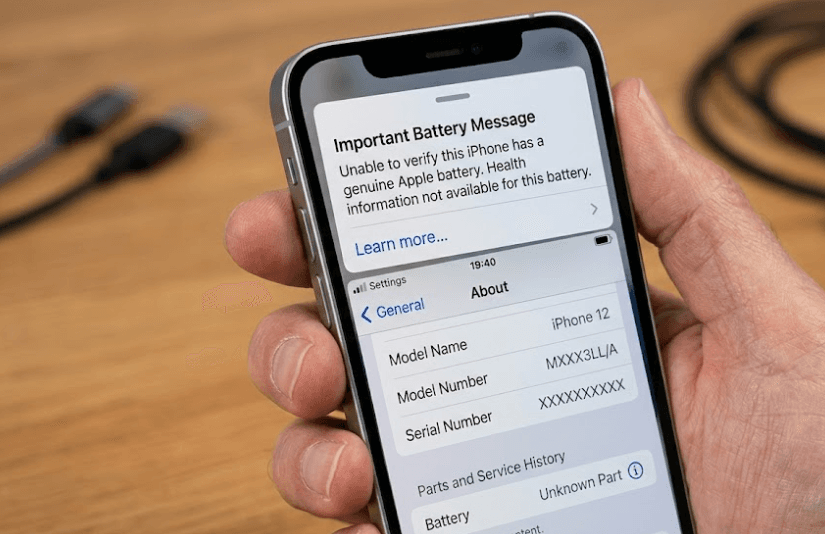
TL;DR: If you see an "Unknown Part" or battery warning on a refurbished iPhone, do not panic, but do not ignore it either. These messages can appear when a component is nongenuine, malfunctioning, modified, or not properly verified after a repair. An "Unknown Part" message does not automatically mean the iPhone is fake or unusable, but it may affect functionality, battery-health reporting, and resale value. Before buying, open Settings, check Parts and Service History, review Battery Health, test essential features, and confirm the seller's warranty and return policy. A refurbished iPhone can still be a good purchase, provided you understand the warning and the device passes the necessary checks.
What Does "Unknown Part" Mean On An iPhone?
Understanding Apple's Parts And Service History
Apple uses a feature called Parts and Service History to show information about certain repaired components. On supported iPhones, you can find it by opening Settings, selecting General, tapping About, and scrolling down to the relevant section. Depending on the iPhone model and iOS version, the information may cover the battery, display, cameras, or other components.
An "Unknown Part" message means the iPhone cannot fully verify a component under Apple's repair and verification system. This may happen if the part is not genuine, is not functioning as expected, has been modified, or was not successfully verified and linked to the phone after a repair. It does not automatically establish that the entire phone is counterfeit or that the component cannot function.
For refurbished iPhones, this distinction matters because a previous owner may have replaced a battery, display, or camera before the device was resold. The replacement may work, but the warning indicates that you should investigate its origin, condition, and repair history. Ask the seller for an explanation instead of assuming that every refurbished iPhone with this message is defective.
What Do The Different iPhone Part Messages Mean?
Genuine, Used, Unknown, And Finish Repair
Apple displays different labels depending on the component, iPhone model, software version, and repair status. Understanding the difference helps you avoid rejecting a perfectly reasonable refurbished device or overlooking a genuine problem.
A Genuine label indicates that the repair was completed using genuine Apple parts and processes. A Used label, available on supported newer models and software versions, indicates that a genuine Apple part was previously used in another iPhone. A Finish Repair message means the repair process still needs to be completed, such as through Apple's Repair Assistant where supported.
An Unknown label indicates that the component cannot be fully verified or has another verification-related issue. Apple also uses an Unverified label for certain logic-board situations, which can affect some features, including Apple Pay. These messages are not interchangeable, and the exact implications depend on the component involved.
| Message | What It Generally Means | What Buyers Should Do |
|---|---|---|
| Genuine | Repair completed using genuine Apple parts and processes | Test the component and check the repair details |
| Used | A previously used genuine part is installed on a supported model | Check its condition and performance |
| Unknown | The component cannot be fully verified or has another relevant issue | Investigate the part, functionality, and repair history |
| Finish Repair | The repair or calibration process is incomplete | Ask the seller to complete the process before purchase |
| Unverified | Certain components, such as a previously used logic board, have verification concerns | Check affected features and seek professional advice |
What Does The iPhone Battery Message Mean?
Battery Verification And Battery Health
One of the most important warnings to understand is "Unable to verify this iPhone has a genuine Apple battery." Apple explains that when this message appears, the battery-health information may not be accurate. This means you should not rely solely on a displayed battery percentage to judge the condition of the replacement battery.
A non-genuine battery is not automatically defective. However, Apple warns that a replacement battery may be poorly designed, previously used, damaged, or incorrect for the particular iPhone model. Depending on its quality and installation, it could have insufficient capacity, charging issues, unexpected behaviour, or safety problems. A battery that cannot be verified deserves closer inspection, particularly if the seller claims it is new.
To check the battery, open Settings, tap Battery, and select Battery Health or Battery Health & Charging, depending on your iOS version. Review the information and any warnings shown. If battery-health information is unavailable or explicitly marked as potentially inaccurate, ask the seller for documentation of the replacement and have the battery assessed by a qualified service provider if necessary.
How To Check Parts And Service History Before Buying
A Step-By-Step Inspection
Start by opening Settings, then General, then About. Look for Parts and Service History, if available on your model. Review each listed component and its status. The absence of a history section does not guarantee that the iPhone has never been repaired, so do not treat it as definitive proof of an untouched device.
Next, check the battery information under Settings, then Battery, then Battery Health or Battery Health & Charging. Review any available capacity, service recommendations, or verification messages. On supported iPhone 15 models and later running iOS 18 or later, additional battery details such as cycle count and date of first use may be available. The information shown depends on the model and software version.
Finally, test the phone rather than relying entirely on the Settings screen. Check the display for dead pixels and touch problems, test the cameras, connect to Wi-Fi, make a call, test the speakers and microphones, and confirm that Face ID or Touch ID works where applicable. Ask the seller for the repair history, invoice, warranty terms, and return conditions before completing the purchase.
Should You Buy A Refurbished iPhone With An Unknown Part Message?
When It May Be Acceptable And When To Walk Away
A refurbished iPhone with an Unknown Part message may still be usable, but the decision depends on which component is affected and how well it works. A replacement battery that performs reliably presents a different situation from a malfunctioning display or a camera that fails intermittently. Evaluate the actual component, not just the label.
Consider the seller's transparency, too. If the seller clearly explains the replacement, provides appropriate documentation, offers a written warranty, and permits sufficient time for testing, you can make a more informed decision. However, if the seller refuses to explain the warning, makes unsupported claims about a "100% original" replacement, or will not allow basic checks, treat that as a reason to reconsider.
The price should reflect the device's condition and any uncertainty. Compare it with a similar iPhone that has verified parts and a comparable warranty. A small discount may not justify uncertain battery performance, reduced resale value, or possible repair expenses. A larger saving may be worth considering only if you understand the limitations and can afford any necessary repairs.
How These Messages Affect Performance And Resale Value
What To Expect After Purchase
An Unknown Part message does not necessarily stop an iPhone from working. Depending on the component, the phone may continue operating normally, although some features or performance characteristics may be affected. For example, a replacement display may have brightness, color, touch, or sensor-related problems, while an unverified battery may make battery-health readings unreliable.
Resale value is another consideration. Apple notes that an Unknown Part can affect trade-in value. A future buyer may be less willing to purchase the device without a clear repair history, even when the component appears to work properly. Keeping invoices and repair records can help explain the device's condition when you sell it later.
If you already own an iPhone with a warning, you do not necessarily need to replace the phone immediately. Check whether the affected component is working correctly and seek a professional assessment if you notice rapid battery drain, charging problems, overheating, display issues, or camera failures. If the battery is swollen or the device becomes dangerously hot, stop using it and arrange appropriate service.
How To Resolve An Unknown Part Or Battery Warning
Repair Options And Practical Next Steps
If the warning appeared after a recent repair, contact the repair provider and ask whether the required verification or calibration process was completed. For supported devices and components, Apple Repair Assistant may be used to finish certain repairs. A Finish Repair message should be addressed before assuming that the component has been fully configured.
If the part is not genuine or cannot be verified, consult Apple or an Apple Authorized Service Provider about your options. Independent Repair Providers may also have access to genuine Apple parts and repair resources, although their work is not covered by Apple's warranty or AppleCare plans and may instead be covered by the provider's own warranty. Ask about the available service options and costs before authorizing a repair.
For a recently purchased refurbished phone, contact the seller before arranging an independent repair. Changing the device yourself or using an outside repair service could affect the seller's warranty or return eligibility. Document the warning with screenshots, keep the purchase invoice, and request a resolution within the applicable return period.
Final Recommendation
An "Unknown Part" or battery message should be treated as useful information about a refurbished iPhone, not as an automatic reason to reject it. The message tells you that a component needs closer investigation, but it does not, by itself, prove that the phone is fake, unsafe, or unusable. The component's condition, repair history, functionality, and verification status matter far more than the label alone.
Before purchasing, check Parts and Service History, review Battery Health, test the phone's essential features, and ask the seller for a clear explanation of any replacement components. Confirm the warranty, return policy, and final price, and compare the device against a similar iPhone with verified parts. If the seller cannot explain the warning or the phone shows signs of malfunction, choosing another unit is generally the safer decision.
For the best balance of value and peace of mind, choose a refurbished iPhone from a seller that provides documented testing, transparent condition grading, and meaningful after-sales support. If you already own a device with a warning, get the affected component checked before deciding whether a repair or replacement is necessary.
Frequently Asked Questions
Q. Does an Unknown Part message mean an iPhone is fake?
No. It means a component cannot be fully verified or has another relevant issue. The message does not automatically mean the entire iPhone is counterfeit.
Q. Can I use an iPhone with an Unknown Part warning?
Usually, yes, although functionality depends on the component and the issue. Test the affected feature and seek professional advice if the phone behaves unexpectedly.
Q. Does an Unknown Part message mean the battery is unsafe?
Not necessarily. However, Apple warns that unverified batteries may have quality, performance, charging, or safety problems. Have a questionable battery assessed if you notice concerning symptoms.
Q. Why does my refurbished iPhone say its battery cannot be verified?
The battery may be nongenuine, malfunctioning, modified, or not properly verified and linked to the phone after repair. The message alone does not establish which explanation applies.
Q. How do I check whether an iPhone battery has been replaced?
Open Settings, select General, tap About, and review Parts and Service History if available. You can also check Battery Health or Battery Health & Charging for battery information and warnings.
Q. Can a genuine Apple battery show an Unknown Part message?
Yes, in certain circumstances, including when verification or the repair process has not been completed successfully. An Unknown label does not always prove that a component is nongenuine.
Q. Does an Unknown Part warning affect iPhone resale value?
It can. Apple states that an Unknown Part may affect trade-in value, and prospective buyers may be concerned about the component's condition or repair history.
Q. Can I remove the Unknown Part warning myself?
Do not try to bypass the warning. If the repair is incomplete, a supported repair-calibration process may resolve it. Otherwise, consult Apple or a qualified repair provider.
Q. Should I buy a refurbished iPhone with an Unknown Part message?
Only after checking the affected component, testing its functionality, understanding the price difference, and confirming the seller's warranty and return policy. Avoid devices with unexplained warnings or signs of malfunction.
Q. Is battery health accurate when an iPhone cannot verify its battery?
Not necessarily. Apple explicitly warns that battery-health information may be inaccurate when the battery cannot be verified. Seek a professional assessment instead of relying on the displayed percentage alone.
Ready to upgrade your tech?
Browse our collection of quality refurbished products at unbeatable prices.






